当前位置:网站首页>Hyperleger fabric installation
Hyperleger fabric installation
2022-06-10 23:53:00 【Hey. - zero one】
install curl、git
yum -y install curl
yum -y install git
install docker
download fabric
mkdir hyperledgerFabric
cd hyperledgerFabric
git clone https://github.com/hyperledger/fabric.git

install fabric-samples Example
cd fabric/scripts
git clone -b main https://github.com/hyperledger/fabric-samples.git

Install binaries , Automatically install to fabric-samples In the catalog bin and config Under the table of contents
wget https://github.com/hyperledger/fabric/releases/download/v2.4.2/hyperledger-fabric-linux-amd64-2.4.2.tar.gz
tar -xzvf hyperledger-fabric-linux-amd64-2.4.2.tar.gz -C fabric-samples
Made into docker Mirror image
modify bootstrap.sh The contents of the file can be successfully created by running docker Mirror image
cd fabric/scripts
vim bootstrap.sh

BINARIES=false  #  take 136 Yes BINARIES Of true Change it to false

./bootstrap.sh  #  Run the installation script
View after successful operation docker Containers 
Start the test network
Create a that consists of two peer nodes and a sort node Fabric The Internet
cd /fabric-samples/test-network

./network.sh up

 If an error is reported, you can run the following command
curl -L https://github.com/docker/compose/releases/download/1.23.2/docker-compose-`uname -s`-`uname -m` -o /usr/local/bin/docker-compose

chmod +x /usr/local/bin/docker-compose

Create a channel
./network.sh createChannel
Solutions to the following problems
Error: failed to normalize chaincode path: failed to determine module root: exec: “go”: executable file not found in $PATH
Chaincode packaging has failed
Deploying chaincode failed
install go
cd ~
mkdir go
cd go
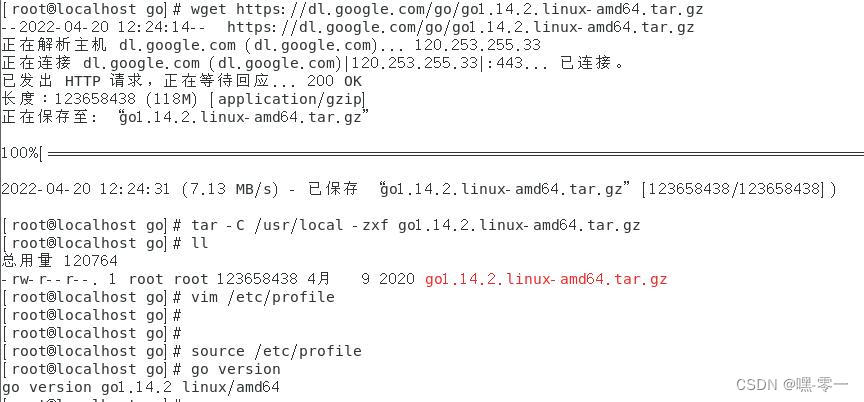
wget https://dl.google.com/go/go1.14.2.linux-amd64.tar.gz
tar -C /usr/local -zxf go1.14.2.linux-amd64.tar.gz
vim /etc/profile
export PATH=$PATH:/usr/local/go/bin
export GOROOT=/usr/local/go
export GOPATH=$HOME/go
export PATH=$PATH:$HOME/go/bin

 Update profile
source /etc/profile
go version
Solutions to the following problems
Error: failed to normalize chaincode path: ‘go list’ failed with: go: github.com/golang/[email protected]: Get “https://proxy.golang.org/github.com/golang/protobuf/@v/v1.3.2.mod”: dial tcp 142.251.43.17:443: i/o timeout: exit status 1
Chaincode packaging has failed
Deploying chaincode failed
go env -w GOPROXY=https://goproxy.io,direct
go env -w GO111MODULE=on
Chain code test
./network.sh deployCC -ccn basic -ccp ../asset-transfer-basic/chaincode-go -ccl go
There's a problem
Error: chaincode install failed with status: 500 - failed to invoke backing implementation of ‘InstallChaincode’: chaincode already successfully installed (package ID ‘basic_1.0:dee2d612e15f5059478b9048fa4b3c9f792096554841d642b9b59099fa0e04a4’)
Chaincode installation on peer0.org1 has failed
Deploying chaincode failed

solve
go env -w GOPROXY=https://goproxy.io,direct
go env -w GO111MODULE=on
go mod vendor

 Or restart the image
./network.sh down
./network.sh up createChannel
./network.sh deployCC -ccn basic -ccp ../asset-transfer-basic/chaincode-go -ccl go
The success is as follows 
Interact with the network
export PATH=${PWD}/../bin:$PATH
export FABRIC_CFG_PATH=$PWD/../config/
export CORE_PEER_TLS_ENABLED=true
export CORE_PEER_LOCALMSPID="Org1MSP"
export CORE_PEER_TLS_ROOTCERT_FILE=${PWD}/organizations/peerOrganizations/org1.example.com/peers/peer0.org1.example.com/tls/ca.crt
export CORE_PEER_MSPCONFIGPATH=${PWD}/organizations/peerOrganizations/org1.example.com/users/[email protected]/msp
export CORE_PEER_ADDRESS=localhost:7051
peer chaincode invoke -o localhost:7050 --ordererTLSHostnameOverride orderer.example.com --tls --cafile ${PWD}/organizations/ordererOrganizations/example.com/orderers/orderer.example.com/msp/tlscacerts/tlsca.example.com-cert.pem -C mychannel -n basic --peerAddresses localhost:7051 --tlsRootCertFiles ${PWD}/organizations/peerOrganizations/org1.example.com/peers/peer0.org1.example.com/tls/ca.crt --peerAddresses localhost:9051 --tlsRootCertFiles ${PWD}/organizations/peerOrganizations/org2.example.com/peers/peer0.org2.example.com/tls/ca.crt -c '{"function":"InitLedger","Args":[]}'

peer chaincode query -C mychannel -n basic -c '{"Args":["GetAllAssets"]}'

peer channel list
.crt -c '{"function":"InitLedger","Args":[]}'

peer chaincode query -C mychannel -n basic -c '{"Args":["GetAllAssets"]}'

peer channel list
边栏推荐
- Leetcode 501: mode dans l'arbre de recherche binaire
- Openvp * consolider l'authentification LDAP
- LabVIEW调用DLL时出现异常0xc0000005代码
- LeetCode+ 16 - 20
- 选择排序
- Difference between oscilloscope and spectrum analyzer
- 归并排序
- 示波器刷新率怎么测量
- Dark horse headlines - Tencent's salary system reform has caused controversy; Intel expanded the recruitment of female engineers nationwide; Black horse is 100% employed really
- R language to draw two-dimensional normal distribution density surface;
猜你喜欢

LabVIEW programming specification

vtk.js中vtp下载

300 questions on behalf of the first lecture on determinant

Error 1046 when LabVIEW uses MathScript node or matlab script

LabVIEW中NI MAX中缺少串口
Leetcode 501: mode in binary search tree
HyperLeger Fabric安装

Unity 脚本无法显示C#源码的中文注释 或者VS创建的脚本没有C#源码的注释

【无标题】

BGP - route map extension (explanation + configuration)
随机推荐
Classic sentences in Yi Shu's works
细数十大信息安全原则
File转为MultipartFile的方法
vtk. VTP download in JS
Data and information resource sharing platform (VII)
csdn每日一练——找出最接近元素并输出下标
Chapter 6 - branch and bound method
Is it safe to open an account for tongdaxin stock? How to open an account?
After deepin20 menu startup option, the self-test indicates that iwlwwifi is stopped
PHP implementation of iframe cross site text replacement / iframe website text replacement
curl导入postman报错小记
Solutions to the error reported by executing Oracle SQL statement [ora-00904: "createtime": invalid identifier] and [ora-00913: too many values]
Two debugging techniques in embedded software development
判等问题:如何确定程序的判断是正确的?
LabVIEW and VDM extract color and generate gray image
Binary tree pruning
快速排序
HyperLeger Fabric安装
Why many new websites are not included by search engines
Error 1046 when LabVIEW uses MathScript node or matlab script