当前位置:网站首页>Design virtual network to realize communication between virtual machine instance and external network
Design virtual network to realize communication between virtual machine instance and external network
2022-06-12 12:51:00 【Sleepy snail】
adopt RDO Of packstack Installed OpenStack The virtual network has been configured by default , However, there is no specific configuration , Therefore, it cannot communicate with the external network .
Open vSwitch similar Linux bridge, It can realize the abstraction of layer-2 network , Provide distributed switch function for virtual network , Running on various or the same virtualization platforms in the cloud environment vSwitch Realize the virtual switch of distributed purchasing
OpenStack Virtual machine instances can be assigned two types of addresses , One is private ip Address , This address can be used ip a notice
The other is floating ip Address , This is from Neutron Services provided by components , Unwanted dhcp service , Directly set it statically on the client .
 **** Installation completed successfully ******

Additional information:
 * A new answerfile was created in: /root/packstack-answers-20211108-155737.txt
 * Time synchronization installation was skipped. Please note that unsynchronized time on server instances might be problem for some OpenStack components.
 * File /root/keystonerc_admin has been created on OpenStack client host 192.168.31.250. To use the command line tools you need to source the file.
 * To access the OpenStack Dashboard browse to http://192.168.31.250/dashboard .
Please, find your login credentials stored in the keystonerc_admin in your home directory.
 * The installation log file is available at: /var/tmp/packstack/20211108-155737-AxGfFO/openstack-setup.log
 * The generated manifests are available at: /var/tmp/packstack/20211108-155737-AxGfFO/manifests
1、 Connect the network interface to the external bridge interface br-ex Association
adopt RDO Of packstack Installed OpenStack By default Neutron Components provide virtual network services , Use virtual switches open vSwitch As a network proxy plug-in
The configuration file of the network proxy plug-in is located in /etc/neutron/plugins/ml2/ml2_conf.ini

analysis : the vbox, And as a OpenStack node centos7 Of ip The address is configured on the network interface ifcfg-enp0s3 On , This interface has no external bridge interface with the host system br-ex Association , Therefore, it is necessary to configure the network interface and the external bridge interface br-ex Association
stay /etc/sysconfig/network-scripts/ Create a new file in the folder ifcfg-br-ex file ,/etc/sysconfig/network-scripts/ifcfg-br-ex
Add the following
DEVICE=br-ex
DEVICETYPE=ovs
TYPE=OVSBridge
BOOTPROTO=static
IPADDR=192.168.31.250
NETNASK=255.255.255.0
GATEWAY=192.168.31.1
DNS1=114.114.114.114
ONBOOT=yes
Here to the original /etc/sysconfig/network-scripts/ifcfg-enp0s3 Make a backup of the network card configuration file
TYPE=Ethernet
BOOTPROTO=static
DEFROUTE=yes
PEERDNS=yes
PEERROUTES=yes
IPV4_FAILURE_FATAL=no
IPV6INIT=yes
IPV6_AUTOCONF=yes
IPV6_DEFROUTE=yes
IPV6_PEERDNS=yes
IPV6_PEERROUTES=yes
IPV6_FAILURE_FATAL=no
IPV6_ADDR_GEN_MODE=stable-privacy
NAME=enp0s3
UUID=afbf019e-74ec-46aa-8e97-16431f4dc906
DEVICE=enp0s3
ONBOOT=yes
IPADDR=192.168.31.250
NETWORK=255.255.255.0
GATEWAY=192.168.31.1
DNS1=144.144.144.144
DNS2=8.8.8.8
08 Network card configuration of
TYPE=Ethernet
BOOTPROTO=dhcp
DEFROUTE=yes
PEERDNS=yes
PEERROUTES=yes
IPV4_FAILURE_FATAL=no
IPV6INIT=yes
IPV6_AUTOCONF=yes
IPV6_DEFROUTE=yes
IPV6_PEERDNS=yes
IPV6_PEERROUTES=yes
IPV6_FAILURE_FATAL=no
IPV6_ADDR_GEN_MODE=stable-privacy
NAME=enp0s8
UUID=27da7e8a-30e6-4649-8694-5f7fb1d4369f
DEVICE=enp0s8
ONBOOT=no
Modify the configuration file /etc/sysconfig/network-scripts/ifcfg-enp0s3 by
TYPE=OVSPort
DEVICETYPE=ovs
OVS_BRIDGE=br-ex
NAME=enp0s3
UUID=UUID=afbf019e-74ec-46aa-8e97-16431f4dc906
DEVICE=enp0s3
ONBOOT=yes
HWADDR=08:00:27:4F:13:B1
Note here , The first few letters will be missing when copying here after the crash , It took a long time to find the problem , Pay attention to the comparison
HWADDR It's a network card MAC Address , stay

And then restart network
systemctl restart network

Check out the Internet

After the modification, it is found that the instance cannot be created !!!
2、 Configure the virtual network
An internal network is configured by default , An external network , A route .
View routes
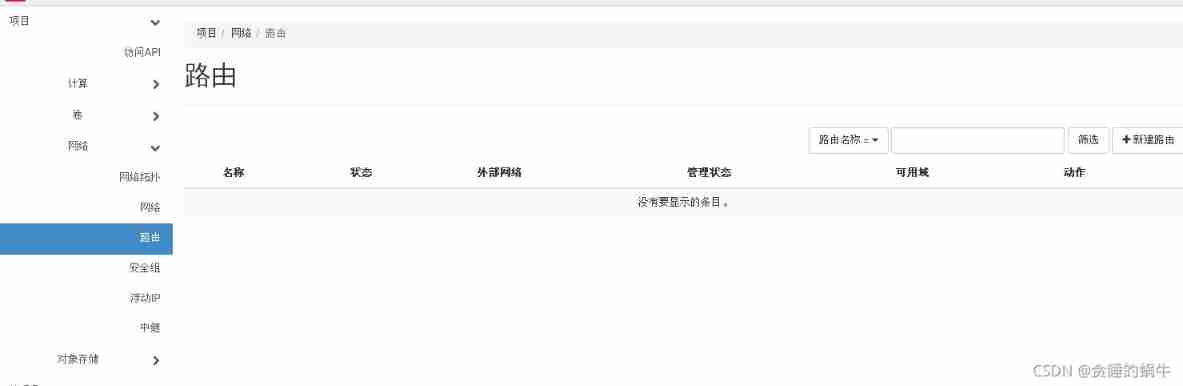
1、 Delete existing route
The default configured route has set the external network as the gateway ( It must be completely deleted, or there will be problems later , And the cause of the problem has never been found ), So delete all the routes
2、 Configure the external network
Delete the network first

Creating networks

It should be noted that , You need to set the default virtual machine in advance open vswitch Agent configuration file /etc/neutron/plugins/ml2/openvswitch_agent.ini The bridge mapping for is set to

continue

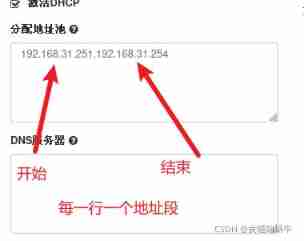
dns The server 114.114.114.114
3、 Adjust the internal network


Add a dns Server address
4、 Configure the routing
You need to create a new route to connect the internal network and the external network , This configuration is based on each project ,
, Create a new route in the project network ( It is necessary to advance public Set the network as an external network )


Click the route name to enter the details
Add interface

Set up the gateway

Check the network topology , You can see that the router connects the internal and external networks

5、 Assign floats to virtual machine instances ip Address


Create port
Note that you want to delete the network , You need to delete the corresponding interface in the route , Then delete the network .
Finally found ssh Configuration of (/etc/ssh/sshd_config) It's not the same ,14.04 The default configuration for is :
PermitRootLogin without-password
Change it to :
PermitRootLogin yes
And then restart ssh:
restart ssh

<physical_network>:<bridge> A comma separated list of tuples maps physical network names to be used for flat and VLAN The proxy node of the network is specific Open vSwitch Bridge name . The length of the bridge name should not exceed 11. Every bridge must exist , And there should be a physical network interface configured as port . All physical networks configured on the server should be mapped to the appropriate bridges on each agent . Be careful : If you remove a bridge from this mapping , Be sure to disconnect it from the integrated bridge , Because the agent will no longer manage it . ( List value )


ovs-vsctl show Defined external network extnet It's mapped to OVS bridge , namely Openstack The instance will pass through the bridge br-ex Access to external networks ,
watch cat /proc/net/dev Check traffic

Use network nodes to access the external network eth0 Interface to br-ex In the bridge


Create a second network card , The name of the second network card is enp0s8, Online search found an update , The way network interfaces are named has changed
/etc/neutron/plugins/ml2/ml2_conf.ini
“ request timeout ” Description local issue ICMP There is no response to the package , That is, the router will filter the packet directly
“ Unable to access target host ” explain : This is not available on the current network IP The address is accessible to the user

ssh
cd ~/.ssh
chmod 700 passkey.pem
ssh -i ~/.ssh/passkey.pem [email protected]
plugin.ini
l3_agent.ini:
openvswitch_agent.ini:
bridge_mappings
Restart configuration
# openstack-service restart neutron
# systemctl restart neutron-l3-agent.service neutron-openvswitch-agent.service
Default network configuration
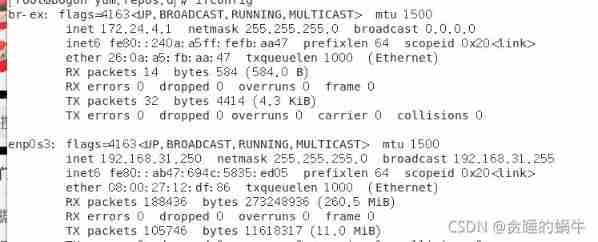
restart
# openstack-service restart neutron
# systemctl restart neutron-l3-agent.service neutron-openvswitch-agent.service
Try to modify

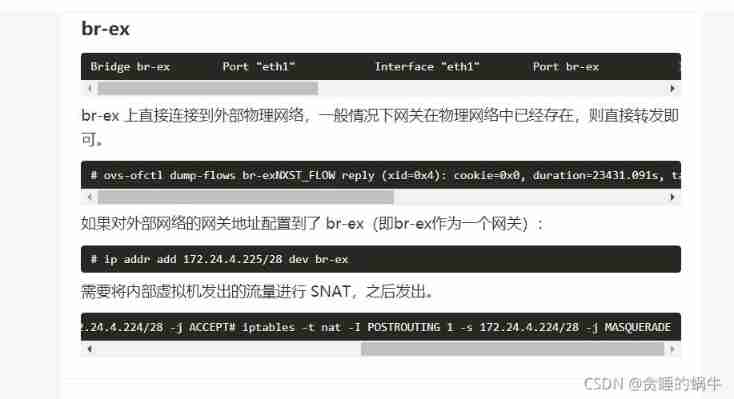
Network nodes - In depth understanding of OpenStack Network implementation Neutron - Wenjiang blog

Basic knowledge of firewall SNAT Detailed explanation | Erya speaks Buddhism

iptables -t nat -A POSTROUTING -s 192.168.31.0/24 -o br-ex -j SNAT --to-source 192.168.31.249
glance namely image service, It is a service that provides images for the creation of virtual machines
horizon Provide web The user interface
keystone Provide authentication
nova Quickly automate the creation of virtual machines
Reference resources
OpenStack All networking knowledge points
Chapter 8. Troubleshoot Provider Networks Red Hat OpenStack Platform 8 | Red Hat Customer Portal
27. To configure openstack Multiple extranets br-ex_Michael_XiaoQ The blog of -CSDN Blog
Open vSwitch Of VxLAN Tunnel network experiment | SDNLAB | Focus on Network Innovation Technology
OVS Use notes ( forty-three )_bob The blog of -CSDN Blog
In depth understanding of Neutron -- OpenStack Network implementation (Openstack Understand Neutron)
One ,openstack Command line management (br-ex Network settings )_yangfan The blog of -CSDN Blog
VLAN Pattern - linhaifeng - Blog Garden
One ,openstack Command line management (br-ex Network settings )_yangfan The blog of -CSDN Blog
centos7 packstack Deploy openstack | Code farm home
OpenStack Mirror image Handle
边栏推荐
- [you code, I fix] whitesource was officially renamed mend
- R language Visual facet chart, hypothesis test, multivariable grouping t-test, visual multivariable grouping faceting bar plot, adding significance level and jitter points
- 检测vector是否有交集
- R语言ggplot2可视化:使用ggrepel包在线图(line plot)的尾端那个数据点添加数值标签(number label)
- 大一女生废话编程爆火!懂不懂编程的看完都拴Q了
- 什么时候运用二分搜索
- 数组——双指针技巧秒杀七道数组题目
- Jacobian matrix IK of manipulator
- leetcode 47. Permutations II 全排列 II(中等)
- Typeof and instanceof, how to simulate the implementation of an instanceof? Is there a general detection data type?
猜你喜欢

【您编码,我修复】WhiteSource正式更名为Mend

Newoj week 10 question solution

路由信息的来源

实战 | 巧用位姿解算实现单目相机测距

Improve pipeline efficiency: you need to know how to identify the main obstacles in ci/cd pipeline

itk itk::BSplineDeformableTransform

Binary tree (serialization)
NewOJ Week 10题解

一个ES设置操作引发的“血案”

Bitmap, bloom filter and hash sharding
随机推荐
[database] Navicat -- Oracle database creation
Deep analysis of advanced pointer -- advanced chapter of C language
路由信息的来源
常数时间删除/查找数组中的任意元素
Buu question brushing record - 7
Openmax (OMX) framework
嵌入式系统概述1-嵌入式系统定义、特点和发展历程
this.$ How to solve the problem when refs is undefined?
Safety KNN
ITK Examples/RegistrationITKv4/DeformableRegistration
[an Xun cup 2019]iamthinking
Embedded driver design
机器人雅可比求解
Three dimensional coordinate point fitting sphere (MATLAB and C)
八大误区,逐个击破(2):性能差?应用程序少?你对云的这些担心很多余!
Eight misunderstandings are broken one by one (2): poor performance? Fewer applications? You worry a lot about the cloud!
Embedded system hardware composition - embedded system hardware architecture
【VIM】.vimrc配置,已经安装Vundle,YoucompleteMe
VTK image sequence mouse interactive flipping
【您编码,我修复】WhiteSource正式更名为Mend