当前位置:网站首页>EBook list page
EBook list page
2022-06-12 05:55:00 【Snow flies fast】
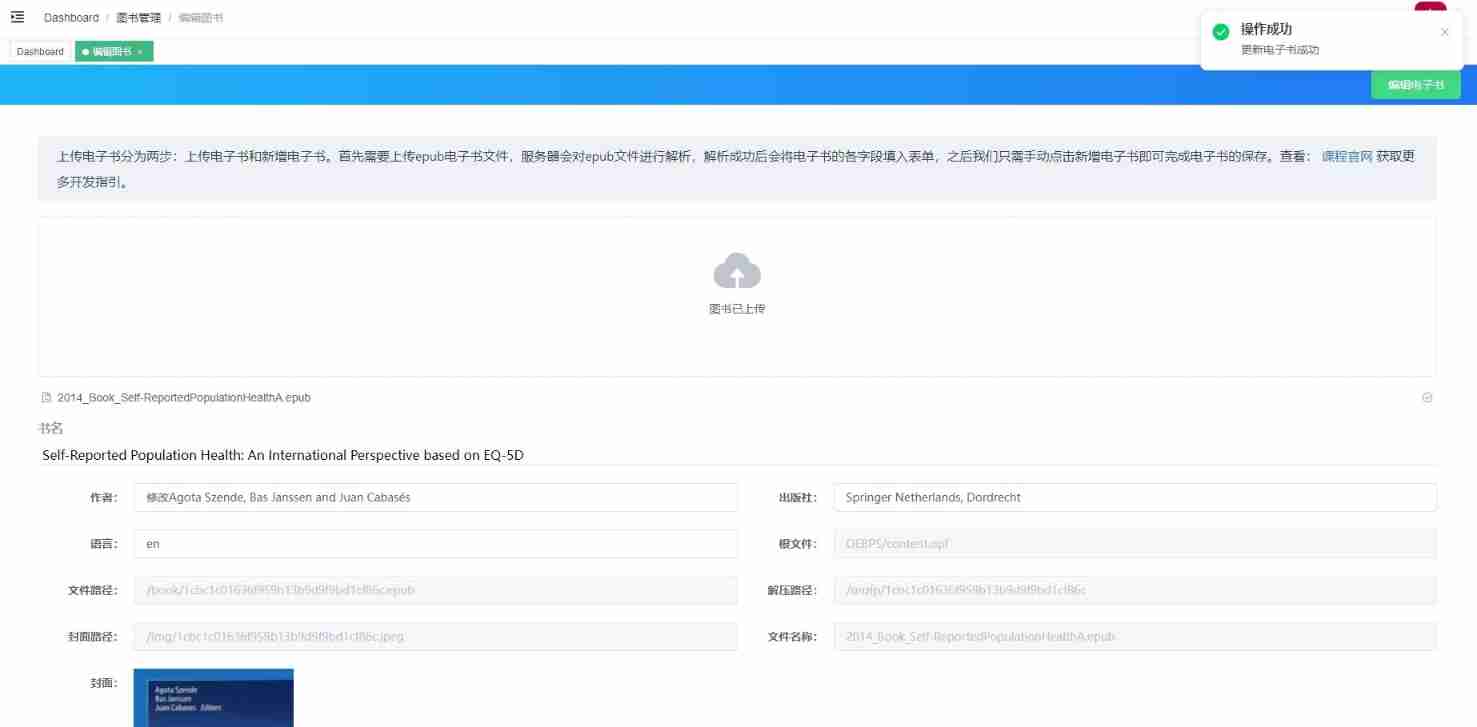
EBook editing
The page display

- Deleting the e-book will emit
onRemoveMethod , When this method is executed, the data is assigned a default value - Click the tree menu to open a new one tabs
<template>
  <ebook-upload :file-list="fileList" :disabled="isEdit" @onSuccess="onUploadSucess" @onRemove="onUploadRemove" />

  <el-tree :data="contentsTree" @node-click="onContentClick" />
</template>

<script> const defaultForm = {
       title: '', author: '', publisher: '', language: '', rootFile: '', filePath: '', unzipPath: '', coverPath: '', cover: '', originalName: '' } export default {
       methods: {
       setData(data) {
       const {
       title, author, publisher, language, rootFile, cover, originalName, contents, coverPath, filePath, unzipPath, contentsTree } = data this.postForm = {
       ...this.postForm, title, //  Title  author, //  author  publisher, //  Press.  language, //  Language  rootFile, //  Root file path  filePath, //  File path  unzipPath, //  The path where the extracted file is located  coverPath, //  Cover picture path  cover, //  Cover picture URL contents, //  Catalog  originalName //  file name  } this.contentsTree = contentsTree }, setDefault() {
       this.postForm = Object.assign({
      }, defaultForm) this.contentsTree = [] }, onContentClick(data) {
       if (data.text) {
       window.open(data.text) } }, onUploadSucess(data) {
       this.setData(data) }, onUploadRemove() {
       this.setDefault() } } } </script>
problem : The length is not the same
newNavMap and epub.flow Length inconsistency
newNavMap: Information in the directoryepub.flow: Represents the reading order of the entire e-book reader , Some contents may not be reflected in the chapter contents
const path = require('path')

class Book {

  // ...
  const dir = path.dirname(ncxFilePath).replace(UPLOAD_PATH, '')
  // ...
  newNavMap.forEach((chapter, index) => {

    const src = chapter.content['$'].src
    chapter.text = `${
      UPLOAD_URL}${
      dir}/$`
    chapter.label = chapter.navLabel.text || ''
    chapter.navId = chapter['$'].id
    chapter.filename = filename
    chapter.order = index + 1
    chapters.push(chapter)
  })
}
Form verification
Add... To editable form items
propadopt
fields[Object.keys(fields)[0]][0].messageGet error message
In this way, the effect shown in the figure below can be achieved

const fields = {

  title: ' title ',
  author: ' author ',
  publisher: ' Press. ',
  language: ' Language '
}
export default {

  data() {

    const validateRequire = (rule, value, callback) => {

      if (value.length === 0) {

        callback(new Error(fields[rule.field] + ' Must fill in '))
      } else {

        callback()
      }
    }
    return {

      rules: {

        title: [{
     validator: validateRequire }],
        author: [{
     validator: validateRequire }],
        publisher: [{
     validator: validateRequire }],
        language: [{
     validator: validateRequire }]
      }
    }
  },
  methods: {

    submitForm() {

      this.$refs.postForm.validate((valid, fields) => {

        if (valid) {

          //...
        } else {

          const message = fields[Object.keys(fields)[0]][0].message
          this.$message({

            message,
            type: 'error',
            showClose: true
          })
        }
      })
    }
  }
}
Submit Form
You need to provide two interfaces when submitting forms ,createBook and updateBook
src\api\book.js
import request from '@/utils/request'

export function createBook(book) {

  return request({

    url: '/book/create',
    method: 'post',
    data: book
  })
}
modify submitForm Method
import {
     createBook } from '@/api/book'

if (valid) {

  const book = Object.assign({
    }, this.postForm)
  delete book.status
  delete book.contentsTree
  if (!this.isEdit) {

    createBook(book)
      .then(response => {

        const {
     msg } = response
        this.$notify({

          title: ' Successful operation ',
          message: msg,
          type: 'success',
          duration: 2000
        })
        this.setDefault()
      })
      .catch(() => {
    })
      .finally(() => (this.loading = false))
  } else {

    // updateBook(book)
  }
} else {

  const message = fields[Object.keys(fields)[0]][0].message
  this.$message({

    message,
    type: 'error',
    showClose: true
  })
}
After the upload is successful, there will be 2 A question
- After the new form is successfully added, a verification exception will appear when the form is cleared
- The file list was not removed
setDefault() {

  //...
  this.fileList = []
  this.$refs.postForm.resetFields()
}
The backend development API
New books
router\book.jsincreasecreateInterfaceadopt
jwtVerify that the user name is obtained , After thereq.bodyParameters are passed intoBookclass
const {
     decoded } = require('../utils')
const bookService = require('../services/book')

router.post('/create', (req, res, next) => {

  const decode = decoded(req)
  if (decode && decode.username) {

    req.body.username = decode.username
  }
  const book = new Book(null, req.body)
  bookService
    .insertBook(book)
    .then(() => {

      new Result(' E-book added successfully ').success(res)
    })
    .catch(err => next(boom.badImplementation(err)))
})
stay utils\constant.js Fill in the following :
UPDATE_TYPE_FROM_WEB: 1
stay models\Book.js Fill in the following :
Add from
dataObjectBookObject methodsnewly added
toDbMethod , So that when inserting the databaseBookThere are more fields in the object than in the design tablebookThe contents of the design table are as follows :
const {
     UPDATE_TYPE_FROM_WEB } = require('../utils/constant')

createBookFromData(data) {

  this.fileName = data.fileName
  this.cover = data.coverPath
  this.title = data.title
  this.author = data.author
  this.publisher = data.publisher
  this.bookId = data.fileName
  this.language = data.language
  this.rootFile = data.rootFile
  this.originalName = data.originalName
  this.path = data.path || data.filePath
  this.filePath = data.path || data.filePath
  this.unzipPath = data.unzipPath
  this.coverPath = data.coverPath
  this.createUser = data.username
  this.createDt = new Date().getTime()
  this.updateDt = new Date().getTime()
  this.updateType = data.updateType === 0 ? data.updateType : UPDATE_TYPE_FROM_WEB
  this.contents = data.contents
  this.category = data.category || 99
  this.categoryText = data.categoryText || ' Customize '
}

toDb() {

  return {

    fileName: this.fileName,
    cover: this.cover,
    title: this.title,
    author: this.author,
    publisher: this.publisher,
    bookId: this.fileName,
    language: this.language,
    rootFile: this.rootFile,
    originalName: this.originalName,
    filePath: this.filePath,
    unzipPath: this.unzipPath,
    coverPath: this.coverPath,
    createUser: this.createUser,
    createDt: this.createDt,
    updateDt: this.updateDt,
    updateType: this.updateType,
    category: this.category,
    categoryText: this.categoryText,
  }
}
newly build services\book.js Fill in the following :
- The main task here is to execute
insertMethod , Biography isbook.toDb()
const Book = require('../models/Book')
const db = require('../db')

function exists(book) {
    }

function removeBook(book) {
    }

function insertContents(book) {
    }

function insertBook(book) {

  return new Promise(async (resolve, reject) => {

    try {

      if (book instanceof Book) {

        const result = await exists(book)
        if (result) {

          await removeBook(book)
          reject(new Error(' E-books already exist '))
        } else {

          await db.insert(book.toDb(), 'book')
          await insertContents(book)
          resolve()
        }
      } else {

        reject(new Error(' The added Book object is illegal '))
      }
    } catch (e) {

      reject(new Error(e))
    }
  })
}

module.exports = {
     insertBook }
stay utils\index.js The following methods are added in the :
function isObject(o) {

  return Object.prototype.toString.call(o) === '[object Object]'
}
perfect db\index.js Medium insert.js Method :
- In fact, you can not add
model.hasOwnProperty(), becauseObject.keys()The return includes the object itself ( Without inheritance ) All enumerable properties (enumerable: true)
function insert(model, tableName) {

  return new Promise((resolve, reject) => {

    if (!isObject(model)) reject(' Insert database failed , Insert data non object ')
    const keys = []
    const values = []
    Object.keys(model).forEach(key => {

      if (!model.hasOwnProperty(key)) return
      keys.push(`\`${
      key}\``) //  avoid key And sql Duplicate keyword for
      values.push(`'${
      model[key]}'`)
    })
    if (keys.length > 0 && values.length > 0) {

      let sql = `INSERT INTO \`${
      tableName}\` (`
      const keysString = keys.join(',')
      const valuesString = values.join(',')
      sql = `${
      sql}${
      keysString}) VALUES (${
      valuesString})`
      DEBUG && console.log(sql)
      const conn = connect()
      try {

        conn.query(sql, (err, result) => {

          if (err) return reject(err)
          resolve(result)
        })
      } catch (e) {

        reject(e)
      } finally {

        conn.end() //  Be sure to add , Otherwise, memory leakage will occur
      }
    } else {

      reject(new Error(' Insert database failed , Object doesn't have any properties '))
    }
  })
}
stay models\Book.js Newly added getContents Method :
getContents() {

  return this.contents
}
contents The contents of the design table are as follows :

stay services\book.js New China insertContents Method :
Use
lodashMediumpickMethod , Clean up redundant fields , After cleaning, see the following figure :
const _ = require('lodash')

async function insertContents(book) {

  const contents = book.getContents()
  if (contents && contents.length > 0) {

    for (let i = 0; i < contents.length; i++) {

      const content = contents[i]
      const _content = _.pick(content, [
        'fileName',
        'id',
        'href',
        'text',
        'order',
        'level',
        'label',
        'pid',
        'navId',
      ])
      await db.insert(_content, 'contents')
    }
  }
}
Click "add e-book" and the front prompt will appear : E-book added successfully , View that the database has successfully inserted data
E-book duplication check
Determine whether the e-book exists in the database , We can start from three aspects : Title 、 author 、 Press.
stay services\book.js Revision in China exists Method content :
function exists(book) {

  const {
     title, author, publisher } = book
  const sql = `select * from book where title='${
      title}' and author='${
      author}' and publisher='${
      publisher}'`
  return db.queryOne(sql)
}
If the ebook exists in the database , From book Table and contents Remove relevant content from the table
async function removeBook(book) {

  if (book) {

    book.reset()
    if (book.fileName) {

      const removeBookSql = `delete from book where fileName='${
      book.fileName}'`
      const removeContentSql = `delete from contents where fileName='${
      book.fileName}'`
      await db.querySql(removeBookSql)
      await db.querySql(removeContentSql)
    }
  }
}
book Example of reset Method is used to delete the duplicate e-book related resources just uploaded by the server (filePath、coverPath、unzipPath)
fs.unlinkSync: Used to delete the file of the corresponding pathfs.rmdirSync: Used to delete the folder of the corresponding path
reset() {

  if (Book.pathExists(this.filePath)) {

    fs.unlinkSync(Book.genPath(this.filePath))
  }
  if (Book.pathExists(this.coverPath)) {

    fs.unlinkSync(Book.genPath(this.coverPath))
  }
  if (Book.pathExists(this.unzipPath)) {

    //  Be careful node The second attribute... Will not be supported in the lower version ( Iteratively delete )
    fs.rmdirSync(Book.genPath(this.unzipPath), {
     recursive: true })
  }
}

static pathExists(path) {

  if (path.startsWith(UPLOAD_PATH)) return fs.existsSync(path)
  return fs.existsSync(Book.genPath(path))
}
Since then, the e-book de duplication operation has been completed
E-book query
Modify in the front-end project src\router\index.js stay book/edit After adding :fileName Form a dynamic route
{

  path: '/book/edit/:fileName',
  component: () => import('@/views/book/edit'),
  name: 'bookEdit',
  hidden: true,
  meta: {
     title: ' Editing books ', icon: 'edit', roles: ['admin'], activeMenu: '/book/list' }
},
stay src\views\book\components\Detail.vue New life cycle function in created and getBookData Method
created() {

  if (this.isEdit) {

    const fileName = this.$route.params.fileName
    this.getBookData(fileName)
  }
},
methods: {

  getBookData(fileName) {

    getBook(fileName).then(response => {

      this.setData(response.data)
    })
  },
}
stay src\api\book.js Newly added getBook API:
export function getBook(fileName) {

  return request({

    url: '/book/get',
    method: 'get',
    params: {
     fileName }
  })
}
Then you can start developing getBook The interface . stay router\book.js To add the following :
router.get('/get', (req, res, next) => {

  const {
     fileName } = req.query
  if (!fileName) {

    next(boom.badRequest(new Error(' Parameters fileName Can't be empty ')))
  } else {

    bookService
      .getBook(fileName)
      .then(book => {

        new Result(book, ' Successful acquisition of book information ').success(res)
      })
      .catch(err => {

        next(boom.badImplementation(err))
      })
  }
})
stay services\book.js To add the following :
function getBook(fileName) {

  return new Promise(async (resolve, reject) => {

    const bookSql = `select * from book where fileName='${
      fileName}'`
    const contentSql = `select * from contents where fileName='${
      fileName}' order by \`order\``
    const book = await db.queryOne(bookSql)
    const contents = await db.querySql(contentSql)
    if (book) {

      book.cover = Book.genCoverUrl(book)
      book.contentsTree = Book.genContentsTree(contents)
    } else {

      reject(new Error(' E-books don't exist '))
    }
    return resolve(book)
  })
}
Restart the server , Refresh the browser , There is something wrong with the cover and contents
stay utils\constant.js add OLD_UPLOAD_URL , Used to be compatible with previous projects cover The address of
const OLD_UPLOAD_URL = env === 'dev'?
      'http://127.0.0.1:8089/book/res/img' :
      'http://www.book.llmysnow.top/book/res/img'
stay models\Book.js New static transformation in cover Path method :
static genCoverUrl(book) {

  const {
     cover } = book
  if (+book.updateType === 0) {

    if (cover) {

      if (cover.startsWith('/')) {

        return `${
      OLD_UPLOAD_URL}${
      cover}`
      } else {

        return `${
      OLD_UPLOAD_URL}/${
      cover}`
      }
    } else {

      return null
    }
  } else {

    if (cover) {

      if (cover.startsWith('/')) {

        return `${
      UPLOAD_URL}${
      cover}`
      } else {

        return `${
      UPLOAD_URL}/${
      cover}`
      }
    } else {

      return null
    }
  }
}
such cover The path is handled , The next step is to deal with content 了 , stay models\Book.js New static transformation in contents Directory method :
static genContentsTree(contents) {

  if (contents) {

    const contentsTree = []
    contents.forEach(c => {

      c.children = []
      if (c.pid === '') {

        contentsTree.push(c)
      } else {

        const parent = contents.find(_ => _.navId === c.pid)
        parent.children.push(c)
      }
    })
    return contentsTree
  }
}
After the front end requests the data, it needs to display the upload list , stay setData Add :
setData(data) {

  // ....
  this.fileList = [{
     name: originalName || fileName }]
},
Update ebook
stay src\api\book.js Add the following new content in :
export function updateBook(book) {

  return request({

    url: '/book/update',
    method: 'post',
    data: book
  })
}
stay src\views\book\components\Detail.vue Of submitForm It is revised as follows :
submitForm() {

  const onSuccess = response => {

    const {
     msg } = response
    this.$notify({

      title: ' Successful operation ',
      message: msg,
      type: 'success',
      duration: 2000
    })
    this.loading = false
  }
  this.loading = true
  this.$refs.postForm.validate((valid, fields) => {

    if (valid) {

      const book = Object.assign({
    }, this.postForm)
      delete book.status
      delete book.contentsTree
      if (!this.isEdit) {

        createBook(book)
          .then(response => {

            onSuccess(response)
            this.setDefault()
          })
          .catch(() => {
    })
      } else {

        updateBook(book)
          .then(response => {

            onSuccess(response)
          })
          .catch(() => {
    })
      }
    } else {

      const message = fields[Object.keys(fields)[0]][0].message
      this.$message({

        message,
        type: 'error',
        showClose: true
      })
      this.loading = false
    }
  })
},
Next, modify the server , stay router\book.js New interface in :
router.post('/update', (req, res, next) => {

  const decode = decoded(req)
  if (decode && decode.username) {

    req.body.username = decode.username
  }
  const book = new Book(null, req.body)
  bookService
    .updateBook(book)
    .then(() => {

      new Result(' E-book update succeeded ').success(res)
    })
    .catch(err => next(boom.badImplementation(err)))
})
stay services\book.js New e-book update logic in updateBook Method :
function updateBook(book) {

  return new Promise(async (resolve, reject) => {

    try {

      if (book instanceof Book) {

        const result = await getBook(book.fileName)
        if (result) {

          const model = book.toDb()
          if (+result.updateType === 0) {

            reject(new Error(' Built in books cannot be edited '))
          } else {

            await db.update(model, 'book', `where fileName='${
      book.fileName}'`)
            resolve()
          }
        }
      } else {

        reject(new Error(' The added Book object is illegal '))
      }
    } catch (e) {

      reject(new Error(e))
    }
  })
}
stay db\index.js Add database update in update Method :
function update(zmodel, tableName, where) {

  return new Promise((resolve, reject) => {

    if (!isObject(model)) reject(' Insert database failed , Insert data non object ')
    const entry = []
    Object.keys(model).forEach(key => {

      if (model.hasOwnProperty(key)) {

        entry.push(`\`${
      key}\`='${
      model[key]}'`)
      }
    })
    if (entry.length > 0) {

      let sql = `UPDATE \`${
      tableName}\` SET`
      sql = `${
      sql} ${
      entry.join(',')} ${
      where}`
      DEBUG && console.log(sql)
      const conn = connect()
      try {

        conn.query(sql, (err, result) => {

          if (err) return reject(err)
          resolve(result)
        })
      } catch (e) {

        reject(e)
      } finally {

        conn.end()
      }
    }
  })
}
Delete book、img、unzip Contents of Li
Deleting these folders manually is really a bit cumbersome , Create a new directory in the root directory delete.js
- I'm going through each file and delete it in turn ( The advantage is : It can be controlled in the middle , You can specify that a file is not deleted ) Of course, you can also delete the folder directly , Create folder again
const {
     UPLOAD_PATH } = require('./utils/constant')
const path = require('path')
const fs = require('fs')

const bookPath = path.resolve(UPLOAD_PATH, 'book')
const imgPath = path.resolve(UPLOAD_PATH, 'img')
const unzipPath = path.resolve(UPLOAD_PATH, 'unzip')

function removeFile(dirPath) {

  return new Promise((resolve, reject) => {

    fs.readdir(dirPath, (err, files) => {

      if (err) return reject(err)
      if (!files.length) return reject(`${
      dirPath} The folder is empty `)
      files.forEach(item => {

        const filePath = path.resolve(dirPath, item)
        if (fs.statSync(filePath).isFile()) {

          fs.unlinkSync(filePath)
        } else {

          fs.rmdirSync(filePath, {
     recursive: true })
        }
      })
      resolve(`${
      dirPath}  Delete successful `)
    })
  })
}

Promise.allSettled([removeFile(bookPath), removeFile(imgPath), removeFile(unzipPath)])
  .then(res => {

    res.forEach(item => {

      if (item.value) console.log(item.value)
      if (item.reason) console.log(item.reason)
    })
  })
  .catch(err => console.log(err))
边栏推荐
- Brief summary of software project architecture
- Json-c common APIs
- 个人申请OV类型SSL证书
- Stack and queue classic interview questions
- Un mois de DDD hépatique.
- Flutter monitors application lifecycle status
- Individual application for ov type SSL certificate
- [gin] gin framework for golang web development
- Types, functions and applications of intelligent sensors
- Leetcode dynamic programming
猜你喜欢

RTMP streaming +rtmp playback low delay solution in unity environment
Data integration framework seatunnel learning notes

Special materials | household appliances, white electricity, kitchen electricity

Conversion of Halcon 3D depth map to 3D image

Details of FPGA syntax

A month's worth of DDD will help you master it
肝了一个月的 DDD,一文带你掌握

MySQL 主从,6 分钟带你掌握

Chapter 7 - pointer learning

WiFi band resources
随机推荐
China Aquatic Fitness equipment market trend report, technical innovation and market forecast
数据库实验一:数据定义实验指导
Win10 desktop unlimited refresh
个人申请OV类型SSL证书
Towards End-to-End Lane Detection: an Instance SegmentationApproach
[machine learning] first day of introduction
C WMI query remote Win32_ Operatingsystem class
March 4, 2021
Rtmp/rtsp/hls public network real available test address
从传统网络IO 到 IO多路复用
GRP development: four communication modes of GRP
网络加速谁更猛?CDN领域再现新王者
Simple introduction to key Wizard
【js小知识】轻松了解js防抖与节流
Conversion of Halcon 3D depth map to 3D image
About architecture (in no particular order)
How much Ma is the driving current of SIM card signal? Is it adjustable?
A month's worth of DDD will help you master it
MySQL master-slave, 6 minutes to master
Introduction to Internet Protocol