当前位置:网站首页>Compile and install lamp architecture of WordPress and discuz for multi virtual hosts based on fastcgi mode
Compile and install lamp architecture of WordPress and discuz for multi virtual hosts based on fastcgi mode
2022-06-12 13:49:00 【wwzroom】
Realization CentOS 7 The compilation installation is based on fastcgi Mode of multi virtual host wordpress and discuz Of LAMP framework
1 Experimental framework
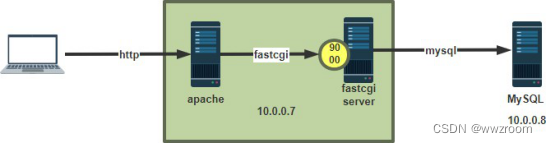
2 Environmental preparation
Two hosts :
- A mainframe :httpd+php(fastcgi Pattern )
- A mainframe :mariadb The server
Software version :
- CentOS 7.9
- mariadb-10.2.44-linux-systemd-x86_64.tar.gz General binary format
- apr-1.7.0.tar.bz2
- apr-util-1.6.1.tar.bz2
- httpd-2.4.46.tar.bz2
- php-7.4.29.tar.gz
- wordpress-6.0-zh_CN.tar.gz
- Discuz_X3.4_SC_UTF8_20210926.zip
3 Implementation steps
3.1 Binary installation mariadb
1. Modify hostname
[[email protected]:~]#
hostname mariadb && exit

2. Download the decompression package
[[email protected]:~]#
wget https://mirrors.bkns.vn/mariadb//mariadb-10.2.44/bintar-linux-systemd-x86_64/mariadb-10.2.44-linux-systemd-x86_64.tar.gz
[[email protected]:~]#
tar xvf mariadb-10.2.44-linux-systemd-x86_64.tar.gz  -C /usr/local

3. Create a soft connection , Create a new corresponding directory and modify the folder main group
[[email protected]:~]#
cd /usr/local
[[email protected]:/usr/local]#
ln -sv mariadb-10.2.44-linux-systemd-x86_64 mysql
[[email protected]:/usr/local]#
cd /usr/local/mysql
[[email protected]:/usr/local/mysql]#
chown -R root.root /usr/local/mysql/*
[[email protected]:/usr/local/mysql]#
mkdir /data/mysql -p
[[email protected]:/usr/local/mysql]#
chown -R mysql.mysql /data/mysql

4. Copy the configuration file and modify the path
[[email protected]:/usr/local/mysql]#
cp /usr/local/mysql/support-files/my-huge.cnf /etc/my.cnf  # new edition mariadb No my-huge.cnf file , Download it yourself
[[email protected]:/usr/local/mysql]#
vim /etc/my.cnf
datadir =/data/mysql
skip_name_resolve = ON

5. Prepare environment variables
[[email protected]:/usr/local/mysql]#
echo 'PATH=/usr/local/mysql/bin/:$PATH' > /etc/profile.d/lamp.sh
[[email protected]:/usr/local/mysql]#
. /etc/profile.d/lamp.sh

6. Install dependency packages
[[email protected]:/usr/local/mysql]#
yum -y install libaio

7. Execute installation script
[[email protected]:/usr/local/mysql]#
 /usr/local/mysql/scripts/mysql_install_db  --datadir=/data/mysql --user=mysql

8. Set boot up
[[email protected]:/usr/local/mysql]#
cp /usr/local/mysql/support-files/mysql.server /etc/init.d/mysqld
[[email protected]:/usr/local/mysql]#
chkconfig --add mysqld
[[email protected]:/usr/local/mysql]#
systemctl enable --now mysqld

9. start-up MySQL
 If you are prompted mysql: error while loading shared libraries: /lib64/libncurses.so.5: file too short  Install dependent packages
[[email protected]:/usr/local/mysql]#
yum install ncurses-compat-libs

10. by Wordpress and discuz Applications create databases and accounts
MariaDB [(none)]> create database wordpress;
Query OK, 1 row affected (0.00 sec)

MariaDB [(none)]> create database discuz;
Query OK, 1 row affected (0.00 sec)

MariaDB [(none)]> grant all on wordpress.* to [email protected]'10.0.0.%' identified by "wppass";
Query OK, 0 rows affected (0.01 sec)

MariaDB [(none)]> grant all on discuz.* to [email protected]'10.0.0.%' identified by "dispass";
Query OK, 0 rows affected (0.00 sec)
3.2 Compilation and installation httpd 2.4
1. Modify hostname
[[email protected]:~]#
hostname fastcgi && exit

2. Install the dependent package
yum install gcc pcre-devel openssl-devel expat-devel -y

3. Upload and unzip the source package , install lrzsz, Send multiple files directly to the terminal interface
[[email protected]:~]#
tar xvf apr-1.7.0.tar.bz2
[[email protected]:~]#
tar xvf apr-util-1.6.1.tar.bz2
[[email protected]:~]#
tar xvf httpd-2.4.46.tar.bz2
[[email protected]:~]#
mv apr-1.7.0 httpd-2.4.46/srclib/apr
[[email protected]:~]#
mv apr-util-1.6.1 httpd-2.4.46/srclib/apr-util

4. Compilation and installation httpd
[[email protected]:~]#
cd httpd-2.4.46/
[[email protected]:~/httpd-2.4.46]#
./configure \
--prefix=/apps/httpd \
--enable-so \
--enable-ssl \
--enable-cgi \
--enable-rewrite \
--with-zlib \
--with-pcre \
--with-included-apr \
--enable-modules=most \
--enable-mpms-shared=all \
--with-mpm=event
[[email protected]:~/httpd-2.4.46]#
make -j2 && make install

5. Prepare environment variables
[[email protected]:~/httpd-2.4.46]#
echo 'PATH=/apps/httpd/bin:$PATH' > /etc/profile.d/httpd.sh
[[email protected]:~/httpd-2.4.46]#
. /etc/profile.d/httpd.sh

6. Create and configure users and groups
[[email protected]:~/httpd-2.4.46]#
sed -ri -e '/^User/c User apache' -e '/^Group/c Group apache' /apps/httpd/conf/httpd.conf

7. modify event Pattern , If it has been specified at compile time that it does not need to be modified , You need to modify the uncompiled specification .
vim /apps/httpd/conf/httpd.conf
LoadModule mpm_event_module modules/mod_mpm_event.so
#LoadModule mpm_prefork_module modules/mod_mpm_prefork.so
#LoadModule mpm_worker_module modules/mod_mpm_worker.so

8. Set boot up
[[email protected]:~/httpd-2.4.46]#
vim /usr/lib/systemd/system/httpd.service
[Unit]
Description=The Apache HTTP Server
After=network.target remote-fs.target nss-lookup.target
Documentation=man:httpd(8)
Documentation=man:apachectl(8)
[Service]
Type=forking
#EnvironmentFile=/etc/sysconfig/httpd
ExecStart=/apps/httpd/bin/apachectl start
#ExecStart=/apps/httpd/bin/httpd $OPTIONS -k start
ExecReload=/apps/httpd/bin/apachectl graceful
#ExecReload=/apps/httpd/bin/httpd $OPTIONS -k graceful
ExecStop=/apps/httpd/bin/apachectl stop
KillSignal=SIGCONT
PrivateTmp=true
[Install]
WantedBy=multi-user.targe

9. Start the service
[[email protected]:~/httpd-2.4.46]#
apachectl start
3.3 Compilation and installation fastcgi The way of php 7.4
1. Install the dependent package
[[email protected]:~]#
yum -y install gcc libxml2-devel bzip2-devel libmcrypt-devel sqlite-devel oniguruma-devel

2. Decompress and compile
[[email protected]:~]#
wget https://www.php.net/distributions/php-7.4.29.tar.gz
[[email protected]:~]#
tar xvf php-7.4.29.tar.gz
[[email protected]:~]#
cd  php-7.4.29
[[email protected]:~]#
./configure \
--prefix=/apps/php \
--enable-mysqlnd \
--with-mysqli=mysqlnd \
--with-pdo-mysql=mysqlnd \
--with-openssl \
--with-zlib \
--with-config-file-path=/etc \
--with-config-file-scan-dir=/etc/php.d \
--enable-mbstring \
--enable-xml \
--enable-sockets \
--enable-fpm \
--enable-maintainer-zts \
--disable-fileinfo
[[email protected]:~]#
make -j 2 && make install

3. Prepare environment variables
[[email protected]:~/php-7.4.29]#
echo 'PATH=/apps/php/bin:/apps/httpd/bin:$PATH' > /etc/profile.d/php.sh
[[email protected]:~/php-7.4.29]#
 . /etc/profile.d/php.sh
[[email protected]:~/php-7.4.29]#
php --version
PHP 7.4.29 (cli) (built: Jun 10 2022 19:59:37) ( ZTS )
Copyright (c) The PHP Group
Zend Engine v3.4.0, Copyright (c) Zend Technologies

4. Get ready php Configuration and startup files for
[[email protected]:~/php-7.4.29]#
cp php.ini-production /etc/php.ini
[[email protected]:~/php-7.4.29]#
cp sapi/fpm/php-fpm.service /usr/lib/systemd/system/
[[email protected]:~/php-7.4.29]#
cd /apps/php/etc
[[email protected]:/apps/php/etc]#
cp php-fpm.conf.default  php-fpm.conf
[[email protected]:/apps/php/etc]#
cd php-fpm.d
[[email protected]:/apps/php/etc/php-fpm.d]#
cp www.conf.default  www.conf

5. Modify the process owner
[[email protected]:/apps/php/etc/php-fpm.d]#
vim /apps/php/etc/php-fpm.d/www.conf
# Modify the process owner , With Apache Identity running .
user = apache
group = apache
# Support status and ping page
pm.status_path = /fpm_status    # uncomment , And modify it fpm_status, Consistent with the virtual host
ping.path = /ping

6. Support opcache Speed up
[[email protected]:/apps/php/etc/php-fpm.d]#
mkdir /etc/php.d/
[[email protected]:/apps/php/etc/php-fpm.d]#
vim /etc/php.d/opcache.ini
[opcache]
zend_extension=opcache.so
opcache.enable=1

7. Start the service ( The module has been compiled , Just add the configuration file )
[[email protected]:/apps/php/etc/php-fpm.d]#
systemctl daemon-reload  # Profile validation
[[email protected]:/apps/php/etc/php-fpm.d]#
systemctl enable --now php-fpm.service
3.4 Modify the configuration httpd Support php-fpm
1. Modify the configuration file
[[email protected]:/apps/php/etc/php-fpm.d]#
vim /apps/httpd/conf/httpd.conf
# Uncomment the next two lines , Thus, reverse proxy is supported
LoadModule proxy_module modules/mod_proxy.so
LoadModule proxy_fcgi_module modules/mod_proxy_fcgi.so

# add to index For the main page , Add directly to index.html Before
<IfModule dir_module>
DirectoryIndex index.php index.html
</IfModule>

# Add the following two lines to the end , Support php Suffix file , Turn on reverse proxy
AddType application/x-httpd-php .php
ProxyRequests Off

# Implement the first virtual machine wordpress,
<virtualhost *:80>
servername blog.magedu.org
documentroot /data/wordpress
<directory /data/wordpress>
require all granted
</directory>
ProxyPassMatch ^/(.*\.php)$ fcgi://127.0.0.1:9000/data/wordpress/$1
# Realization status and ping page
ProxyPassMatch ^/(fpm_status|ping)$ fcgi://127.0.0.1:9000/$1
CustomLog "logs/access_wordpress_log" common
</virtualhost>

# Implement the second virtual machine discuz
<virtualhost *:80>
servername forum.magedu.org
documentroot /data/discuz
<directory /data/discuz/>
require all granted
</directory>
ProxyPassMatch ^/(.*\.php)$ fcgi://127.0.0.1:9000/data/discuz/$1
CustomLog "logs/access_discuz_log" common
</virtualhost>
3.5 Get ready wordpress and discuz! Related documents
1. Get ready wordpress file
[[email protected]:~]#
mkdir /data/
[[email protected]:~]#
tar xvf wordpress-6.0-zh_CN.tar.gz
[[email protected]:~]#
mv wordpress/ /data
[[email protected]:~]#
setfacl -R -m u:apache:rwx /data/wordpress/
# perhaps chown –R apache.apache /data/wordpress

2. equipment discuz file
[[email protected]:~]#
unzip Discuz_X3.4_SC_UTF8_20220518.zip
[[email protected]:~]#
mv upload/ /data/discuz
[[email protected]:~]#
setfacl -R -m u:apache:rwx /data/discuz/
3.6 Test access
stay windows in , modify hosts file , Add domain name resolution :
C:\Windows\System32\drivers\etc\hosts
10.0.0.7 forum.magedu.org  blog.magedu.org
1.wordpress Test screenshot


2.discuz Test screenshot

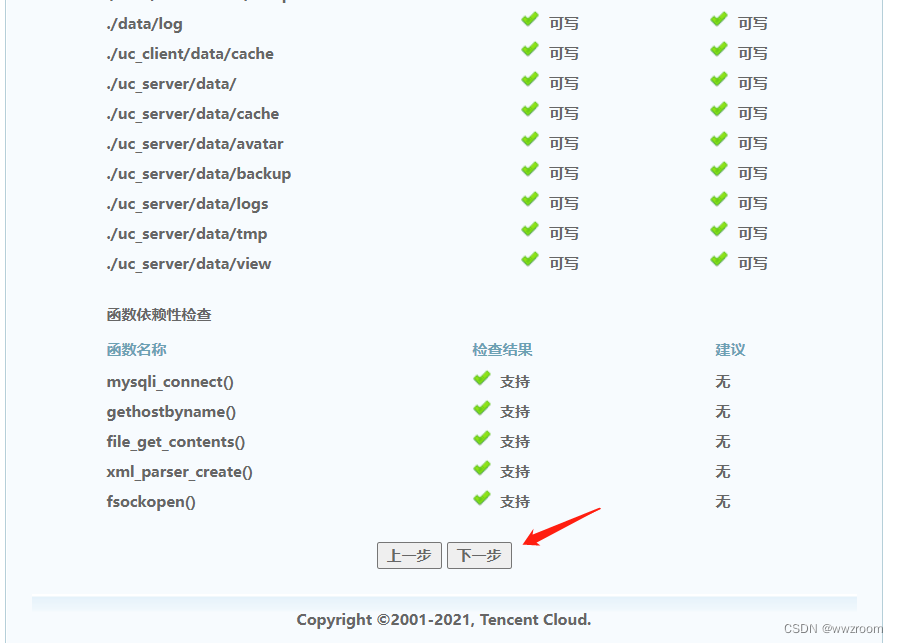

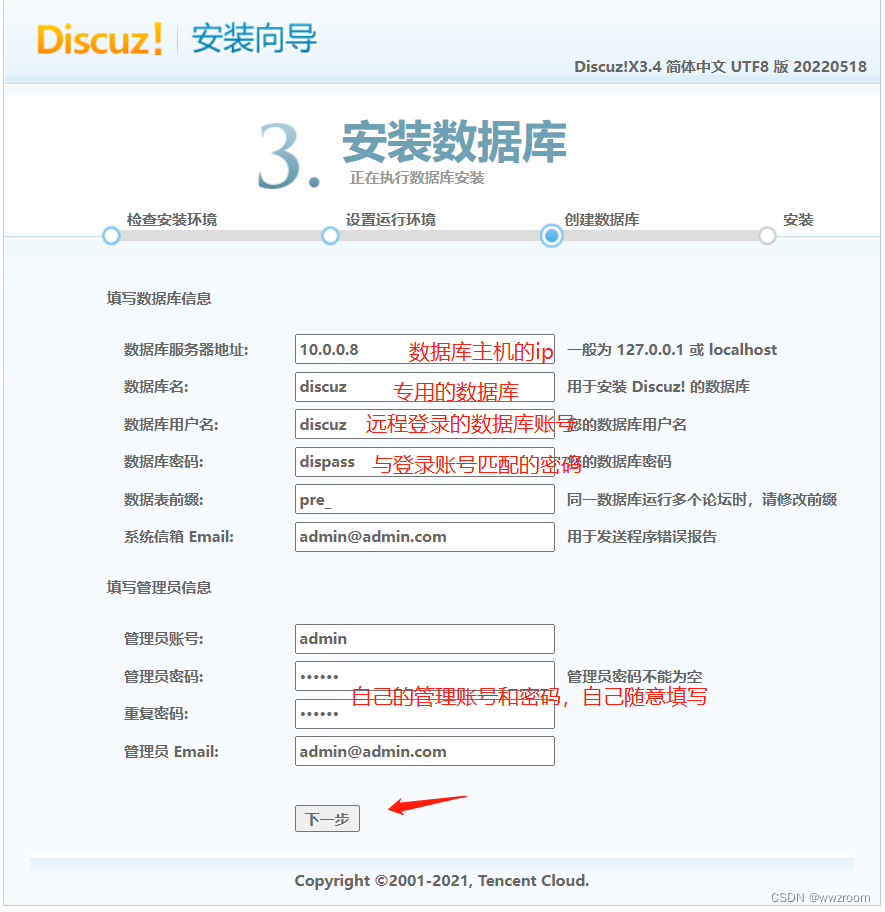

边栏推荐
- Comparator summary
- Codeforces 1629 F1. Game on sum (easy version) - DP, game, thinking
- 【视频课】android studio物联网APP设计制作全套教程--国庆期间全掌握
- [wustctf2020] selfie score query -1
- 2065: [example 2.2] sum of integers
- 颜色编码格式介绍
- RK3399平台开发系列讲解(内核调试篇)2.50、systrace的使用
- 十四周作业
- AVFoundation
- 2068: [example 2.6] chicken and rabbit in the same cage
猜你喜欢

阿里云开发板HaaS510响应UART串口指令

Qt5 plug-in production
事件的传递和响应以及使用实例

Relevant knowledge points of cocoapods

阿里云开发板HaaS510解析串口JSON数据并发送属性

Innovation training (x) advanced interface beautification

Web3.0, the era of "stimulating creativity"

Data type conversion and conditional control statements
![[WUSTCTF2020]颜值成绩查询-1](/img/dc/47626011333a0e853be87e492d8528.png)
[WUSTCTF2020]颜值成绩查询-1

Implementing tensorflow deep learning framework similarflow with numpy
随机推荐
view的子视图的递归
阿里云开发板HaaS510连接物联网平台--HaaS征文
Hash tables, sets, maps, trees, heaps, and graphs
Paw advanced user guide
颜色编码格式介绍
阿里云开发板HaaS510响应UART串口指令
Pytorch to onnx, onnxruntime reasoning in mmclas
Player screen orientation scheme
Debug code to quickly locate the error location
2061: [example 1.2] trapezoidal area
Codeforces 1629 D. pecuriar movie preferences - simple thinking, palindrome strings
Implementing singleton mode of database under QT multithreading
简历 NFT 平台 TrustRecruit 加入章鱼网络成为候选应用链
Codeforces 1638 A. reverse - simple thinking
2068: [example 2.6] chicken and rabbit in the same cage
[WUSTCTF2020]颜值成绩查询-1
M1 pod install pod lint failure solution
Time processing in C language (conversion between string and timestamp)
"Non" reliability of TCP
Alibaba cloud development board haas510 submission device attributes