当前位置:网站首页>Alibaba cloud development board haas510 submission device attributes
Alibaba cloud development board haas510 submission device attributes
2022-06-12 13:47:00 【TMS320VC5257H】
Abstract :HaaS510 The development board can use mobile network communication , So please wifi Signal dependence . It also supports JavaScript Language , Very reliable cloud operations are implemented with very simple statements . This article shares with you after the cloud , How to submit device attributes to the Internet of things platform .

The experiment purpose : adopt haas510 interval 5 Report the switch attribute of the smart light once every second LightSwitch, Each flip .
Hardware :haas510 (2.0 edition ),USB A serial port
Software :win7 x64,vscode
Catalog
1. Development environment preparation
2. Internet of things cloud platform device registration
6. Extended reading :JSON.stringify
1. Development environment preparation
If you have already configured based on vscode Of haas-studio development environment , Please skip this step .
without , Please refer to the article
Alibaba cloud development board vscode Development environment construction  https://blog.csdn.net/youngwah292/article/details/120356887?spm=1001.2014.3001.5501
2. Internet of things cloud platform device registration
If registration is complete , Please skip this step .
without , Please refer to the article
Alibaba cloud development board HaaS510 Connect to the Internet of things platform --HaaS Solicitation https://blog.csdn.net/youngwah292/article/details/120358210?spm=1001.2014.3001.5501
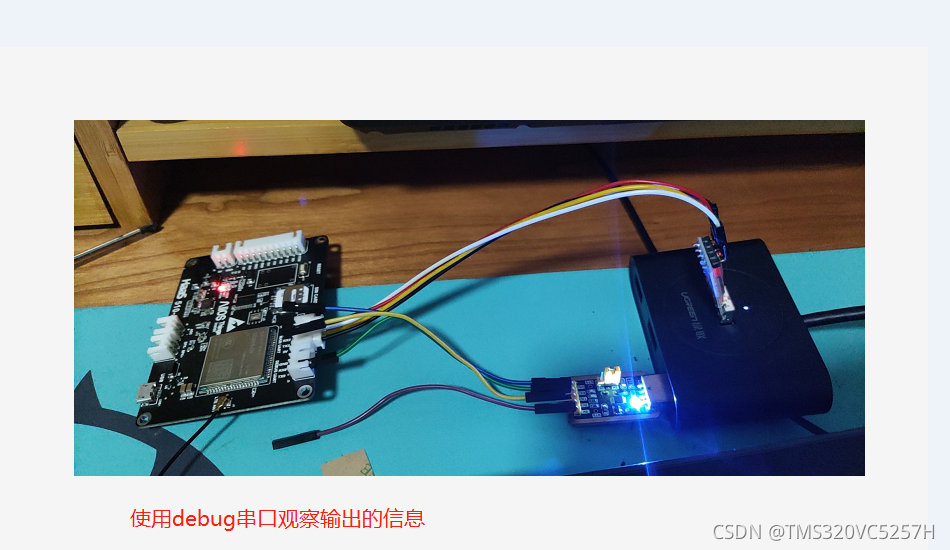
3. Connect hardware
Connect as shown in the figure below
 4. Write code
The code is as follows . Please note that , The author also shows the wrong code , It is convenient for us to compare and learn .Interval The Chinese meaning is “ interval ; ( In time ) The gap ; intermission ”. Here we set the interval 5 Second .
every other 5 The second operation is to send a message through the debug serial port , This message is equivalent to an indicator light , Tell the developer , The program is running normally .
every other 5 Second ,510 The development board will also submit attributes to the Internet of things platform once . The name of the attribute is LightSwitch, The value is 0 perhaps 1. sentence lightSwitch = 1 - lightSwitch It means that it will be flipped before each submission .
var iot = require('iot');
var network = require('network');
var net = network.openNetWorkClient();
/*  For information about device triples, please refer to common In the catalog iot Component description  */
var productKey = 'gcXXXXXjX';
var deviceName = 'light001';
var deviceSecret = 'b25XXXXXXXXXXXXXXXXXXXXXXXXXXX6db';
//  Build Internet of things connection instances
var device;
var lightSwitch = 0;
net.on('connect', function () {
    device = iot.device({
        productKey: productKey,
        deviceName: deviceName,
        deviceSecret: deviceSecret,
        region: 'cn-shanghai',
        success: function () {
            console.log('iot: [success] connect');
        },
        fail: function () {
            console.log('iot: [failed] connect');
        }
    });
})


setInterval(function () {
    lightSwitch = 1 - lightSwitch;

    console.log('Hello World, time: ' + new Date());

/*  Error model  iot.postProps({ payload: {LightSwitch:'0'} })*/
/* Correct demonstration , To send attributes , You have to use stringify Talent */
    device.postProps(
        JSON.stringify({
            LightSwitch: lightSwitch
        })
    );

  }, 5000);
Be careful , We used a  Method . If you don't use this method , For example, we use payload: {LightSwitch:'0'} Will cause syntax errors . As shown in the figure below , This screenshot comes from connecting to DEBUG UART Serial port assistant program .

The way to correct this error is simple , It's called JSON.stringify. What does this method do ?
Its function is to apply the method to JavaScript Value to JSON character string .
Using this method , You can easily implement attribute reporting .
5. Running effect
Log in to the Internet of things platform , Observe the specified equipment ( This article is about light001) Object model data , You can see that the attribute is successfully submitted .
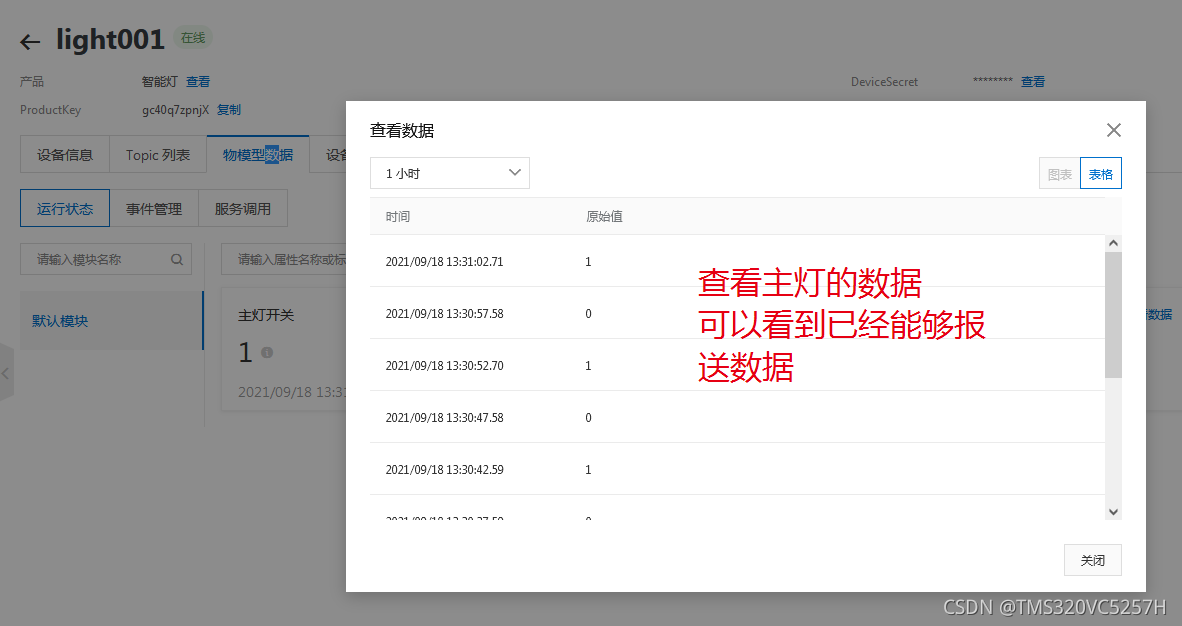
Open the serial port assistant , Observe DEBUG UART Output , You can see the interval 5 Second display hello world character string . If there is an error , interval 5 Second , except helloworld, There are other error messages .

The object model can also be refreshed in real time , So you can observe “ Main light switch ” attribute , interval 5 Every second . Successful experiment .
haas-studio A relatively complete temperature test program is provided iot-sensor(LM75 Temperature detection procedure ). This routine provides IIC Interface driver code . It's more complicated . For starters , The simpler the code, the easier it is to learn . Therefore, this article makes a simple example of regularly sending flip attributes . The procedure is simple , Highlight only the key issues .
Reporting attribute is a basic function , It is also the key content of the Internet of things . After making IOT devices , The device status can be reported to the cloud platform , It is a difficulty in the development of Internet of things equipment , When programming , Often make mistakes .
Especially after referring to Alibaba cloud's documentation , Students who don't know how to solve their mistakes , Mastering the skills described in this article is a very necessary job .
6. Extended reading :JSON.stringify
References in this part 6. Extended reading :JSON.stringify
JSON.stringify() Method is used to JavaScript Value to JSON character string .
The syntax is
JSON.stringify(value, replacer, space)
To convert JavaScript Values are usually objects or arrays . For example, we use bool Type data 0 perhaps 1.
If replacer For the function , be JSON.stringify This function will be called , And pass in the key and value of each member . Use the return value instead of the original value . If this function returns undefined, Then exclude members . The key of the root object is an empty string :"".
If replacer Is an array , Only the members with key values in the array are converted . Members are converted in the same order as keys in the array .
space Is text indented 、 Spaces and line breaks , If space It's a number , The return value text is indented by a specified number of spaces at each level , If space Greater than 10, The text is indented 10 A space .space You can also use non numbers , Such as :\t.
Here's an example JSON.stringify() Detailed usage and running effect of .
var str = {
    "name":" Novice tutorial ", "site":"http://www.runoob.com"}
str_pretty1 = JSON.stringify(str)
document.write( " Case with only one parameter :" );
document.write( "<br>" );
document.write("<pre>" + str_pretty1 + "</pre>" );

document.write( "<br>" );
str_pretty2 = JSON.stringify(str, null, 4) // Indent with four spaces
document.write( " Usage parameters :" );
document.write( "<br>" );
document.write("<pre>" + str_pretty2 + "</pre>" ); // pre  Used to format output
The operation effect is shown in the figure below .

边栏推荐
- D1 Nezha Development Board understands the basic startup and loading process
- Go language functions as parameters of functions
- JVM runtime parameters
- 阿里云开发板HaaS510连接物联网平台--HaaS征文
- 2062: [example 1.3] movie tickets
- MySQL 查询 limit 1000,10 和 limit 10 速度一样快吗? 深度分页如何破解
- Return value of WaitForSingleObject
- Script import CDN link prompt net:: err_ FILE_ NOT_ Found problem
- Cocoapods的相关知识点
- 2066: [example 2.3] buying books
猜你喜欢

Talk about the top 10 classic MySQL errors

Understanding recursion

【mysql进阶】索引分类及索引优化方案(五)

章鱼网络进展月报 | 2022.5.1-5.31

Application of binary search -- finding the square root sqrt of a number
![[wustctf2020] selfie score query -1](/img/90/e4c2882357e0a1c6a80f778887e3f5.png)
[wustctf2020] selfie score query -1

How to solve the problem of data table query error when SQLite writes the registration function?

When the byte jumps, the Chinese 996 is output in the United States

Realization of Joseph Ring with one-way ring linked list

Data type conversion and conditional control statements
随机推荐
2063: [example 1.4] cattle eat grass
Encryptor and client authenticate with each other
C language implementation of string and memory library functions
1004: character triangle
Time processing in C language (conversion between string and timestamp)
Cmake basic tutorial - 01 a-hello-cmake
安装MySQL时出错,照着下面这个链接,做到cmd就不行了
Player screen orientation scheme
2061: [example 1.2] trapezoidal area
What if the MySQL installation on the apple computer is completed and cannot be found
Implementing tensorflow deep learning framework similarflow with numpy
【SemiDrive源码分析】【X9芯片启动流程】26 - R5 SafetyOS 之 LK_INIT_LEVEL_TARGET 阶段代码流程分析(TP Drvier、Audio Server初始化)
A method of quickly creating test window
将字符串转为16进制字符串并显示出来
Informatics Olympiad all in one 2059: [example 3.11] buy a pen
Codeforces 1638 D. Big Brush —— BFS
Application of bit operation in C language
Codeforces 1634 F. Fibonacci additions - Fibonacci sequence addition, ideas
Teach you how to create SSM project structure in idea
AVFoundation