当前位置:网站首页>VsCode connects to the remote server and modifies the file code
VsCode connects to the remote server and modifies the file code
2022-07-30 07:25:00 【A positive little salted fish】
A plugin installation configuration
1. Install the Remote Development plugin, search for Remote Development in the store and install it.

2. Select SSH Targets
After the installation is complete, there is an additional menu bar on the left side of vscode. We click the configure button to configure the address of the remote server.Select SSH Targets.

Second remote server configuration
1. Use file configuration
At this time, there are more remote connection icons in the sidebar. You can click the plus sign to add a new connection, or click the gear to adjust the config file (recommended).In fact, the things connected by the plus sign will also ask you which config to record in.As for which config to choose, the first one is enough (recommended), and the others seem to work as well.The way to add the plus sign is to fill in according to the prompts inside.Host is equivalent to your nickname, HostName is your server ip address, User is the username on your server
Where the configuration file content
Host Node5HostName 192.1678.124.35 #ipUser jgy #usernamePort 9205 #Port number2. Use command line configuration
Enter the ssh command in the command box
ssh your remote [email protected] remote address -p your remote port number
Three connect to the remote server
Before this, you need to configure vscode, specific file-preference-settings-extension find Remote-SSH and select Show Login Terminal in it
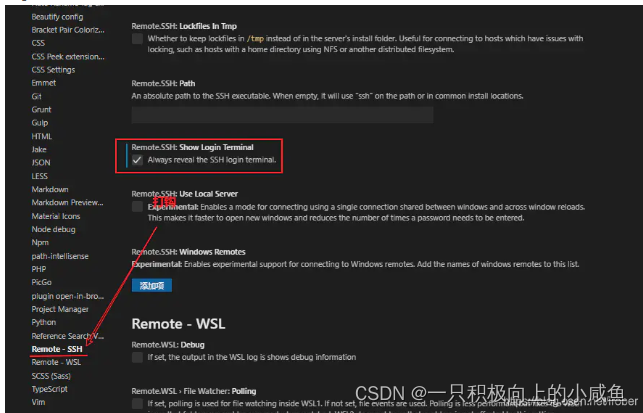 :
:
At this point, you will see a remote server that you have configured in the remote resource manager of vscode, and you can connect:

After clicking, a new vscode window will open, and in the terminal under it, you will be asked to enter the password of the remote server:

Four Open Folder
Your vscode is now working on the remote server, let's open a folder:

After clicking, the home directory will be opened. At this time, we can directly use vscode's resource manager to manage our files as usual.
If we want to open the shell of the remote server, we can open it directly in the terminal as we do locally:

Five install plugins
The plug-in in the local machine cannot be used in the remote server, which requires us to install the plug-in again. This is also relatively simple. After connecting to the remote server, you can see a special plug-in sidebar in vscdoe.Displays the area where the plugin is installed for the remote server, after which the operation is basically the same as the local installation.I currently have three installed

Six code runs
Enter the relevant commands in the terminal.
Seven Notes
To be added
Reference link
2. VScode remote connection to Ubuntu server 3. vscode connection server to set the port number_Blue Rain Flying 7's blog-CSDN blog_vscode port
边栏推荐
猜你喜欢

C语言,库函数中qsort的用法,及解释

虚拟机栈帧结构

QT serial 2: LORA test platform based on QT and STM32H750 (1)

Diwen serial screen production (serialization 1) ===== preparation work

Kunlun On-state Screen Production (serial 1)---Contact
![[Punctuality Atom] Simple application of sys.c, sys.h bit-band operations](/img/7f/d9f480ab9a1e542e4fa1fda7978e4c.png)
[Punctuality Atom] Simple application of sys.c, sys.h bit-band operations

Acwing刷题第一节

【正点原子】IIC的学习与使用(未完...)

多层板的层数,为啥选项都是偶数?就不能选奇数?

数码管动态显示及模块化编程
随机推荐
QT serial and CAN dynamic real-time display the log data
Antd 树拖拽一些细节,官网没有,摸坑篇
VSCode隐藏左边活动栏
clinit方法
Insertion Sort in Classic Sort
Kunlun state screen production (serial 3) - based article (button serial port to send)
CPU的三种工作模式:实模式、保护模式、长模式
HSPF model application
[Common usage of markdown]
探究make_shared效率
信号链模拟芯片是什么?
jvm之逃逸分析
爬2.12.6的Antd上传图片坑
【速成MSP430f149】电赛期间学习MSP430f149笔记
SSH-RSA密钥
你不知道的JS语法篇笔记
openssl 1.1.1 compile statement
通过位运算进行字符大小写转换
Acwing刷题第一节
[Punctuality Atom] Learning and use of IIC (unfinished...)