当前位置:网站首页>Istio一之Envoy工作原理
Istio一之Envoy工作原理
2022-07-24 20:00:00 【taoli-qiao】
在学习istio前先了解两个术语服务网格(Service Mesh)和sidecar。
服务网格(Service Mesh):用于描述构成这些应用程序的微服务网络以及应用之间的交互。它的需求包括服务发现、负载均衡、故障恢复、指标收集和监控等。或者是更复杂运维需求,例如A/B测试、金丝雀发布、限流、访问控制和端到端认证等。服务网格如下图所示

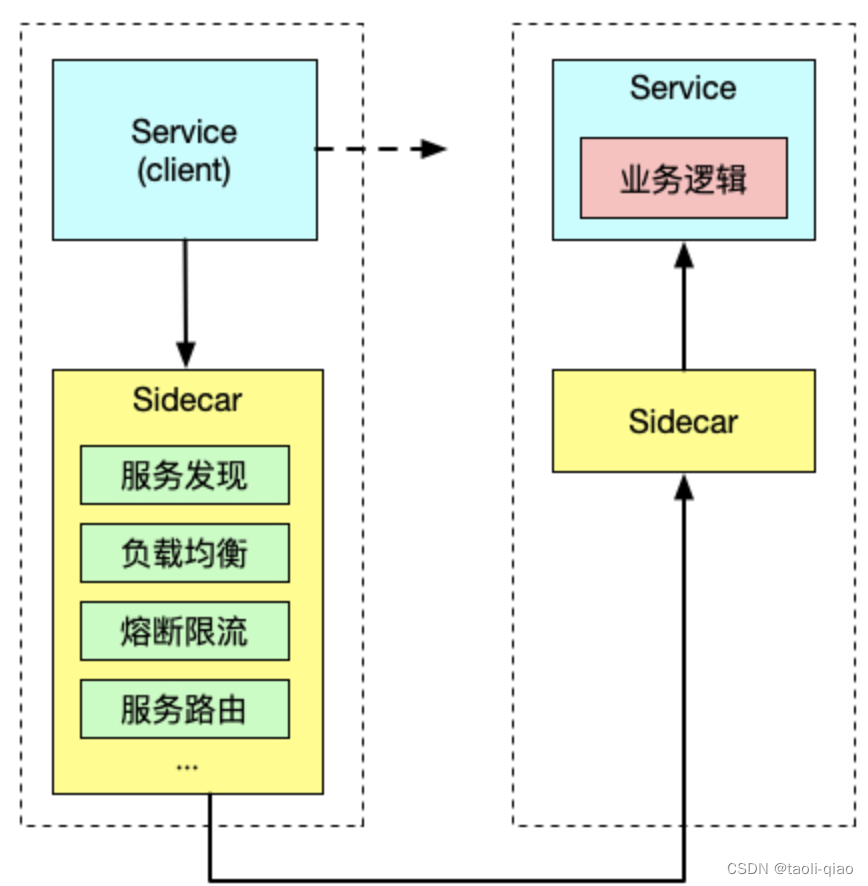
SideCar:将应用程序的功能划分为单独的进程可以被视为 Sidecar 模式。Sidecar 模式允许您在应用程序旁边添加更多功能,而无需额外第三方组件配置或修改应用程序代码。就像连接了 Sidecar的三轮摩托车一样,在软件架构中, Sidecar 连接到父应用并且为其添加扩展或者增强功能。Sidecar应用与主应用程序松散耦合。它可以屏蔽不同编程语言的差异,统一实现微服务的可观察性、监控、日志记录、配置、断路器等功能。sidecar如下图所示
要实现服务网格管理,有多个工具可以支持,如下图所示,绿色表示横向对比时支持的突出能力。

为什么会选择istio呢?istio主要有如下突出优势:
- 支持HTTP、gRPC、WebSocket和TCP流量的自动负载均衡。
- 提供丰富的路由规则、重试、故障转移、故障注入能力,可以对流量进行细颗粒度的控制。
- 对出入集群入口和出口中所有流量进行自动指标度量、日志记录和跟踪。
- 提供强大的基于身份验证和授权的能力,实现集群中服务间通信安全。
Istio的三个核心特性是流量管理、安全、可观测性。
流量管理:Istio 简单的规则配置和流量路由允许您控制服务之间的流量和 API 调用过程。Istio 简化了服务级属性(如熔断器、超时和重试)的配置,并且让它轻而易举的执行重要的任务(如 A/B 测试、金丝雀发布和按流量百分比划分的分阶段发布)。
安全:Istio解放了开发人员,使其只需专注于应用程序级别的安全。Istio 提供了底层的安全通信通道,并为大规模的服务通信管理认证、授权和加密。有了 Istio,服务通信在默认情况下就是受保护的,可以让您在跨不同协议和运行时的情况下实施一致的策略——而所有这些都只需要很少甚至不需要修改应用程序。Istio 是独立于平台的,可以与 Kubernetes(或基础设施)的网络策略一起使用。但它更强大,能够在网络和应用层面保护pod到 pod 或者服务到服务之间的通信。
可观测:Istio 健壮的追踪、监控和日志特性让您能够深入的了解服务网格部署。
指标:istio基于4个监控的黄金指标(延迟、流量、错误、饱和)生成一系列的服务指标。
分布式追踪:istio为每个服务生成分布式追踪span,运维人员可以获取到网格内服务的依赖和调用流程。
访问日志:所有流入网格服务的请求,istio生成每个请求的完整记录,包括源、目标元数据。
istio包括数据平面和控制平面,数据平面由一组以sidecar方式部署的智能代理(Envoy)组成,这些代理可以调节和控制微服务以及Mixer之间所有的网络通信。控制平面负责管理和配置代理的流量,此外控制平面配置Mixer以实施策略和收集遥测数据。其中Envoy是非常关键的组成部分,主流的7层代理有多种工具支持,具体如下所示:

那为什么Istio会选择Envoy作为数据平面呢?主要是因为Envoy有如下优势:
性能:Envoy在提供极高吞吐量和低尾部延迟差异时,CPU和RAm消耗相对较少。
可扩展:Envoy在L4和L7都提供了丰富的可插拔过滤能力,让用户可以轻松添加开源版本中没有的能力。
API可配置:Envoy提供了一组可以通过控制平台服务实现的管理API,从而使得Envoy无需重新启动即可刷新配置。
另外,Envoy采用单进程多线程模式,建议Envoy配置的worker数量与Envoy所在的硬件线程数一致。上面介绍了Envoy的理论知识,接下来看看Envoy的配置。static_resource下面有三个关键配置,listener,route_config,cluster这里Listener监听10000端口号,route配置是如果请求是“/”那么发送的targetCluster进行处理(需要注意:Envoy中cluster的概念是一组IP地址的集合)
static_resources:
  listeners:
  - name: listener_0
    address:
      socket_address: { address: 0.0.0.0, port_value: 10000 }
    filter_chains:
    - filters:
      - name: envoy.http_connection_manager
        config:
          codec_type: auto
          stat_prefix: ingress_http
          route_config:
            name: local_route
            virtual_hosts:
            - name: backend
              domains:
                - "*"
              routes:
              - match:
                  prefix: "/"
                route:
                  cluster: targetCluster
          http_filters:
          - name: envoy.router
接着还需要定义cluster的信息,模版如下所示
clusters:
- name: targetCluster
  connect_timeout: 0.25s
  type: STRICT_DNS
  dns_lookup_family: V4_ONLY
  lb_policy: ROUND_ROBIN
  hosts: [
    { socket_address: { address: 172.17.0.3, port_value: 80 }},
    { socket_address: { address: 172.17.0.4, port_value: 80 }}
  ]
介绍完Envoy的配置后,接下来通过一个实际例子来看看Envoy的工作过程。首先部署一个simple的服务。
apiVersion: apps/v1
kind: Deployment
metadata:
  name: simple
spec:
  replicas: 1
  selector:
    matchLabels:
      app: simple
  template:
    metadata:
      annotations:
        prometheus.io/scrape: "true"
        prometheus.io/port: "80"
      labels:
        app: simple
    spec:
      containers:
        - name: simple
          imagePullPolicy: Always
          image: cncamp/httpserver:v1.0-metrics
          ports:
            - containerPort: 80
---
apiVersion: v1
kind: Service
metadata:
  name: simple
spec:
  ports:
    - name: http
      port: 80
      protocol: TCP
      targetPort: 80
  selector:
    app: simple
Envoy服务自身的Deployment yaml文件,通过这个文件让Envoy服务启动。 Pod启动时加载静态的Envoy配置文件信息,配置文件信息通过configmap的形式mount到/etc/envoy目录下。
apiVersion: apps/v1
kind: Deployment
metadata:
  labels:
    run: envoy
  name: envoy
spec:
  replicas: 1
  selector:
    matchLabels:
      run: envoy
  template:
    metadata:
      labels:
        run: envoy
    spec:
      containers:
        - image: envoyproxy/envoy-dev
          name: envoy
          volumeMounts:
            - name: envoy-config
              mountPath: "/etc/envoy"
              readOnly: true
      volumes:
        - name: envoy-config
          configMap:
            name: envoy-config
下面是Envoy的配置信息,配置信息里面的routes定义的也是“/”,cluster的address是simple,即当有请求发送到Envoy的10000端口时,请求的URL包含“/”,请求会被转发到simple这个service处理。即上面创建的service。Envoy的配置信息存放到ConfigMap中。
kubectl create configmap envoy-config --from-file=envoy-config.yaml
admin:
  address:
    socket_address: { address: 127.0.0.1, port_value: 9901 }

static_resources:
  listeners:
    - name: listener_0
      address:
        socket_address: { address: 0.0.0.0, port_value: 10000 }
      filter_chains:
        - filters:
            - name: envoy.filters.network.http_connection_manager
              typed_config:
                "@type": type.googleapis.com/envoy.extensions.filters.network.http_connection_manager.v3.HttpConnectionManager
                stat_prefix: ingress_http
                codec_type: AUTO
                route_config:
                  name: local_route
                  virtual_hosts:
                    - name: local_service
                      domains: ["*"]
                      routes:
                        - match: { prefix: "/" }
                          route: { cluster: some_service }
                http_filters:
                  - name: envoy.filters.http.router
                    typed_config:
                      "@type": type.googleapis.com/envoy.extensions.filters.http.router.v3.Router
  clusters:
    - name: some_service
      connect_timeout: 0.25s
      type: LOGICAL_DNS
      lb_policy: ROUND_ROBIN
      load_assignment:
        cluster_name: some_service
        endpoints:
          - lb_endpoints:
              - endpoint:
                  address:
                    socket_address:
                      address: simple
                      port_value: 80
创建完成后,可以看到envoy的pod成功启动,此时访问envoy pod的IP地址+10000端口,和访问simple service的结果一致,说明当请求发到了envoy,envoy根据route配置将请求转发到后面的服务进行处理。结果如下图所示,启动的envoy pod的ip地址是10.20.1.119,访问该ip地址的1000端口,请求的URL是/hello,返回了请求响应信息,该响应信息和直接访问simple service的结果一致。

通过上面的例子演示了如果通过envoy完成代理转发请求的过程,更多关于envoy的配置说明可查看官网信息。
边栏推荐
- Hide the middle digit of ID number
- Cmake series tutorial 2 HelloWorld
- 从码农转型大音乐家,你只差这些音乐处理工具
- Istio二之流量劫持过程
- Stop using UUID indiscriminately. Have you tested the performance gap between self incrementing ID and UUID?
- Leetcode 146: LRU cache
- Sword finger offer 46. translate numbers into strings
- Valdo2021 - vascular space segmentation in vascular disease detection challenge (2)
- Implementation of OA office system based on JSP
- Microservice architecture | service monitoring and isolation - [sentinel] TBC
猜你喜欢

Valdo2021 - vascular space segmentation in vascular disease detection challenge (3)
![微服务架构 | 服务监控与隔离 - [Sentinel] TBC...](/img/28/8ca90e9dbd492688e50446f55959ff.png)
微服务架构 | 服务监控与隔离 - [Sentinel] TBC...

Pix2seq: Google brain proposes a unified interface for CV tasks!

01 | opening words: teach you to build a blog website hand in hand

Duilib actual combat 1- imitate Baidu online disk login interface

How to export map files tutorial

ATL container - catlmap, crbmap

Common methods of string class

day 3

C# 窗体应用TreeView控件使用
随机推荐
原反补及大小端
2019 Hangzhou Electric Multi School Game 7 6651 final exam [Law + thinking]
Sword finger offer 49. ugly number
strlen函数剖析和模拟实现
Substr and substring function usage in SQL
Flink Window&Time 原理
Day 6 (array example)
从码农转型大音乐家,你只差这些音乐处理工具
Richview table table alignment
Elastomer simulation (elasticity)
Use of paging assistant PageHelper
Hidden Markov model HMM
Convolutional neural network CNN
Analysis and Simulation of strlen function
Sword finger offer 46. translate numbers into strings
The beginning of winter in the year of bitterness and ugliness
[untitled]
Safe way -- Analysis of single pipe reverse connection back door
Sword finger offer 52. The first common node of the two linked lists
Prevent static decompilation, dynamic debugging and plug-in