当前位置:网站首页>qt -- QTabWidget 中支持拖拽TabBar项
qt -- QTabWidget 中支持拖拽TabBar项
2022-06-24 10:00:00 【cc_rong】
目录
需求
1、支持拖动交换TabBar标签位置
ui->tabWidget->setMovable(true);2、支持将TabBar项拖出 QTabWidget 置顶显示
3、支持将拖出的TabBar项重新拖入QTabWidget中
效果

代码
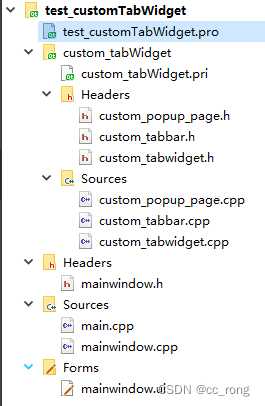
MainWindow
#include "mainwindow.h" #include "ui_mainwindow.h" #include "custom_tabWidget/custom_tabwidget.h" MainWindow::MainWindow(QWidget *parent) : QMainWindow(parent), ui(new Ui::MainWindow) { ui->setupUi(this); m_pTabWidget = new CustomTabWidget(this); ui->verticalLayout->addWidget(m_pTabWidget); m_pTabWidget->addTab(new QTextEdit,"eidt 1"); m_pTabWidget->addTab(new QTextEdit,"eidt 2"); m_pTabWidget->addTab(new QTextEdit,"eidt 3"); m_pTabWidget->addTab(new QTextEdit,"eidt 4"); } MainWindow::~MainWindow() { delete ui; } /*************************************/ #ifndef MAINWINDOW_H #define MAINWINDOW_H #include <QMainWindow> #include <QTextEdit> namespace Ui { class MainWindow; } class CustomTabWidget; class MainWindow : public QMainWindow { Q_OBJECT public: explicit MainWindow(QWidget *parent = 0); ~MainWindow(); private: Ui::MainWindow *ui; CustomTabWidget* m_pTabWidget; }; #endif // MAINWINDOW_HCustomTabBar#ifndef CUSTOM_TABBAR_H #define CUSTOM_TABBAR_H #include <QTabBar> #include <QObject> #include <QPoint> #include <QMouseEvent> class CustomTabBar : public QTabBar { Q_OBJECT public: CustomTabBar(QWidget *parent = nullptr); ~CustomTabBar(); protected: void mousePressEvent(QMouseEvent *event); void mouseMoveEvent(QMouseEvent *event); void mouseReleaseEvent(QMouseEvent *event); signals: void signalStartDragTab(int); void signalStopDrapTab(); private: bool m_bPressFlag; QPoint m_pointPress; QPoint m_pointRelease; }; #endif // CUSTOM_TABBAR_H /******************************/ #include "custom_tabbar.h" CustomTabBar::CustomTabBar(QWidget *parent):QTabBar(parent) { m_bPressFlag = false; setMovable(true); //this->setAcceptDrops(true); } CustomTabBar::~CustomTabBar() { } void CustomTabBar::mousePressEvent(QMouseEvent *event) { if(event->button() == Qt::LeftButton && currentIndex() >= 0) { m_bPressFlag = true; m_pointPress = event->pos(); } QTabBar::mousePressEvent(event); } void CustomTabBar::mouseMoveEvent(QMouseEvent *event) { if(m_bPressFlag && event->buttons()) { if(qAbs(m_pointPress.y() - event->pos().y()) > this->height() && !tabRect(this->currentIndex()).contains(event->pos())) { m_bPressFlag = false; if(this->count() != 1) { emit signalStartDragTab(this->currentIndex()); emit signalStopDrapTab(); } } } QTabBar::mouseMoveEvent(event); } void CustomTabBar::mouseReleaseEvent(QMouseEvent *event) { m_bPressFlag = false; m_pointRelease = event->pos(); if (qAbs(m_pointPress.y() - m_pointRelease.y()) > this->height()) { // if(this->count() != 1) { // emit signalStopDrapTab(); // } } QTabBar::mouseMoveEvent(event); }CustomTabWidget#ifndef CUSTOM_TABWIDGET_H #define CUSTOM_TABWIDGET_H #include <QDrag> #include <QTabWidget> #include <QMimeData> #include <QDragEnterEvent> #include <QMouseEvent> class CustomTabBar; class CustomPopupPage; class CustomTabWidget : public QTabWidget { public: CustomTabWidget(QWidget *parent = nullptr); ~CustomTabWidget(); private: void init(); protected: // void dragEnterEvent(QDragEnterEvent *event); // void dragMoveEvent(QDragMoveEvent *event); // void dropEvent(QDropEvent *event); // void mousePressEvent(QMouseEvent *event); // void mouseMoveEvent(QMouseEvent *event); // void mouseReleaseEvent(QMouseEvent *event); private slots: void addTabPage(const QPoint &pos); private: CustomTabBar* m_pTabBar; QWidget* m_pDragTab; //拖拽显示的页面 int m_nTabIndex; //标签索引 QString m_strTitle; //标签标题 CustomPopupPage* m_pPopupPage; }; #endif // CUSTOM_TABWIDGET_H /*******************************/ #include "custom_tabwidget.h" #include "custom_tabbar.h" #include "custom_popup_page.h" CustomTabWidget::CustomTabWidget(QWidget *parent): QTabWidget(parent), m_pTabBar(nullptr) { init(); } CustomTabWidget::~CustomTabWidget() { } void CustomTabWidget::init() { this->setAcceptDrops(true); m_pTabBar = new CustomTabBar(this); this->setTabBar(m_pTabBar); //拖拽窗口 connect(m_pTabBar, &CustomTabBar::signalStartDragTab, this, [&](int index) { m_nTabIndex = index; m_strTitle = this->tabText(index); m_pDragTab = this->widget(index); }); //拖拽释放窗口显示 connect(m_pTabBar, &CustomTabBar::signalStopDrapTab, this, [&]() { // this->removeTab(m_nTabIndex); m_pPopupPage = new CustomPopupPage(this); connect(m_pPopupPage, &CustomPopupPage::signalDragRelease, this, &CustomTabWidget::addTabPage); connect(m_pPopupPage, &CustomPopupPage::signalAddTab, this, [&](){ const int index = this->insertTab(m_nTabIndex, m_pDragTab, m_strTitle); //切换为当前新增页 this->setCurrentIndex(index); }); m_pPopupPage->setContentWidget(m_pDragTab); m_pPopupPage->setWindowTitle(m_strTitle); m_pPopupPage->resize(m_pDragTab->size()); m_pDragTab->show(); m_pPopupPage->exec(); }); } void CustomTabWidget::addTabPage(const QPoint &pos) { const QPoint bar_pos = this->tabBar()->mapFromGlobal(pos); //如果又拖回了tabbar范围内,把widget取出来放回tab if(this->tabBar()->contentsRect().contains(bar_pos)) { const int index = this->insertTab(m_nTabIndex, m_pPopupPage->getContentWidget(), m_pPopupPage->windowTitle()); //切换为当前新增页 this->setCurrentIndex(index); m_pPopupPage->disconnect(); m_pPopupPage->close(); } }CustomPopupPage#ifndef CUSTOM_POPUP_PAGE_H #define CUSTOM_POPUP_PAGE_H #include <QObject> #include <QWidget> #include <QDialog> #include <QEvent> #include <QMouseEvent> #include <QVBoxLayout> #include <QCloseEvent> class CustomPopupPage : public QDialog { Q_OBJECT public: CustomPopupPage(QWidget *parent = nullptr); ~CustomPopupPage(); void setContentWidget(QWidget *page); QWidget* getContentWidget(); protected: bool event(QEvent *event); void closeEvent(QCloseEvent *event); signals: void signalDragRelease(const QPoint &globalPos); void signalAddTab(); private: QWidget * m_page; }; #endif // CUSTOM_POPUP_PAGE_H /******************************************************/ #include "custom_popup_page.h" CustomPopupPage::CustomPopupPage(QWidget *parent): QDialog(parent) { m_page = nullptr; } CustomPopupPage::~CustomPopupPage() { } void CustomPopupPage::setContentWidget(QWidget *page) { if(!page) return; m_page = page; QVBoxLayout *layout = new QVBoxLayout(this); layout->setMargin(0); layout->addWidget(page); } QWidget *CustomPopupPage::getContentWidget() { return m_page; } bool CustomPopupPage::event(QEvent *event) { switch(event->type()) { case QEvent::MouseButtonRelease: case QEvent::NonClientAreaMouseButtonRelease: { QMouseEvent *e=static_cast<QMouseEvent*>(event); if(e && e->button()==Qt::LeftButton) { emit signalDragRelease(e->globalPos()); } } break; } return QDialog::event(event); } void CustomPopupPage::closeEvent(QCloseEvent *event) { emit signalAddTab(); }
边栏推荐
- Group counting_ Structure and workflow of CPU
- 08. Tencent cloud IOT device side learning - device shadow and attributes
- Centripetalnet: more reasonable corner matching, improved cornernet | CVPR 2020 in many aspects
- Any 与 TypeVar,让 IDE 的自动补全更好用
- The latest entry date of SQL Sever test questions
- Tencent geek challenge small - endless!
- Does the depth system work?
- Cool interactive animation JS special effects implemented by p5.js
- Functions of document management what functions does the document management software have
- [technical tutorial] national standard protocol platform easygbs cascading supports customized national standard channels
猜你喜欢

程序员大部分时间不是写代码,而是。。。

Moving Tencent to the cloud cured their technical anxiety
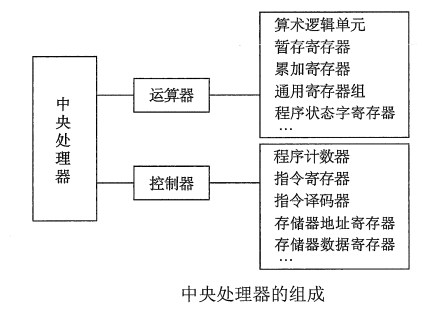
计组_cpu的结构和工作流程

Canvas infinite scan JS special effect code
A group of skeletons flying canvas animation JS special effect

服乔布斯不服库克,苹果传奇设计团队解散内幕曝光
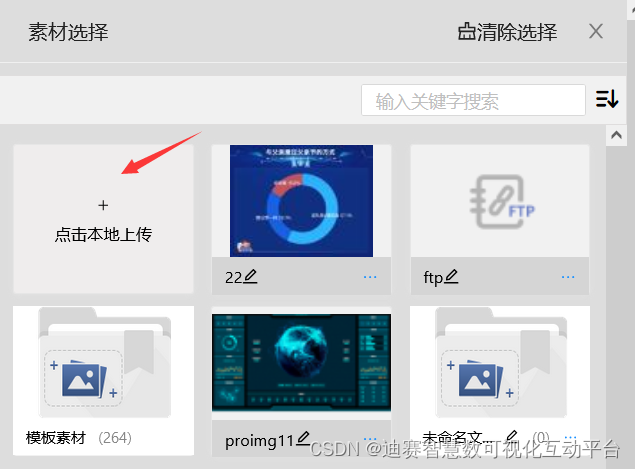
图片的可视化呈现有效增强大屏吸引力

Canvas falling ball gravity JS special effect animation
Canvas pipe animation JS special effect

Shell脚本(.sh文件)如何执行完毕之后不自动关闭、闪退?
随机推荐
"One good programmer is worth five ordinary programmers!"
Cloud vendor secondary virtualization restrictions
Maui的学习之路 -- 开篇
2D 照片变身 3D 模型,来看英伟达的 AI 新“魔法”!
A group of skeletons flying canvas animation JS special effect
[Flink source code practice (I)] add a rest API to Flink
Déplacer Tencent sur le cloud a guéri leur anxiété technologique
Oxylabs live online: website capture demo
Centripetalnet: more reasonable corner matching, improved cornernet | CVPR 2020 in many aspects
Go basic series | 4 Environment construction (Supplement) - gomod doubts
Self cleaning Manual of mining Trojan horse
Extremenet: target detection through poles, more detailed target area | CVPR 2019
“一次编写,运行各端”,高通重磅发布 AI 软件栈!
The latest entry date of SQL Sever test questions
RPM installation percona5.7.34
Maui's way of learning -- Opening
I just did it! Visualization of character relationships in Douluo continent
喜欢就去行动
[Qianfan 618 countdown!] IAAs operation and maintenance special preferential activities
Lightweight deployment of firefoxsend temporary file sharing service using Tencent cloud