当前位置:网站首页>pycaret源码分析:下载数据集\Lib\site-packages\pycaret\datasets.py
pycaret源码分析:下载数据集\Lib\site-packages\pycaret\datasets.py
2022-08-01 00:00:00 【人工智能曾小健】
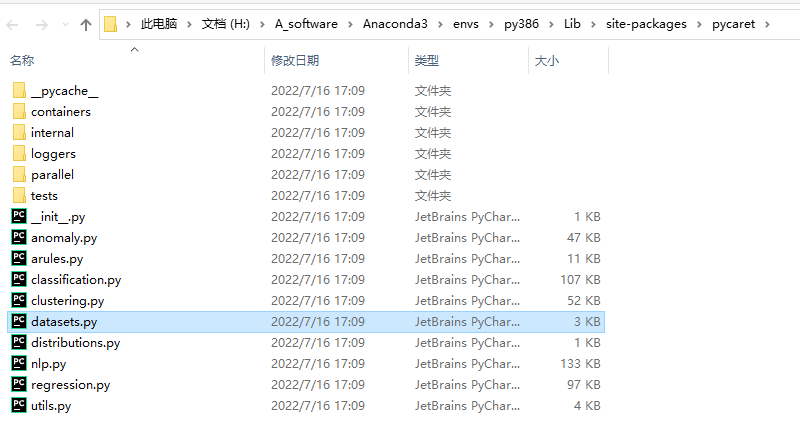
def get_data(
    dataset="index",
    save_copy=False,
    profile=False,
    verbose=True,
    address="https://raw.githubusercontent.com/pycaret/pycaret/master/datasets/",
):

    """
    This function loads sample datasets from git repository. List of available
    datasets can be checked using ``get_data('index')``.


    Example
    -------
    >>> from pycaret.datasets import get_data
    >>> all_datasets = get_data('index')
    >>> juice = get_data('juice')


    dataset: str, default = 'index'
        Index value of dataset.


    save_copy: bool, default = False
        When set to true, it saves a copy in current working directory.


    profile: bool, default = False
        When set to true, an interactive EDA report is displayed.


    verbose: bool, default = True
        When set to False, head of data is not displayed.

    address: string, default = "https://raw.githubusercontent.com/pycaret/pycaret/master/datasets/"
        Download url of dataset. For people have difficulty linking to github, they can change
        the default address to their own (e.g. "https://gitee.com/IncubatorShokuhou/pycaret/raw/master/datasets/")


    Returns:
        pandas.DataFrame


    Warnings
    --------
    - Use of ``get_data`` requires internet connection.

    """

    import pandas as pd
    import os.path
    from IPython.display import display, HTML, clear_output, update_display

    extension = ".csv"
    filename = str(dataset) + extension

    complete_address = address + filename

    if os.path.isfile(filename):
        data = pd.read_csv(filename)
    else:
        data = pd.read_csv(complete_address)

    # create a copy for pandas profiler
    data_for_profiling = data.copy()

    if save_copy:
        save_name = filename
        data.to_csv(save_name, index=False)

    if dataset == "index":
        display(data)

    else:
        if profile:
            import pandas_profiling

            pf = pandas_profiling.ProfileReport(data_for_profiling)
            display(pf)

        else:
            if verbose:
                display(data.head())

    return data
边栏推荐
- SQL injection Less46 (injection after order by + rand() Boolean blind injection)
- 周总结
- 【Acwing】The 62nd Weekly Game Solution
- vim的基本使用概念
- 类和对象:中
- Google Earth Engine——Error: Image.clipToBoundsAndScale, argument ‘input‘: Invalid type的错误解决
- 博弈论(Depu)与孙子兵法(42/100)
- PHP三元(三目)运算符
- Difference between first and take(1) operators in NgRx
- Shell common scripts: Nexus batch upload local warehouse enhanced version script (strongly recommended)
猜你喜欢

NIO编程

基于simulink的Active anti-islanding-AFD主动反孤岛模型仿真

IJCAI2022 | 代数和逻辑约束的混合概率推理

How to Design High Availability and High Performance Middleware - Homework
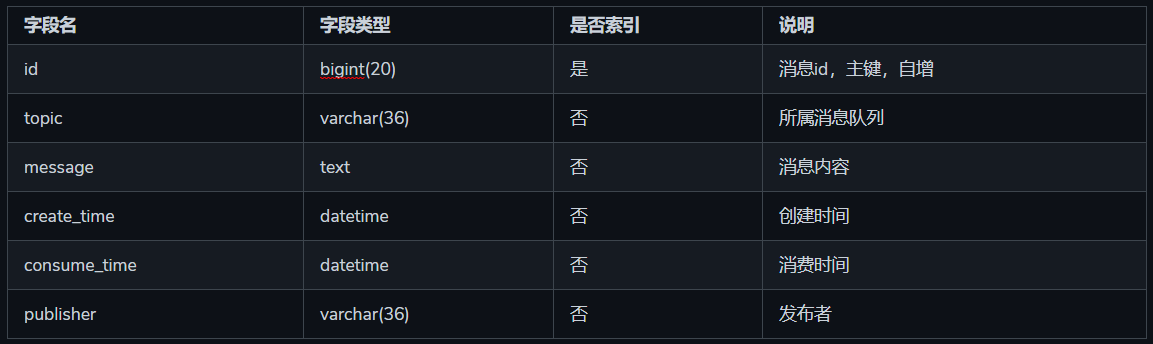
基于mysql的消息队列设计

网络安全--通过握手包破解WiFi(详细教程)
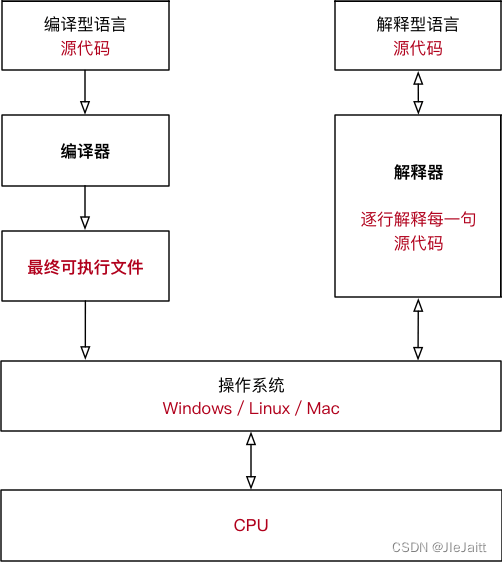
编译型语言和解释型语言的区别

Recommendation system: Summary of common evaluation indicators [accuracy rate, precision rate, recall rate, hit rate, (normalized depreciation cumulative gain) NDCG, mean reciprocal ranking (MRR), ROC

一体化步进电机在无人机自动机场的应用
![[Reading Notes -> Data Analysis] 02 Data Analysis Preparation](/img/e7/258daf851746cb043f301437ee3bbe.png)
[Reading Notes -> Data Analysis] 02 Data Analysis Preparation
随机推荐
Binary tree non-recursive traversal
Flutter教程之 01配置环境并运行demo程序 (教程含源码)
Basic use of vim - bottom line mode
PHP三元(三目)运算符
Google Earth Engine——Error: Image.clipToBoundsAndScale, argument ‘input‘: Invalid type的错误解决
IPD流程专业术语
游戏安全03:缓冲区溢出攻击简单解释
SQL injection Less42 (POST type stack injection)
[MATLAB project combat] LDPC-BP channel coding
(26)Blender源码分析之顶层菜单的关于菜单
SQL注入 Less38(堆叠注入)
基于simulink的Active anti-islanding-AFD主动反孤岛模型仿真
Keil nRF52832 download failed
Flink 1.13(八)CDC
Usage of mysql having
【读书笔记->数据分析】02 数据分析准备
MySQL数据库‘反斜杠\’ ,‘单引号‘’,‘双引号“’,‘null’无法存储
mysql having的用法
不知道该怎么办的同步问题
网络安全--通过握手包破解WiFi(详细教程)