当前位置:网站首页>Koa_mySQL_Ts 的整合
Koa_mySQL_Ts 的整合
2022-06-26 08:26:00 【BloggerM】
Koa_mySQL_Ts 的整合
桌面新建文件夹
ts_mysql_koa初始化项目:
npm init -y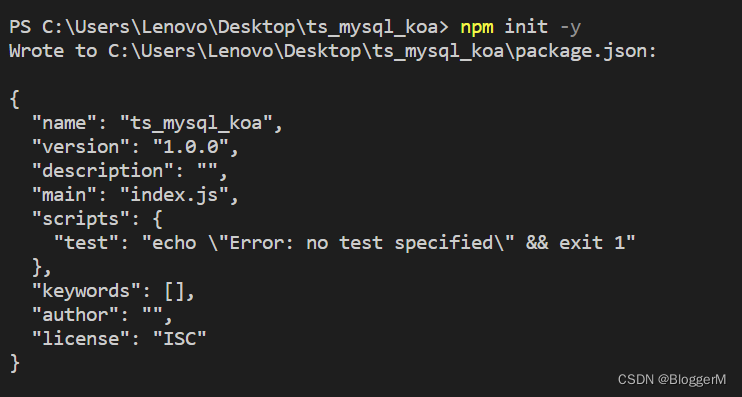
安装一些需要的第三方模块:
npm i koa koa-router koa-bodyparser typescript mysql2
在
package.json中配置脚本{ "name": "ts_mysql_koa", "version": "1.0.0", "description": "", "main": "index.js", "scripts": { "start": "ts-node-dev ./src/app.ts" }, "keywords": [], "author": "", "license": "ISC", "dependencies": { "koa": "^2.13.4", "koa-bodyparser": "^4.3.0", "koa-router": "^10.1.1", "mysql2": "^2.3.3", "ts-node-dev": "^2.0.0", "typescript": "^4.7.4" } }在根目录下新建文件夹
src,在文件夹src下面新建文件夹app.ts作为入口文件。搭建项目的目录结构

首先打开
Navicat Premium数据库开发工具,新建数据库malluse mall; CREATE TABLE `user` ( id INT PRIMARY KEY AUTO_INCREMENT, username VARCHAR(20), `password` VARCHAR(20), nickName VARCHAR(20), age INT, birthday TIMESTAMP DEFAULT CURRENT_TIMESTAMP ) INSERT INTO `user` SET username = 'admin',password = '123456',nickname = '张三',age = 18; INSERT INTO `user` SET username = 'lisi',password = '123456',nickname = '李四',age = 18; INSERT INTO `user` SET username = 'wangwu',password = '123456',nickname = '王五',age = 18; INSERT INTO `user` SET username = 'zhaoliu',password = '123456',nickname = '赵六',age = 18; SELECT * FROM `user`;在
config文件夹下新建db.ts文件夹export default { host:'localhost', port:3306, user:'root', password:'123456', database:'mall' }在
util文件夹下面新建文件index.ts(封装数据库操作语句)import { createConnection} from "mysql2"; import config from '../config/db' // 获取数据库连接 const connection = createConnection(config) export default class DBUtil { // 封装通用的数据库操作语句 static query(sql:string,params?:any|any[]|{ [param:string]:any}):Promise<any>{ // 通过Promise返回操作数据库的结果 return new Promise<unknown>((resolve,reject)=>{ // 通过数据库连接执行sql语句 connection.query(sql,params,(err,result,fields)=>{ // 判断sql执行有没有错误 if(err){ // 失败 reject(err) }else { // 成功 resolve(result ) } }) }) } }在
router文件夹下面新建user.tsimport * as Router from 'koa-router' import UserService from '../service/user' const userRouter = new Router({ prefix:'/user'}) const { queryAll,count,queryOne,del,save,edit} = new UserService() /** * 查询全部 */ userRouter.get('/',queryAll) /** * 查询数量 */ userRouter.get('/count',count) /** * 根据id查询 */ userRouter.get('/:id',queryOne) /** * 根据id删除 */ userRouter.delete('/:id',del) /** * 添加 */ userRouter.post('/',save) /** * 修改 */ userRouter.patch('/:id',edit) export default userRouter在
service文件夹下面新建user.tsimport UserController from '../controller/user' const { queryAll,getCount,queryOne,del,save,edit} = new UserController() export default class UserService{ /** * 查询所有 * @param ctx */ async queryAll(ctx):Promise<void>{ const { page}=ctx.query let currentPage = 1 if(page && page !='undefined') { currentPage = (page - 1) * 10 } const res = await queryAll([currentPage,10]) ctx.body = res } /** * 数量 * @param ctx */ async count(ctx):Promise<void>{ const [count] = await getCount() ctx.body = count } /** * 根据id查询 * @param ctx */ async queryOne(ctx):Promise<void>{ const { id} = ctx.params const [res] = await queryOne(id) ctx.body = res } /** * 根据id删除 * @param ctx */ async del(ctx):Promise<void>{ const { id} = ctx.params const { affectedRows} = await del([id]) ctx.body = affectedRows?'删除成功':'删除失败' } /** * 添加 * @param ctx */ async save(ctx):Promise<void>{ const body = ctx.request.body const { insertId} = await save(body) ctx.body = insertId?'添加成功':'添加失败' } /** * 修改 * @param ctx */ async edit(ctx):Promise<void>{ const body = ctx.request.body const { id} = ctx.params const { affectedRows} = await edit([body,id]) ctx.body = affectedRows?'修改成功':'修改失败' } }在
controller文件夹下面新建user.tsimport DBUtil from '../util' export default class UserController { /** * 查询全部 * @param params */ queryAll(params:any){ return DBUtil.query('select * from user limit ?,?',params) } getCount(){ return DBUtil.query('select count(*) as count from user') } /** * 根据id查询 * @param params */ queryOne(params:any){ return DBUtil.query('select * from user where id=?',params) } /** * 根据id删除 * @param params */ del(params:any){ return DBUtil.query('delete from user where id=?',params) } /** * 添加 * @param params */ save(params:any){ return DBUtil.query('insert into user set ?',params) } /** * 修改 * @param params */ edit(params:any){ return DBUtil.query('update user set ? where id=?',params) } }最后根据
Postman接口测试工具一一测试,无误
边栏推荐
- Comparison version number [leetcode]
- Interview JS and browser
- (5) Matrix key
- Win11 open folder Caton solution summary
- Win10 mysql-8.0.23-winx64 solution for forgetting MySQL password (detailed steps)
- optee中支持的时间函数
- SOC wireless charging scheme
- Installation of jupyter
- 在 KubeSphere 部署 Wiki 系统 wiki.js 并启用中文全文检索
- STM32 encountered problems using encoder module (library function version)
猜你喜欢

Vs2019-mfc setting edit control and static text font size

Database learning notes I

STM32 project design: an e-reader making tutorial based on stm32f4

(4) Independent key
![[postgraduate entrance examination: planning group] clarify the relationship among memory, main memory, CPU, etc](/img/c2/d1432ab6021ee9da310103cc42beb3.jpg)
[postgraduate entrance examination: planning group] clarify the relationship among memory, main memory, CPU, etc

Apple motherboard decoding chip, lightning Apple motherboard decoding I.C
Test method - decision table learning
Oracle database self study notes
Wechat applet beginner level chapter

HEVC学习之码流分析
随机推荐
Undefined symbols for architecture i386 is related to third-party compiled static libraries
Deploy wiki system Wiki in kubesphere JS and enable Chinese full-text retrieval
Discrete device ~ resistance capacitance
你为什么会浮躁
JS file message invalid character error
Crawler case 1: JS reversely obtains HD Wallpapers of minimalist Wallpapers
MySQL insert Chinese error
【Unity Mirror】NetworkTeam的使用
(4) Independent key
opencv学习笔记二
loading view时,后面所有东西屏蔽
Pychart connects to Damon database
JMeter performance testing - Basic Concepts
MySQL practice: 2 Table definition and SQL classification
(1) Turn on the LED
JS precompile - Variable - scope - closure
How to Use Instruments in Xcode
Using transformers of hugging face to realize multi label text classification
Use a switch to control the lighting and extinguishing of LEP lamp
drf的相关知识