当前位置:网站首页>Use verdaccio to build your own NPM private library
Use verdaccio to build your own NPM private library
2022-07-26 16:32:00 【Pull gourd from east to West】
Before there is no server , Let's test locally first
install
Global installation
npm i verdaccio -g
After installed , Run the command directly verdaccio
At this time, we will see the following information on the console :
warn — config file - C:\Users\yanglian\AppData\Roaming\verdaccio\config.yaml
warn — Plugin successfully loaded: verdaccio-htpasswd
warn — Plugin successfully loaded: verdaccio-audit
warn — http address - http://localhost:4873/ - verdaccio/5.7.0
config file - C:\Users\yanglian\AppData\Roaming\verdaccio\config.yaml The information tells us ,verdaccio Storage address of configuration file
http address - http://localhost:4873/ - verdaccio/5.7.0 Tell us Warehouse address
Directly send the address http://localhost:4873/ Paste to browser , We see the following page 
very good!! Our warehouse has been built !
Release
Next , It's time to contract !
We use it vue Create a new project , Then execute the release order . Because we publish our own private library , Specify the warehouse first when publishing here , Otherwise, the release package will be sent to the currently used source address , Not our private library address .
We turn on cmd window , Carry out orders
npm publish --registry http://localhost:4873/
At this time, we may see the following errors :
1.npm ERR! This package has been marked as private
This package is a private package . That is, to npm The package of the library cannot be set as private package , Otherwise, the release will not succeed . We need to package.json Inside private Change it to false
2.npm ERR! code E401
npm ERR! Unable to authenticate, your authentication token seems to be invalid.
npm ERR! To correct this please trying logging in again with:
npm ERR! npm login
This is the prompt that publishing does not have permission , Need to log in , Login is to login to our private warehouse , instead of npm official . Again , Private warehouse should also be specified for login here . Of course , The login account requires us to npm Official registration .
Run the command
npm login --registry http://localhost:4873/
Then press the prompt to enter Username,Password,Email, If login is successful , Login success information will be displayed :Logged in as xxx on http://localhost:4873/. Here's the picture :

Note that when entering the password , There is no display , Just make sure the input is correct .
When logging in , Although we log in to the local private warehouse , But because the account is npm Registered on the official website , So I will still visit npm Official data , If the network environment is bad, it cannot be accessed , It is recommended to use scientific Internet .
3.error: one of the uplinks is down, refuse to publish
It means that the line is interrupted , Refuse to publish .
This problem Generally, it is only encountered in non server environment testing , This is because verdaccio By default, it runs on the server , In a non server environment , It's offline , Offline status does not allow publishing packages by default , The configuration file needs to be changed config.yaml.
First find config.yaml, File address in our run verdaccio The order has been given , I am here : C:\Users\yanglian\AppData\Roaming\verdaccio\config.yaml
Let's solve the above error report first , open config.yaml After the document , find publish To configure , Default is annotated 
Let's get rid of the comments , And will allow_offline Change it to true, Allow offline publishing 
Then try again , success .

Refresh the browser package address , You will see the released package

Notice here , modify yaml When you file ,publish There can be no spaces in front , Otherwise it won't work . If there are spaces , What may happen is , After modification , The release still reports the same error . But if you re run verdaccio command , File error will be reported 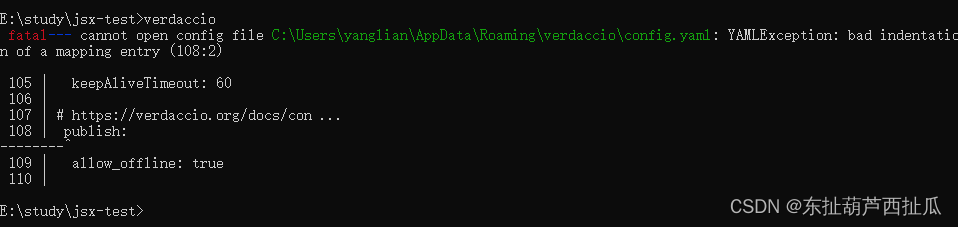
Use the warehouse
After the package is successfully released , We can use the warehouse installation package . This is just for convenience , Recommended nrm Manage warehouse sources
npm install nrm -g
nrm ls Check the existing package ,nrm The default configuration is 6 Source address
 npm ---------- https://registry.npmjs.org/
  yarn --------- https://registry.yarnpkg.com/
  tencent ------ https://mirrors.cloud.tencent.com/npm/
  cnpm --------- https://r.cnpmjs.org/
  taobao ------- https://registry.npmmirror.com/
  npmMirror ---- https://skimdb.npmjs.com/registry/
Now we add our private library address
nrm add my-npm http://localhost:4873/
Then switch to our private library address
nrm use my-npm
Try installing packages through private libraries
Create a project my-npm-test Or just try installing another project
npm i verdaccio --save
Installation results 
Use pm2 Management process .
Now although we can run directly verdaccio Command to start the warehouse , But if we close the window , Service is dead . In normal use, you must be able to use it when closing the server window , At this time, the daemon is needed .
npm install pm2 -g
Use pm2 start-up verdaccio
pm2 start verdaccio
If startup appears erroed, It can be used
npm start `which verdaccio`
verdaccio The configuration file config.yaml
There are many contents in the configuration file , Here are just a few , Other more detailed and advanced configurations , see https://verdaccio.org/zh-cn/docs/configuration/
1.storage
# path to a directory with all packages
storage: ./storage
storage It's where the packages we released are stored , The default is and config.yaml Of the same rank storage In the folder 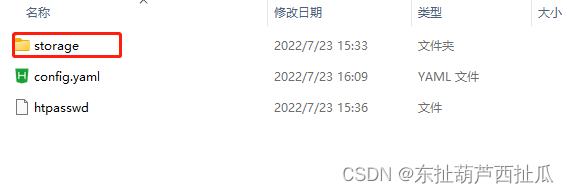

2.web verdaccio ui Interface configuration
Let's take the inside title Change to “ My private library ”, Save and run again verdaccio command , Refresh the browser

3.uplinks and packages Upstream source address and package configuration
We built our own private library , At the beginning, only our own packages were released , But in the project, in addition to our own , There must be a lot of third-party packages , If you download directly from our warehouse , I'm sure I can't find , At this time, you need to configure an upstream source address , When you can't find it in the private library , Will look for the upstream source . The default configuration is npm Source , Here we change it to Taobao image . Here it is with packages In combination with
uplinks My name is taobao, meanwhile package Of proxy It's also taobao
uplinks:
  taobao:
    url: https://registry.npmmirror.com/

 # Learn how to protect your packages
 # https://verdaccio.org/docs/protect-your-dependencies/
 # https://verdaccio.org/docs/configuration#packages
packages:
  '@*/*':
    # scoped packages
    access: $all
    publish: $authenticated
    unpublish: $authenticated
    proxy: taobao

  '**':
    # allow all users (including non-authenticated users) to read and
    # publish all packages
    #
    # you can specify usernames/groupnames (depending on your auth plugin)
    # and three keywords: "$all", "$anonymous", "$authenticated"
    access: $all

    # allow all known users to publish/publish packages
    # (anyone can register by default, remember?)
    publish: $authenticated
    unpublish: $authenticated

    # if package is not available locally, proxy requests to 'npmjs' registry
    proxy: taobao

- listen Listening to the configuration
The default is localhost:4873, Here is the address or http://127.0.0.1:4873/ You can visit , For example, we want to use Ip, You can't .
At this point, if we change the configuration to 0.0.0.0:4873, You can use it ip visit
Try on the server
Follow the above steps to install the configuration , The only thing that doesn't need to be changed is publish allow_offline This place .
Here, the test server uses Oracle VM VirtualBox install ubuntu Virtual machine building .
Using intranet penetration web Interface pit
When building the company's private library , Intranet used ip, But for easy access outside , The operation will be intranet ip Penetrate to get an Internet accessible ip. But you can't use the intranet ip And the Internet ip Simultaneous access web page . see verdaccio The first requested domain name of the day will be cached when the page request is found . Suppose you visit the Intranet environment domain name first , Then the external network environment web The page will not be accessible , Because the request is written as an intranet address , If you visit the Internet address first , Then the intranet address jumps to the no package page .
Fortunately, , This does not affect the installation of the package
边栏推荐
- 2022 latest Beijing Construction Safety Officer simulation question bank and answers
- Technology vane | interpretation of cloud native technology architecture maturity model
- 工作流引擎在vivo营销自动化中的应用实践
- Which book is the "the Nine Yin Manual" in the field of programming
- First knowledge of OpenGL (4) link shader
- vlang捣鼓之路
- [physical simulation] ultra simple shape matching simulates rigid body motion
- MVC和ECS两种设计架构的初浅理解
- Comprehensively design an oppe homepage -- Design of star models
- Modify the password of the root user of MySQL database
猜你喜欢





随机推荐
NUC 11构建 ESXi 7.0.3f安装网卡驱动-V2(2022年7月升级版)
Botu PLC Sequential switch function block (SCL)
Linux Installation mysql8.0.29 detailed tutorial
vscode批量删除
FTP protocol
Final consistency distributed transaction TCC
Comprehensively design an oppe homepage -- the design of the top and head
ACL-IJCAI-SIGIR顶级会议论文报告会(AIS 2022)笔记3:对话和生成
【万字长文】使用 LSM-Tree 思想基于.Net 6.0 C# 实现 KV 数据库(案例版)
Re7: reading papers fla/mlac learning to predict charges for critical cases with legal basis
There are six ways to help you deal with the simpledateformat class, which is not a thread safety problem
2022年最新西藏建筑施工架子工(建筑特种作业)模拟考试试题及答案
互联网协议
Tdengine landed in GCL energy technology, with tens of billions of data compressed to 600gb
综合设计一个OPPE主页--顶部,头部的设计
Which book is the "the Nine Yin Manual" in the field of programming
初识OpenGL (2)编译着色器
docker安装redis?如何配置持久化策略?
A preliminary understanding of MVC and ECS design architectures
研发效能的道与术 - 道篇