当前位置:网站首页>Row and column differences in matrix construction of DX HLSL and GL glsl
Row and column differences in matrix construction of DX HLSL and GL glsl
2022-06-24 22:33:00 【Jave. Lin】
List of articles
Purpose
I've been doing some work recently DXBC to HLSL The job of , Some of them DX HLSL Medium mul(pos, matrix) and GL GLSL Medium mul(matrix, pos) The difference of
To make it easier to do shader reverse , So keep a record DX, GL Some of the differences in
problem
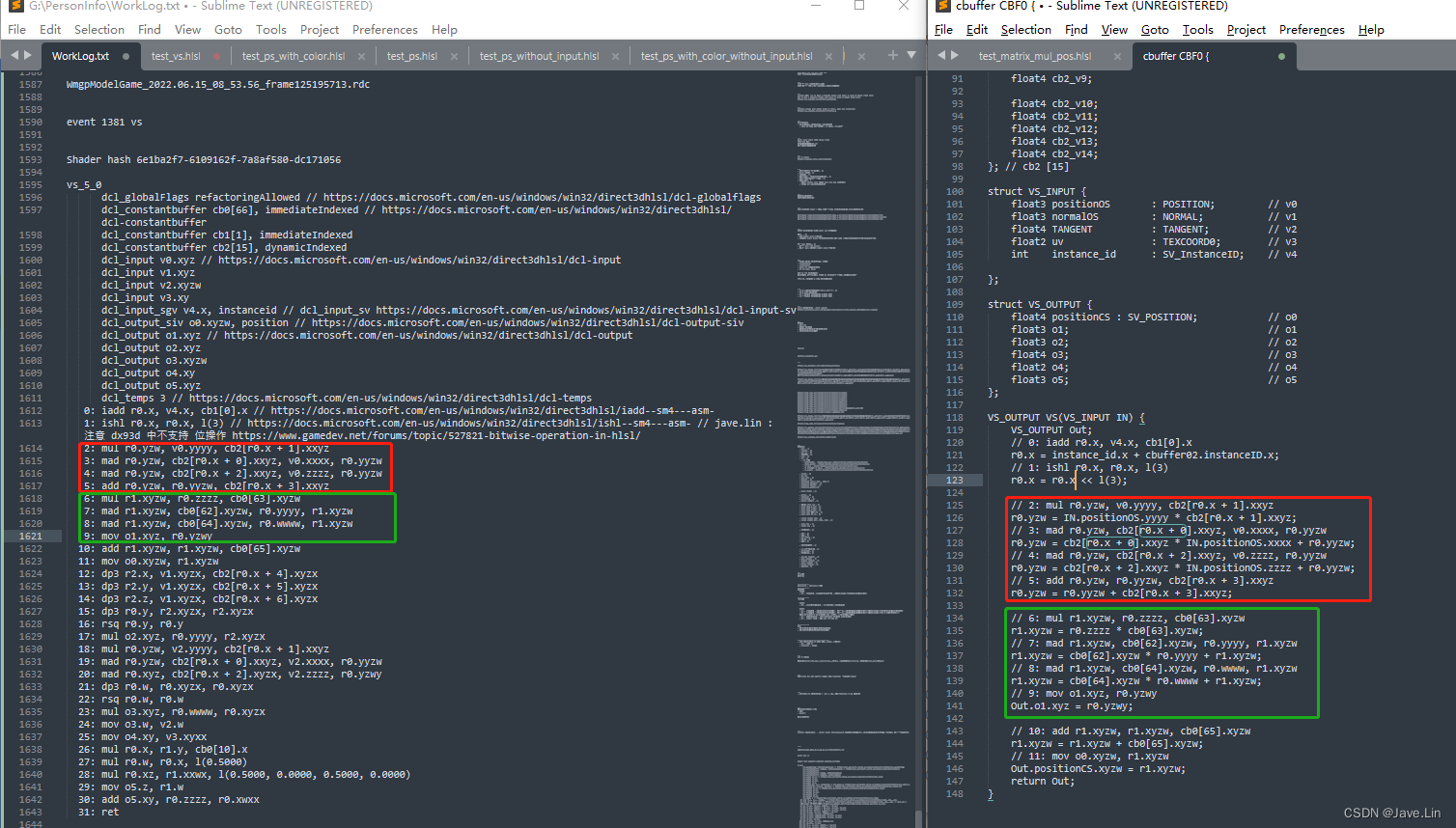
above In the red box and Green box The code in , I can probably see that Some matrix transformation operations
But revert to Corresponding HLSL when , Or see some HLSL Example time , Find out DX, GL Of mul The usage function Have lost lose Different
these DX And GL The difference is really annoying , Easy to forget , and Unity It uses column major The way To build the structure
But the operation is GL To build the matrix , I almost lost my mind ...
Write it down again , Otherwise, it's easy to forget 、 Mix up ( After all, I don't use it often Microsoft HLSL、FXC compiler )
In the picture above A piece of code can actually be rewritten to correspond to HLSL in mul(floatN, matrixNxN)
	// 2: mul r0.yzw, v0.yyyy, cb2[r0.x + 1].xxyz
	r0.yzw = IN.positionOS.yyyy * cb2[r0.x + 1].xxyz;
	// 3: mad r0.yzw, cb2[r0.x + 0].xxyz, v0.xxxx, r0.yyzw
	r0.yzw = cb2[r0.x + 0].xxyz * IN.positionOS.xxxx + r0.yyzw;
	// 4: mad r0.yzw, cb2[r0.x + 2].xxyz, v0.zzzz, r0.yyzw
	r0.yzw = cb2[r0.x + 2].xxyz * IN.positionOS.zzzz + r0.yyzw;
	// 5: add r0.yzw, r0.yyzw, cb2[r0.x + 3].xxyz
	r0.yzw = r0.yyzw + cb2[r0.x + 3].xxyz;

	// jave.lin :  above  2~5 lines Of  DXBC  The code analysis , Can be equivalent to
	float4x4 matrixL2W = {
     // jave.lin : local to world matrix
		cb2[r0.x + 0].xxyz,  // jave.lin :  New coordinate base :x Axis
		cb2[r0.x + 1].xxyz,  // jave.lin :  New coordinate base :Y Axis
		cb2[r0.x + 2].xxyz,  // jave.lin :  New coordinate base :Z Axis
		cb2[r0.x + 3].xxyz   // jave.lin :  Radially transformed  xyz  Translation
	};
	r0.yzw = mul(float4(IN.positionOS, 1.0), matrixL2W);
From here DXBC It looks good , Because I used to GL Medium Matrix left multiplication , But it's written HLSL Words , We need to pay attention to DX and GL The difference between
I'm on my own excel Some pictures are drawn to summarize 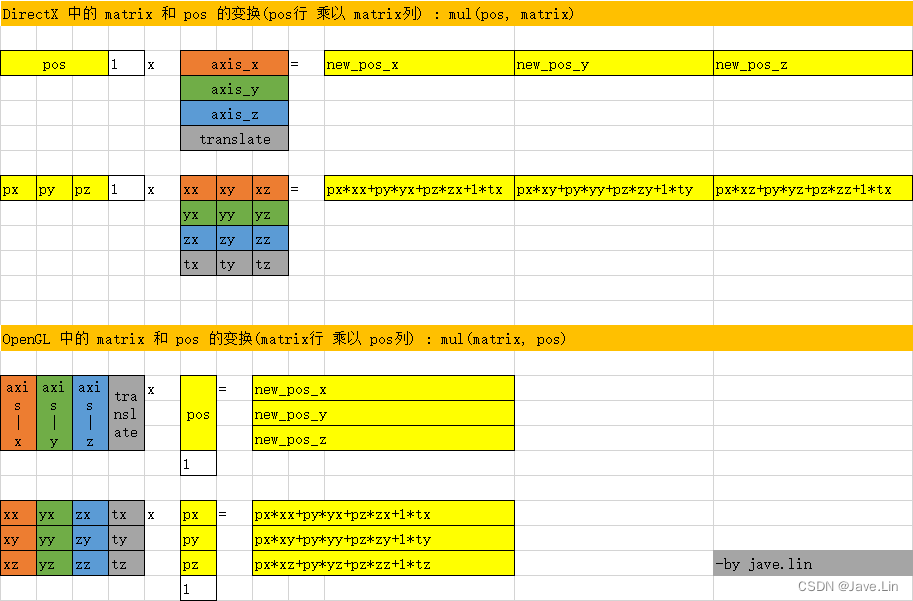
OpenGL Medium matrix[0] What is taken is Column
DirectX Medium matrix[0] What is taken is That's ok
Here are some sample code , and official One or two paragraphs describe and Code
show me the code, talk is cheap.
Example
OpenGL:
vec3 pos = ...;
mat3x3 model_mat = mat3x3(
	vec3(0,0,0), // column 1
	vec3(1,1,1), // column 2
	vec3(2,2,2), // column 3
	);
vec3 posWS = mul(model_mat, pos); // model_mat  That's ok   ride  pos  Column
DirectX:
float3 pos = ...;
float3x3 model_mat = {

	0, 0, 0, // row 1
	1, 1, 1, // row 2
	2, 2, 2  // row 3
};
float3 posWS = mul(pos, model_mat); // pos  That's ok   ride  model_mat  Column
file
Let's refer to :DirectX Medium matrix type Of Component operation :Per-Component Math Operations - matrix type
Overloaded versions of the multiply intrinsic function handle cases where one operand is a vector and the other operand is a matrix. Such as: vector * vector, vector * matrix, matrix * vector, and matrix * matrix. For instance:
float4x3 World;

float4 main(float4 pos : SV_POSITION) : SV_POSITION
{

    float4 val;
    val.xyz = mul(pos,World);
    val.w = 0;

    return val;
}
produces the same result as:
float4x3 World;

float4 main(float4 pos : SV_POSITION) : SV_POSITION
{

    float4 val;
    val.xyz = (float3) mul((float1x4)pos,World);
    val.w = 0;

    return val;
}
This example casts the pos vector to a column vector using the (float1x4) cast. Changing a vector by casting, or swapping the order of the arguments supplied to multiply is equivalent to transposing the matrix.
Automatic cast conversion causes the multiply and dot intrinsic functions to return the same results as used here:
{

  float4 val;
  return mul(val,val);
}
This result of the multiply is a 1x4 * 4x1 = 1x1 vector. This is equivalent to a dot product:
{

  float4 val;
  return dot(val,val);
}
References
- DirectX Medium matrix type Of Component operation :Per-Component Math Operations - matrix type
边栏推荐
- In the era of full programming, should I give up this road?
- 华大04a工作模式/低功耗模式
- Chapter 10 project stakeholder management
- 一个女孩子居然做了十年硬件。。。
- 进程的通信方式
- 干货丨产品的可行性分析要从哪几个方面入手?
- Seven principles of software design
- Idea close global search box
- 产业互联网时代,并不存在传统意义上的互联网
- How to automatically remove all . orig files in Mercurial working tree?
猜你喜欢

envoy获取客户端真实IP

KT6368A蓝牙芯片的主从机之前透传功能说明,2.4G跳频自动连接

leetcode:515. 在每个树行中找最大值【无脑bfs】

EasyBypass

Kubevela v1.2 release: the graphical operation console velaux you want is finally here

Chapter 10 project communication management

How does flutter use the online transcoding tool to convert JSON to model

VRRP skills topic

中国SSD行业企业势力全景图

Redis-跳表
随机推荐
leetcode:55. 跳跃游戏【经典贪心】
Docker installs MySQL 8.0. Detailed steps
KT6368A蓝牙芯片的主从机之前透传功能说明,2.4G跳频自动连接
NiO zero copy
华大04a工作模式/低功耗模式
代理模式详解
零代码即可将数据可视化应用到企业管理中
Interrupt, interrupted, isinterrupted differences
[ingénierie logicielle] points clés à la fin de la période
系统测试主要步骤
What aspects should we start with in the feasibility analysis of dry goods?
Unable to use the bean introduced into the jar package
try-with-resources 中的一个坑,注意避让
Problèmes de concurrence dans l'allocation de mémoire en tas
Technology inventory: Technology Evolution and Future Trend Outlook of cloud native Middleware
seven
Disk structure
In the era of industrial Internet, there is no Internet in the traditional sense
leetcode:515. Find the maximum value in each tree row [brainless BFS]
EasyBypass