当前位置:网站首页>Configuration software -- control drag and drop
Configuration software -- control drag and drop
2022-06-11 07:28:00 【Fantastical Yu ruiyin】
Catalog
Configuration software – Control drag and drop
I have been using it recently Qt Make configuration software , At the beginning with QGraphics To do configuration software UI Design procedure , No kidding , To be honest, it looks a bit like , But there are big problems in the subsequent secondary development , So the second time is for reference feiyangqingyun Great God's attribute design idea , It can be said that it went very smoothly 10 Most of the work was finished in days .
First of all, let's show the effect 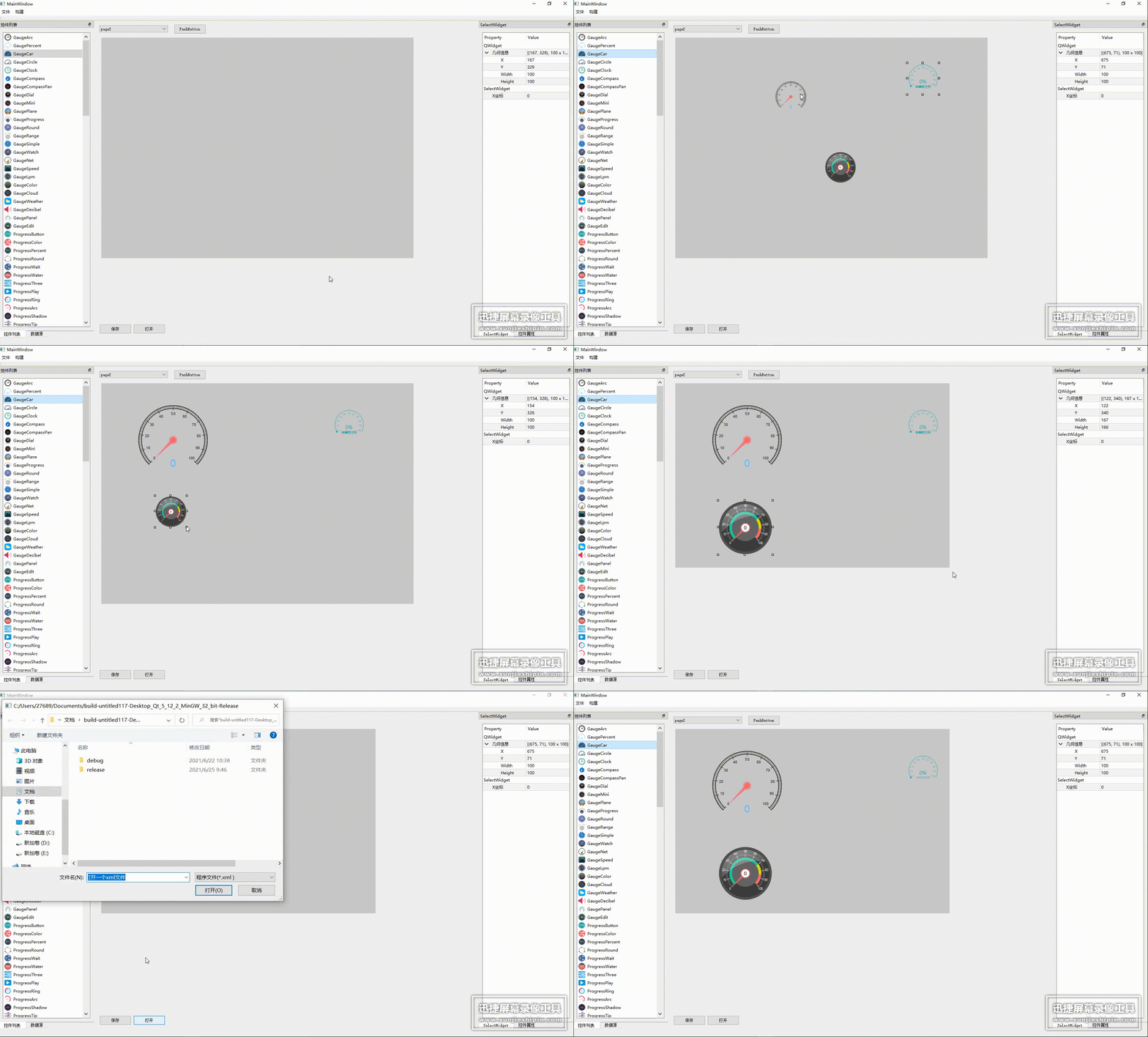
Realization function
Control's drag, zoom, and select functions .
Related instructions
seen feiyangqingyun The students of related blogs should have found a problem , Build one by yourself SelectWidget Of QWidget Type of window , All relevant parameters are configured , But in the end Select It is impossible to drag a control by binding the corresponding control , But the zoom function really exists . Here you may realize feiyangqingyun When uploading the core code, delete some of the programs that make the control move , You need to add it by yourself .
Some of the wiser students here may think of feiyangqingyun One more movewidget A program that binds a control to make the control move , Isn't it perfect to add it . If you try , Control is bound SelectWidget and movewidget after ,movewidget It doesn't work at all . Come here , People who are used to code handling may panic , It is obvious that you need to study the program yourself and movewidget The mobile program in moves to Selectwidget In order to realize the function of control movement .
Two ways of thinking
The first way of thinking
Overlay controls on SelectWidget above
bool SelectWidget::eventFilter(QObject *obj, QEvent *event)// Here the program is a virtual function , Don't delete this program because it is empty
{

    QMouseEvent *mouseEvent = (QMouseEvent *)event;

    if(obj==widget&&widget!=nullptr&&move)
    {


        if (mouseEvent->type() == QEvent::MouseButtonPress) {

            // If it is limited to drag with the left mouse button, judge whether it is the left mouse button at present
            if (mouseEvent->button() != Qt::LeftButton) {

                return false;
            }
                widgetpressed=true;
                widgetpressed2=true;
                selected=true;
               // sendSelect(widget);
                sendSelect();
                lastPoint = mouseEvent->globalPos();
                point4=this->pos();
                point5=QPoint(point4.x()+this->width(),point4.y()+this->height());
        }  else if (mouseEvent->type() == QEvent::MouseMove && widgetpressed) {

            // Calculate the coordinate offset , call move The function moves past
                int offsetX = mouseEvent->globalPos().x() - lastPoint.x();
                int offsetY = mouseEvent->globalPos().y() - lastPoint.y();
                this->setGeometry(point4.x()+offsetX,point4.y()+offsetY,point5.x()-point4.x(),point5.y()-point4.y());
        } else if (mouseEvent->type() == QEvent::MouseButtonRelease && widgetpressed) {

            widgetpressed = false;
            sendSelect2();
            lastPoint=mouseEvent->globalPos();
        }
        return QWidget::eventFilter(obj,event);
    }
    else if(obj==this)
    {

        if (mouseEvent->type() == QEvent::MouseButtonPress) {

            // If it is limited to drag with the left mouse button, judge whether it is the left mouse button at present
            if(widgetpressed2==false)
            {

                emit presswidget();
                widgetpressed2=false;
            }
            selected=true;
            if (mouseEvent->button() == Qt::RightButton) {


            }

            // Determine whether the area of the control contains the coordinates of the current mouse
            if (this->rect().contains(mouseEvent->pos())) {

                //lastPoint = mouseEvent->pos();
                QPoint point1=mouseEvent->pos();
                point2=this->pos();
                point3=QPoint(point2.x()+this->width(),point2.y()+this->height());

                // This part of the program is commented out , Unstable function
              /* if(point1.x()<20&&point1.y()<20) pressedarea=1;//qDebug()<<" Top left "<<endl; else if(point1.x()<this->width()*2/3&& point1.x()>this->width()/3&&point1.y()<20) pressedarea=2;// qDebug()<<" Middle up "<<endl; else if(point1.x()>point1.x()-20&&point1.y()<20) pressedarea=3;// qDebug()<<" The upper right "<<endl; else if(point1.x()<20&&point1.y()>this->height()/3&&point1.y()<this->height()*2/3)pressedarea=4;// qDebug()<<" Left center "<<endl; else if(point1.x()>this->width()-20&&point1.y()>this->height()/3&&point1.y()<this->height()*2/3)pressedarea=5;//qDebug()<<" Right middle "<<endl; else*/ if(point1.x()<20&&point1.y()>this->height()-20)pressedarea=6;// qDebug()<<" The lower left "<<endl;
                else if(point1.x()<this->width()*2/3&& point1.x()>this->width()/3&&point1.y()>this->height()-20)pressedarea=7;//qDebug()<<" lower-middle "<<endl;
                else if(point1.x()>point1.x()-20&&point1.y()>this->height()-20) pressedarea=8; //qDebug()<<" The lower right "<<endl;
                else pressedarea=0;
                pressed = true;
            }
        }  else if (mouseEvent->type() == QEvent::MouseMove && pressed) {


            // Calculate the coordinate offset , call move The function moves past
            int offsetX = mouseEvent->pos().x();
            int offsetY = mouseEvent->pos().y();
            int x = point3.x()-point2.x()- offsetX;
            /*if(pressedarea==1) { this->setGeometry(point2.x()+offsetX,point2.y()+offsetY,point3.x()-point2.x()-offsetX,point3.y()-point2.y()-offsetY); } else if(pressedarea==2) this->setGeometry(point2.x(),point2.y()+offsetY,point3.x()-point2.x(),point3.y()-point2.y()-offsetY); else if(pressedarea==3) this->setGeometry(point2.x(),point2.y()+offsetY,offsetX,point3.y()-point2.y()-offsetY); else if(pressedarea==4) this->setGeometry(point2.x()-(x-point3.x()+point2.x()),point2.y(),x,point3.y()-point2.y()); else if(pressedarea==5) this->setGeometry(point2.x(),point2.y(),offsetX,point3.y()-point2.y()); else*/ if(pressedarea==6)
                this->setGeometry(point2.x()-(x-point3.x()+point2.x()),point2.y(),x,offsetY);
            else if(pressedarea==7)
                this->setGeometry(point2.x(),point2.y(),point3.x()-point2.x(),offsetY);
            else if(pressedarea==8)
                this->setGeometry(point2.x(),point2.y(),offsetX,offsetY);
        } else if (mouseEvent->type() == QEvent::MouseButtonRelease && pressed) {

            pressed = false;
            //lastPoint=mouseEvent->globalPos();
        }

    }

    return QWidget::eventFilter(obj,event);
}
This kind of program needs to change the parent Set to SelectWidget, Stack the controls directly onto SelectWidget above , In this way, the coordinates of the control are always relative to SelectWidget Of , Just move and zoom SelectWidget You can drag and zoom the control , It can be said to be extremely convenient . But the disadvantages are also very obvious , Later, when setting the control property sheet, the corresponding coordinates and length and width information of the control property cannot be obtained , You need to reset a control property sheet to set the control separately parent Coordinates and length and width information of , May affect the appearance and later read and write xml The file just needs to be correct xywh Do a separate treatment , But there's no denying it , The interface program designed by this method runs very smoothly , Unexpected BUG’ It's also very low . But this is not a mainstream approach , After all, some unnecessary amount of code will be added later , So the second is the more mainstream method .
The second method
In the same widget Next, force binding SelectWidget And the coordinates of the control .
bool SelectWidget::eventFilter(QObject *obj, QEvent *event)// Here the program is a virtual function , Don't delete this program because it is empty
{

    QMouseEvent *mouseEvent = (QMouseEvent *)event;

    if(obj==widget&&widget!=nullptr&&move)
    {

        if (mouseEvent->type() == QEvent::MouseButtonPress) {

            // If it is limited to drag with the left mouse button, judge whether it is the left mouse button at present
            if (mouseEvent->button() != Qt::LeftButton) {

                return false;
            }
                widgetpressed=true;
                widgetpressed2=true;
                selected=true;
               // sendSelect(widget);
                sendSelect();
                lastPoint = mouseEvent->globalPos();
                point4=this->pos();
                point5=QPoint(point4.x()+this->width(),point4.y()+this->height());
        }  else if (mouseEvent->type() == QEvent::MouseMove && widgetpressed) {

            // Calculate the coordinate offset , call move The function moves past
                int offsetX = mouseEvent->globalPos().x() - lastPoint.x();
                int offsetY = mouseEvent->globalPos().y() - lastPoint.y();
                this->setGeometry(point4.x()+offsetX,point4.y()+offsetY,point5.x()-point4.x(),point5.y()-point4.y());
                widget->setGeometry(point4.x()+offsetX+5,point4.y()+offsetY+5,point5.x()-point4.x()-10,point5.y()-point4.y()-10);
        } else if (mouseEvent->type() == QEvent::MouseButtonRelease && widgetpressed) {

            widgetpressed = false;
            sendSelect2();
            lastPoint=mouseEvent->globalPos();
        }
        else  if (event->type() == QEvent::Resize) {

            // Set the current form size to follow the increase in the size of the form
            this->setGeometry(widget->x()-5,widget->y()-5,widget->width()+10,widget->height()+10);
        } else if (event->type() == QEvent::Move) {

            // Move the current form to the offset
            this->setGeometry(widget->x()-5,widget->y()-5,widget->width()+10,widget->height()+10);
        }
        return QWidget::eventFilter(obj,event);
    }
    else if(obj==this)
    {

        if (mouseEvent->type() == QEvent::MouseButtonPress) {

            // If it is limited to drag with the left mouse button, judge whether it is the left mouse button at present
            if(widgetpressed2==false)
            {

                emit presswidget();
                widgetpressed2=false;
            }
            selected=true;
            if (mouseEvent->button() == Qt::RightButton) {


            }

            // Determine whether the area of the control contains the coordinates of the current mouse
            if (this->rect().contains(mouseEvent->pos())) {

                //lastPoint = mouseEvent->pos();
                QPoint point1=mouseEvent->pos();
                point2=this->pos();
                point3=QPoint(point2.x()+this->width(),point2.y()+this->height());

                // This part of the program is commented out , Unstable function
              /* if(point1.x()<20&&point1.y()<20) pressedarea=1;//qDebug()<<" Top left "<<endl; else if(point1.x()<this->width()*2/3&& point1.x()>this->width()/3&&point1.y()<20) pressedarea=2;// qDebug()<<" Middle up "<<endl; else if(point1.x()>point1.x()-20&&point1.y()<20) pressedarea=3;// qDebug()<<" The upper right "<<endl; else if(point1.x()<20&&point1.y()>this->height()/3&&point1.y()<this->height()*2/3)pressedarea=4;// qDebug()<<" Left center "<<endl; else if(point1.x()>this->width()-20&&point1.y()>this->height()/3&&point1.y()<this->height()*2/3)pressedarea=5;//qDebug()<<" Right middle "<<endl; else*/ if(point1.x()<20&&point1.y()>this->height()-20)pressedarea=6;// qDebug()<<" The lower left "<<endl;
                else if(point1.x()<this->width()*2/3&& point1.x()>this->width()/3&&point1.y()>this->height()-20)pressedarea=7;//qDebug()<<" lower-middle "<<endl;
                else if(point1.x()>point1.x()-20&&point1.y()>this->height()-20) pressedarea=8; //qDebug()<<" The lower right "<<endl;
                else pressedarea=0;
                pressed = true;
            }
        }  else if (mouseEvent->type() == QEvent::MouseMove && pressed) {

            selected=true;
            // Calculate the coordinate offset , call move The function moves past
            int offsetX = mouseEvent->pos().x();
            int offsetY = mouseEvent->pos().y();
            int x = point3.x()-point2.x()- offsetX;
            /*if(pressedarea==1) { this->setGeometry(point2.x()+offsetX,point2.y()+offsetY,point3.x()-point2.x()-offsetX,point3.y()-point2.y()-offsetY); } else if(pressedarea==2) this->setGeometry(point2.x(),point2.y()+offsetY,point3.x()-point2.x(),point3.y()-point2.y()-offsetY); else if(pressedarea==3) this->setGeometry(point2.x(),point2.y()+offsetY,offsetX,point3.y()-point2.y()-offsetY); else if(pressedarea==4) this->setGeometry(point2.x()-(x-point3.x()+point2.x()),point2.y(),x,point3.y()-point2.y()); else if(pressedarea==5) this->setGeometry(point2.x(),point2.y(),offsetX,point3.y()-point2.y()); else*/ if(pressedarea==6)
                this->setGeometry(point2.x()-(x-point3.x()+point2.x()),point2.y(),x,offsetY);
            else if(pressedarea==7)
                this->setGeometry(point2.x(),point2.y(),point3.x()-point2.x(),offsetY);
            else if(pressedarea==8)
                this->setGeometry(point2.x(),point2.y(),offsetX,offsetY);
        } else if (mouseEvent->type() == QEvent::MouseButtonRelease && pressed) {

            pressed = false;
            //lastPoint=mouseEvent->globalPos();
        }

    }

    return QWidget::eventFilter(obj,event);
}
After all, I compare dishes , In the program of setting coordinates and sizes, we use setGeometry, This may also make the program less fluent in execution , If necessary, you can optimize it yourself , Change to move and resize Two functions .
I am going to look for a job after graduation , This code may help me find a job , So I can only show part of it . If you really can't use these programs in the future , May be sent to github On .
Reference blog
https://qtchina.blog.csdn.net/article/details/100703610
边栏推荐
- Building a full-featured NAS server with raspberry pie (06): built-in file synchronization tool for penetration
- R语言并行计算实战教程
- CMAP of Matplotlib
- Compound RateModel合约解析
- Notes on learning Es5 and ES6
- May 30-June 5, 2022 AI industry weekly (issue 100): three years
- Leetcode-141. Linked List Cycle
- Find the longest common substring of N arrays (strings)
- MS office level II wrong question record [9]
- The maximum number of divisors of numbers in the int range is 1536
猜你喜欢
@JsonProperty注解
一、SQLServer2008安裝(帶密碼)、創建數據庫、C#窗體項目測試
![[STL source code analysis] summary notes (5): a good helper for understanding iterators --list](/img/a7/c54bfb6a03c04e4ffeafdfcf8cedc2.jpg)
[STL source code analysis] summary notes (5): a good helper for understanding iterators --list

CRMEB/V4.4标准版打通版商城源码小程序公众号H5+App商城源码

【Oracle 数据库】奶妈式教程day03 排序查询

2022 low voltage electrician test questions and online simulation test

Directrix of ellipse

2022.5.30-6.5 AI行业周刊(第100期):三年时光
![[STL source code analysis] summary note (2): overview of containers](/img/66/60fba564ae6020dfb503c7fdf78529.jpg)
[STL source code analysis] summary note (2): overview of containers

Senior openstacker - Bloomberg, vexxhost upgraded to gold member of openinfra Foundation
随机推荐
Find the longest common substring of N arrays (strings)
The gap between the parent box and the child box
Mistakes in Niuke JS exercise
MySQL设置管理员密码无法生效的案例一则
2022 melting welding and thermal cutting exam exercises and answers
I/o multiplexing - select/poll/epoll
SQLZOO刷题记录-3
Pat class A by category
pycharm出现error.DeprecatedEnv: Env FrozenLake-v0 not found (valid versions include [‘FrozenLake-v1‘])
MS office level II wrong question record [6]
[STL source code analysis] summary notes (10): hashtable exploration
Typora set markdown syntax inline mode
big. Js-- use / instance
10 advanced concepts that must be understood in learning SQL
【编译原理】05-语法制导的语义计算——基于翻译模式的语义计算
Building a full-featured NAS server with raspberry pie (06): built-in file synchronization tool for penetration
Interview question 02.06 Palindrome linked list
自动化测试的生命周期是什么?
[Oracle database] mammy tutorial day04 Sorting Query
二、用户登录和注册