当前位置:网站首页>Getting started with fastdfs
Getting started with fastdfs
2022-07-01 19:56:00 【A fool carrying bricks】
List of articles
distributed file system
All of the file system , Distributed storage on multiple hosts , Form a complete file system .
Basic structure of distributed file system
Manager Can store data It's also possible not to store data

fastDFS summary
c An open source distributed file system written in
fastDFS characteristic
1. Application level file system
2. You can't mount , Namely   You can't  mount  operation
fastDFS The three roles and the relationship between them
role :
	1.  Tracker  - tracker
	2.  Storage nodes  - storage
	3.  client  - client
Relationship :
1. client  and  storage  Active connection Tracker
2. storage  Active direction  tracker  The report   State information
		 Disk remaining 、 File synchronization status 、 File upload and download times
3.Storage  It will start   A single thread   Yes  Tracker  Connection and regular report
3.  A group contains storage  It is not set through the configuration file , adopt tracker  Acquired

fastDFS Capacity expansion
1. Lateral capacity
	 Add capacity
	 increase group Group
2.  The longitudinal expansion
	 The data backup
	 The maximum capacity currently rented ( The storage node with the smallest capacity )
	 All storage node group names must be the same
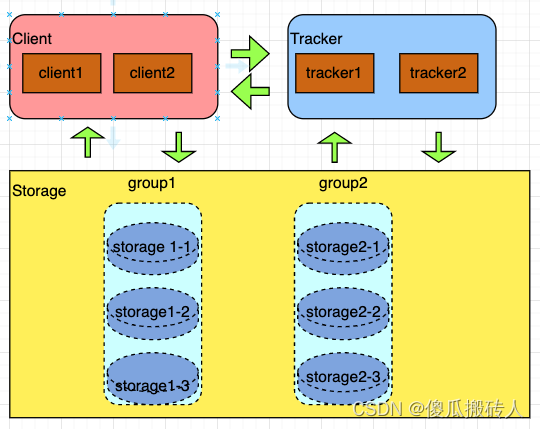
fastDFS install
- install
#  Basic library package
# libfastcommon-1.36.zip
./make.sh
sudo ./make.sh install
# fastDFS
# fastdfs-5.10.tar.gz
./make.sh
sudo ./make.sh install
- Test for successful installation
fdfs_test
fastDF To configure
# 1.  Default profile location
# /etc/fdfs

#2. Tracker( Tracker )
#  Modify the configuration file
bind_addr=192.168.82.253  # Current host ip
port=22122 #  Bound port
base_path=/home/root/fastDFS/tracker # log Catalog
#  start-up Tracker  service
fdfs_trackerd /etc/fdfs/tracker.conf
sudo fdfs_trackerd /etc/fdfs/tracker.conf restart
sudo fdfs_trackerd /etc/fdfs/tracker.conf stop

#3.stroage( Storage nodes )
#  Modify the configuration file
group_name=group1 #  The group to which the storage node belongs
bind_addr=192.168.82.253 #  Storage node bound ip
port=23000 #  Bound port
base_path=/home/root/fastDFS/storage #  Number of storage directories
store_path0=/home/root/fastDFS/storage #  Configure specific storage directories
tracker_server=192.168.82.252:22122 #  Connect tracker  Used when ip And port
#  start-up storage  service
fdfs_storaged /etc/fdfs/storage.conf
sudo fdfs_storaged /ect/fdfs/storage.conf restart
sudo fdfs_storaged /etc/fdfs/storage.conf stop

#4. Client
base_path=/home/root/fastDFS/client # log  Log directory
tracker_server=192.168.82.253:22122 #  Connect tracker  It's time to ip And port letter

#  Detect current fdfs  Whether the environment is accessible
fdfs_monitor /etc/fdfs/client.conf #  appear  active  Is normal
边栏推荐
猜你喜欢

GC garbage collection

全国职业院校技能大赛网络安全“splunk“详细配置
开发那些事儿:EasyCVR平台添加播放地址鉴权功能

Win11如何取消任务栏隐藏?Win11取消任务栏隐藏的方法

【无标题】

振弦采集模块测量振弦传感器的流程步骤

Graduation season | Huawei experts teach the interview secret: how to get a high paying offer from a large factory?

1592 例题1 国王(Sgu223 LOJ10170 LUOGU1896 提高+/省选-) 暴力思考 状压DP 01背包
What is the essential difference between Bi development and report development?

有意思了!数据库也搞Serverless!
随机推荐
通过js实现金字塔(星号金字塔,回文对称数字金字塔)
HLS4ML进入方法
GC垃圾回收
Source code series of authentic children -inheritablethreadlocal (line by line source code takes you to analyze the author's ideas)
毕业季 | 华为专家亲授面试秘诀:如何拿到大厂高薪offer?
Cookie和Session的相关概念
Is Dao safe? Build finance encountered a malicious governance takeover and was looted!
STC 32位8051单片机开发实例教程 二 I/O工作模式及其配置
【多线程】锁策略
一个悄然崛起的国产软件,低调又强大!
CMU AI PhD first year summary
科技T3国产平台!成功搭载“翼辉国产实时系统SylixOS”
今日群里分享的面试题
Graduation season | Huawei experts teach the interview secret: how to get a high paying offer from a large factory?
A quietly rising domestic software, low-key and powerful!
DS Transunet:用于医学图像分割的双Swin-Transformer U-Net
Modsim basic use (Modbus simulator)
HLS4ML/vivado HLS 报错解决方案
1592 例题1 国王(Sgu223 LOJ10170 LUOGU1896 提高+/省选-) 暴力思考 状压DP 01背包
mysql 报错 Can‘t create table ‘demo01.tb_Student‘ (errno: 150)*