当前位置:网站首页>Web vulnerability manual detection and analysis
Web vulnerability manual detection and analysis
2022-06-29 10:21:00 【Chinese Cabbage】
Web Vulnerability manual detection and analysis
The experiment purpose
1、 Learn about common Web Vulnerability and attack principle .
2、 understand Burp Suite Basic functions and Proxy function .
Test environment
1、 stay VMware Created in Windows Server 2008 And kali Linux virtual machine , The two virtual machines are configured to form a LAN , Set up windows Server 2008 The virtual machine IP The address is 192.168.1.108,kali Linux The virtual machine IP The address is 192.168.1.101, The test topology is shown in the figure below Shown :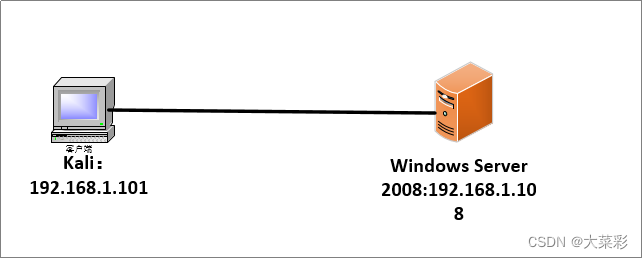
Test content
Item 1 Environment settings
Task a Windows Server 2008 Middle configuration IIS
Reference resources :https://blog.csdn.net/qq_53786696/article/details/125210106?spm=1001.2014.3001.5502
Task 2 Windows Server 2008 Create a test site in dvwa
Item 2 Cloud security Web Vulnerability manual detection and analysis
Task a Burp Suite Basics Proxy
Step one : Settings related IP Address ,Kali Linux Set to 192.168.10.6,Windows Server 2008 Set up IP The address is 192.168.10.8.

Detection is as follows :

Step two : stay Kali Linux Open in a virtual machine Burp Suite Tools and settings .
open “Proxy” tab , Choose “Opentions” Subtab , single click ”add” Button , Add a listening agent , Usually set to 127.0.0.1:8080
Step three : start-up Kali Linux Explorer in , Click the menu button in the upper right corner , choice “perferences”
Step four : open “Connection Setting” Dialog box , Perform manual proxy configuration .
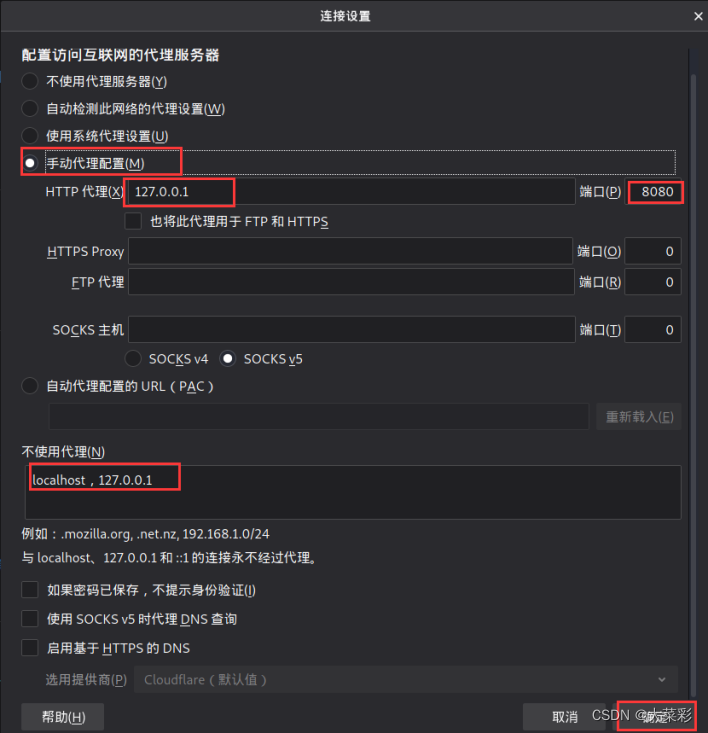
Step five : stay Kali Linux Open in “Interpect” tab , Below “Intercept is on” Indicates that the packet interception function is enabled , On the contrary, release all web Traffic .
Step six : open Kali linux Browser for , And enter... In the address bar “http://192.168.10.8”
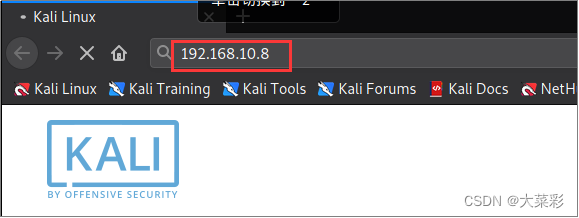
Step seven : stay Burp Suite Middle click “forward” Button , You can see the intercepted data .
Task 2 Burp Suite Basics Proxy
Step one : start-up Burp Suite, open “Target”–>”Site map”, tab .
Step two : Select the associated web address shown in the figure above , Right click a web address in the tree structure on the left , Choose... From the shortcut menu that pops up “Add to scope” command , That is, set a website to the target range , As shown in the figure below :

Step three :Target Scope Target domain rule settings .
Step four : Click on the “Add” Button , You can edit include rules and remove rules , The specific setting dialog box is shown in the following figure :
Task three Burp Suite Basics Proxy
Step one : open Burp Suite, According to the front target About configuration in , Select the web page link to test , Right click the network connection address , Choose “Spider this host” command .
Step two : Yes “Spirder” Under the tab “Options” The default configuration is selected for the relevant options of the sub tab .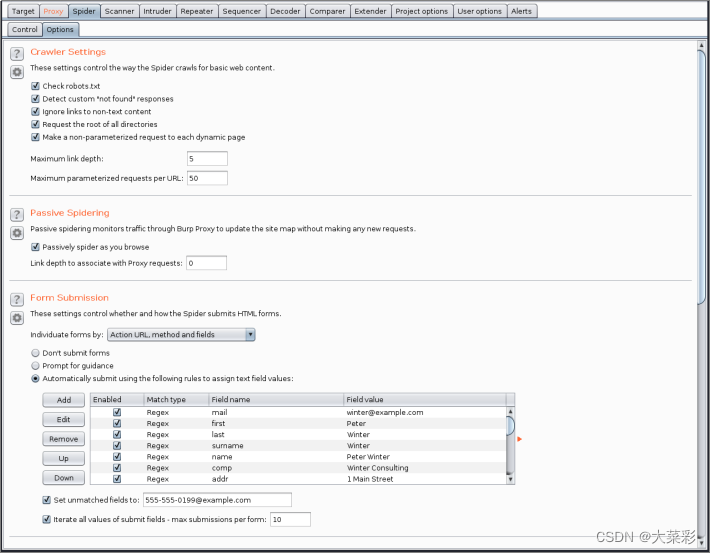
Step three : single click “Spirder” Tab “Control” label , single click “Spider is running” Button , The requested quantity is shown below , Number of bytes transferred , Crawler range and other information .

Task 4 Burp Suite Basics Proxy
Step one : start-up “Burp Suite”, Configured correctly Burp Proxy and Set up the browser proxy , At the same time “Target” Tab “Site map” Configure the fields that need rice seedlings in the subtab URL The module path , Right click the site to be scanned , Select... From the shortcut menu “Actively Scan thid host” command .

Step two : Open the active scan configuration wizard .
Step three : Click on the “Next” Button , Open the following window , Continue configuring scan items . Remove websites that do not need scanning .
Step four : Configure the attack insertion point .
Step five : Get into “Scanner” Tab “Scan queue” Subtab , View the progress of the current scan . As shown in the figure below :
Step six : Configure active and passive scanning 
Step seven : stay “Target” In the sub tabs of the tab “Site Map” Select a directory to scan under the sub tab , More optimized scanning options will pop up , Options can be configured , Specify which files are no longer scanned ,
Step eight : stay “Target” Tab “Site map” Select the web address to be added in the sub tab , Right click , In the shortcut menu that pops up , choice “Add to Scope” command , Add the web address to the scope , Then perform automatic scanning .
Step nine : Get into “Scanner” Tab “Live scanning” In the subtab , stay Live Active Scanning Choose from “Use suite scope” Radio button ,Burp Suite Will automatically scan through Burp Proxy The interaction information of .

Step 10 : View scan results , choice “Result” Subtab , View the results of this scan .
Task five Burp Suite Basics Proxy
Step one : start-up Burp Suite, And complete the basic configuration as described in task 1 .
Step two : Log in with the browser http://192.168.10.8, Here to test the system dvwa For target sites .
Step three : single click “Brute Force” Button , And click Burp Suite Of “Proxy” Under the tab “Forword” Button , Open the interface shown in the figure in the explorer , Enter the login account and password , Suppose you already know that the login account is admin, The password needs to be exploded , So enter a password at will 
Step four : Click on the login Button , And in Burp Suite Intercept login data in ,
Step five : Select all data on the way and select... From the right-click shortcut menu “Send to Inturder” command , As shown in the figure below :
Step six : choice Intruder tab , And select “Positions” Subtab , Configure the blasting variables , As shown in the figure below :
Step seven : Explode the variables automatically marked in the above figure , Click on the right clean Button , And then behind the Xuanzong code 123, And then add it as the blasting variable .
Step eight : Choose Intruder tab , And select “payloads” tab , Configure the password required for the blasting variable .
Step nine : After setting up , single click Burp Suite Medium “Intruder” A menu item , Choose “Start attack” command .
Experience
- Be sure to thoroughly understand the theoretical knowledge learned in class before the experiment , This is the basis of doing experiments . Otherwise, it will increase the difficulty in the follow-up experiment , A waste of time . When the teacher explains, he will not understand , This will make it more difficult for us to do experiments , Waste precious time doing experiments . If you don't know , Only when doing the experiment , This will be a great waste of your time , Make you get twice the result with half the effort .
- Preview in advance , Understand the principle of the experiment , Understand the process of the experiment . When doing experiments , Be sure to do it yourself , Be sure to take each step , Find out every detail , Find out , After the experiment , And review , reflection . such , We are impressed , It is only when you remember . otherwise , It will soon be forgotten , It's better not to do . When doing experiments , Teachers will also learn from their own experience , Teach us some knowledge that is not in the textbook , Broaden our horizons , Make us realize that the application of this course in life is so extensive .
- During the experiment , Minimize the blindness of operation , Know what you're doing at every step , Why do , Of course , This is also based on a clear understanding of the experimental principle and purpose . Every step should be careful , The configuration is correct , In order to avoid that the following experiments cannot continue due to careless configuration errors , And it's a waste of time to go back and reconfigure ;
- When there are problems in the experiment , Keep calm , Don't mess with yourself , First analyze the cause of the error , First solve the problem by yourself ; If there is no solution , You can inquire online or ask your classmates for advice ; There is really no way , You can also ask the teacher for help ;
- For other people's advice , Have a questioning spirit . I need to analyze it carefully , Judge that it is correct and then adopt . You can't blindly drift with the tide , So as not to bring more trouble to yourself .
- When you encounter problems or failures , Don't give up because of the present difficulties , We should have the spirit of being more courageous and more frustrated . Believe that others can accomplish , You can do it yourself . Try again and again , grope . And face failure with optimism , Because experience can be accumulated in repeated failures , The process of troubleshooting is also the process of learning . It is more impressive to acquire knowledge from books than from books .
Through this experiment , So that I not only have a deeper understanding and deepening of the theoretical knowledge I have learned before , Moreover, the ability of using hands and brains has also been improved , And also learned some problem-solving methods and attitude towards problems , I gained a lot from this experiment !
边栏推荐
- Maze walking BFS medium + -- the last programming challenge
- L2-026 small generation (25 points)
- Codeforces Round #657 Div. 2
- Serpentine filling number
- 51nod1277 maximum value in string [KMP]
- 基辅周边的凄美废墟——切尔诺贝利的安全前往指南!
- Substring score - Ultra detailed version - the last programming challenge
- 2019.10.6训练总结
- Codeforces Round #659 (Div. 2)
- Codeforces Round #652 (Div. 2)
猜你喜欢

Use of Azkaban in task scheduler

Seaweedfs security configuration

Nacos registry cluster
Nacos environmental isolation

Function pointer, function pointer array, calculator + transfer table, etc
SeaweedFS安全配置(Security Configuration)

Beautiful ruins around Kiev -- a safe guide to Chernobyl!

PGP在加密技术中的应用

Using rancher to build kubernetes cluster

Codeforces Round #645 (Div. 2)
随机推荐
子串分值-超详细版——最后的编程挑战
2019.10.6 training summary
Setinterval, setTimeout and requestanimationframe
The Stones Game【取石子博弈 & 思维】
To 3 -- the last programming challenge
Analysis of liferayportal jsonws deserialization vulnerability (cve-2020-7961)
51nod1277 字符串中的最大值【KMP】
SymPy Tutorial(译)
Flutter 基础组件之 Text
To 3 --- 最后的编程挑战
2019.10.27 training summary
520 diamond Championship 2021
Power strings [KMP cycle section]
Application of keil5 integrated development environment for single chip microcomputer
Related problems of pointer array, array pointer and parameter passing
51nod1277 maximum value in string [KMP]
If I were in Beijing, where would it be better to open an account? In addition, is it safe to open an account online now?
manacher
L2-026 small generation (25 points)
Wandering -- the last programming challenge