当前位置:网站首页>Ambari (VII) --- ambari integrated hue4.2 document (valid for personal test)
Ambari (VII) --- ambari integrated hue4.2 document (valid for personal test)
2022-06-28 07:45:00 【New objects first】
Reference material :
ambari-hue-service:Ambari Integrate Hue github Code
Hue Official documents database Part introduction
Document directory
One . Preparation before installation
- 1.1 Environment configuration
- 1.2 download Hue Installation package
- 1.3 stay Hue The installation node installation must depend on
Two . take Hue It is integrated into Ambari
- 2.1 take Hue Added to the Ambari management
- 2.2 Modify the code according to the actual situation
- 2.3 restart ambari-server
3、 ... and . Ambari Install configuration in hue
Four . Ambari Integrate Hue Problems encountered in the process and solutions
- 4.1 yum install python-simplejson Report errors :No package python-simplejson available.
- 4.2 hue Initialization error : ‘ascii’ codec can’t encode character u’\u201c’ in position 3462: ordinal not in range(128)
- 4.3 hue Initialization error :HTTP request sent, awaiting response… 404 Not Found
- 4.4 hue An error is reported when the interface is opened : 1044, “Access denied for user ‘hue’@’%’ to database ‘desktop/desktop.db’”
- 4.5 hue Interface access hdfs Report errors Cannot access: /. Note: you are a Hue admin but not a HDFS superuser, “hadoop” or part of HDFS supergroup, “supergroup”
One . Preparation before installation
1.1 Environment configuration
My environment configuration is as follows :
| Environmental Science | Corresponding version |
|---|---|
| Amabri | 2.6.0.0 |
| HDP | 2.6.3.0 |
| HDP-UTILS | HDP-UTILS-1.1.0.21 |
| CentOs | 7.4 |
1.2 download Hue Installation package
Hue4.2 Download link on official website
notes : If you encounter problems in downloading the official website, you can use the following link
Baidu SkyDrive Hue4.2 Compressed package
Extraction code : qflu
After downloading , take hue-4.2.0.tgz Copy files to local yum The source of hue Under the table of contents . This path can be viewed through hdp Source profile acquisition , example :
#  notes :  yes , we have ambari Corresponding HDP.repo file
 cat /etc/yum.repos.d/hdp.repo | grep baseurl
#  The results are as follows
baseurl=http://{
    hostname}/ambari/HDP/centos7/2.6.3.0-235
baseurl=http://{
    hostname}/ambari/HDP-UTILS
# Then the above configuration corresponds to hue The catalogue is
/var/www/html/ambari/HDP/centos7/2.6.3.0-235/hue
1.3 stay Hue The installation node installation must depend on
In the installation Hue Execute the following command on the node of to install the necessary dependencies
yum install -y ant

yum install -y maven

yum install -y git

yum install -y gcc gcc-c++ make

yum install -y cyrus-sasl-devel cyrus-sasl-plain cyrus-sasl-gssapi

yum install -y krb5-devel libxml2-devel libxslt-devel

yum install -y python-setuptools

yum install -y openldap-devel python-devel sqlite-devel openssl-devel gmp-devel libffi-devel saslwrapper-devel

yum install -y mysql mysql-devel

yum install -y asciidoc

yum install -y python-simplejson  #  notes :  If the command runs abnormally , Please go to problem one to see the solution
Two . take Hue Integrated into the Ambari
2.1 take Hue Added to the Ambari management
Execute the following three commands on the master node
VERSION=`hdp-select status hadoop-client | sed 's/hadoop-client - \([0-9]\.[0-9]\).*/\1/'`
rm -rf /var/lib/ambari-server/resources/stacks/HDP/$VERSION/services/HUE
sudo git clone https://github.com/EsharEditor/ambari-hue-service.git /var/lib/ambari-server/resources/stacks/HDP/$VERSION/services/HUE
2.2 Modify the code according to the actual situation
2.2.1 Version changes
2.1 The file downloaded in step involves Hue Version and to be installed Hue edition (4.2) It's inconsistent . Therefore, relevant documents need to be modified .
The documents related to the version are as follows
metainfo.xml
README.md
package/scripts/params.py
package/scripts/setup_hue.py
All that appear in the above documents will be 3.11.0 Replace with 4.2.0 that will do
2.2.2 Script modification
In order to ensure Hue Can download and install normally , We also need to make necessary changes to some scripts
The script directory is as follows
/var/lib/ambari-server/resources/stacks/HDP/2.6/services/HUE/package/scripts/
modify common.py file
First, add the following execution commands , After modification, the result is as follows :
Next, comment out the following lines , The comments are followed by the following :
modify setup_hue.py file
Comment out the following two lines , After modification, the following is displayed :
modify params.py file
First , modify 32 That's ok ,download_url To configure , The modified results are shown in the following figure :
Be careful : The configuration here should be based on your actual situation ! Finally, we need to ensure that download_url Parameters return results and 1.2 The values configured in step are consistent
otherwise hue During the initialization process, there will be 404 Problems lead to failure
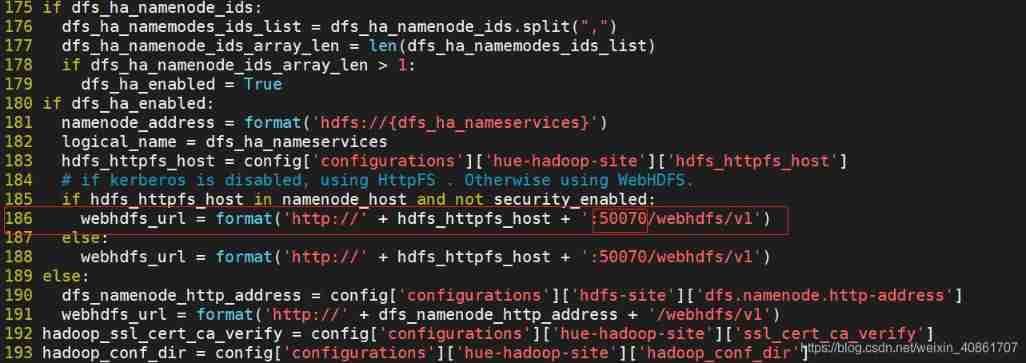
Next , modify 186 That's ok , Change the port number to 50070, as follows :
Check configs.sh file
The directory where the file is located :
/var/lib/ambari-server/resources/stacks/HDP/2.6/services/HUE/package/files
Check the file ambari Platform password , Whether the port number is set to and ambari-server Consistent configuration , Inconsistencies need to be corrected

2.3 restart ambari-server
After revising 2.2 After the configuration described , Restart by executing the following command ambari-server
ambari-server restart
We can already see in the add services list Hue service 
3、 ... and . Ambari Install configuration in hue
3.1 hue Configure before formal installation
3.1.1 install hadoop-httpfs
If hdfs To enable the HA Pattern , Then you need to turn on hadoop-httpfs service , because webhdfs Can't automatically sense hdfs-site.xml Inside match HA Highly available information . and HDP It was castrated httpfs Of , So you need to install it manually , The operation is as follows :
 #  install  hadoop-httpfs
 sudo yum install hadoop-httpfs
 #  start-up HttpFs
 sudo service hadoop-httpfs  start( perhaps /usr/hdp/current/hadoop-httpfs/etc/rc.d/init.d/hadoop-httpfs start)
3.1.2 hdfs Add related configuration
Be careful : In the process of adding the following parameters, you don't need to ignore the prompt that the parameters already exist , Just add the next one
HDFS Components are customized core-site Add the following parameters to the configuration file
hadoop.proxyuser.hue.groups=*

hadoop.proxyuser.hue.hosts=*

hadoop.proxyuser.httpfs.groups=*

hadoop.proxyuser.httpfs.hosts=*

hadoop.proxyuser.livy.groups=*

hadoop.proxyuser.livy.hosts=*
HDFS Components are customized hdfs-site Add the following parameters to the configuration file :
dfs.namenode.acls.enabled=true
And make sure webhdfs It's on
3.1.3 mysql Database configuration
Need to be in MySQL To create a Hue database
create database hue;

CREATE USER [email protected]'%'IDENTIFIED BY 'password';

GRANT ALL PRIVILEGES ON hue.* TO [email protected]'*' IDENTIFIED BY 'password';

GRANT ALL PRIVILEGES ON hue.* TO [email protected]'%' IDENTIFIED BY 'password';

FLUSH PRIVILEGES;
3.2 hue initialization
At the end of the above configuration , Can be in ambari web Follow the prompts on the interface hue Initialization work
Hue Databases To configure 
You can also configure to MySQL Configs In the part 
Hue User Info To configure
Enable User Sync, Use linux System local user 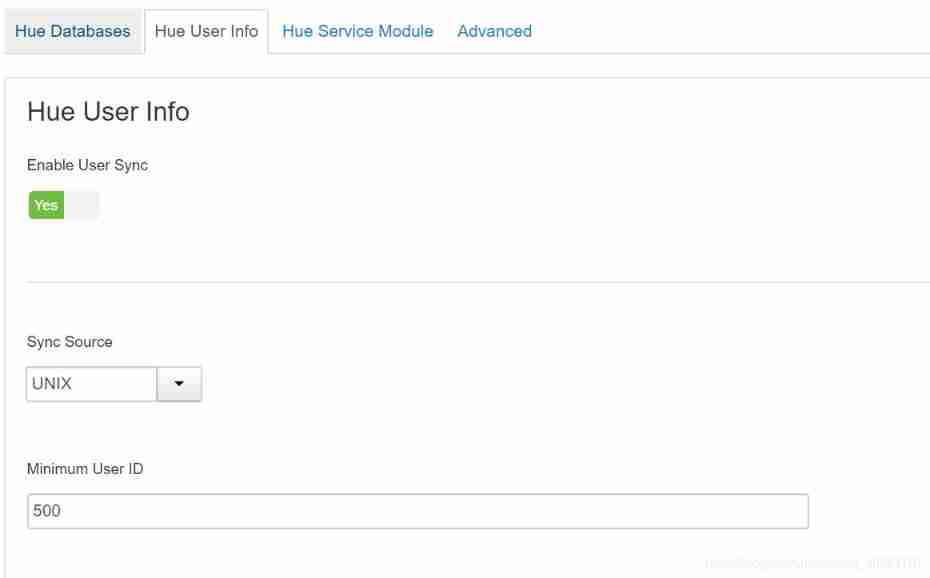
Hue Service Module To configure

Others keep the default values , Click next , Until the installation and deployment are completed
This involves source code compilation , So I will wait a long time
here , If an error is reported , Check and solve the problem according to the relevant error information prompted on the interface
If /usr/local/hue/build/env/bin/ The following directory proves the successful installation

Be careful ! Up to the above operation , We have only completed hue Installation work of ,
At this time, the startup or interface jump transfer fails , Because we haven't installed it yet Hue For further configuration
3.3 hue Configuration after initialization
Manually modify Hue The configuration file Hue.ini
Configuration file in /usr/local/hue/desktop/conf/ Under the table of contents . Configure from beginning to end . Need configuration mysql、hive、hdfs、webhdfs、yarn wait . Modify according to your existing components (hue The startup code is pushed to through the interface configuration parameters pseudo-distributed.ini file , This operation is for reference only ), The details are as follows :
modify [desktop]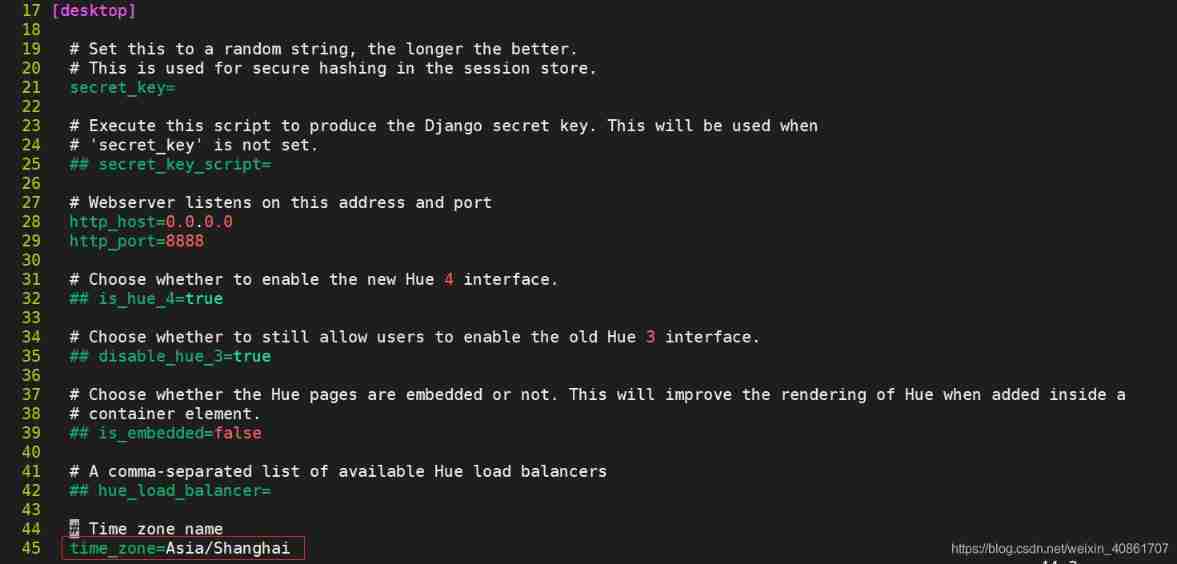
modify [[database]]

modify [hadoop]
Be careful : The example cluster here is enabled HA

modify [[yarn_cluesters]]
notes : My example here yarn Also opened. HA To configure

modify [[ha]]

modify [beeswax]
modify [spark]

modify [firebrowser]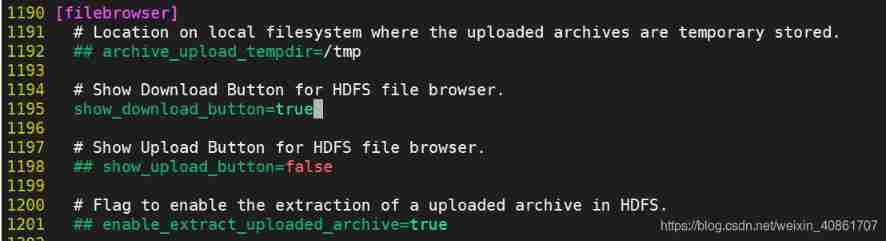
modify [zookeeper]

modify [libzookeeper]
notes : I only list my own components here , If other components are involved , Also modify the configuration file according to the actual situation
3.4 Generate hue Databases and tables
Get into /usr/local/hue/build/env/bin/ Catalog , Execute the following two commands :
./hue syncdb
./hue migrate
hue The tables in the database are similar to the following figure , Prove the execution is successful :

3.5 Start and log in Hue
If you want to enable HBase, start-up hue Before , Start first hbase thrift service,ambari HDP No startup by default hbase thrift, You need to start it manually . stay HBase Master Execution on node :
/usr/hdp/current/hbase-client/bin/hbase-daemon.sh start thrift
stay Ambari Interface to start Hue, Open on the quick link Hue Interface
The following interface appears , prove hue The installation configuration is normal 
Enter the account name and password to log in ! My login username here :hue, password :hue
Four . Ambari Integrate Hue Problems encountered in the process and solutions
4.1 yum install python-simplejson Report errors :No package python-simplejson available.
Problem description :
#  Perform the following installation simplejson When
yum install python-simplejson -y
Report errors :
No package python-simplejson available.
Error: Nothing to do
Solution :
You can try the following download methods :
Method 1 :
wget https://pypi.python.org/packages/source/s/simplejson/simplejson-3.5.2.tar.gz#md5=10ff73aa857b01472a51acb4848fcf8b --no-check-certificate
tar vxzf simplejson-3.5.2.tar.gz
cd simplejson-3.5.2
python setup.py install
Method 2 :
pip install simplejson
Method 3 :
easy_install simplejson
I finally solved the problem with method 1
4.2 hue Initialization error : ‘ascii’ codec can’t encode character u’\u201c’ in position 3462: ordinal not in range(128)
Problem description :
# hue Initialization error , as follows
File "/usr/lib/python2.6/site-packages/resource_management/core/sudo.py", line 141, in create_file
    fp.write(content)
UnicodeEncodeError: 'ascii' codec can't encode character u'\u201c' in position 3462: ordinal not in range(128)
Question why :
Coding problem
Solution :
Modify the coding method of the error reporting file , as follows :
vim /usr/lib/python2.6/site-packages/resource_management/core/sudo.py
#  Add the following :
import sys

reload(sys)

sys.setdefaultencoding('utf-8')
As shown in the figure below :
4.3 hue Initialization error :HTTP request sent, awaiting response… 404 Not Found
#  On the interface install hue Report errors ,  The specific tips are as follows :
2020-11-11 14:08:52 (298 MB/s) - 'hue.tgz' saved [48520359/48520359]

--2020-11-11 14:08:52--  http://{
    ip}/ambari/HDP-UTILS/hue/hue-4.2.0.tgz
Reusing existing connection to 172.16.87.191:80.
HTTP request sent, awaiting response... 404 Not Found
2020-11-11 14:08:52 ERROR 404: Not Found.

FINISHED --2020-11-11 14:08:52--
Total wall clock time: 0.2s
Downloaded: 1 files, 46M in 0.2s (298 MB/s)
Error reason :
From the error prompt , There is no... Under the link given hue-4.2.0.tgz Compressed package
The suspicion is download_url Some configuration resolution problems
Solution :
modify params.py file
cd /var/lib/ambari-server/resources/stacks/HDP/2.6/services/HUE/package/scripts/

vim params.py

#  modify download_url The configuration is as follows , notes : This configuration needs to be modified according to your actual situation , Do not copy and paste directly
download_url = 'cat /etc/yum.repos.d/hdp.repo | grep "baseurl" | grep "ambari/HDP/centos" | awk -F \'=\' \'{print $2"/hue /hue-4.2.0.tgz"}\''
After modification , Reinitialize , Problem solved !
4.4 hue An error is reported when the interface is opened : 1044, “Access denied for user ‘hue’@’%’ to database ‘desktop/desktop.db’”
Problem description :
hue After initialization and successful startup ,ambari Click on quicklinks Get into Hue An error is reported in the interface :
OperationalError at /hue/accounts/login/
(1044, "Access denied for user 'hue'@'%' to database 'desktop/desktop.db'")
Request Method:	GET
Request URL:	http://ambari-191-master:8888/hue/accounts/login/?next=/
Django Version:	1.6.10
Exception Type:	OperationalError
Exception Value:
(1044, "Access denied for user 'hue'@'%' to database 'desktop/desktop.db'")
Exception Location:	/usr/local/hue/build/env/lib/python2.7/site-packages/MySQL_python-1.2.5-py2.7-linux-x86_64.egg/MySQLdb/connections.py in __init__, line 193
Python Executable:	/usr/local/hue/build/env/bin/python2.7
Python Version:	2.7.5
Question why :
hue Database initialization exception
Solution :
Get into /usr/local/hue/build/env/bin/ Catalog , Execute the following two commands :
./hue syncdb
./hue migrate
Restart after correct hue, And related components , Click the link , The interface displays normally !
4.5 hue Interface access hdfs Report errors Cannot access: /. Note: you are a Hue admin but not a HDFS superuser, “hadoop” or part of HDFS supergroup, “supergroup”
Error details :
Cannot access: /. Note: you are a Hue admin but not a HDFS superuser, "hadoop" or part of HDFS supergroup, "supergroup".

SecurityException: Failed to obtain user group information: org.apache.hadoop.security.authorize.AuthorizationException: User: hue is not allowed to impersonate hue (error 403)
Error reason :
Permission problems , hue The user does not have the corresponding hdfs Access to directory
Solution :
by hue Add the following configuration
This configuration is consistent with 3.1.1 The host name in the process is consistent 
Modify the following configuration , take Default User The value of is configured as an error reporting user 
After modifying the above configuration , Restart hue. The problem can be solved
边栏推荐
- XML serialization backward compatible
- Conversion between HJ integer and IP address
- Idea package together, using compact middle packages to solve &
- HJ string sort
- 自动化测试的生命周期是什么?
- Redis implements distributed locks
- 7-1 understand everything
- Is it safe for flush to open an account online
- Flutter realizes the function of "shake"
- R language Kolmogorov Smirnov tests whether the two samples follow the same distribution.
猜你喜欢

Section 5: zynq interrupt

Hash slot of rediscluster cluster cluster implementation principle

Alibaba cloud server creates snapshots and rolls back disks

SOC serial port configuration

asp. Net datalist when there are multiple data displays

Kubernetes理论基础

MySQL installation and environment variable configuration

安全培训是员工最大的福利!2022新员工入职安全培训全员篇
Flex layout

PLC -- Notes
随机推荐
自动化测试的生命周期是什么?
HJ整数与IP地址间的转换
Evaluation of inverse Polish expression < difficulty coefficient >
R language ggmap
基金的投资交易与结算
以动态规划的方式求解最长回文子串
协程、asyncio、异步编程
Application of XOR. (extract the rightmost 1 in the number, which is often used in interviews)
挖财注册开户靠谱吗?安全吗?
Installing redis on Linux
Spark 离线开发框架设计与实现
Real time database - Notes
Sentinel mechanism of redis cluster
Section VI UART of zynq
Soft test -- software designer -- database design of afternoon questions
Es data export CSV file
Unity-UI-shadow组件
打新债注册开户靠谱吗?安全吗?
Section 5: zynq interrupt
2021 programming language ranking summary