当前位置:网站首页>Kali installs burpsuite professional
Kali installs burpsuite professional
2022-07-29 00:17:00 【Ant200】
After successfully installing the professional version , hold kali The self-contained community version is deleted , Then build a shortcut for your newly installed professional version .
Get ready :
Download good software :(burpsuite pro .rar-Linux Document resources -CSDN library  https://download.csdn.net/download/weixin_61835841/85214228
Installation steps
Install first Java Environmental Science , In the installation bp
1. Unzip it and move it to /opt Under the table of contents
tar -xzvf jdk-8u261-linux-x64.tar.gz
sudo mv jdk1.8.0_261 /opt
cd /opt/jdk1.8.0_261

2. install gedit( It is easy to fail the installation here , Just execute :apt --fix-broken install)

3. After successful installation , Set the environment variable , perform gedit ~/.zhsrc, And add the following at the end , Then save to exit : ( Be careful : There is a small pit here , Many posts are about setting .bashrc, In fact, the new edition kali default shell yes zhs 了 , So you should modify the configuration here , If you really don't know, you can set it all )
#install JAVA JDK
export JAVA_HOME=/opt/jdk1.8.0_261
export CLASSPATH=.:${JAVA_HOME}/lib
export PATH=${JAVA_HOME}/bin:$PATH
If there is data in it, paste it to the end and save , I didn't put it here, so I put it directly

function source ~.zshrc, No mistake.
4. register jdk And add
Modify and execute the command
update-alternatives --install /usr/bin/java java /opt/jdk1.8.0_261/bin/java 1
update-alternatives --install /usr/bin/javac javac /opt/jdk1.8.0_261/bin/javac 1
update-alternatives --set java /opt/jdk1.8.0_26/bin/java
update-alternatives --set javac /opt/jdk1.8.0_261/bin/javac
If the version is different, you can modify the marked part , At the end of 1 Represents the number you set for him , self-setting .
5. Version of the switch
Input update-alternatives --config java( Prompt you can enter this command to view before adding registration , Convenient comparison )

Select serial number 1 Switch , Installation successful , View version , If you change, that's it jdk Successfully installed , If your version hasn't changed, go back and check , Don't go to the next step .
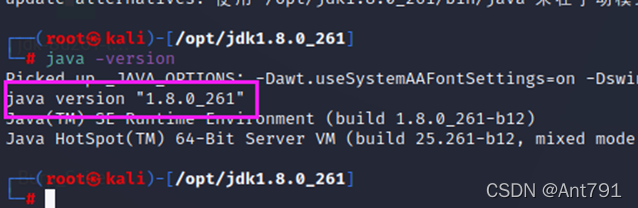
6. Install well jdk You can start the installation burpsuite
First, put the Two files moved to /usr/bin, command :mv burp-loader-keygen.jar burpsuite_pro_v1.7.37.jar /usr/bin, The uploaded file is a folder , You need to drag them to the desktop to directly execute

Then go to the directory , command cd /usr/bin

Carry out orders :java -jar burp-loader-keygen.jar, Things in the box will pop up automatically after execution .
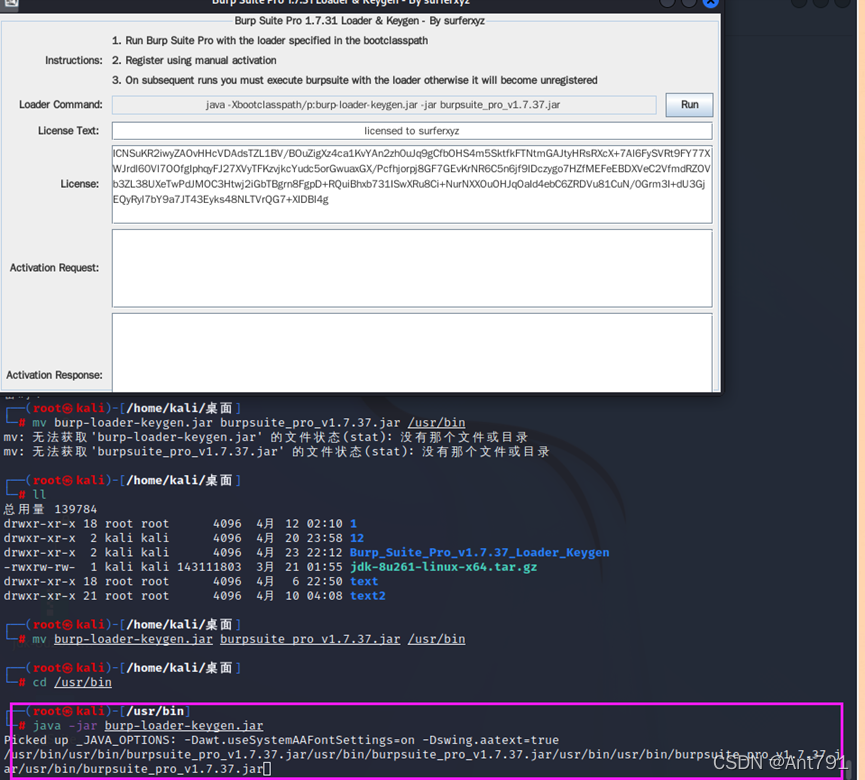
Click on the top left run, Then choose I agree ( The one on the right )

Then follow the direction of the arrow , Copy in


Follow the steps

Come here , If your interface is the same as mine , Congratulations, you have completed the installation

Next, you can configure shortcuts : stay /usr/bin Create burpsuite, stay /usr/bin Delete the previous community version from the directory burpsuit

perform gedit burpsuite
Add the following :
#!/bin/sh
java -Xbootclasspath/p:/usr/bin/burp-loader-keygen.jar -jar /usr/bin/burpsuite_pro_v1.7.37.jar

Add execution permission chmod +x burpsuite

Get into /usr/share/applications, Create and edit burpsuite Shortcut to , Input gedit burpsuite.desktop

Add the following :
[Desktop Entry]

Name=burpsuite

Encoding=UTF-8

Exec=sh -c "/usr/bin/burpsuite"

Icon=kali-burpsuite

StartupNotify=false

Terminal=false

Type=Application

Categories=03-webapp-analysisc;03-06-web-application-proxies;

X-Kali-Package=burpsuite
And then when we're done

See if the creation is successful

You have completed the installation , study hard and make progress every day !
边栏推荐
- GhostNets on Heterogeneous Devices via Cheap Operations
- Attack and defense world web master advanced area web_ php_ unserialize
- EN 1873 assembly accessories for roofing - plastic single roof lamps - CE certification
- 【C】 Reverse string (two recursive ideas)
- Concurrency in go
- centos7安装mysql8
- PMP Exam countdown, look at 3A pass bag!
- 2022 network security learning route is very detailed, recommended Learning
- mysql索引失效的常见9种原因详解
- Type 1-5 components
猜你喜欢

Interpretation of ISO 13400 (doip) standard

With this, your messages can't be monitored
Idea2021.2 installation and configuration (continuous update)

Advanced area of attack and defense world web masters -baby Web

Linux之yum安装MySQL
MySQL安装配置教程(超级详细、保姆级)

Attack and defense world web master advanced area web_ php_ unserialize

基于 FPGA 实现数字时钟详细原理讲解及验证结果

Develop effective Tao spell

html+css+php+mysql实现注册+登录+修改密码(附完整代码)
随机推荐
1-6 state与绑定事件
Do you know any formal part-time platforms?
Attack and defense world web master advanced area PHP_ rce
Sword finger offer 41. median in data flow
Type 1-5 components
【C】 Drink soda and find a single dog
Cmake basic learning
Samsung asset management (Hong Kong) launched yuancosmos ETF to focus on investing in the future tuyere track
Where is sandbox's confidence in rejecting meta's acquisition of meta universe leader sand?
Application of Devops in Internet of things solutions
Doip communication of canoe application case
Advanced area of attack and defense world web masters training www robots
After SAP Oracle replicates a new instance, the remote connection of the database reports an error ora-01031
【MySQL 8】Generated Invisible Primary Keys(GIPK)
Laptop external display
How NAT configures address translation
Multimodal model sketch (1)
研发效能的道法术器
curl (7) Failed connect to localhost8080; Connection refused
【C】 Introduction and Simulation Implementation of ATOI and offsetof