当前位置:网站首页>MFC General dialog color dialog
MFC General dialog color dialog
2022-06-12 04:19:00 【Bill66】
CColorDialog Class encapsulates the color dialog , This class allows you to incorporate color selection dialogs into your application . The color dialog is like a painter's palette , The system defined color list can be displayed , Users can select or create specific colors from the list . Construct a CColorDialog Class object , You can use DoModal() Function to display the color dialog .
CColorDialog The constructor prototype for is as follows :
CColorDialog(COLORREF clrInit = 0, DWORD dwFlags = 0, CWnd* pParentWnd = NULL);
Parameters
clrInit
Default color selection . If no value is specified , The default value is RGB (0,0,0) ( black ) .
dwFlags
A set of flags for customizing the functions and appearance of the dialog box . For more information , see also Windows SDK Medium CHOOSECOLOR structure .
pParentWnd
Pointer to the parent window or owner window of the dialog .
except DoModal( ) Out of function , There are also the following member functions :
| CColorDialog:: GetColor | Return to one COLORREF structure , This structure contains the values for the selected color . |
| CColorDialog::GetSavedCustomColors | Retrieve user created custom colors . |
| CColorDialog::SetCurrentColor | Force the current color to select the specified color . |
CCorlorDialog Class has one. CHOOSECOLOR Public data members of structure types m_cc, have access to m_cc To achieve , Set the initial selection color of the color dialog box, etc .CHOOSECOLOR The structure is defined as follows :
typedef struct {
  DWORD        lStructSize;
  HWND         hwndOwner;
  HWND         hInstance;
  COLORREF     rgbResult;
  COLORREF   * lpCustColors;
  DWORD        Flags;
  LPARAM       lCustData;
  LPCCHOOKPROC lpfnHook;
  LPCTSTR      lpTemplateName;
} CHOOSECOLOR, *LPCHOOSECOLOR;
Its member functions are described as follows ( Excerpt from MSDN Library):
lStructSize
Specifies the length, in bytes, of the structure.
hwndOwner
Handle to the window that owns the dialog box. This member can be any valid window handle, or it can be NULL if the dialog box has no owner.
hInstance
If the CC_ENABLETEMPLATEHANDLE flag is set in the Flags member, hInstance is a handle to a memory object containing a dialog box template. If the CC_ENABLETEMPLATE flag is set, hInstance is a handle to a module that contains a dialog box template named by the lpTemplateName member. If neither CC_ENABLETEMPLATEHANDLE nor CC_ENABLETEMPLATE is set, this member is ignored.
rgbResult
If the CC_RGBINIT flag is set, rgbResult specifies the color initially selected when the dialog box is created. If the specified color value is not among the available colors, the system selects the nearest solid color available. If rgbResult is zero or CC_RGBINIT is not set, the initially selected color is black. If the user clicks the OK button, rgbResult specifies the user's color selection.
To create a COLORREFcolor value, use the RGB macro.
lpCustColors
Pointer to an array of 16 COLORREF values that contain red, green, blue (RGB) values for the custom color boxes in the dialog box. If the user modifies these colors, the system updates the array with the new RGB values. To preserve new custom colors between calls to the ChooseColor function, you should allocate static memory for the array.
To create a COLORREFcolor value, use the RGB macro.
Flags
A set of bit flags that you can use to initialize the Color dialog box. When the dialog box returns, it sets these flags to indicate the user's input. This member can be a combination of the following flags.
| Flag | Meaning |
|---|---|
| CC_ANYCOLOR | Causes the dialog box to display all available colors in the set of basic colors. |
| CC_ENABLEHOOK | Enables the hook procedure specified in the lpfnHook member of this structure. This flag is used only to initialize the dialog box. |
| CC_ENABLETEMPLATE | Indicates that the hInstance and lpTemplateName members specify a dialog box template to use in place of the default template. This flag is used only to initialize the dialog box. |
| CC_ENABLETEMPLATEHANDLE | Indicates that the hInstance member identifies a data block that contains a preloaded dialog box template. The system ignores the lpTemplateName member if this flag is specified. This flag is used only to initialize the dialog box. |
| CC_FULLOPEN | Causes the dialog box to display the additional controls that allow the user to create custom colors. If this flag is not set, the user must click the DefineCustomColor button to display the custom color controls. |
| CC_PREVENTFULLOPEN | Disables the DefineCustomColors button. |
| CC_RGBINIT | Causes the dialog box to use the color specified in the rgbResult member as the initial color selection. |
| CC_SHOWHELP | Causes the dialog box to display the Help button. The hwndOwner member must specify the window to receive the HELPMSGSTRING registered messages that the dialog box sends when the user clicks the Help button. |
| CC_SOLIDCOLOR | Causes the dialog box to display only solid colors in the set of basic colors. |
lCustData
Specifies application-defined data that the system passes to the hook procedure identified by the lpfnHook member. When the system sends the WM_INITDIALOG message to the hook procedure, the message's lParam parameter is a pointer to the CHOOSECOLOR structure specified when the dialog was created. The hook procedure can use this pointer to get the lCustData value.
lpfnHook
Pointer to a CCHookProc hook procedure that can process messages intended for the dialog box. This member is ignored unless the CC_ENABLEHOOK flag is set in the Flags member.
lpTemplateName
Pointer to a null-terminated string that names the dialog box template resource in the module identified by the hInstance member. This template is substituted for the standard dialog box template. For numbered dialog box resources, lpTemplateName can be a value returned by the MAKEINTRESOURCE macro. This member is ignored unless the CC_ENABLETEMPLATE flag is set in the Flags member.
Example ( Single document project created based on presentation file dialog box ):
1. stay IDR_MAINFRAME New in menu file “ColorDialogTest” menu , And submenu “Set Color”、“Draw Line”, as follows :

2. Add variables to the view class mSelCorlor, as follows :

3. by “SetCorlor” Add event handler , as follows :

The code is as follows :
void CFileDialogTestView::OnSetColor()
{
	// TODO:  Add command handler code here
	CColorDialog cdlg(mSelColor);
	cdlg.m_cc.rgbResult = mSelColor;
	if (cdlg.DoModal()==IDOK)
	{
		mSelColor = cdlg.GetColor();
	}
}4. For the menu “Draw Line” Add event handler , as follows :

The code is as follows :
void CFileDialogTestView::OnDrawLine()
{
	// TODO:  Add command handler code here
	drawType = 2;
}
5. Add variables to the view class endPoint And bDraw, as follows :

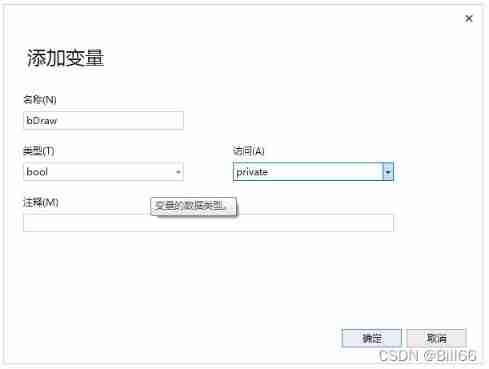
6. stay OnLButtonDown(UINT nFlags, CPoint point) Add... To the message processing function “case 2:” The corresponding code of is as follows :
void CFileDialogTestView::OnLButtonDown(UINT nFlags, CPoint point)
{
	// TODO:  Add message handler code and / Or call the default value
	CClientDC dc(this);
	switch(drawType)
	{
	case 1:
		TEXTMETRIC tm;
		dc.GetTextMetrics(&tm);
		CreateSolidCaret(tm.tmAveCharWidth / 8, tm.tmHeight);
		//CreateSolidCaret(mLogfont.lfWidth/8, mLogfont.lfHeight);
		SetCaretPos(point);
		ShowCaret();
		startPoint = point;
		mstr.Empty();
		break;
	case 2:
		startPoint = point;
		break;
	default:
		break;
	}

	CView::OnLButtonDown(nFlags, point);
}7. Add in view class OnMouseMove(UINT nFlags, CPoint point) Message handler , The code is as follows :
void CFileDialogTestView::OnMouseMove(UINT nFlags, CPoint point)
{
	// TODO:  Add message handler code and / Or call the default value
	if (bDraw == true)
	{
		CClientDC dc(this);
		INT oldMode = dc.SetROP2(R2_NOT);
		dc.MoveTo(startPoint);
		dc.LineTo(endPoint);
		endPoint = point;
		dc.MoveTo(startPoint);
		dc.LineTo(endPoint);
		dc.SetROP2(oldMode);

	}
	CView::OnMouseMove(nFlags, point);
}
8. Add in view class OnLButtonUp(UINT nFlags, CPoint point) Message handler , The code is as follows :
void CFileDialogTestView::OnLButtonUp(UINT nFlags, CPoint point)
{
	// TODO:  Add message handler code and / Or call the default value
	if(drawType==2)
		drawType = 0;
	if (bDraw)
		bDraw = false;
	CClientDC dc(this);
	INT oldMode = dc.SetROP2(R2_NOT);
	dc.MoveTo(startPoint);
	dc.LineTo(endPoint);
	dc.SetROP2(oldMode);
	CPen pen(PS_SOLID, 1, mSelColor);
	CPen* pOldPen = dc.SelectObject(&pen);
	dc.MoveTo(startPoint);
	dc.LineTo(endPoint);
	dc.SelectObject(pOldPen);
	CView::OnLButtonUp(nFlags, point);
}9. Press Ctrl+F5 Run the program , And then click SetColor menu

Set the color , as follows :

10. Click on “Draw Line” menu , Draw a straight line , give the result as follows :

The color of the drawn line is visible , That is, the set color .
边栏推荐
- Smart Panel wifi Linkage Technology, esp32 wireless chip module, Internet of Things WiFi Communication Application
- Double objective learning materials sorting
- Install/Remove of the Service Denied!
- [C language] analysis of variable essence
- SQL Safe Backup显示器和缩放字体的支持
- R语言plotly可视化:可视化回归模型实际值和回归预测值的散点图分析回归模型的预测效能、区分训练集和测试集、一个好的模型大部分的散点在对角线附近、添加边缘直方图以快速诊断模型可能存在的任何预测偏差
- E-commerce middle office system architecture
- 成功解决:TypeError: the JSON object must be str, bytes or bytearray, not dict
- R language plot visualization: use plot to visualize simple regression model linear regression plots
- 【C语言】变量本质分析
猜你喜欢

【C语言】变量本质分析

疫情数据分析平台工作报告【2】接口API

基于SSH实现健身俱乐部管理系统
![Epidemic data analysis platform work report [3] website deployment](/img/94/04af8ab245a0162219cd90b2ab96b8.png)
Epidemic data analysis platform work report [3] website deployment

Drop down menu dropdown yyds dry inventory of semantic UI
疫情数据分析平台工作报告【1】数据采集

DS18B20数字温度计 (一) 电气特性, 供电和接线方式

WiFi module scheme of the wireless Internet of things, esp32-s3 chip technology, helps the equipment to be intelligent

leetcode797. 所有可能的路径(中等)

图解 Apache SkyWalking UI 的使用
随机推荐
【C语言】程序的内存四区模型
LINQ group by and select series - LINQ group by and select collection
调用提醒事项
关于线程池需要注意的几点
疫情数据分析平台工作报告【6.5】疫情地图
DS18B20 digital thermometer (I) electrical characteristics, power supply and wiring mode
Recommended system cleaning tools, cocktail Download
[fpga+fft] design and implementation of FFT frequency meter based on FPGA
[fpga+gps receiver] detailed design introduction of dual frequency GPS receiver based on FPGA
Webpack--- optimization_ cache
Cryptology Summary
Unity脚本出現missing時的解决方法
mysqld: Can‘t create directory ‘D: oftinstall\mysql57 (Errcode: 2 - No such file or directory)
【mysql】mysql安装
Cloud native overview
19. Optimized database query of tornado project
WiFi module scheme of the wireless Internet of things, esp32-s3 chip technology, helps the equipment to be intelligent
PHP and JS remove all spaces
後續版本是否會支持代碼塊搜索高亮顯示
[data recovery in North Asia] data recovery in which the logical volume of the server is changed and the file system is damaged due to system reinstallation