当前位置:网站首页>Learn online case practice
Learn online case practice
2022-07-01 23:46:00 【Ruoshui CJJ】
Learn online case practice
1. Layout ideas
In order to improve the efficiency of web page production , The layout usually has the following overall ideas :
- 1. You must determine the layout center of the page ( Visual area ), Through measurement, we can know .
- 2. Analyze the line module in the page , And the column modules in each row module . The first rule of page layout .
- 3. Column modules in a row are often floating , First determine the size of each column, and then determine the position of the column . Page layout second . Rules
- 4. Make HTML structure . Follow the prior structure , The principle of style after . Structure is always the most important .
- 5. therefore , First clarify the layout structure , Writing code again is particularly important .
2. Head making
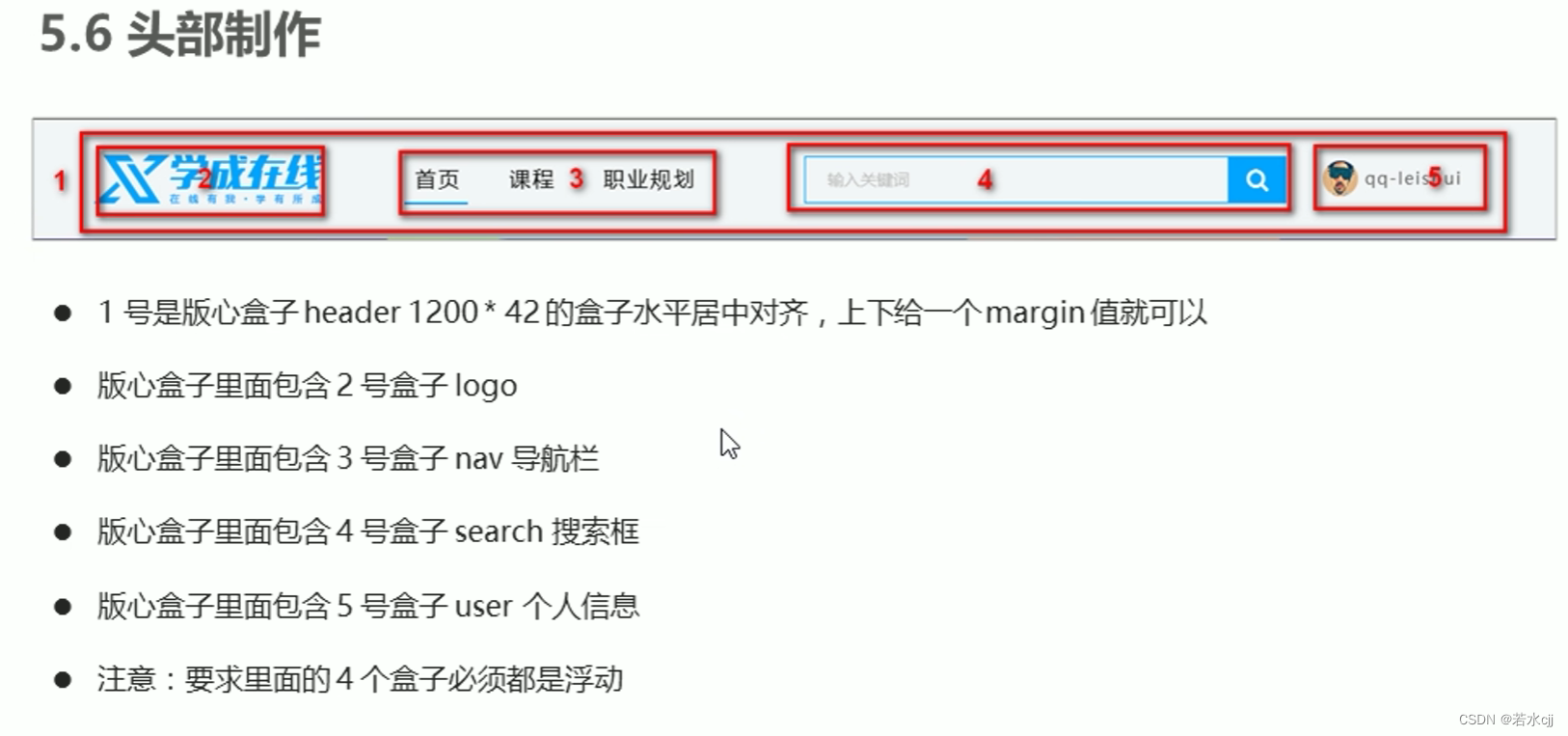
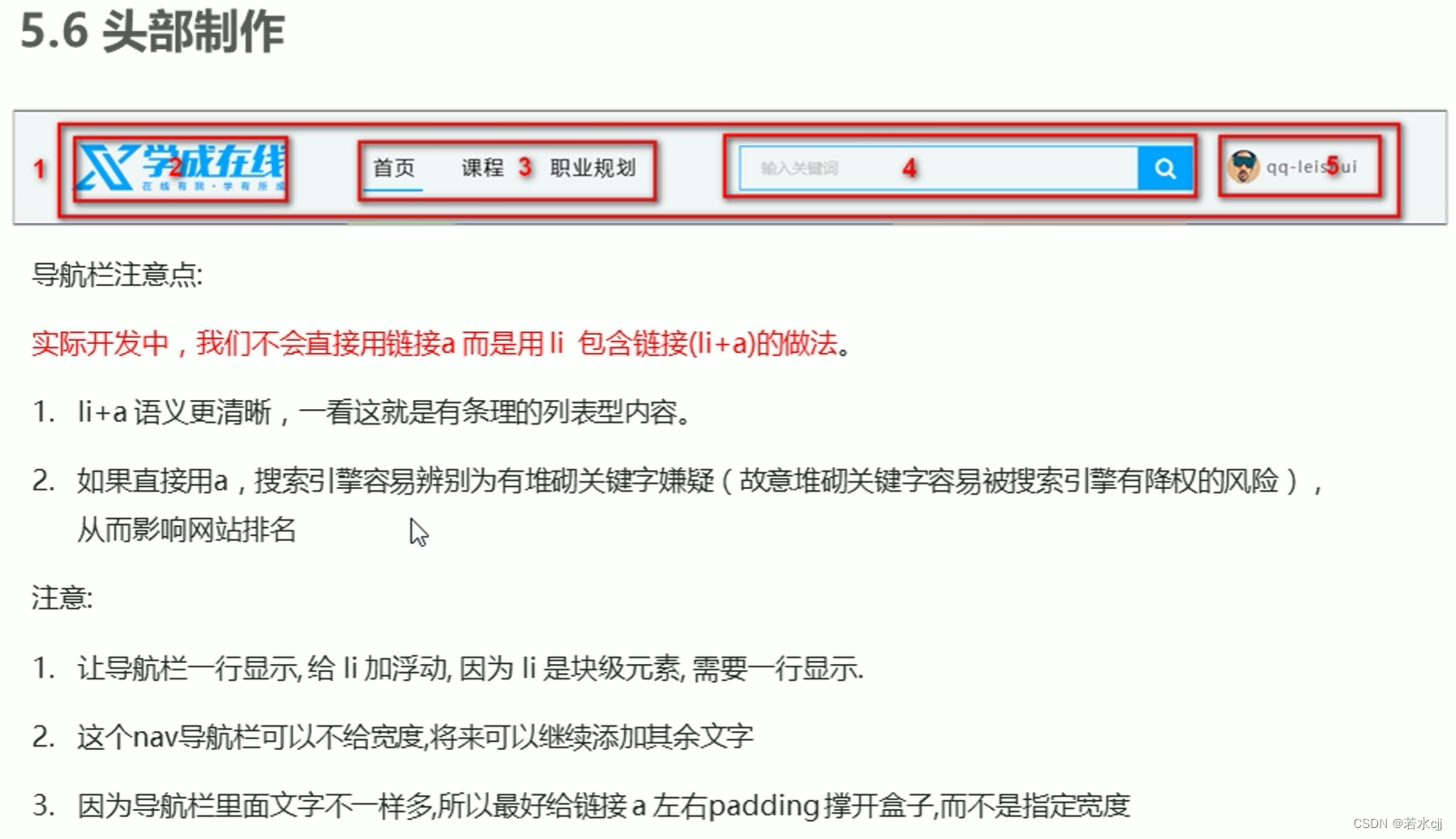
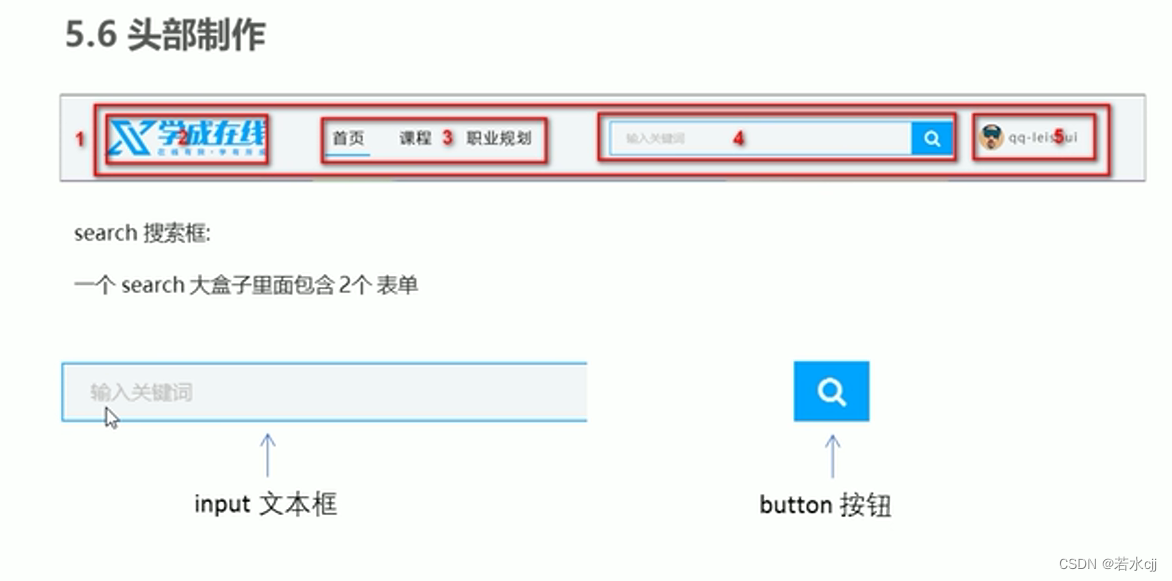
<!DOCTYPE html>
<html lang="en">
<head>
    <meta charset="UTF-8">
    <meta http-equiv="X-UA-Compatible" content="IE=edge">
    <meta name="viewport" content="width=device-width, initial-scale=1.0">
    <title> Learning online </title>
    <link rel="stylesheet" href="style2.css">
</head>
<body>
    <!-- header Start  -->
    <div class="header w">  <!-- The head also needs to be centered , So apply w style  -->
        <!-- logo -->
        <div class="logo">
            <img src="images/ Learning online .png" alt=" Learning online logo">
        </div>
        <!--  Navigation bar section  -->
        <div class="nav">
            <ul>
                <li><a href="#"> home page </a></li>
                <li><a href="#"> Course </a></li>
                <li><a href="#"> Occupation planning </a></li>
            </ul>
        </div>
        <!-- search part  -->
        <div class="search">
            <input type="text" value=" Please enter keywords ">
            <button><img src="images/fa-search.png" alt=""></button>
        </div>
        <!-- user part  -->
        <div class="user">
            <img src="images/touxiang.png" alt="">
            qq-lilei
        </div>
    </div>
    <!-- header end  -->
</body>
</html>
* {

    margin: 0;
    padding: 0;
}
/*  Set the style of the applied layout , Fixed width , centered  */
.w {

    width: 1200px;
    margin: 0 auto;
}
body {

    /* background-color: #f3f5f7; */
}
/*  Yes li and a Set global style  */
li {

    list-style: none;
}
a {

    text-decoration: none;
}
/*  Head style start  */
.header {

    height: 42px;
    /* background-color: #fff; */
    /*  Because the header element also applies w and header style ,  Of the latter margin It will cover the former margin, therefore   Even if you don't need margin, Also set it to auto*/
    margin: 30px auto;
}
/* logo style  */
.logo {

    float: left;
    width: 195px;
    height: 42px;
}
/*  The navigation bar nav style  */
.nav {

    float: left;
    margin-left: 60px;
}
.nav ul li {

    float: left;
    margin: 0 15px;
}
.nav ul li a {

    /* a It's an in-line element , To specify the width and height , You need to turn it into a block element  */
    display: block;
    height: 42px;
    line-height: 42px;
    padding: 0 10px;
    font-size: 18px;
    color: #050505;
}
.nav ul li a:hover {

    border-bottom: 2px solid #00a4ff;
    color: #00a4ff;
}
/* search part  */
.search {

    float: left;
    width: 412px;
    height: 42px;
    margin-left: 50px;
}
.search input {

    float: left;
    width: 345px;
    height: 40px;
    border: 1px solid #00a4ff;
    border-right: 0; /*  Remove the right border  */
    /*  to input Medium value Add style  */
    color: #bfbfbf;
    font-size: 14px;
    /*  Due to input The width is specified , So specify padding It's going to hold up input, take width Subtract it  */
    padding-left: 15px;
}
.search button {

    float: left;
    width: 50px;
    height: 42px;
    /*  Remove its default border  */
    border: none;
    background-color: #00a4ff;
}
/* user */
.user {

    float: right;
    margin-right: 30px;
    font-size: 14px;
    color: #666;
}
.user img {

    height: 42px;
    line-height: 42px;
}
/*  End of head style  */
3. banner Make

4. Recommended small module production

<!DOCTYPE html>
<html lang="en">
<head>
    <meta charset="UTF-8">
    <meta http-equiv="X-UA-Compatible" content="IE=edge">
    <meta name="viewport" content="width=device-width, initial-scale=1.0">
    <title> Learning online </title>
    <link rel="stylesheet" href="style2.css">
</head>
<body>
    <!-- header Start  -->
    <div class="header w">  <!-- The head also needs to be centered , So apply w style  -->
        <!-- logo -->
        <div class="logo">
            <img src="images/ Learning online .png" alt=" Learning online logo">
        </div>
        <!--  Navigation bar section  -->
        <div class="nav">
            <ul>
                <li><a href="#"> home page </a></li>
                <li><a href="#"> Course </a></li>
                <li><a href="#"> Occupation planning </a></li>
            </ul>
        </div>
        <!-- search part  -->
        <div class="search">
            <input type="text" value=" Please enter keywords ">
            <button><img src="images/fa-search.png" alt=""></button>
        </div>
        <!-- user part  -->
        <div class="user">
            <img src="images/touxiang.png" alt="">
            qq-lilei
        </div>
    </div>
    <!-- header end  -->

    <!-- banner Start  -->
    <div class="banner">
        <div class="w">
            <div class="subnav">
                <ul>
                    <li><a href="#"> The front-end development  <span> > </span></a></li>
                    <li><a href="#"> The front-end development  <span> > </span></a></li>
                    <li><a href="#"> The front-end development  <span> > </span></a></li>
                    <li><a href="#"> The front-end development  <span> > </span></a></li>
                    <li><a href="#"> The front-end development  <span> > </span></a></li>
                    <li><a href="#"> The front-end development  <span> > </span></a></li>
                    <li><a href="#"> The front-end development  <span> > </span></a></li>
                    <li><a href="#"> The front-end development  <span> > </span></a></li>
                    <li><a href="#"> The front-end development  <span> > </span></a></li>
                </ul>
            </div>
            <div class="course">
                <h2> My curriculum </h2>
                <div class="bd">
                    <ul>
                        <li>
                            <h4> Continue to learn   Programming language design </h4>
                            <p> Is learning - Use object </p>
                        </li>
                        <li>
                            <h4> Continue to learn   Programming language design </h4>
                            <p> Is learning - Use object </p>
                        </li>
                        <li>
                            <h4> Continue to learn   Programming language design </h4>
                            <p> Is learning - Use object </p>
                        </li>
                    </ul>
                    <a href="#" class="more"> All courses </a>
                </div>
            </div>
        </div>
    </div>
    <!-- banner end  -->
    <!--  The boutique recommendation module starts  -->
    <div class="goods w">
        <h3> Excellent recommendation </h3>
        <ul>
            <li><a href="#">JQuary</a></li>
            <li><a href="#">Spark</a></li>
            <li><a href="#">MySQL</a></li>
            <li><a href="#">JQuary</a></li>
            <li><a href="#">JavaWeb</a></li>
            <li><a href="#">Java</a></li>
        </ul>
        <a href="#" class="mod"> Modify interest </a>
    </div>
    <!--  The boutique recommendation module ends  -->
</body>
</html>
* {

    margin: 0;
    padding: 0;
}
/*  Set the style of the applied layout , Fixed width , centered  */
.w {

    width: 1200px;
    margin: 0 auto;
}
body {

    /* background-color: #f3f5f7; */
}
/*  Yes li and a Set global style  */
li {

    list-style: none;
}
a {

    text-decoration: none;
}
/*  Head style start  */
.header {

    height: 42px;
    /* background-color: #fff; */
    /*  Because the header element also applies w and header style ,  Of the latter margin It will cover the former margin, therefore   Even if you don't need margin, Also set it to auto*/
    margin: 30px auto;
}
/* logo style  */
.logo {

    float: left;
    width: 195px;
    height: 42px;
}
/*  The navigation bar nav style  */
.nav {

    float: left;
    margin-left: 60px;
}
.nav ul li {

    float: left;
    margin: 0 15px;
}
.nav ul li a {

    /* a It's an in-line element , To specify the width and height , You need to turn it into a block element  */
    display: block;
    height: 42px;
    line-height: 42px;
    padding: 0 10px;
    font-size: 18px;
    color: #050505;
}
.nav ul li a:hover {

    border-bottom: 2px solid #00a4ff;
    color: #00a4ff;
}
/* search part  */
.search {

    float: left;
    width: 412px;
    height: 42px;
    margin-left: 50px;
}
.search input {

    float: left;
    width: 345px;
    height: 40px;
    border: 1px solid #00a4ff;
    border-right: 0; /*  Remove the right border  */
    /*  to input Medium value Add style  */
    color: #bfbfbf;
    font-size: 14px;
    /*  Due to input The width is specified , So specify padding It's going to hold up input, take width Subtract it  */
    padding-left: 15px;
}
.search button {

    float: left;
    width: 50px;
    height: 42px;
    /*  Remove its default border  */
    border: none;
    background-color: #00a4ff;
}
/* user */
.user {

    float: right;
    margin-right: 30px;
    font-size: 14px;
    color: #666;
}
.user img {

    height: 42px;
    line-height: 42px;
}
/*  End of head style  */

/* banner Start  */
.banner {

    height: 420px;
    background-color: #1c036c;
}
.banner .w {

    height: 420px;
    background-color: pink;
    /*  Set the background image not to repeat , Top and center  */
    background: url(images/banner2.png) no-repeat top center;
}
/*  Left navigation module  */
.banner .w .subnav {

    float: left;
    height: 420px;
    width: 190px;
    background: rgba(0, 0, 0, .3);
}
.banner .subnav ul li {

    height: 45px;
    line-height: 45px;
    margin: 0 20px;
}
.banner ul li a {

    font-size: 14px;
    color: #fff;
}
.banner ul li span {

    float: right;
}
.banner ul li a:hover {

    color: #00a4ff;
}
/*  Course module on the right  */
.banner .w .course {

    float: right;
    height: 300px;
    width: 230px;
    /* background-color: #fff; */
    /*  Floating boxes have no problem of merging outer margins  */
    margin-top: 50px;
}
.banner .w .course h2 {

    height: 48px;
    line-height: 48px;
    font-size: 18px;
    background-color: #9bceea;
    text-align: center;
}
.course .bd {

    height: 262px;
    padding: 0 20px;
    background: rgba(0, 0, 0, .3);
}
.course .bd ul li {

    padding: 16px 0 15px 0;
    border-bottom: 1px solid #ccc;
}
.course .bd h4 {

    font-size: 16px;
    color: #4e4e4e;
}
.course .bd p {

    font-size: 12px;
    color: #a5a5a5;
}
.course .more {

    display: block;
    height: 38px;
    border: 1px solid #00a4ff;
    line-height: 38px;
    text-align: center;
    font-size: 16px;
    margin-top: 5px;
}
/* banner end  */
/*  The boutique recommendation module starts  */
.goods {

    height: 60px;
    margin-top: 10px;
    line-height: 60px;
    box-shadow: 0px 2px 5px rgba(0, 0, 0, .3);
}
.goods h3 {

    float: left;
    font-size: 16px;
    margin: 0 35px;
    color: #00a4ff;
}
.goods>ul {

    float: left;
}
.goods>ul>li {

    float: left;

}
.goods>ul>li>a {

    padding: 0 30px;
    font-size: 16px;
    color: #050505;
    border-left: 1px solid #666;
}
.goods .mod {

    float: right;
    margin-right: 35px;
    font-size: 14px;
    color: #00a4ff;
}
/*  The boutique recommendation module ends  */
5. It is recommended to make large modules


6. Bottom module fabrication

Complete code
<!DOCTYPE html>
<html lang="en">
<head>
    <meta charset="UTF-8">
    <meta http-equiv="X-UA-Compatible" content="IE=edge">
    <meta name="viewport" content="width=device-width, initial-scale=1.0">
    <title> Learning online </title>
    <link rel="stylesheet" href="style2.css">
</head>
<body>
    <!-- header Start  -->
    <div class="header w">  <!-- The head also needs to be centered , So apply w style  -->
        <!-- logo -->
        <div class="logo">
            <img src="images/ Learning online .png" alt=" Learning online logo">
        </div>
        <!--  Navigation bar section  -->
        <div class="nav">
            <ul>
                <li><a href="#"> home page </a></li>
                <li><a href="#"> Course </a></li>
                <li><a href="#"> Occupation planning </a></li>
            </ul>
        </div>
        <!-- search part  -->
        <div class="search">
            <input type="text" value=" Please enter keywords ">
            <button><img src="images/fa-search.png" alt=""></button>
        </div>
        <!-- user part  -->
        <div class="user">
            <img src="images/touxiang.png" alt="">
            qq-lilei
        </div>
    </div>
    <!-- header end  -->

    <!-- banner Start  -->
    <div class="banner">
        <div class="w">
            <div class="subnav">
                <ul>
                    <li><a href="#"> The front-end development  <span> > </span></a></li>
                    <li><a href="#"> The front-end development  <span> > </span></a></li>
                    <li><a href="#"> The front-end development  <span> > </span></a></li>
                    <li><a href="#"> The front-end development  <span> > </span></a></li>
                    <li><a href="#"> The front-end development  <span> > </span></a></li>
                    <li><a href="#"> The front-end development  <span> > </span></a></li>
                    <li><a href="#"> The front-end development  <span> > </span></a></li>
                    <li><a href="#"> The front-end development  <span> > </span></a></li>
                    <li><a href="#"> The front-end development  <span> > </span></a></li>
                </ul>
            </div>
            <div class="course">
                <h2> My curriculum </h2>
                <div class="bd">
                    <ul>
                        <li>
                            <h4> Continue to learn   Programming language design </h4>
                            <p> Is learning - Use object </p>
                        </li>
                        <li>
                            <h4> Continue to learn   Programming language design </h4>
                            <p> Is learning - Use object </p>
                        </li>
                        <li>
                            <h4> Continue to learn   Programming language design </h4>
                            <p> Is learning - Use object </p>
                        </li>
                    </ul>
                    <a href="#" class="more"> All courses </a>
                </div>
            </div>
        </div>
    </div>
    <!-- banner end  -->
    <!--  The boutique recommendation module starts  -->
    <div class="goods w">
        <h3> Excellent recommendation </h3>
        <ul>
            <li><a href="#">JQuary</a></li>
            <li><a href="#">Spark</a></li>
            <li><a href="#">MySQL</a></li>
            <li><a href="#">JQuary</a></li>
            <li><a href="#">JavaWeb</a></li>
            <li><a href="#">Java</a></li>
        </ul>
        <a href="#" class="mod"> Modify interest </a>
    </div>
    <!--  The boutique recommendation module ends  -->
    <!-- box The core content begins  -->
    <div class="box w">
        <div class="box-hd">
            <h3> Excellent recommendation </h3>
            <a href="#"> Check all </a>
        </div>
        <div class="box-bd">
            <ul class="clearfix">
                <li>
                    <img src="images/ Excellent recommendation .png" alt="">
                    <div class="info">
                        Think PHP 5.0  Blog system actual combat project drill
                        <p><span> senior </span>   •  1125 People are learning </p>
                    </div>
                </li>
                <li>
                    <img src="images/ Excellent recommendation .png" alt="">
                    <div class="info">
                        Think PHP 5.0  Blog system actual combat project drill
                        <p><span> senior </span>   •  1125 People are learning </p>
                    </div>
                </li>
                <li>
                    <img src="images/ Excellent recommendation .png" alt="">
                    <div class="info">
                        Think PHP 5.0  Blog system actual combat project drill
                        <p><span> senior </span>   •  1125 People are learning </p>
                    </div>
                </li>
                <li>
                    <img src="images/ Excellent recommendation .png" alt="">
                    <div class="info">
                        Think PHP 5.0  Blog system actual combat project drill
                        <p><span> senior </span>   •  1125 People are learning </p>
                    </div>
                </li>
                <li>
                    <img src="images/ Excellent recommendation .png" alt="">
                    <div class="info">
                        Think PHP 5.0  Blog system actual combat project drill
                        <p><span> senior </span>   •  1125 People are learning </p>
                    </div>
                </li>
                <li>
                    <img src="images/ Excellent recommendation .png" alt="">
                    <div class="info">
                        Think PHP 5.0  Blog system actual combat project drill
                        <p><span> senior </span>   •  1125 People are learning </p>
                    </div>
                </li>
                <li>
                    <img src="images/ Excellent recommendation .png" alt="">
                    <div class="info">
                        Think PHP 5.0  Blog system actual combat project drill
                        <p><span> senior </span>   •  1125 People are learning </p>
                    </div>
                </li>
                <li>
                    <img src="images/ Excellent recommendation .png" alt="">
                    <div class="info">
                        Think PHP 5.0  Blog system actual combat project drill
                        <p><span> senior </span>   •  1125 People are learning </p>
                    </div>
                </li>
                <li>
                    <img src="images/ Excellent recommendation .png" alt="">
                    <div class="info">
                        Think PHP 5.0  Blog system actual combat project drill
                        <p><span> senior </span>   •  1125 People are learning </p>
                    </div>
                </li>
                <li>
                    <img src="images/ Excellent recommendation .png" alt="">
                    <div class="info">
                        Think PHP 5.0  Blog system actual combat project drill
                        <p><span> senior </span>   •  1125 People are learning </p>
                    </div>
                </li>
            </ul>
        </div>
    </div>
    <!-- box The core content ends  -->
    <!-- footer Part of it  -->
    <div class="footer">
        <div class="w">
            <div class="copyright">
                <img src="images/ Learning online .png" alt="">
                <p> Xuecheng online is committed to popularizing the best education in China. It cooperates with China's top universities and institutions to provide online courses .<br>
                     2017 year XTCG Inc. All rights reserved .- Shanghai ICP To prepare 15025210 Number </p>
                <a href="#"> download APP</a>
            </div>
            <div class="links">
                    <dl>
                        <dt> About xuecheng.com </dt>
                        <dd> About </dd>
                        <dd> Management team </dd>
                        <dd> Job opportunities </dd>
                        <dd> Customer service </dd>
                        <dd> help </dd>
                    </dl>
                    <dl>
                        <dt> About xuecheng.com </dt>
                        <dd> About </dd>
                        <dd> Management team </dd>
                        <dd> Job opportunities </dd>
                        <dd> Customer service </dd>
                        <dd> help </dd>
                    </dl>
                    <dl>
                        <dt> About xuecheng.com </dt>
                        <dd> About </dd>
                        <dd> Management team </dd>
                        <dd> Job opportunities </dd>
                        <dd> Customer service </dd>
                        <dd> help </dd>
                    </dl>
            </div>
        </div>
    </div>
    <!-- footer Partial end  -->
</body>
</html>
* {

    margin: 0;
    padding: 0;
}
/*  Set the style of the applied layout , Fixed width , centered  */
.w {

    width: 1200px;
    margin: 0 auto;
}
.clearfix::before,
.clearfix::after{

    content: '';
    display: table;
    clear: both;
}

body {

    /* background-color: #f3f5f7; */
}
/*  Yes li and a Set global style  */
li {

    list-style: none;
}
a {

    text-decoration: none;
}
/*  Head style start  */
.header {

    height: 42px;
    /* background-color: #fff; */
    /*  Because the header element also applies w and header style ,  Of the latter margin It will cover the former margin, therefore   Even if you don't need margin, Also set it to auto*/
    margin: 30px auto;
}
/* logo style  */
.logo {

    float: left;
    width: 195px;
    height: 42px;
}
/*  The navigation bar nav style  */
.nav {

    float: left;
    margin-left: 60px;
}
.nav ul li {

    float: left;
    margin: 0 15px;
}
.nav ul li a {

    /* a It's an in-line element , To specify the width and height , You need to turn it into a block element  */
    display: block;
    height: 42px;
    line-height: 42px;
    padding: 0 10px;
    font-size: 18px;
    color: #050505;
}
.nav ul li a:hover {

    border-bottom: 2px solid #00a4ff;
    color: #00a4ff;
}
/* search part  */
.search {

    float: left;
    width: 412px;
    height: 42px;
    margin-left: 50px;
}
.search input {

    float: left;
    width: 345px;
    height: 40px;
    border: 1px solid #00a4ff;
    border-right: 0; /*  Remove the right border  */
    /*  to input Medium value Add style  */
    color: #bfbfbf;
    font-size: 14px;
    /*  Due to input The width is specified , So specify padding It's going to hold up input, take width Subtract it  */
    padding-left: 15px;
}
.search button {

    float: left;
    width: 50px;
    height: 42px;
    /*  Remove its default border  */
    border: none;
    background-color: #00a4ff;
}
/* user */
.user {

    float: right;
    margin-right: 30px;
    font-size: 14px;
    color: #666;
}
.user img {

    height: 42px;
    line-height: 42px;
}
/*  End of head style  */

/* banner Start  */
.banner {

    height: 420px;
    background-color: #1c036c;
}
.banner .w {

    height: 420px;
    background-color: pink;
    /*  Set the background image not to repeat , Top and center  */
    background: url(images/banner2.png) no-repeat top center;
}
/*  Left navigation module  */
.banner .w .subnav {

    float: left;
    height: 420px;
    width: 190px;
    background: rgba(0, 0, 0, .3);
}
.banner .subnav ul li {

    height: 45px;
    line-height: 45px;
    margin: 0 20px;
}
.banner ul li a {

    font-size: 14px;
    color: #fff;
}
.banner ul li span {

    float: right;
}
.banner ul li a:hover {

    color: #00a4ff;
}
/*  Course module on the right  */
.banner .w .course {

    float: right;
    height: 300px;
    width: 230px;
    /* background-color: #fff; */
    /*  Floating boxes have no problem of merging outer margins  */
    margin-top: 50px;
}
.banner .w .course h2 {

    height: 48px;
    line-height: 48px;
    font-size: 18px;
    background-color: #9bceea;
    text-align: center;
}
.course .bd {

    height: 262px;
    padding: 0 20px;
    background: rgba(0, 0, 0, .3);
}
.course .bd ul li {

    padding: 16px 0 15px 0;
    border-bottom: 1px solid #ccc;
}
.course .bd h4 {

    font-size: 16px;
    color: #4e4e4e;
}
.course .bd p {

    font-size: 12px;
    color: #a5a5a5;
}
.course .more {

    display: block;
    height: 38px;
    border: 1px solid #00a4ff;
    line-height: 38px;
    text-align: center;
    font-size: 16px;
    margin-top: 5px;
}
/* banner end  */
/*  The boutique recommendation module starts  */
.goods {

    height: 60px;
    margin-top: 10px;
    /*  The child element inherits the row height of the parent element  */
    line-height: 60px;
    box-shadow: 0px 2px 5px rgba(0, 0, 0, .3);
}
.goods h3 {

    float: left;
    font-size: 16px;
    margin: 0 35px;
    color: #00a4ff;
}
.goods>ul {

    float: left;
}
.goods>ul>li {

    float: left;

}
.goods>ul>li>a {

    padding: 0 30px;
    font-size: 16px;
    color: #050505;
    border-left: 1px solid #666;
}
.goods .mod {

    float: right;
    margin-right: 35px;
    font-size: 14px;
    color: #00a4ff;
}
/*  The boutique recommendation module ends  */

/* box Module start  */
.box .box-hd {

    margin-top: 30px;
    height: 45px;
}
.box .box-hd h3{

    float: left;
    font-size: 20px;
    color: #494949;
}
.box .box-hd a{

    float: right;
    font-size: 12px;
    color: #a5a5a5;
    margin-top: 10px;
    margin-right: 30px;
}
.box .box-bd ul {

    width: 1215px;
}
.box .box-bd ul li {

    float: left;
    width: 228px;
    height: 270px;
    background-color: #fff;
    margin-right: 15px;
    margin-bottom: 15px;
}
.box .box-bd ul li img {

    width: 100%;
}
.box-bd .info {

    margin: 20px 20px 25px 20px ;
    font-size: 14px;
    color: #050505;
}
.box-bd .info p {

    margin-top: 22px;
    font-size: 12px;
    color: #999;
}
.box-bd .info p span {

    color: #ff7c2d;
}
/* box Module end  */

/* footer Part of it  */
.footer {

    height: 415px;
    background-color: #fff;
}
/* footer Partial end  */
.footer .w {

    padding-top: 35px;
}
.footer .copyright {

    float: left;
}
.footer .copyright img{

    margin-bottom: 30px;
}
.footer .copyright p {

    margin-bottom: 15px;
    font-size: 12px;
    color: #666;
}
.footer .copyright a {

    display: block;
    width: 120px;
    height: 35px;
    line-height: 35px;
    text-align: center;
    border: 1px solid #00a4ff;
    font-size: 16px;
}
.footer .links {

    float: right;
    margin-right: 30px;
}
.footer .links dl {

    float: left;
    margin-left: 120px;
}
.footer .links  dt {

    font-size: 16px;
    color: #333;
    margin-bottom:20px ;
}
.footer .links  dd {

    font-size: 12px;
    color: #333;
}
边栏推荐
- Redis RDB snapshot
- 攻防演练复盘
- The best smart home open source system in 2022: introduction to Alexa, home assistant and homekit ecosystem
- [leetcode] length of the last word [58]
- Redis AOF日志
- Notblank and notempty
- 电商RPA机器人,助力品牌电商抢立流量高点
- Using uni simple router, dynamically pass parameters typeerror: cannot convert undefined or null to object
- const // It is a const object...class nullptr_t
- openwrt 开启KV漫游
猜你喜欢

SWT / anr problem - SWT causes kernel fuse deadlock

Concurrentskiplistmap -- principle of table skipping

Multi table operation - one to one, one to many and many to many

使用uni-simple-router,动态传参 TypeError: Cannot convert undefined or null to object

Deep learning | three concepts: epoch, batch, iteration
【ES实战】ES上的安全性运行方式

Kubernetes resource object introduction and common commands (III)

TS initial use, TS type

Material Design组件 - 使用BottomSheet展现扩展内容(一)
- Oui. Env. Fichier XXX, avec constante, mais non spécifié
随机推荐
ADO.NET之SqlDataAdpter对象
golang中的iota
How to solve the image pop-up problem when pycharm calls Matplotlib to draw
软件架构的本质
2022-07-01: at the annual meeting of a company, everyone is going to play a game of giving bonuses. There are a total of N employees. Each employee has construction points and trouble points. They nee
Daily three questions 6.30
哈工大《信息内容安全》课程知识要点和难点
Behind sharing e-commerce: the spirit of CO creation, symbiosis, sharing, CO prosperity and win-win
from pip._internal.cli.main import main ModuleNotFoundError: No module named ‘pip‘
Various global files related to [.Net core] program
[swoole Series 1] what will you learn in the world of swoole?
[untitled]
ARP message header format and request flow
MySQL Replication中并行复制怎么实现
jpa手写sql,用自定义实体类接收
PostgreSQL source code (57) why is the performance gap so large in hot update?
VIM color the catalogue
华为HMS Core携手超图为三维GIS注入新动能
Leetcode (34) -- find the first and last positions of elements in a sorted array
[LeetCode] 最后一个单词的长度【58】