当前位置:网站首页>Linux基础 —— CentOS7 离线安装 MySQL
Linux基础 —— CentOS7 离线安装 MySQL
2022-07-01 22:52:00 【繁依Fanyi】
大数据系列文章:目录

一、安装前准备
1. MySQL rpm 包准备
① 打开 MySQL 下载页面,选择自己想要的版本即可
- MySQL 下载页面链接:https://dev.mysql.com/downloads/mysql/
- 阿里云 MySQL 镜像(推荐):https://mirrors.aliyun.com/mysql/?spm=a2c6h.13651104.0.0.712126b0xBBqsR

② 找到自己想要安装的版本,点击下载即可。

2. CentOS7 环境准备
详细安装方法可见下文:
| 内容 | 链接 |
|---|---|
| CentOS 安装 | 大数据环境搭建 —— CentOS 安装 |
3. XShell 与 Xftp
白嫖过程可见下文:
| 内容 | 链接 |
|---|---|
| 工具获取 — XShell | Linux基础 —— XShell 免费获取指南 |
二、开始安装
1. 卸载 MySQL
为了保险起见,防止之前安装过的 MySQL 与现在的 MySQL 产生冲突,就先卸载一遍 MySQL。
① 查看 MySQL 依赖
rpm -qa | grep mysql
如果找到什么,要进行下一步的卸载,如果没有,就不用了。

② 卸载 MySQL
rpm -e --nodeps `rpm -qa | grep mysql`
2. 发送 MySQL 安装包到节点主机上
① 建立 ftp 连接
这里使用 sftp 协议将文件传送到节点上,打开 xftp ,填写信息,建立链接。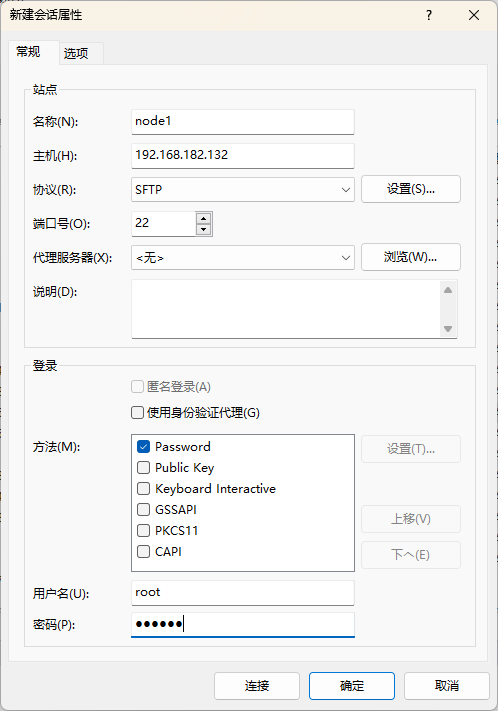
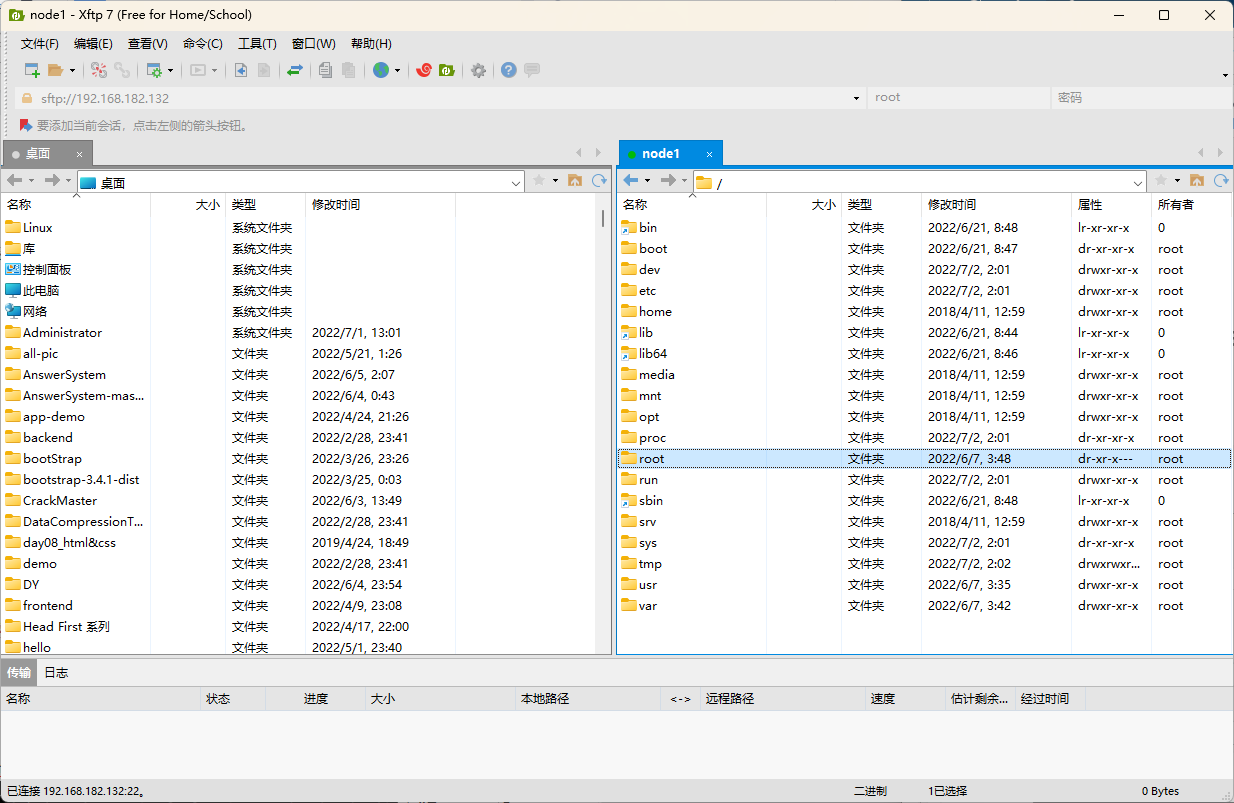
② 发送安装包文件
将 MySQL 安装包拖入到想要放入的目录即可。
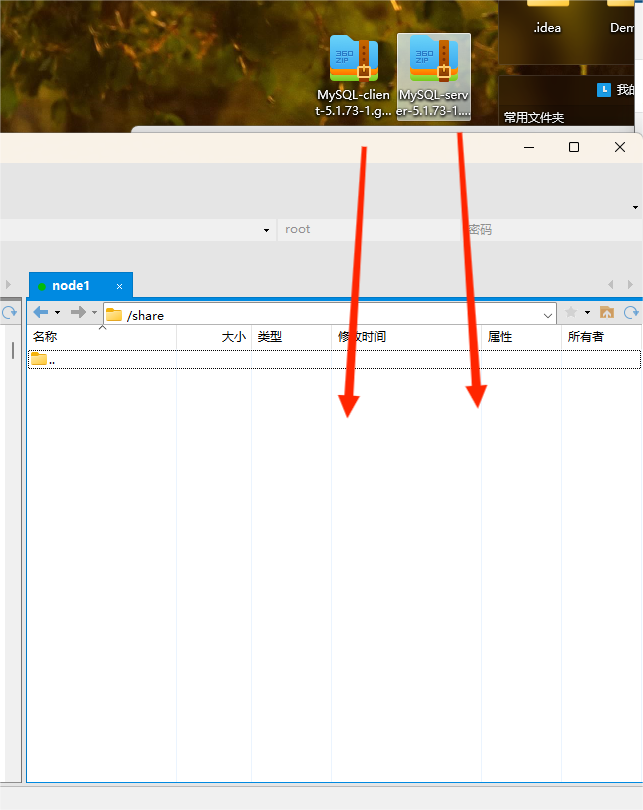
3. 安装 MySQL 安装包
cd 进入安装目录,安装 MySQL 安装包。
# rpm -ivh + 包名

rpm -ivh MySQL-server-5.1.73-1.glibc23.x86_64.rpm
rpm -ivh MySQL-client-5.1.73-1.glibc23.x86_64.rpm
三、简单配置
1. 配置开机启动
service mysql start

chkconfig mysql on
2. 修改 MySQL 密码
由于这里安装的是 5.6 以下版本,下面的操作只对 5.6 以下版本可行
① 输入 mysql 进入 MySQL
mysql
② 操作数据库修改密码
use mysql;	# 切换数据库

user set password=password('123456') where user='root' and host='localhost';	# 修改密码为 123456

flush privileges	# 配置生效

exit	#退出 MySQL
3. 配置允许远程访问
use mysql;	# 切换数据库

update user set host = '%' where user = 'root';	# 配置允许远程主机访问 root

flush privileges	# 配置生效
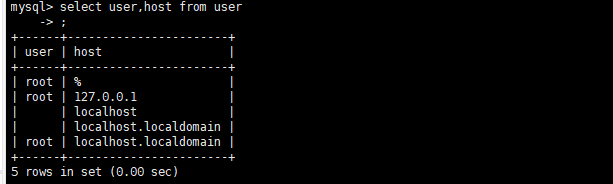
如果报错可以忽略,再次查询 user 表,会发现 % 是被添加进去的。

边栏推荐
- Summary of "performance testing" of software testing, novice will know the knowledge points on the road
- Cisco test -- the concept and configuration test of routing
- Win 10 mstsc connect RemoteApp
- Matplotlib常用设置
- window10安装wsl(一)(WslRegisterDistribution ERROR)
- mt管理器测试滑雪大冒险
- dat.GUI
- 常见的二十种软件测试方法详解(史上最全)
- win 10 mstsc连接 RemoteApp
- What is the mosaic tailgate?
猜你喜欢
![[kotlin third party] coil koltin collaboration picture loading library coil glide like picture loading third party](/img/ad/dcb993c3e1e79d2c3663f031dfd1b3.png)
[kotlin third party] coil koltin collaboration picture loading library coil glide like picture loading third party

Redis~02 cache: how to ensure data consistency in MySQL and redis when updating data?

RPA: Bank digitalization, business process automation "a small step", and loan review efficiency "a big step"
Three development trends of enterprise application from the perspective of the third technological revolution

CKS CKA CKAD 将终端更改为远程桌面
![Jielizhi, production line assembly link [chapter]](/img/5f/9ea7fd3b93df1fd3ecbfc1b669c831.png)
Jielizhi, production line assembly link [chapter]

CKS CKA CKAD 将终端更改为远程桌面
Cisco -- an external tool for WAN's concept examination

Yoga27 multidimensional all-in-one computer with excellent appearance and high-end configuration
![Jielizhi Bluetooth headset quality control and production skills [chapter]](/img/ad/28e7461f8c5dc5c54a3f4da0c111ac.png)
Jielizhi Bluetooth headset quality control and production skills [chapter]
随机推荐
Force buckle 710 Random numbers in the blacklist
Redis数据类型和应用场景
2022 R1 fast opening pressure vessel operation test questions and answers
[micro service sentinel] @sentinelresource details
2022 examination questions and online simulation examination for safety management personnel of hazardous chemical business units
[applet] realize the left and right [sliding] list through the scroll view component
SWT/ANR问题--SWT 导致 low memory killer(LMK)
Jielizhi Bluetooth headset quality control and production skills [chapter]
Advanced skills of testers: a guide to the application of unit test reports
mysql binlog的清理
【微服务|Sentinel】SentinelResourceAspect详解
Aaai22 | structural tagging and interaction modeling: a "slim" network for graph classification
什么是马赛克?
【微服务|Sentinel】@SentinelResource详解
You probably haven't noticed the very important testing strategy in your work
[micro service sentinel] sentinel integrates openfeign
每日三题 6.30
What is the mosaic tailgate?
毕业季,既是告别,也是新的开始
众昂矿业:发展以氟化工为主的特色化工产业具有先天优势