当前位置:网站首页>Dlib+opencv library for fatigue detection
Dlib+opencv library for fatigue detection
2022-07-01 19:20:00 【Keep_ Trying_ Go】
List of articles
- 1. Key point detection
- 2. The core of algorithm implementation
- 3. Algorithm implementation
- (1) Key point set of face
- (2) Load face detection database and face key point detection database
- (3) Draw the frame of face detection
- (4) Transform the coordinates of the detected face key points
- (5) Calculate the Euclidean distance
- (6) Calculate the aspect ratio of the eye
- (7) Draw points for face keys
- (8) Set relevant thresholds
- (9) Real time face key point detection
- (10) The overall code
1. Key point detection
https://mydreamambitious.blog.csdn.net/article/details/125542337
2. The core of algorithm implementation
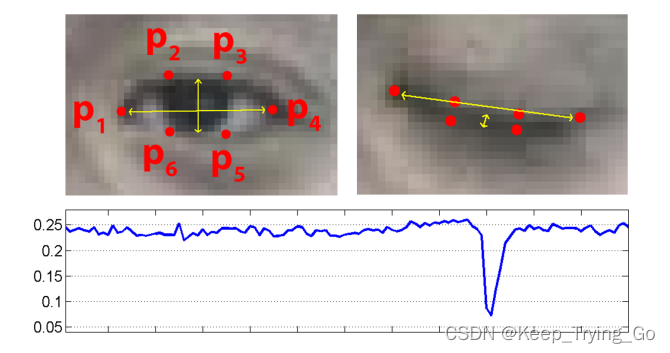
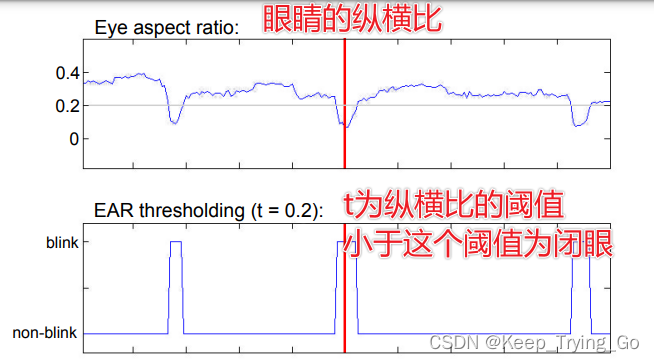

The aspect ratio represents whether to blink ;p1,p2,p3,p4,p5,p6 Coordinates of key points for human eyes ,||p2-p6|| Indicates the Euclidean distance between two key points . In fact, you only need to understand the above figure and formula .
Address of thesis
http://vision.fe.uni-lj.si/cvww2016/proceedings/papers/05.pdf
Detailed explanation of reference theory
https://blog.csdn.net/uncle_ll/article/details/117999920
3. Algorithm implementation
notes : This code looks a little too much ( complex ), But readers should not “ Fear ”, This idea is very clear , As long as you step by step, it is easy to understand the implementation process ( It's not difficult to understand. ).
(1) Key point set of face
# about 68 Test points , Arrange several key points of the face in order , For later traversal
shape_predictor_68_face_landmark=OrderedDict([
    ('mouth',(48,68)),
    ('right_eyebrow',(17,22)),
    ('left_eye_brow',(22,27)),
    ('right_eye',(36,42)),
    ('left_eye',(42,48)),
    ('nose',(27,36)),
    ('jaw',(0,17))
])
(2) Load face detection database and face key point detection database
#  Load face detection and key point location
#http://dlib.net/python/index.html#dlib_pybind11.get_frontal_face_detector
detector = dlib.get_frontal_face_detector()
#http://dlib.net/python/index.html#dlib_pybind11.shape_predictor
criticPoints = dlib.shape_predictor("shape_predictor_68_face_landmarks.dat")
(3) Draw the frame of face detection
# Draw face draw rectangle
def drawRectangle(detected,frame):
    margin = 0.2
    img_h,img_w,_=np.shape(frame)
    if len(detected) > 0:
        for i, locate in enumerate(detected):
            x1, y1, x2, y2, w, h = locate.left(), locate.top(), locate.right() + 1, locate.bottom() + 1, locate.width(), locate.height()

            xw1 = max(int(x1 - margin * w), 0)
            yw1 = max(int(y1 - margin * h), 0)
            xw2 = min(int(x2 + margin * w), img_w - 1)
            yw2 = min(int(y2 + margin * h), img_h - 1)

            cv2.rectangle(frame, (x1, y1), (x2, y2), (0, 255, 0), 2)

            face = frame[yw1:yw2 + 1, xw1:xw2 + 1, :]
            cv2.putText(frame, 'Person', (locate.left(), locate.top() - 10),
            cv2.FONT_HERSHEY_SIMPLEX, 1.2, (255, 0, 0), 3)
    return frame
(4) Transform the coordinates of the detected face key points
# The face key point coordinates obtained after detection are transformed
def predict2Np(predict):
    #  establish 68*2 Two dimensional empty array of keys [(x1,y1),(x2,y2)……]
    dims=np.zeros(shape=(predict.num_parts,2),dtype=np.int)
    # Traverse each key point of the face to obtain two-dimensional coordinates
    length=predict.num_parts
    for i in range(0,length):
        dims[i]=(predict.part(i).x,predict.part(i).y)
    return dims
(5) Calculate the Euclidean distance
# Calculate the Euclidean distance
def Euclidean(PointA,PointB):
    x=math.fabs(PointA[0]-PointB[0])
    y=math.fabs(PointA[1]-PointB[1])
    Ear=math.sqrt(x*x+y*y)
    return Ear
(6) Calculate the aspect ratio of the eye
# Calculate the distance of blinking
def ComputeCloseEye(left_eye):
    # Calculation P2 And P6,P3 And P5
    P1=Euclidean(left_eye[1],left_eye[5])
    P2=Euclidean(left_eye[2],left_eye[4])
    # Calculation P1 And P4
    P3=Euclidean(left_eye[0],left_eye[3])
    # Calculation P
    P=(P1+P2)/(2*P3)
    return P
(7) Draw points for face keys
# Get the key coordinate values of the left eye and the right eye
avg_Ear=0.0
def draw_left_and_right_eye(detected,frame):
    global avg_Ear
    for (step,locate) in enumerate(detected):
        # Get the key points of the human eye
        dims=criticPoints(frame,locate)
        # Convert the obtained coordinate values into two dimensions
        dims=predict2Np(dims)
        # Get the list of key coordinate values of the left eye
        left_eye=dims[42:48]
        #  Get the list of key coordinate values of the right eye
        right_eye=dims[36:42]
        # Draw the point of the left eye
        for (x, y) in left_eye:
            cv2.circle(img=frame, center=(x, y),
                       radius=2, color=(0, 255, 0), thickness=-1)
        # Draw the point of the right eye
        for (x, y) in right_eye:
            cv2.circle(img=frame, center=(x, y),
                       radius=2, color=(0, 255, 0), thickness=-1)
        # Calculated distance
        earLeft=ComputeCloseEye(left_eye)
        earRight=ComputeCloseEye(right_eye)
        # Calculate the average aspect ratio of the left eye and the right eye
        avg_Ear=(earRight+earLeft)/2
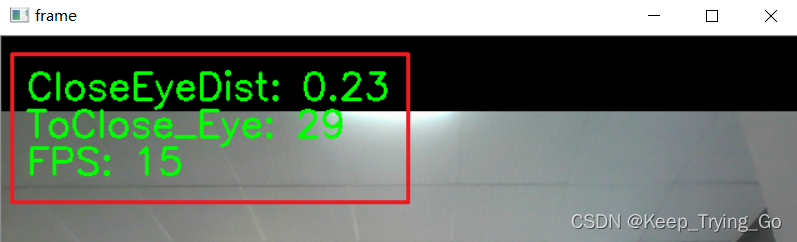
        cv2.putText(img=frame,text='CloseEyeDist: '+str(round(avg_Ear,2)),org=(20,50),
                    fontFace=cv2.FONT_HERSHEY_SIMPLEX,fontScale=1.0,
                    color=(0,255,0),thickness=2)
    return frame,avg_Ear
(8) Set relevant thresholds
# Set the threshold of aspect ratio
Ear_Threshod=0.2
# Blinking is a fast closing process , The blink lasts almost 100-400ms
# Set when continuous 3 If the aspect ratio of the frame is less than the threshold, it means blinking
Ear_frame_Threshold=3
# The total number of blinks in a task
ToClose_Eye=0
(9) Real time face key point detection
# Real time face key point detection
def detect_time():
    cap=cv2.VideoCapture(0)
    # Record the number of consecutive blinks
    count=0
    global ToClose_Eye

    while cap.isOpened():
        # Record the start time
        statime=time.time()
        ret,frame=cap.read()
        # Detect face position
        detected = detector(frame)
        # Use the located face to detect face key points
        frame = drawRectangle(detected, frame)
        frame,avg_Ear=draw_left_and_right_eye(detected,frame)
        if avg_Ear<Ear_Threshod:
            count+=1
            if count>=Ear_frame_Threshold:
                ToClose_Eye+=1
                count=0
        cv2.putText(img=frame,text='ToClose_Eye: '+str(ToClose_Eye),org=(20,80),fontFace=cv2.FONT_HERSHEY_SIMPLEX,
                    fontScale=1.0,color=(0,255,0),thickness=2)

        # Record the end time
        endtime=time.time()
        FPS=1/(endtime-statime)
        cv2.putText(img=frame, text='FPS: '+str(int(FPS)), org=(20, 110), fontFace=cv2.FONT_HERSHEY_SIMPLEX,
                    fontScale=1.0, color=(0, 255, 0), thickness=2)
        cv2.imshow('frame', frame)
        key=cv2.waitKey(1)
        if key==27:
            break
    cap.release()
    cv2.destroyAllWindows()
(10) The overall code
import os
import cv2
import dlib
import time
import math
import numpy as np
from collections import OrderedDict

# about 68 Test points , Arrange several key points of the face in order , For later traversal
shape_predictor_68_face_landmark=OrderedDict([
    ('mouth',(48,68)),
    ('right_eyebrow',(17,22)),
    ('left_eye_brow',(22,27)),
    ('right_eye',(36,42)),
    ('left_eye',(42,48)),
    ('nose',(27,36)),
    ('jaw',(0,17))
])

#  Load face detection and key point location
#http://dlib.net/python/index.html#dlib_pybind11.get_frontal_face_detector
detector = dlib.get_frontal_face_detector()
#http://dlib.net/python/index.html#dlib_pybind11.shape_predictor
criticPoints = dlib.shape_predictor("shape_predictor_68_face_landmarks.dat")

# Draw face draw rectangle
def drawRectangle(detected,frame):
    margin = 0.2
    img_h,img_w,_=np.shape(frame)
    if len(detected) > 0:
        for i, locate in enumerate(detected):
            x1, y1, x2, y2, w, h = locate.left(), locate.top(), locate.right() + 1, locate.bottom() + 1, locate.width(), locate.height()

            xw1 = max(int(x1 - margin * w), 0)
            yw1 = max(int(y1 - margin * h), 0)
            xw2 = min(int(x2 + margin * w), img_w - 1)
            yw2 = min(int(y2 + margin * h), img_h - 1)

            cv2.rectangle(frame, (x1, y1), (x2, y2), (0, 255, 0), 2)

            face = frame[yw1:yw2 + 1, xw1:xw2 + 1, :]
            cv2.putText(frame, 'Person', (locate.left(), locate.top() - 10),
            cv2.FONT_HERSHEY_SIMPLEX, 1.2, (255, 0, 0), 3)
    return frame

# The face key point coordinates obtained after detection are transformed
def predict2Np(predict):
    #  establish 68*2 Two dimensional empty array of keys [(x1,y1),(x2,y2)……]
    dims=np.zeros(shape=(predict.num_parts,2),dtype=np.int)
    # Traverse each key point of the face to obtain two-dimensional coordinates
    length=predict.num_parts
    for i in range(0,length):
        dims[i]=(predict.part(i).x,predict.part(i).y)
    return dims

# Calculate the Euclidean distance
def Euclidean(PointA,PointB):
    x=math.fabs(PointA[0]-PointB[0])
    y=math.fabs(PointA[1]-PointB[1])
    Ear=math.sqrt(x*x+y*y)
    return Ear
# Calculate the distance of blinking
def ComputeCloseEye(left_eye):
    # Calculation P2 And P6,P3 And P5
    P1=Euclidean(left_eye[1],left_eye[5])
    P2=Euclidean(left_eye[2],left_eye[4])
    # Calculation P1 And P4
    P3=Euclidean(left_eye[0],left_eye[3])
    # Calculation P
    P=(P1+P2)/(2*P3)
    return P


# Get the key coordinate values of the left eye and the right eye
avg_Ear=0.0
def draw_left_and_right_eye(detected,frame):
    global avg_Ear
    for (step,locate) in enumerate(detected):
        # Get the key points of the human eye
        dims=criticPoints(frame,locate)
        # Convert the obtained coordinate values into two dimensions
        dims=predict2Np(dims)
        # Get the list of key coordinate values of the left eye
        left_eye=dims[42:48]
        #  Get the list of key coordinate values of the right eye
        right_eye=dims[36:42]
        # Draw the point of the left eye
        for (x, y) in left_eye:
            cv2.circle(img=frame, center=(x, y),
                       radius=2, color=(0, 255, 0), thickness=-1)
        # Draw the point of the right eye
        for (x, y) in right_eye:
            cv2.circle(img=frame, center=(x, y),
                       radius=2, color=(0, 255, 0), thickness=-1)
        # Calculated distance
        earLeft=ComputeCloseEye(left_eye)
        earRight=ComputeCloseEye(right_eye)
        # Calculate the average aspect ratio of the left eye and the right eye
        avg_Ear=(earRight+earLeft)/2
        cv2.putText(img=frame,text='CloseEyeDist: '+str(round(avg_Ear,2)),org=(20,50),
                    fontFace=cv2.FONT_HERSHEY_SIMPLEX,fontScale=1.0,
                    color=(0,255,0),thickness=2)
    return frame,avg_Ear

# Set the threshold of aspect ratio
Ear_Threshod=0.2
# Blinking is a fast closing process , The blink lasts almost 100-400ms
# Set when continuous 3 If the aspect ratio of the frame is less than the threshold, it means blinking
Ear_frame_Threshold=3
# The total number of blinks in a task
ToClose_Eye=0

# Real time face key point detection
def detect_time():
    cap=cv2.VideoCapture(0)
    # Record the number of consecutive blinks
    count=0
    global ToClose_Eye

    while cap.isOpened():
        # Record the start time
        statime=time.time()
        ret,frame=cap.read()
        # Detect face position
        detected = detector(frame)
        # Use the located face to detect face key points
        frame = drawRectangle(detected, frame)
        frame,avg_Ear=draw_left_and_right_eye(detected,frame)
        if avg_Ear<Ear_Threshod:
            count+=1
            if count>=Ear_frame_Threshold:
                ToClose_Eye+=1
                count=0
        cv2.putText(img=frame,text='ToClose_Eye: '+str(ToClose_Eye),org=(20,80),fontFace=cv2.FONT_HERSHEY_SIMPLEX,
                    fontScale=1.0,color=(0,255,0),thickness=2)

        # Record the end time
        endtime=time.time()
        FPS=1/(endtime-statime)
        cv2.putText(img=frame, text='FPS: '+str(int(FPS)), org=(20, 110), fontFace=cv2.FONT_HERSHEY_SIMPLEX,
                    fontScale=1.0, color=(0, 255, 0), thickness=2)
        cv2.imshow('frame', frame)
        key=cv2.waitKey(1)
        if key==27:
            break
    cap.release()
    cv2.destroyAllWindows()


if __name__ == '__main__':
    print('Pycharm')
    detect_time()
边栏推荐
- Lake Shore 连续流动低温恒温器传输线
- 一次SQL优化,数据库查询速度提升 60 倍
- 寶,運維100+服務器很頭疼怎麼辦?用行雲管家!
- Graduation summary
- 【直播预约】数据库OBCP认证全面升级公开课
- The former 4A executives engaged in agent operation and won an IPO
- app发版后的缓存问题
- How to realize the applet in its own app to realize continuous live broadcast
- Clean up system cache and free memory under Linux
- 【快应用】Win7系统使用华为IDE无法运行和调试项目
猜你喜欢

Huawei game failed to initialize init with error code 907135000

The market value evaporated by 74billion yuan, and the big man turned and entered the prefabricated vegetables

Love business in Little Red Book

C-end dream is difficult to achieve. What does iFLYTEK rely on to support the goal of 1billion users?
【快应用】text组件里的文字很多,旁边的div样式会被拉伸如何解决
6月刊 | AntDB数据库参与编写《数据库发展研究报告》 亮相信创产业榜单
市值蒸发740亿,这位大佬转身杀入预制菜

Cdga | if you are engaged in the communication industry, you should get a data management certificate

Lumiprobe 亚磷酰胺丨六甘醇亚磷酰胺说明书

Bao, que se passe - t - il si le serveur 100 + O & M a mal à la tête? Utilisez le majordome xingyun!
随机推荐
透过华为军团看科技之变(六):智慧公路
[quick application] win7 system cannot run and debug projects using Huawei ide
Usage and underlying implementation principle of PriorityQueue
linux下清理系统缓存并释放内存
ECS summer money saving secret, this time @ old users come and take it away
CDGA|从事通信行业,那你应该考个数据管理证书
【快应用】text组件里的文字很多,旁边的div样式会被拉伸如何解决
Lake Shore continuous flow cryostat transmission line
Lake Shore低温恒温器的氦气传输线
Mipi interface, DVP interface and CSI interface of camera [easy to understand]
11. Users, groups, and permissions (1)
云服务器ECS夏日省钱秘籍,这次@老用户快来领走
nacos配置文件发布失败,请检查参数是否正确的解决方案
Taiaisu M source code construction, peak store app premium consignment source code sharing
毕业季 | 华为专家亲授面试秘诀:如何拿到大厂高薪offer?
[live broadcast appointment] database obcp certification comprehensive upgrade open class
生鲜行业B2B电商平台解决方案,提高企业交易流程标准化和透明度
1. "Create your own NFT collections and publish a Web3 application to show them." what is NFT
indexof和includes的区别
Lumiprobe 活性染料丨吲哚菁绿说明书