当前位置:网站首页>关于接口测试自动化的总结与思考
关于接口测试自动化的总结与思考
2022-06-27 12:54:00 【InfoQ】
序
- 服务端接口测试介绍
- 接口测试自动化介绍
- 接口测试自动化实践
- 关于接口测试自动化的思考和总结
服务端接口测试介绍
什么是服务端?
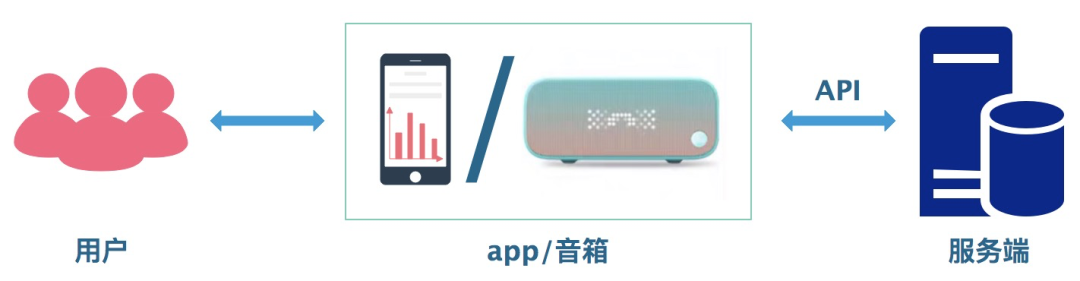
什么是接口?
什么是接口测试?

为什么要做接口测试?
- 接口是服务端对外提供数据服务最常用的信息交换方式,接口大部分内容都是数据,通过数据对比我们可以推测到系统的逻辑,测接口其实也就是测逻辑。
- 接口测试相对容易实现自动化,也容易实现持续集成,且相对 UI 自动化也比较稳定,可以减少人工回归测试人力成本与时间,缩短测试周期,支持后端快速发版需求。
如何做接口测试?

接口测试自动化介绍
什么是接口测试自动化?
为什么要做接口测试自动化?
- 减轻自己工作量,把测试从枯燥的重复劳动的人工测试中解放出来;
- 协助手工测试完成很难模拟或无法模拟的的工作;
- 提高工作效率,比如测试环境的自动化编译、打包、部署、持续集成甚至持续交付等。
- 协助定位问题,比如接口层发现问题了,可以通过添加的 traceID 定位到日志错误或错误代码行,
- 尽早发现 Bug,自动通知测试人员。一旦发现问题,立即通知测试人员,快速高效。
接口测试自动化的规范
- 文档准备
- 明确接口测试自动化需要的功能
- 接口测试自动化框架选型

接口测试自动化实践
TestNG 与 Junit 对比
- 综合性对比

- 详细特性对比
1、
框架整合
:
- pom.xml 中增加 testng 依赖:
<dependency>
 <groupId>org.testng</groupId>
 <artifactId>testng</artifactId>
 <version>6.8.8</version>
 <scope>test</scope>
</dependency>
- 测试类增加 1 条注解@ContextConfiguration(locations = "classpath:applicationContext.xml")并继承 AbstractTestNGSpringContextTests,范例如下
@ContextConfiguration(locations = "classpath:applicationContext.xml")
public class BaseTest extends AbstractTestNGSpringContextTests{
 @Test
 public void testMethods() { ...... }
}
- pom.xml 中增加 junit 依赖:
<!--Junit版本-->
<dependency>
 <groupId>junit</groupId>
 <artifactId>junit</artifactId>
 <version>4.4</version>
 <scope>test</scope>
</dependency>
- 测试类增加 2 条注解
@RunWith(SpringJUnit4ClassRunner.class)
@ContextConfiguration(locations = "classpath:applicationContext.xml")
public class BaseTest{
 @Test
 public void testMethods() { ...... }
}
2、
注解支持

3、异常测试
@Test(expected = ArithmeticException.class) public void divisionWithException() { int i = 1/0; }
@Test(expectedExceptions = ArithmeticException.class) public void divisionWithException() { int i = 1/0; }
4、忽略测试
@Ignore("Not Ready to Run") @Test public void divisionWithException() { System.out.println("Method is not ready yet"); }
@Test(enabled=false) public void divisionWithException() { System.out.println("Method is not ready yet"); }
5、超时测试
@Test(timeout = 1000) public void infinity() { while(true); }
@Test(timeOut = 1000) public voi
6、套件测试
@RunWith(Suite.class) @Suite.SuiteClasses({ JunitTest1.class, JunitTest2.class }) public class JunitTest3 { }
<suite name="My test suite">
<test name="testing">
<classes>
<class name="com.fsecure.demo.testng.TestNGTest1" />
<class name="com.fsecure.demo.testng.TestNGTest2" />
</classes>
</test>
</suite>
@Test(groups="method1") public void testingMethod1() { System.out.println("Method - testingMethod1()"); }
@Test(groups="method2") public void testingMethod2() { System.out.println("Method - testingMethod2()"); }
@Test(groups="method1") public void testingMethod1_1() { System.out.println("Method - testingMethod1_1()"); }
@Test(groups="method4") public void testingMethod4() { System.out.println("Method - testingMethod4()"); }
<suite name="My test suite">
<test name="testing">
<groups>
<run>
<include name="method1"/>
</run>
</groups>
<classes>
<class name="com.fsecure.demo.testng.TestNGTest" /></classes>
</test>
</suite>
7、参数化测试
- 步骤如下:
@RunWith(value = Parameterized.class)
public class JunitTest {
private int number;
public JunitTest6(int number) {
this.number = number;
}
@Parameters
public static Collection<Object[]> data() {
Object[][] data = new Object[][] { { 1 }, { 2 }, { 3 }, { 4 } };
return Arrays.asList(data);
}
@Test
public void pushTest() {
System.out.println("Parameterized Number is : " + number);
}
}
- 缺点:
- 一个测试类只能有一个静态的参数构造方法;
- 测试类需要使用@RunWith(Parameterized.class),无法兼容 spring-test 的 runner
- @RunWith(SpringJUnit4ClassRunner.class),会导致无法通过注解注入待测服务
- 需要在测试类中添加一个构造方法(一种冗余设计)
- 步骤如下:
@Test(dataProvider = "Data-Provider-Function")
public void parameterIntTest(Class clzz, String[] number) {
 System.out.println("Parameterized Number is : " + number[0]);
 System.out.println("Parameterized Number is : " + number[1]);
}
public class TestNGTest {
 @Test @Parameters(value="number")
 public void parameterIntTest(int number) {
 System.out.println("Parameterized Number is : " + number);
 }
}
<suite name="My test suite">
<test name="testing">
<parameter name="number" value="2"/>
<classes>
<class name="com.fsecure.demo.testng.TestNGTest" />
</classes>
</test>
</suite>
8、依赖测试
@Test public void method1() {
 System.out.println("This is method 1");
}
@Test(dependsOnMethods={"method1"})
public void method2() {
 System.out.println("This is method 2");
}
TestNG 接口自动化实践
- 参数化测试示例
public class DeviceStatusHSFServiceTest {
private DeviceStatusHSFService deviceStatusHSFService;
@BeforeTest(alwaysRun = true)
public void beforeTest() {
String envName = System.getProperty("maven.env"); //运行环境可配置
SwitchENV switchEnv = new SwitchENV(envName); //运行环境可配置
deviceStatusHSFService = HsfRepository.getConsumer(DeviceStatusHSFService.class, switchEnv.getEnv(),
"HSF", switchEnv.getHsfVersion(), "aicloud-device-center", switchEnv.getTargetIp()).getTarget();
}
@Test(dataProvider = "updateDeviceStatus", dataProviderClass = DeviceStatusHSFServiceTestDataProvider.class)
public void updateDeviceStatusTest(Long userId, String uuid, DeviceStatus deviceStatus){
Result<Boolean> result = deviceStatusHSFService.updateDeviceStatus(userId, uuid, deviceStatus);
System.out.println("traceId:"+EagleEye.getTraceId()+result.toString());
Boolean res = result.getResult();
assertTrue(res);
}
}
/**
 * 自定义环境配置
 */
public class SwitchENV {

 /**
 * 运行环境
 */
 private Env env;

 /**
 * hsf环境
 */
 private String hsfVersion;

 /**
 * 目标机器
 */
 private String targetIp;

 /**
 * 环境名称
 */
 private String envName;

 public SwitchENV(String envName) {

 Properties prop = new Properties();

 // TODO: 本地自动化测试切换环境专用
 if (envName == null) {
 envName = "pre1";
 }

 switch (envName) {

 case "online": {
 InputStream in = SwitchENV.class.getClassLoader().getResourceAsStream(
 "config/application-online.properties");
 try {
 prop.load(in);
 } catch (IOException e) {
 e.printStackTrace();
 }
 env = Env.ONLINE;
 break;
 }
 case "pre1": {
 InputStream in = SwitchENV.class.getClassLoader().getResourceAsStream(
 "config/application-pre1.properties");
 try {
 prop.load(in);
 } catch (IOException e) {
 e.printStackTrace();
 }
 env = Env.PREPARE;
 break;
 }
 case "pre2": {
 InputStream in = SwitchENV.class.getClassLoader().getResourceAsStream(
 "config/application-pre2.properties");
 try {
 prop.load(in);
 } catch (IOException e) {
 e.printStackTrace();
 }
 env = Env.PREPARE;
 break;
 }
 case "pre3": {
 InputStream in = SwitchENV.class.getClassLoader().getResourceAsStream(
 "config/application-pre3.properties");
 try {
 prop.load(in);
 } catch (IOException e) {
 e.printStackTrace();
 }
 env = Env.PREPARE;
 break;
 }
 default:
 try {
 throw new Exception("环境变量输入错误!");
 } catch (Exception e) {
 e.printStackTrace();
 }
 break;
 }
 hsfVersion = prop.getProperty("hsfVersion").trim();
 targetIp= prop.getProperty("targetIp").trim();
 this.envName = envName;
 }

 public Env getEnv() {
 return env;
 }

 public String getHsfVersion() {
 return hsfVersion;
 }

 public String getTargetIp() {
 return targetIp;
 }

 public String getEnvName() {
 return envName;
 }

}
/**
 * 自定义环境配置
 */
public class SwitchENV {

 /**
 * 运行环境
 */
 private Env env;

 /**
 * hsf环境
 */
 private String hsfVersion;

 /**
 * 目标机器
 */
 private String targetIp;

 /**
 * 环境名称
 */
 private String envName;

 public SwitchENV(String envName) {

 Properties prop = new Properties();

 // TODO: 本地自动化测试切换环境专用
 if (envName == null) {
 envName = "pre1";
 }

 switch (envName) {

 case "online": {
 InputStream in = SwitchENV.class.getClassLoader().getResourceAsStream(
 "config/application-online.properties");
 try {
 prop.load(in);
 } catch (IOException e) {
 e.printStackTrace();
 }
 env = Env.ONLINE;
 break;
 }
 case "pre1": {
 InputStream in = SwitchENV.class.getClassLoader().getResourceAsStream(
 "config/application-pre1.properties");
 try {
 prop.load(in);
 } catch (IOException e) {
 e.printStackTrace();
 }
 env = Env.PREPARE;
 break;
 }
 case "pre2": {
 InputStream in = SwitchENV.class.getClassLoader().getResourceAsStream(
 "config/application-pre2.properties");
 try {
 prop.load(in);
 } catch (IOException e) {
 e.printStackTrace();
 }
 env = Env.PREPARE;
 break;
 }
 case "pre3": {
 InputStream in = SwitchENV.class.getClassLoader().getResourceAsStream(
 "config/application-pre3.properties");
 try {
 prop.load(in);
 } catch (IOException e) {
 e.printStackTrace();
 }
 env = Env.PREPARE;
 break;
 }
 default:
 try {
 throw new Exception("环境变量输入错误!");
 } catch (Exception e) {
 e.printStackTrace();
 }
 break;
 }
 hsfVersion = prop.getProperty("hsfVersion").trim();
 targetIp= prop.getProperty("targetIp").trim();
 this.envName = envName;
 }

 public Env getEnv() {
 return env;
 }

 public String getHsfVersion() {
 return hsfVersion;
 }

 public String getTargetIp() {
 return targetIp;
 }

 public String getEnvName() {
 return envName;
 }

}
思考与总结
- 模块化思想
- 数据驱动思想
- 关键字驱动思想
模块化思想
数据驱动思想
关键字驱动思想
最后

边栏推荐
- printf不定长参数原理
- [day 27] given an integer n, print out the full permutation from 1 to n | Full Permutation template
- 【TcaplusDB知识库】TcaplusDB-tcapsvrmgr工具介绍(三)
- 使用bitnamiredis-sentinel部署Redis 哨兵模式
- socket阻塞和非阻塞模式
- Tiktok practice ~ public / private short video interchange
- Cool in summer
- How to choose LAN instant messaging software
- Shake hands with life and make peace
- Introduce you to ldbc SNB, a powerful tool for database performance and scenario testing
猜你喜欢

新华三的千亿企业梦,还得靠吃ICT老本来实现?

浅谈软件研发的复杂性与效能提升之道

夏日里的清凉

Size end byte order

Firewall foundation Huawei H3C firewall web page login

A pang's operation record

Pre training weekly issue 51: reconstruction pre training, zero sample automatic fine tuning, one click call opt

基于STM32设计的蓝牙健康管理设备

Three traversal methods of binary tree

【动态规划】—— 背包问题
随机推荐
[medical segmentation] unet3+
How to set postman to Chinese? (Chinese)
OpenHGNN发布0.3版本
zabbix支持钉钉报警
再懂已是曲中人
浅谈软件研发的复杂性与效能提升之道
Ali an interview question: use two threads to output letters and numbers alternately
万物互联时代到来,锐捷发布场景化无线零漫游方案
[dynamic programming] - Knapsack Problem
[acwing] explanation of the 57th weekly competition
Neo4j: basic introduction (I) installation and use
7 killer JS lines of code
[tcapulusdb knowledge base] Introduction to tcapulusdb tcapsvrmgr tool (III)
Two TCP flow control problems
面试官:Redis的共享对象池了解吗?
这是什么空调?
PyCharm汉化
Implementation of recruitment website based on SSM
Make learning pointer easier (1)
Centos7 command line installation Oracle11g