当前位置:网站首页>Jojogan practice
Jojogan practice
2022-07-01 16:50:00 【GoCoding】
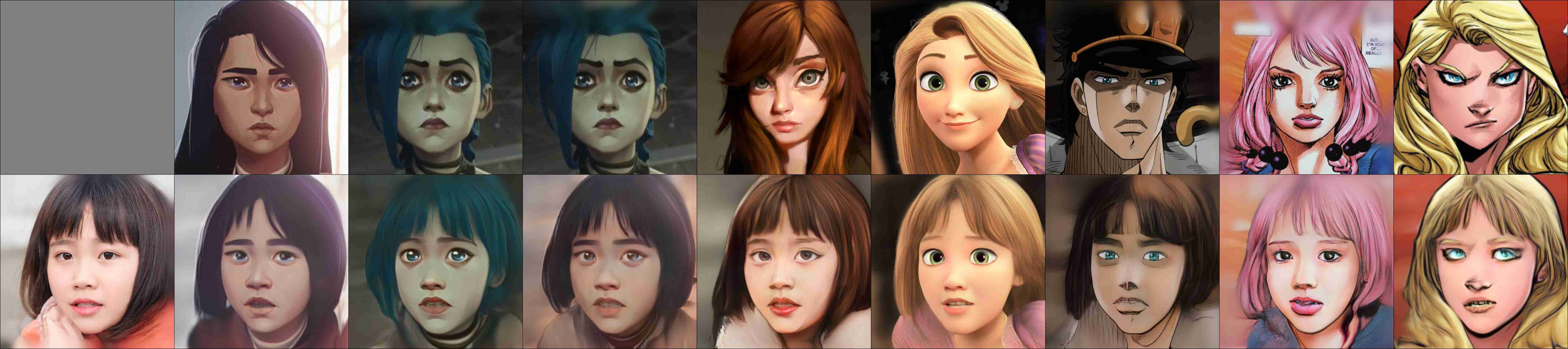
JoJoGAN: One Shot Face Stylization. Only one face image , You can learn its style , Then migrate to other pictures . Training duration only 1~2 min that will do .
effect :
Main process :

This article shares personal experiences in the local environment ( Not colab) practice JoJoGAN The whole process . You can also train your favorite style according to this article .
Prepare the environment
install :
conda create -n torch python=3.9 -yconda activate torchconda install pytorch torchvision torchaudio cudatoolkit=11.3 -c pytorch -yCheck :
$ python - <<EOFimport torch, torchvisionprint(torch.__version__, torch.cuda.is_available())EOF1.10.1 TruePrepare the code
git clone https://github.com/mchong6/JoJoGAN.gitcd JoJoGANpip install tqdm gdown matplotlib scipy opencv-python dlib lpips wandb# Ninja is required to load C++ extensionswget https://github.com/ninja-build/ninja/releases/download/v1.10.2/ninja-linux.zipsudo unzip ninja-linux.zip -d /usr/local/bin/sudo update-alternatives --install /usr/bin/ninja ninja /usr/local/bin/ninja 1 --force then , This article will provide a few *.py In the JoJoGAN Catalog , Get... From here : https://github.com/ikuokuo/start-deep-learning/tree/master/practice/JoJoGAN .
download_models.py: Get the modelgenerate_faces.py: Generate facestylize.py: Stylizedtrain.py: Training
after , In the training process section , Will combine code , Let's talk about it JoJoGAN workflow . Others *.py Just mention the usage , Implementation is not enough .
Get the model
python download_models.py Get the model , as follows :
models/├── arcane_caitlyn_preserve_color.pt├── arcane_caitlyn.pt├── arcane_jinx_preserve_color.pt├── arcane_jinx.pt├── arcane_multi_preserve_color.pt├── arcane_multi.pt├── art.pt├── disney_preserve_color.pt├── disney.pt├── dlibshape_predictor_68_face_landmarks.dat├── e4e_ffhq_encode.pt├── jojo_preserve_color.pt├── jojo.pt├── jojo_yasuho_preserve_color.pt├── jojo_yasuho.pt├── restyle_psp_ffhq_encode.pt├── stylegan2-ffhq-config-f.pt├── supergirl_preserve_color.pt└── supergirl.ptGenerate face
use StyleGAN2 The pre training model generates faces randomly , Used for testing :
python generate_faces.py -n 5 -s 2000 -o inputUse pre training style
JoJoGAN Give it to 8 Pre training models , You can experience it together , Same as the effect picture at the beginning of the article :
# preview JoJoGAN All pre training models Stylize a picture (test_input/iu.jpeg) The effect of python stylize.py -i test_input/iu.jpeg -s all --save-all --show-all# Use JoJoGAN All pre training models Stylize all generated test faces (input/*)find ./input -type f -print0 | xargs -0 -i python stylize.py -i {} -s all --save-allTrain your style
First , Prepare a style map :

after , Start training :
python train.py -n yinshi -i style_images/yinshi.jpeg --alpha 1.0 --num_iter 500 --latent_dim 512 --use_wandb --log_interval 50--use_wandb when , You can view the training log :

Last , The test results :
python stylize.py -i input/girl.jpeg --save-all --show-all --test_style yinshi --test_ckpt output/yinshi.pt --test_ref output/yinshi/style_images_aligned/yinshi.png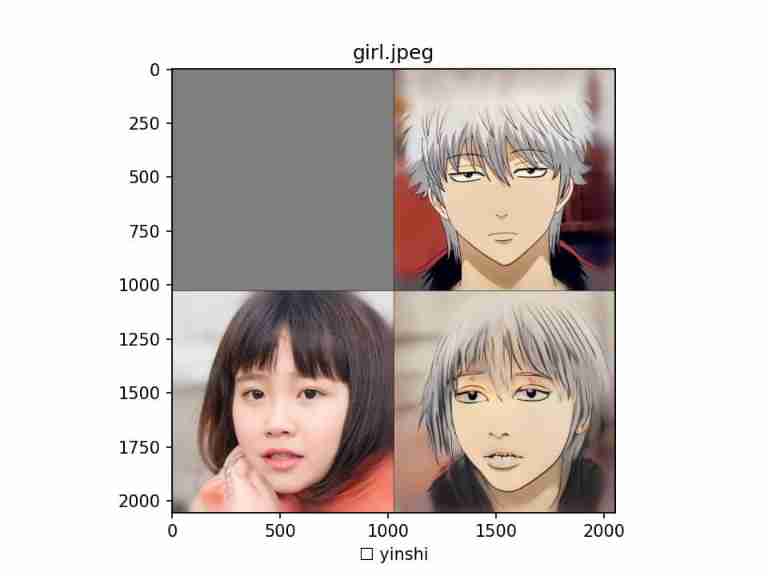
Training workflow
Prepare style pictures , Turn to training data
Cut and align the faces in the style picture :
# dlib Predict facial feature points , Then cut the alignment from util import align_facestyle_aligned = align_face(img_path)Put style pictures GAN Inversion Inverse mapping back to the hidden vector space of the pre training model (Latent Space):
name, _ = os.path.splitext(os.path.basename(img_path))style_code_path = os.path.join(latent_dir, f'{name}.pt')# e4e FFHQ encoder (pSp) > GAN inversion, obtain latentfrom e4e_projection import projectionlatent = projection(style_aligned, style_code_path, device)load StyleGAN2 Model , Training fine tuning
Load the pre-trained model :
latent_dim = 512# Load pre training model original_generator = Generator(1024, latent_dim, 8, 2).to(device)ckpt = torch.load("models/stylegan2-ffhq-config-f.pt", map_location=lambda storage, loc: storage)original_generator.load_state_dict(ckpt["g_ema"], strict=False)# Prepare the fine-tuning model generator = deepcopy(original_generator)Training adjustable parameters :
# Control style intensity [0, 1]alpha = 1.0alpha = 1-alpha# Whether to keep the original image color preserve_color = True# Number of training iterations ( best 500,Adam The learning rate is based on 500 Second iteration tuning )num_iter = 500# Style picture targets And latentstargets = ..latents = ..Training , Fit hidden space . The last save :
# Get ready LPIPS Calculation losslpips_fn = lpips.LPIPS(net='vgg').to(device)# Prepare the optimizer g_optim = torch.optim.Adam(generator.parameters(), lr=2e-3, betas=(0, 0.99))# Which layers are used for Exchange , Used to generate stylized pictures if preserve_color: id_swap = [7,9,11,15,16,17]else: id_swap = list(range(7, generator.n_latent))# Training iterations for idx in tqdm(range(num_iter)): # Exchange layer hybrid style , And add noise mean_w = generator.get_latent(torch.randn([latents.size(0), latent_dim]) .to(device)).unsqueeze(1).repeat(1, generator.n_latent, 1) in_latent = latents.clone() in_latent[:, id_swap] = alpha*latents[:, id_swap] + (1-alpha)*mean_w[:, id_swap] # With latent Stylized pictures , Contrast with the target style img = generator(in_latent, input_is_latent=True) loss = lpips_fn(F.interpolate(img, size=(256,256), mode='area'), F.interpolate(targets, size=(256,256), mode='area')).mean() # Optimize g_optim.zero_grad() loss.backward() g_optim.step()# Save weights , complete torch.save({"g": generator.state_dict()}, save_path)Conclusion
JoJoGAN The effect is good in practice . Use the code given in this article , It's easier to train your favorite style , It's worth trying .
GoCoding Personal experience sharing , We can pay attention to the official account !
边栏推荐
- What is the digital transformation of manufacturing industry
- [jetsonnano] [tutorial] [introductory series] [III] build tensorflow environment
- The supply of chips has turned to excess, and the daily output of Chinese chips has increased to 1billion, which will make it more difficult for foreign chips
- 游戏行业安全选择游戏盾,效果怎么样?
- Red team Chapter 8: blind guess the difficult utilization process of the package to upload vulnerabilities
- OJ questions related to complexity (leetcode, C language, complexity, vanishing numbers, rotating array)
- 虚拟串口模拟器和串口调试助手使用教程「建议收藏」
- Go 语言怎么优化重复的 if err != nil 样板代码?
- 想做软件测试的女孩子看这里
- Preliminary study on golang crawler framework
猜你喜欢

想做软件测试的女孩子看这里
![[nodemon] app crashed - waiting for file changes before starting...解决方法](/img/ee/9830afd86e092851a2a906cb994949.png)
[nodemon] app crashed - waiting for file changes before starting...解决方法
Ring iron pronunciation, dynamic and noiseless, strong and brilliant, magic wave hifiair Bluetooth headset evaluation

VMware 虚拟机启动时出现故障:VMware Workstation 与 Hyper-v 不兼容...

Borui data integrated intelligent observable platform was selected into the "Yunyuan production catalogue" of China Academy of communications in 2022

EndeavourOS移动硬盘安装
数据库系统原理与应用教程(003)—— MySQL 安装与配置:手工配置 MySQL(windows 环境)
![[live broadcast appointment] database obcp certification comprehensive upgrade open class](/img/50/83a533f4e8a60f90e03b991385c08d.jpg)
[live broadcast appointment] database obcp certification comprehensive upgrade open class
![[flask introduction series] cookies and session](/img/2e/d50e0a032c4ec48935cb5df206a29b.png)
[flask introduction series] cookies and session

Bugku's file contains
随机推荐
[nodemon] app crashed - waiting for file changes before starting... resolvent
EndeavourOS移动硬盘安装
[observation] where is the consulting going in the digital age? Thoughts and actions of softcom consulting
数据库系统原理与应用教程(003)—— MySQL 安装与配置:手工配置 MySQL(windows 环境)
[live broadcast appointment] database obcp certification comprehensive upgrade open class
How to solve the keyboard key failure of notebook computer
Red team Chapter 10: ColdFusion the difficult process of deserializing WAF to exp to get the target
sql刷题627. 变更性别
Redis 分布式锁
Germany if was crowned with many awards. How strong is this pair of headphones? In depth evaluation of yinpo GTW 270 hybrid
苹果自研基带芯片再次失败,说明了华为海思的技术领先性
VMware 虚拟机启动时出现故障:VMware Workstation 与 Hyper-v 不兼容...
Leetcode 77 combination -- backtracking method
红队第8篇:盲猜包体对上传漏洞的艰难利用过程
数据库系统原理与应用教程(004)—— MySQL 安装与配置:重置 MySQL 登录密码(windows 环境)
P2893 [USACO08FEB] Making the Grade G(dp&优先队列)
Kali install Nessus
数据库系统原理与应用教程(002)—— MySQL 安装与配置:MySQL 软件的卸载(windows 环境)
Comprehensively view the value of enterprise digital transformation
Redis 分布式鎖