当前位置:网站首页>数据库系统原理与应用教程(001)—— MySQL 安装与配置:MySQL 软件的安装(windows 环境)
数据库系统原理与应用教程(001)—— MySQL 安装与配置:MySQL 软件的安装(windows 环境)
2022-07-01 16:14:00 【睿思达DBA_WGX】
数据库系统原理与应用教程(001)—— MySQL 安装与配置:MySQL 软件的安装(windows 环境)
一、下载 MySQL 软件
1、进入 MySQL官网(网址:https://www.mysql.com/),单击 DOWNLOADS,如下图所示。

2、在页面的下方【DOWNLOADS】区域中选择【MySQL Community Server】,如下图所示。

3、在弹出的页面中单击【Archives】,如下图所示。

4、在弹出的页面中选择 MySQL 的版本号(5.5.58)、操作系统的类型(windows)以及操作系统的版本(根据需要选择32位版本或64位版本),如果选择 ALL 则显示所有版本。此处选择下载64位版本的 MySQL,如下图所示。

单击【Download】按钮完成软件的下载。
二、安装 MySQL
1、双击下载的安装文件,弹出如下图所示的安装向导。
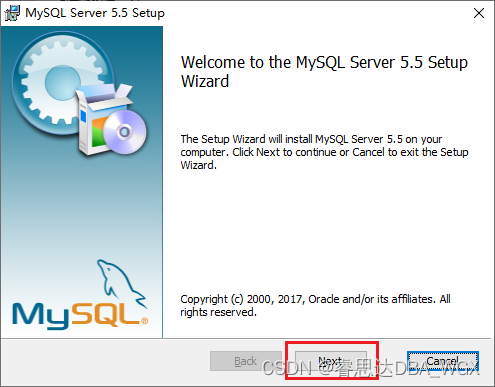
2、单击【Next】按钮,显示用户许可协议窗口,如下图所示。
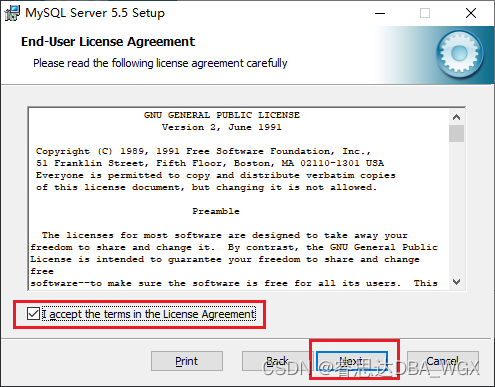
3、选中【I accept the terms in the License Agreement】选项,单击【Next】按钮,弹出如下图所示的【选择安装类型】窗口。
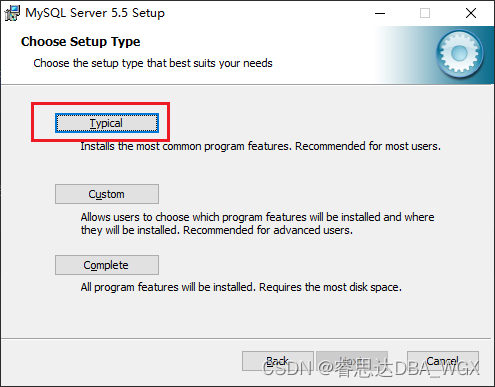
4、单击【Typical】,选择典型安装,弹出如下图所示的【准备开始安装 MySQL】界面,单击【Install】开始安装。

5、安装完成。如果选中【Launch the MySQL Instance Configuration Wizard】选项,单击【Finish】则弹出配置 MySQL 向导。否则,则结束安装,可以使用手工配置 MySQL。

三、配置 MySQL
MySQL 安装完成后,选中【Launch the MySQL Instance Configuration Wizard】选项,单击【Finish】则弹出配置 MySQL 向导,对 MySQL 进行配置。
1、MySQL 配置向导如下图所示。
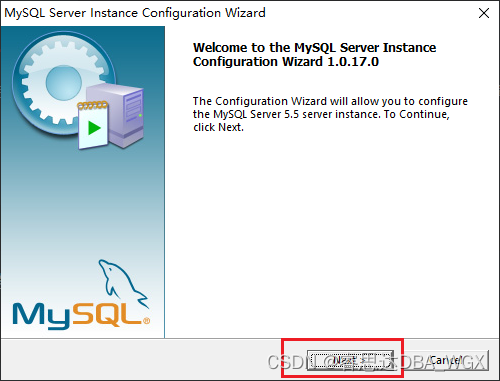
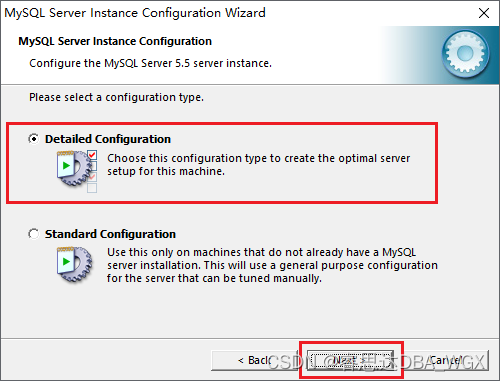
2、单击【Next】按钮,弹出配置类型窗口,选择详细配置(Detailed Configuration),如下图所示。
3、单击【Next】按钮,弹出选择 MySQL 服务器类型窗口,选择开发者类型(Developer Machine),如下图所示。
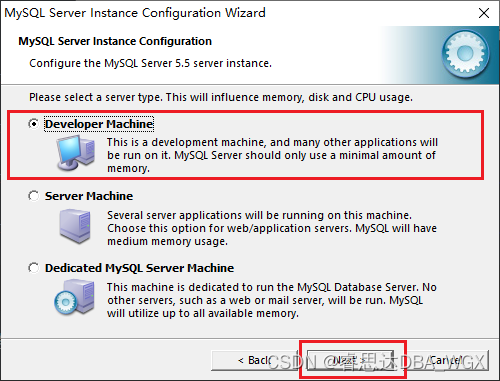
MySQL 服务器类型一共有三种:
开发者类型(Developer Machine):开发使用,所需内存较少。
服务器类型(Server Machine):用作服务器,所需内存较多。
专用 MySQL 服务器(Dedicate MySQL Server Machine):专门用作数据库服务器,所需的内存最多。
4、单击【Next】按钮,弹出选择数据库用途窗口,选择多功能数据库(Multifunctional Database),如下图所示。
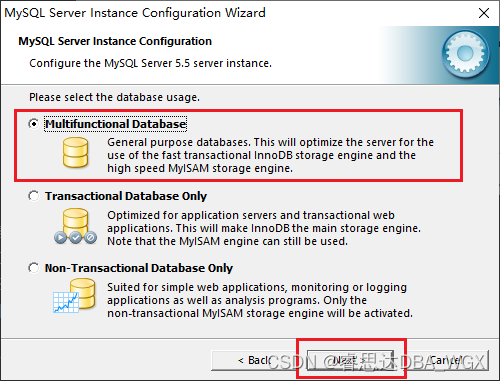
数据库用途一共有三种:
多功能数据库(Multifunctional Database):同时使用 InnoDB 存储引擎和 MyISAM 存储引擎。
事务处理数据库(Transaction Database Only):支持事务处理。
非事务处理数据库(Non-Transaction Database Only):不支持事务处理,禁用 InnoDB 存储引擎。
5、单击【Next】按钮,弹出选择表空间位置窗口,选择默认位置(安装路径),如下图所示。
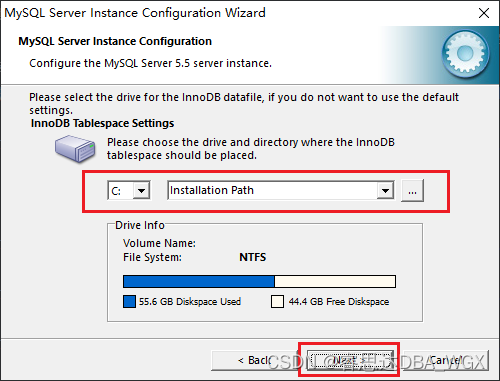
6、单击【Next】按钮,弹出设置并发连接窗口,选择手动设置(Manual Setting),如下图所示。
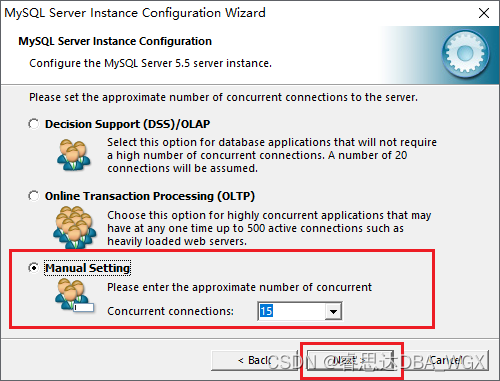
并发连接设置有三种:
决策支持(Decision Support,DSS/OLAP):并发量较小。
联机事务处理(Online Transaction Processing,OLTP):并发量较大。
手动设置(Manual Setting):自定义并发量。
7、单击【Next】按钮,弹出配置网络窗口,设置端口号(3306)等信息,如下图所示。

Port Number(端口号):3306,可以更改为其他端口号。
Add firewall exception for this port(在防火墙注册此端口号):选中此选项,允许远程计算机登录 MySQL。
Enable Strict Mode(标准模式):对输入数据进行严格检查。
8、单击【Next】按钮,弹出选择字符集窗口,选择手动设置的默认字符集编码(Manual Selected Default Character Set/Collation):手动选择字符集 Latin1,如下图所示。
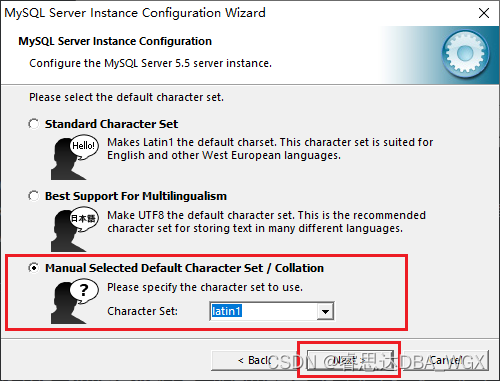
字符集选择有三个选项:
标准字符集(Standard Character Set):默认字符集为 Latin1
支持多种语言(Best Support For Multilingualism):默认字符集为 utf8
手动设置的默认字符集编码(Manual Selected Default Character Set/Collation):手动选择字符集
9、单击【Next】按钮,弹出配置 windows 服务窗口,如下图所示。

选择 Install As Windows Service:将 MySQL安装为 windows 服务。
Service Name:MySQL 服务名,默认为 MySQL。
选择 Launch the MySQL Server Automatically:自动启动 MySQL 服务。
选择 Include Bin Directory in Windows PATH:将 MySQL 的 Bin 目录添加到环境变量中。
10、单击【Next】按钮,弹出配置类型窗口,选择详细配置(Detailed Configuration),如下图所示。
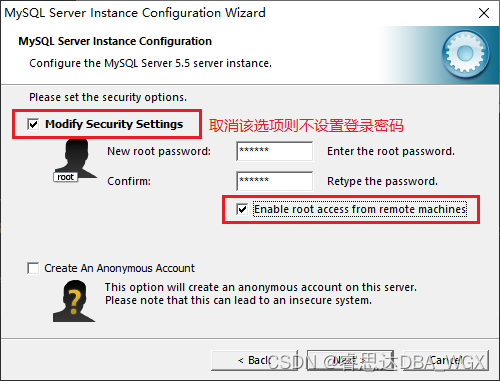
选择 Modify Security Setting:选择此选项,为 MySQL 设置登录密码。如果不选择该选项,则 MySQL 不需要密码就可以登录。
Enable root access from remote machines:是否允许 root 用户在其他计算机上登录。
Create An Anonymous Account:创建一个匿名用户,该用户可以连接数据库,但不能操作数据。
11、单击【Next】按钮,进入准备执行窗口,如下图所示。

12、单击【Execute】按钮,MySQL 将按照配置向导的设置进行配置,单击【Finish】完成配置,如下图所示。

四、测试
打开 windows 命令行窗口,使用 root 用户登录 MySQL,如下图所示。

边栏推荐
- Apple's self-developed baseband chip failed again, which shows Huawei Hisilicon's technological leadership
- 电脑照片尺寸如何调整成自己想要的
- MLPerf Training v2.0 榜单发布,在同等GPU配置下百度飞桨性能世界第一
- 超视频时代,什么样的技术会成为底座?
- 运动捕捉系统原理
- 圈铁发音,动感与无噪强强出彩,魔浪HIFIair蓝牙耳机测评
- 2023届春招实习-个人面试过程和面经分享
- Motion capture system for apple picking robot
- Win11如何設置用戶權限?Win11設置用戶權限的方法
- process.env.NODE_ENV
猜你喜欢

How to adjust the size of computer photos to what you want
The picgo shortcut is amazing. This person thinks exactly the same as me

怎麼用MySQL語言進行行列裝置?

How to write good code - Defensive Programming Guide

德国iF多项大奖加冕,这副耳机有多强?音珀GTW 270 Hybrid深度评测
StoneDB 为国产数据库添砖加瓦,基于 MySQL 的一体化实时 HTAP 数据库正式开源!
Share the daily work and welfare of DJI (Shenzhen headquarters) in Dajiang

Idea start command line is too long problem handling

【观察】数字化时代的咨询往何处走?软通咨询的思与行
Comment utiliser le langage MySQL pour les appareils de ligne et de ligne?
随机推荐
There is a difference between u-standard contract and currency standard contract. Will u-standard contract explode
Principes et applications du système de base de données (006) - - compilation et installation de MySQL 5.7 (environnement Linux)
动作捕捉系统用于苹果采摘机器人
【Hot100】17. Letter combination of telephone number
Pico, do you want to save or bring consumer VR?
Go 语言怎么优化重复的 if err != nil 样板代码?
Zabbix2.2监控之系统及应用日志监控报警
StoneDB 为国产数据库添砖加瓦,基于 MySQL 的一体化实时 HTAP 数据库正式开源!
怎么用MySQL语言进行行列装置?
Please, stop painting star! This has nothing to do with patriotism!
Use Tencent cloud to build a map bed service
In the past six months, it has been invested by five "giants", and this intelligent driving "dark horse" is sought after by capital
Five years after graduation, I became a test development engineer with an annual salary of 30w+
Principle of motion capture system
How to use phpipam to manage IP addresses and subnets
IM即時通訊開發實現心跳保活遇到的問題
Malaysia's Star: Sun Yuchen is still adhering to the dream of digital economy in WTO MC12
Embedded development: five revision control best practices
运动捕捉系统原理
IM即时通讯开发实现心跳保活遇到的问题