当前位置:网站首页>vm虚拟机中使用NAT模式特别说明
vm虚拟机中使用NAT模式特别说明
2022-06-12 08:01:00 【喜欢打篮球的普通人】
1.环境
- VM
- VM中使用ubuntu虚拟机
- 宿主机环境:win10
2.问题:vm配置了NAT,但是还是无法ping通宿主机,也无法连接外网
vm使用NAT模式需要,ubuntu静态配置ip,静态配置的ip配置方法:
打开VMware WorkStation的“编辑”-“虚拟网络编辑器”:
选择更改设置,打开VMnet8,打开DHCP设置,DHCP里面的内容按照默认生成即可,别自己分配
然后在ubuntu中按照上述DHCP配置重新配置个静态IP即可
这样,然后在ubuntu中保存下配置网络配置,即可连接外网咯

重启网络的方式如下:
在ubuntu中可以看到结果
3.VM使用NAT模式下实现ssh互通
本机主机:win10+vm(使用ubuntu,里面已安装好ssh服务)
ssh中注意修改/etc/ssh/sshd_config中如下的配置:以支持root登录
PermitRootLogin yes
其他主机:win10
- win10查看所有端口映射
netstat -ano
- vm配置
打开 Vmware — 点击「编辑」— 选择「虚拟网络编辑器」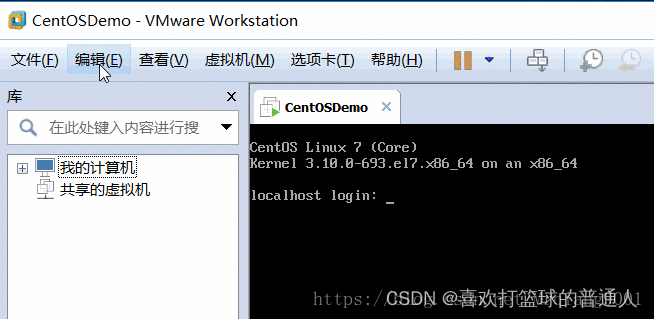
在弹出框选择「NAT模式」 — 点击「更改设置」— 点击之后可以根据自己需要修改虚拟机网关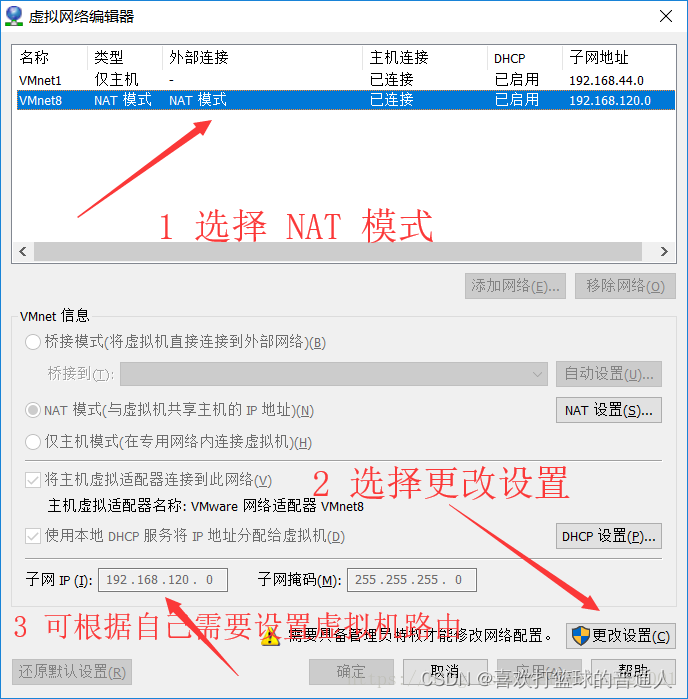
点击「NAT模式」— 选择「NAT设置」
在「端口转发」下边选择「添加」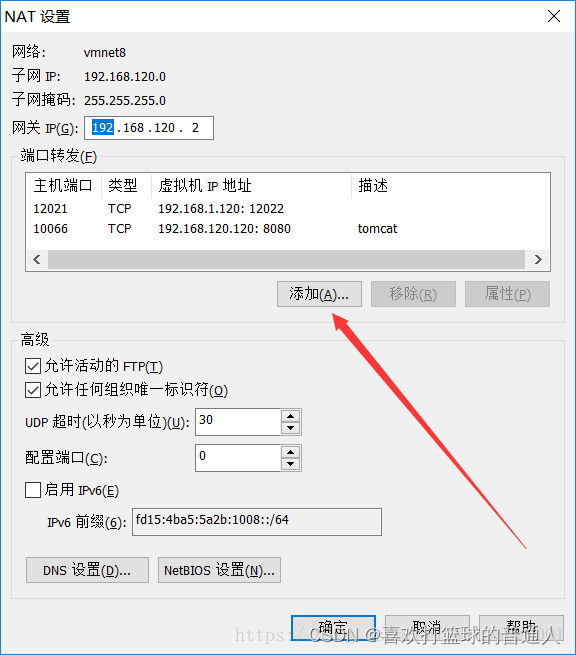
添加端口,然后进行保存
4.通过映射的端口进行连接测试
端口连接测试
SSH 连接: ssh [email protected] -p 10022
登录之后查看 ip: ip addr
- git自带ssh的客户端


5.主机防火墙开放端口
同时按 Win + R ,输入 control 进入控制面板
选择「系统和安全」
选择「防火墙」设置
选择左侧的「高级设置」
进入防火墙的「高级设置」之后,选择「入站规则」,然后点击「新建规则」
选择「端口」
选择「TCP」— 选择「特定本地端口」,并填写端口(需要和前边 Vmware 中设置的一致)


给新建的规则起名
边栏推荐
- Meter Reading Instrument(MRI) Remote Terminal Unit electric gas water
- Final review of Discrete Mathematics (predicate logic, set, relation, function, graph, Euler graph and Hamiltonian graph)
- Summary of structured slam ideas and research process
- tmux常用命令
- Improvement of hash function based on life game
- JSP technology
- Vision transformer | arXiv 2205 - TRT vit vision transformer for tensorrt
- Architecture and performance analysis of convolutional neural network
- Leetcode notes: Weekly contest 280
- 2、 Eight, ten and hexadecimal conversion
猜你喜欢

Detailed explanation of Google open source sfmlearner paper combining in-depth learning slam -unsupervised learning of depth and ego motion from video
20220526 yolov1-v5

Seeking for a new situation and promoting development, the head goose effect of Guilin's green digital economy

Clarify the division of IPv4 addresses
Servlet advanced

Servlet

DUF:Deep Video Super-Resolution Network Using Dynamic Upsampling Filters ...阅读笔记

System service configuration service - detailed version

Classic paper review: palette based photo retrieval

(P40-P41)move资源的转移、forward完美转发
随机推荐
Ten important properties of determinant
Detailed explanation of Google open source sfmlearner paper combining in-depth learning slam -unsupervised learning of depth and ego motion from video
Compiling principle on computer -- functional drawing language (I)
Vision transformer | arXiv 2205 - TRT vit vision transformer for tensorrt
Numerical calculation method chapter6 Iterative method for solving linear equations
Cookies and sessions
TMUX common commands
. net mysql Too many connections
Rnorm function of R language generates positive distribution data, calculates descriptive statistical summary information of vector data using sum function of epidisplay package, and visualizes ordere
Summary of structured slam ideas and research process
Clarify the division of IPv4 addresses
R language uses the sum function of epidisplay package to calculate the descriptive statistical summary information of the specified variables in dataframe under different grouping variables, visualiz
FPGA based communication system receiver [packet detection] development document
20220607. face recognition
Symfony 2: multiple and dynamic database connections
Solve mapper duplication problem in reverse engineering
Ceres optimizer usage (self use)
MSE (mean square error) calculation package function
离散 第一章
R language dplyr package mutate_ At function and one_ The of function converts the data type of a specified data column (specified by a vector) in dataframe data to a factor type