当前位置:网站首页>Servlet API
Servlet API
2022-06-12 16:22:00 【A snail at the end of a pyramid】
HttpServlet
Handle GET request
import javax.servlet.ServletException;
import javax.servlet.annotation.WebServlet;
import javax.servlet.http.HttpServlet;
import javax.servlet.http.HttpServletRequest;
import javax.servlet.http.HttpServletResponse;
import java.io.IOException;

@WebServlet("/hello")
public class helloServlet extends HttpServlet {

    @Override
    protected void doGet(HttpServletRequest req, HttpServletResponse resp) throws ServletException, IOException {

        // This line of code needs to be commented out , Cannot call a parent class's doget
       // super.doGet(req, resp);

        // This is to let the server print on its own console
        System.out.println("hello hello");
        // Also print on the page  hello world, hold hello world character string , Put it in http Responsive body in , The browser will put body The contents of are displayed on the page
        resp.getWriter().write("hello hello");

    }
}
Handle POST request
@WebServlet("/method")
public class MethodServlet extends HttpServlet {

    @Override
    protected void doPost(HttpServletRequest req, HttpServletResponse resp) throws ServletException, IOException {

        //super.doPost(req, resp);
        resp.setContentType("test/html;charset=utf8");
        resp.getWriter().write("POST Respond to ");
    }
}
<body>
    <script src="https://cdn.bootcdn.net/ajax/libs/jquery/3.6.0/jquery.min.js"></script>
    <script>
        $.ajax({

            type:'post',
            url:'method',
            success:function(body){

                console.log(body);


            }

        });
    </script>

</body>

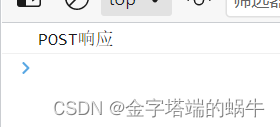
Execution results :
HttpServletRequest
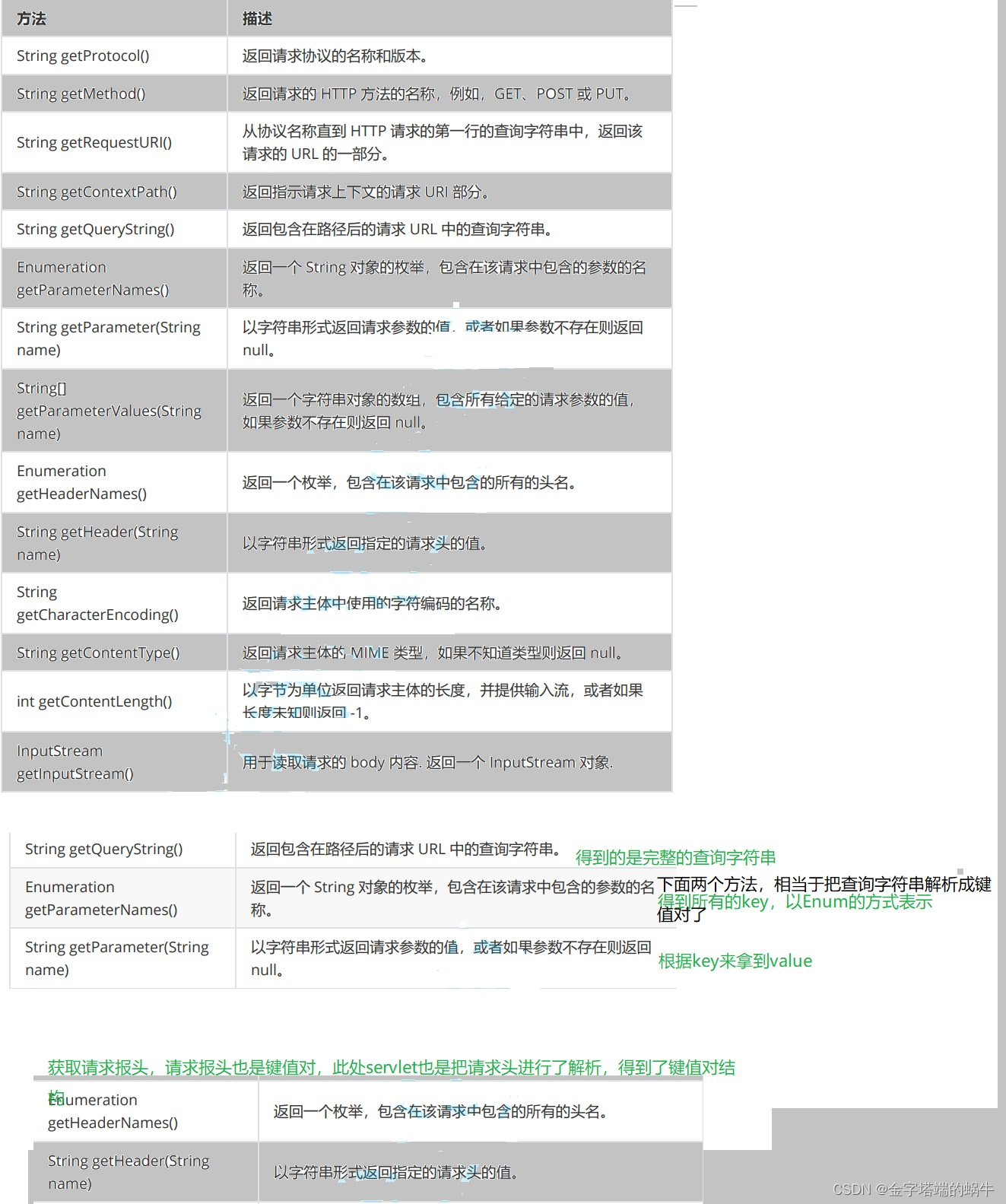
HttpServletRequest It corresponds to a HTTP request ,HTTP What is in the request , There's something here .
The core approach
Print request information
import javax.servlet.ServletException;
import javax.servlet.annotation.WebServlet;
import javax.servlet.http.HttpServlet;
import javax.servlet.http.HttpServletRequest;
import javax.servlet.http.HttpServletResponse;
import java.io.IOException;
import java.util.Enumeration;

@WebServlet("/showRequest")
public class showRequestServlet extends HttpServlet {

    @Override
    protected void doGet(HttpServletRequest req, HttpServletResponse resp) throws ServletException, IOException {

        // Call the API, And organize the results into a html in , And in response body

       // hold api Results of execution , Put it in stringBuilder in
        StringBuilder stringBuilder=new StringBuilder();
        stringBuilder.append("<h3> First line   part </h3>");
        stringBuilder.append(req.getProtocol());
        stringBuilder.append("<br>");
        stringBuilder.append(req.getMethod());
        stringBuilder.append("<br>");
        stringBuilder.append(req.getRequestURI());
        stringBuilder.append("<br>");
        stringBuilder.append(req.getContextPath());
        stringBuilder.append("<br>");
        stringBuilder.append(req.getQueryString());
        stringBuilder.append("<br>");
        stringBuilder.append("<h3>header  part </h3>");
        Enumeration<String> headerNames=req.getHeaderNames();
        while(headerNames.hasMoreElements()) {

            String headerName=headerNames.nextElement();
            String headerValue= req.getHeader(headerName);
            stringBuilder.append(headerName+": "+headerValue+"<br>");
        }
        resp.setContentType("text/html;charset=utf8");
        resp.getWriter().write(stringBuilder.toString());

    }
}
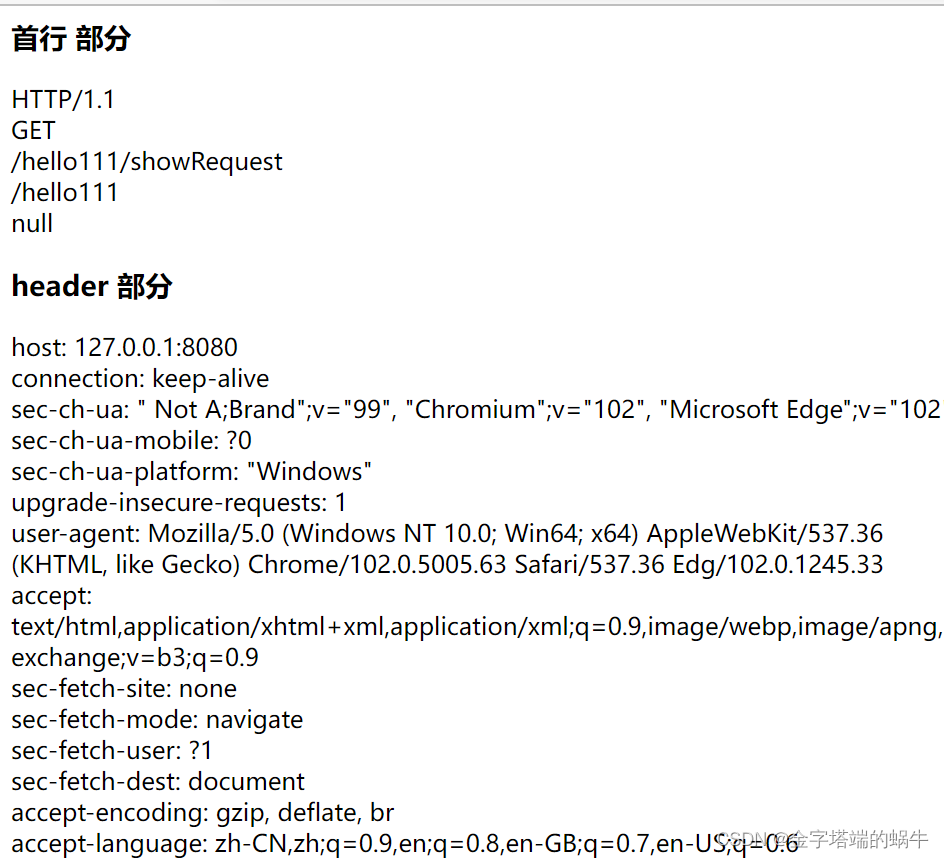
result :
obtain GET Parameters in the request
import javax.servlet.ServletException;
import javax.servlet.annotation.WebServlet;
import javax.servlet.http.HttpServlet;
import javax.servlet.http.HttpServletRequest;
import javax.servlet.http.HttpServletResponse;
import java.io.IOException;

@WebServlet("/getParameter")
public class getParameterServlet extends HttpServlet {

    // Expect a request from the browser to describe this :/getParameter?userId=123&classId=456
  @Override
  protected void doGet(HttpServletRequest req, HttpServletResponse resp) throws ServletException, IOException {

      String userId=req.getParameter("userId");
      String classId=req.getParameter("classId");
      resp.getWriter().write("userId="+userId+", classId="+classId);
  }


}

obtain POST Parameters in the request
POST The parameters in the request are generally passed through body Pass it to the server .
POST request body Format
(1)x-www-form-urlencoded
(2)form-data
(3)json
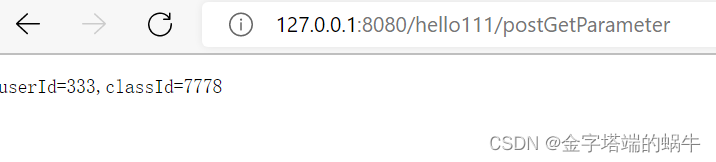
1. If the request is x-www-form-urlencoded This format , How does the server get parameters ?
How to get parameters and GET equally , It's also getParameter
Pass at the front form Form construction request
 Insert a code chip here import javax.servlet.ServletException;
import javax.servlet.annotation.WebServlet;
import javax.servlet.http.HttpServlet;
import javax.servlet.http.HttpServletRequest;
import javax.servlet.http.HttpServletResponse;
import java.io.IOException;

@WebServlet("/postGetParameter")
public class PostGetParameterServlet extends HttpServlet {

    @Override
    protected void doPost(HttpServletRequest req, HttpServletResponse resp) throws ServletException, IOException {

        // Suppose the parameters passed from the front end are userId=10&classId=20
        // The server is also through req.getParameter To get the content
        String userId=req.getParameter("userId");
        String classId=req.getParameter("classId");
        resp.getWriter().write("userId="+userId+",classId="+classId);
    }
}
<body>
    <form action="postGetParameter" method="POST">
        <input type="text" name="userId">
        <input type="text" name="classId">
        <input type="submit" value=" Submit ">
    </form>
    <script src="https://cdn.bootcdn.net/ajax/libs/jquery/3.6.0/jquery.min.js"></script>
    <script>
        // $.ajax({

        // type:'post',
        // url:'method',
        // success:function(body){

        // console.log(body);


        // }

        // });
    </script>


</body>

2. If the request is json The way , How to deal with ?
This can be done through a third-party library , Deal directly with json Format data .
Mainly used libraries , be called Jackson.
adopt maven hold Jackson This library , Download to local , And into the project .

( One ) In the browser front-end code , adopt JS Construct out body by json Format request
<input type="text" id="userId">
<input type="text" id="classId">
<input type="button" value=" Submit " id="submit">
<script src="https://cdn.bootcdn.net/ajax/libs/jquery/3.6.0/jquery.min.js"></script>
    <script>
     let userIdinput=document.querySelector("#userId");
        let classIdinput=document.querySelector("#classId");
        let button=document.querySelector("#submit");
        button.onclick=function(){

            $.ajax({

                type:'post',
                url:'postJson',
                contentType:'application/json',
                data:JSON.stringify({

                    userId:userIdinput.value,
                    classId:classIdinput.value

                }),
                success:function(body){

                    console.log(body);

                }


            });


        }
    </script>
( Two ) stay Java In the back-end code , adopt Jackson To deal with .
import com.fasterxml.jackson.databind.ObjectMapper;

import javax.servlet.ServletException;
import javax.servlet.annotation.WebServlet;
import javax.servlet.http.HttpServlet;
import javax.servlet.http.HttpServletRequest;
import javax.servlet.http.HttpServletResponse;
import java.io.IOException;
class User {

    public int userId;
    public int classId;

}
@WebServlet("/postJson")
public class PostJsonServlet extends HttpServlet {

    //1. Create a Jackson Core objects of
    private ObjectMapper objectMapper=new ObjectMapper();

    @Override
    protected void doPost(HttpServletRequest req, HttpServletResponse resp) throws ServletException, IOException {

        //2. Read body The request , And then use objectMapper To parse into the required object
        //readValue Is to put json Format string , Turn into Java The object of
        // The first parameter , Indicates which string to convert , This parameter can be filled in as String, You can also fill in a InputStream object , It can also be filled in File
        // The second parameter , Express   We need to take this. json Format string , To which Java object
        User user=objectMapper.readValue(req.getInputStream(),User.class);
        resp.getWriter().write("userId:"+user.userId+",classId"+user.classId);


    }
}
result :
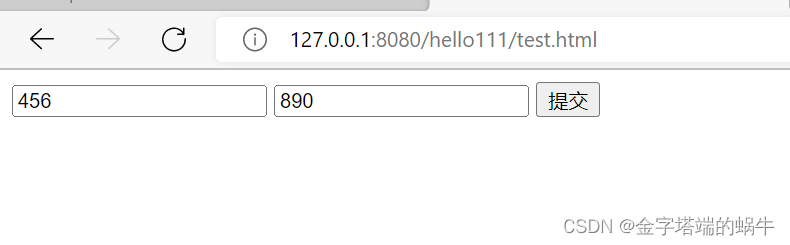
After clicking submit , You can see , In the browser console , The response data of the server is printed out . Currently using ajax The way to submit data , This operation will not generate page Jump by default , And use form The styles vary greatly .

HttpServletResponse
HttpServletResponse It corresponds to a HTTP Respond to ,HTTP In the response
what , There's something here .
The core approach

Set status code
200
import javax.servlet.ServletException;
import javax.servlet.annotation.WebServlet;
import javax.servlet.http.HttpServlet;
import javax.servlet.http.HttpServletRequest;
import javax.servlet.http.HttpServletResponse;
import java.io.IOException;

@WebServlet("/status")
public class StatusServlet extends HttpServlet {

    @Override
    protected void doGet(HttpServletRequest req, HttpServletResponse resp) throws ServletException, IOException {

        resp.setStatus(200);
        resp.getWriter().write("hello");
    }
}
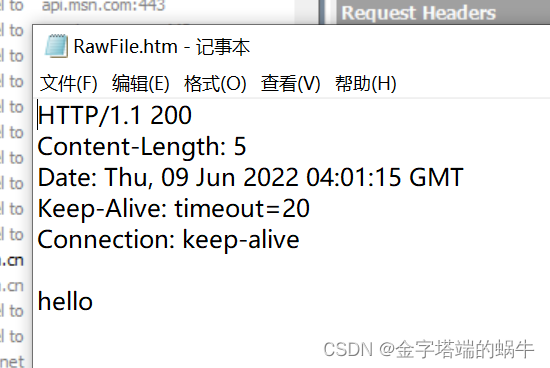
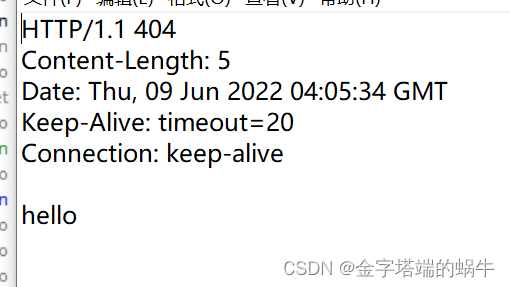
adopt fiddler Grab the bag , You can see the result
404
@WebServlet("/status")
public class StatusServlet extends HttpServlet {

    @Override
    protected void doGet(HttpServletRequest req, HttpServletResponse resp) throws ServletException, IOException {

        resp.setStatus(404);
        resp.getWriter().write("hello");
    }
}
Automatically refresh
to http Set one in the response header.Refresh
import javax.servlet.ServletException;
import javax.servlet.annotation.WebServlet;
import javax.servlet.http.HttpServlet;
import javax.servlet.http.HttpServletRequest;
import javax.servlet.http.HttpServletResponse;
import java.io.IOException;

@WebServlet("/autoRefresh")
public class AutoRefresh extends HttpServlet {

    @Override
    protected void doGet(HttpServletRequest req, HttpServletResponse resp) throws ServletException, IOException {

        resp.setHeader("Refresh","1");
        resp.getWriter().write("timeStamp:"+System.currentTimeMillis());

    }
}
Redirect
import javax.servlet.ServletException;
import javax.servlet.annotation.WebServlet;
import javax.servlet.http.HttpServlet;
import javax.servlet.http.HttpServletRequest;
import javax.servlet.http.HttpServletResponse;
import java.io.IOException;

@WebServlet("/redirect")
public class RedirectServlet extends HttpServlet {

    @Override
    protected void doGet(HttpServletRequest req, HttpServletResponse resp) throws ServletException, IOException {

        // Here we return a 302 Redirect response , Let the browser automatically jump to   Sogou homepage
        resp.setStatus(302);
        resp.setHeader("Location","https://www.sogou.com/");
    }
}
Simpler usage
@WebServlet("/redirect")
public class RedirectServlet extends HttpServlet {

    @Override
    protected void doGet(HttpServletRequest req, HttpServletResponse resp) throws ServletException, IOException {

        // Here we return a 302 Redirect response , Let the browser automatically jump to   Sogou homepage
       resp.sendRedirect("https:www.baidu.com");
    }
}
The server version of the confession wall
The previously implemented confession wall , As soon as the page is refreshed , The content doesn't exist , So you can use the server , To save the data , So that “ Persistence ” Storage .
When implementing this program , You need to first consider how the client and server interact .
That is to say, the front and back end interaction interfaces should be agreed .
For the confession wall , It mainly provides two interfaces .
1. Tell the server , What kind of data is left in the current message
( When the user clicks the submit button , Will send a message to the server HTTP request , Let the server save this message )
2. Get... From the server , What is the current message data .( When the page loads , You need to get the stored message content from the server )
import com.fasterxml.jackson.databind.ObjectMapper;

import javax.servlet.ServletException;
import javax.servlet.annotation.WebServlet;
import javax.servlet.http.HttpServlet;
import javax.servlet.http.HttpServletRequest;
import javax.servlet.http.HttpServletResponse;
import java.io.IOException;
import java.util.ArrayList;
import java.util.List;

class Message {

    public String from;
    public String to;
    public String message;
}
@WebServlet("/message")
public class MessageServlet extends HttpServlet {

    private ObjectMapper objectMapper=new ObjectMapper();

    private List<Message> messages=new ArrayList<>();
    @Override
    protected void doPost(HttpServletRequest req, HttpServletResponse resp) throws ServletException, IOException {

        // Processing requests to submit messages
       Message message= objectMapper.readValue(req.getInputStream(),Message.class);
      // The simplest way to save is to save to memory
       messages.add(message);
       // adopt ContentType Notification page , The data returned is json Format
       resp.setContentType("application/json;charset=utf8");
       resp.getWriter().write("{\"ok\":true}");
    }

    @Override
    protected void doGet(HttpServletRequest req, HttpServletResponse resp) throws ServletException, IOException {

        // Get message list , Just return the whole message list to the client
        // You need to use objectMapper hold Java object , Turn into json Format string

        String jsonString=objectMapper.writeValueAsString(messages);
        System.out.println("jsonString: " + jsonString);
        resp.setContentType("application/json;charset=utf8");
        resp.getWriter().write(jsonString);
    }


}
<script src="https://cdn.bootcdn.net/ajax/libs/jquery/3.6.0/jquery.min.js"></script>
    <script>
    //  Join in ajax Code for , The logic to be added here has two parts
    //  When you click the submit button ,ajax To be able to construct data to send to the server
    //  When the page is loaded , Get the message list from the server , And display directly on the interface
        function getMessages(){

            $.ajax({

                type:'get',
                url:'message',
                success:function(body){

                  // Current body Is already a JS Object array ,ajax According to the response content type To automatically parse
                  // If the server returns content type It's already application/json 了 ,ajax It will body Automatically convert to JS The object of
                  // If the client does not automatically transfer , It can also be done through JSON.parse() To switch manually
                    let container=document.querySelector('.container');
                    for(let message of body){

                        let div=document.createElement('div');
                        div.innerHTML=message.from+' Yes '+message.to+' say :'+message.message;
                        div.className='row';
                        container.appendChild(div);

                    }

                }

            });
        }
        // Function call
        getMessages();


        // When the user clicks submit, You'll get it input The content in , So as to construct the content into a div, Insert at the end of the page
        let submitBtn=document.querySelector('#submit');
        submitBtn.onclick=function() {

            //1. Get it first 3 individual input The content in
            let inputs=document.querySelectorAll('input');
            let from=inputs[0].value;
            let to=inputs[1].value;
            let msg=inputs[2].value;
            if(from=='' || to=='' || msg==''){

                // The user hasn't finished filling in , Don't submit data for the time being
                return;
            }
            //2. Generate a new div, The content is input Contents of Li , Put this new div Add to page
            let div=document.createElement('div');
            div.innerHTML=from+' Yes '+to+' say :'+msg;
            div.className='row';
            let container=document.querySelector('.container');
            container.appendChild(div);
            //3. Clear the contents of the previous input box
            for(let i=0;i<inputs.length;i++){

                inputs[i].value='';
            }
            //4.  Put the contents of the currently obtained input box , Construct into a HTTP POST request , adopt ajax To the server
            let body={

                from:from,
                to:to,
                message:msg
            };
            $.ajax({

                type:"post",
                url:"message",
                contentType:"application/json;charset=utf8",
                data:JSON.stringify(body),
                success:function(body){

                    alert(" Message submitted successfully ");
                },
                error:function(){

                    alert(" Message submission failed ");
                }
            });


        }
    </script>
Refresh the page , The data is still there , But restart the server , The data doesn't exist , So you need to save the data on your hard disk .
Use JDBC The basic flow :
- create data source
- Establish connection with database
- structure SQL sentence
- perform SQL sentence
- If it's a query statement , Need to traverse the result set , If it's insertion / Delete / modify , You don't need to
- Close the connection , Release resources
Part of the source code :
private void save(Message message){

        // Save a message in the database
        Connection connection=null;
        PreparedStatement statement=null;
        try {

            //1. Establish a connection to the database
             connection=DBUtil.getConnection();
            //2. structure SQL
            String sql="insert into message values(?,?,?)";
             statement=connection.prepareStatement(sql);
            statement.setString(1,message.from);
            statement.setString(2,message.to);
            statement.setString(3,message.message);
            //3. perform sql
            statement.executeUpdate();
            //4. Release resources

        } catch (SQLException e) {

            e.printStackTrace();
        }finally {

            DBUtil.close(connection,statement,null);
        }
    }

    private List<Message> load(){

        List<Message> messages=new ArrayList<>();
        // Get all the messages from the database
        Connection connection=null;
        PreparedStatement statement=null;
        ResultSet resultSet=null;
        try {

            connection=DBUtil.getConnection();
            String sql="select * from message";
            statement=connection.prepareStatement(sql);
            resultSet=statement.executeQuery();
            while(resultSet.next()){

                Message message=new Message();
                message.from=resultSet.getString("from");
                message.to=resultSet.getString("to");
                message.message=resultSet.getString("message");
                messages.add(message);
            }
        } catch (SQLException e) {

            e.printStackTrace();
        }finally {

            DBUtil.close(connection,statement,resultSet);
        }
        return  messages;
    }
public class DBUtil {
    private static final String URL="jdbc:mysql://127.0.0.1:3306/java?characterEncoding=utf8&useSSL=false";
    private static  final  String USERNAME="root";
    private static  final  String PASSWORD="999990";
    private volatile static DataSource dataSource = null;

    private  static DataSource getDataSource() {
        if(dataSource == null){
            synchronized (DBUtil.class){
                if(dataSource==null) {
                    dataSource = new MysqlDataSource();
                    ((MysqlDataSource)dataSource).setURL(URL);
                    ((MysqlDataSource)dataSource).setUser(USERNAME);
                    ((MysqlDataSource)dataSource).setPassword(PASSWORD);
                }
            }
        }


        return dataSource;
    }

    public static Connection getConnection() throws SQLException {
        return getDataSource().getConnection();
    }

    public static void close(Connection connection, PreparedStatement statement, ResultSet resultSet) {
        if(resultSet != null){
            try {
                resultSet.close();
            } catch (SQLException e) {
                e.printStackTrace();
            }
        }
        if(statement != null){
            try {
                statement.close();
            } catch (SQLException e) {
                e.printStackTrace();
            }
        }
        if(connection != null){
            try {
                connection.close();
            } catch (SQLException e) {
                e.printStackTrace();
            }
        }
    }
}
The basic steps of developing the confession wall :
(1) Agree on the front and back-end interaction interface ( What is the request , What is the response )
(2) Development server code
Write first Servlet Able to handle requests from the front end
Write database code , To store / Get key data
(3) Develop client code
be based on ajax Ability to construct requests and parse responses
Be able to respond to user's operation ( After clicking the button , Trigger the behavior of sending a request to the server )
MVC
Model( Logic for operating data access )
View( User interface )
Controller( controller , The key logic after processing the request )

边栏推荐
- acwing 801. 二进制中1的个数(位运算)
- Acwing 1927 自动补全(知识点:hash,二分,排序)
- acwing796 子矩阵的和
- Super detailed dry goods! Docker+pxc+haproxy build a MySQL Cluster with high availability and strong consistency
- Multimix: small amount of supervision from medical images, interpretable multi task learning
- 深入理解 Go Modules 的 go.mod 与 go.sum
- std::set compare
- d的sha6转大整
- 如何基于CCS_V11新建TMS320F28035的工程
- Postgresql源码(53)plpgsql语法解析关键流程、函数分析
猜你喜欢


随机推荐
<山东大学项目实训>渲染引擎系统(五)
使用 .NET 升级助手将NET Core 3.1项目升级为.NET 6
Axure RP 9 for MAC (interactive product prototyping tool) Chinese version
批量--03---CmdUtil
Batch --04--- moving components
Acwing794 high precision Division
超详细干货!Docker+PXC+Haproxy搭建高可用强一致性的MySQL集群
面试:为什么整数包装类尽量用equals()来比较大小
Glibc memory management model frees C library memory cache
Recurrent+Transformer 视频恢复领域的‘德艺双馨’
HEMA is the best representative of future retail
The C Programming Language(第 2 版) 笔记 / 8 UNIX 系统接口 / 8.1 文件描述符
34-【go】Golang channel知识点
MySQL - server configuration related problems
C regular expression
acwing 2816. Judgement subsequence
学习记录[email protected]一文搞懂canvas
leetcode-54. Spiral matrix JS
acwing794 高精度除法
<山东大学项目实训>渲染引擎系统(二)