当前位置:网站首页>Servlet API
Servlet API
2022-06-12 16:17:00 【金字塔端的蜗牛】
目录
HttpServlet
处理GET请求
import javax.servlet.ServletException;
import javax.servlet.annotation.WebServlet;
import javax.servlet.http.HttpServlet;
import javax.servlet.http.HttpServletRequest;
import javax.servlet.http.HttpServletResponse;
import java.io.IOException;

@WebServlet("/hello")
public class helloServlet extends HttpServlet {

    @Override
    protected void doGet(HttpServletRequest req, HttpServletResponse resp) throws ServletException, IOException {

        //这行代码要注释掉,不能调用父类的doget
       // super.doGet(req, resp);

        //这个是让服务器在自己的控制台打印
        System.out.println("hello hello");
        //在页面上也打印 hello world,把hello world字符串,放到http响应的body中,浏览器就会把body的内容显示到页面上
        resp.getWriter().write("hello hello");

    }
}
处理POST请求
@WebServlet("/method")
public class MethodServlet extends HttpServlet {

    @Override
    protected void doPost(HttpServletRequest req, HttpServletResponse resp) throws ServletException, IOException {

        //super.doPost(req, resp);
        resp.setContentType("test/html;charset=utf8");
        resp.getWriter().write("POST响应");
    }
}
<body>
    <script src="https://cdn.bootcdn.net/ajax/libs/jquery/3.6.0/jquery.min.js"></script>
    <script>
        $.ajax({

            type:'post',
            url:'method',
            success:function(body){

                console.log(body);


            }

        });
    </script>

</body>

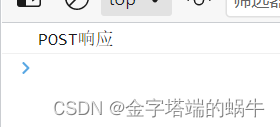
执行结果:
HttpServletRequest
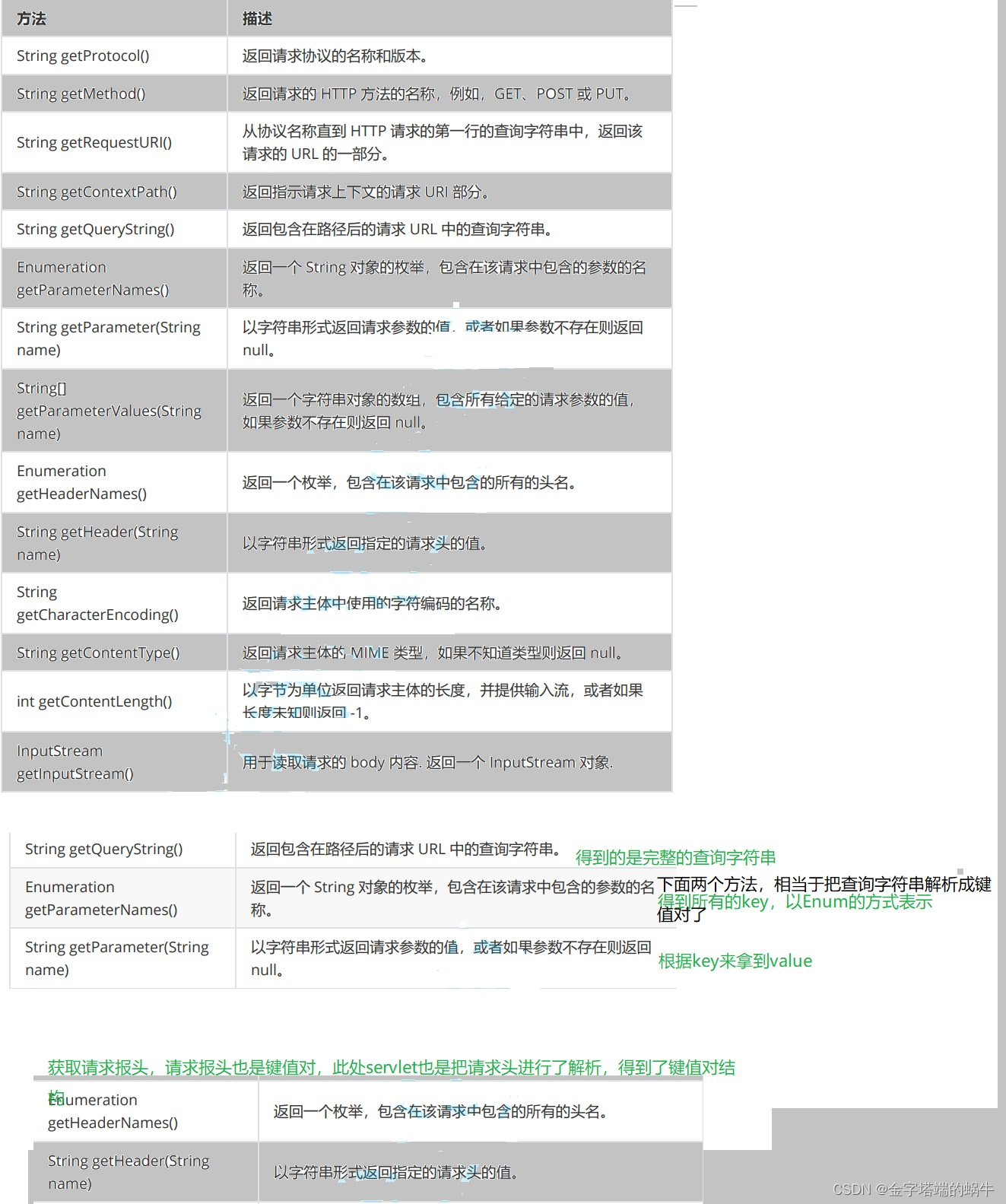
HttpServletRequest对应到一个HTTP请求,HTTP请求中有啥,这里就有啥。
核心方法
打印请求信息
import javax.servlet.ServletException;
import javax.servlet.annotation.WebServlet;
import javax.servlet.http.HttpServlet;
import javax.servlet.http.HttpServletRequest;
import javax.servlet.http.HttpServletResponse;
import java.io.IOException;
import java.util.Enumeration;

@WebServlet("/showRequest")
public class showRequestServlet extends HttpServlet {

    @Override
    protected void doGet(HttpServletRequest req, HttpServletResponse resp) throws ServletException, IOException {

        //调用下刚才涉及到的API,并且把得到的结果组织到一个html中,并作为响应的body

       //把api执行的结果,放到stringBuilder中
        StringBuilder stringBuilder=new StringBuilder();
        stringBuilder.append("<h3>首行 部分</h3>");
        stringBuilder.append(req.getProtocol());
        stringBuilder.append("<br>");
        stringBuilder.append(req.getMethod());
        stringBuilder.append("<br>");
        stringBuilder.append(req.getRequestURI());
        stringBuilder.append("<br>");
        stringBuilder.append(req.getContextPath());
        stringBuilder.append("<br>");
        stringBuilder.append(req.getQueryString());
        stringBuilder.append("<br>");
        stringBuilder.append("<h3>header 部分</h3>");
        Enumeration<String> headerNames=req.getHeaderNames();
        while(headerNames.hasMoreElements()) {

            String headerName=headerNames.nextElement();
            String headerValue= req.getHeader(headerName);
            stringBuilder.append(headerName+": "+headerValue+"<br>");
        }
        resp.setContentType("text/html;charset=utf8");
        resp.getWriter().write(stringBuilder.toString());

    }
}
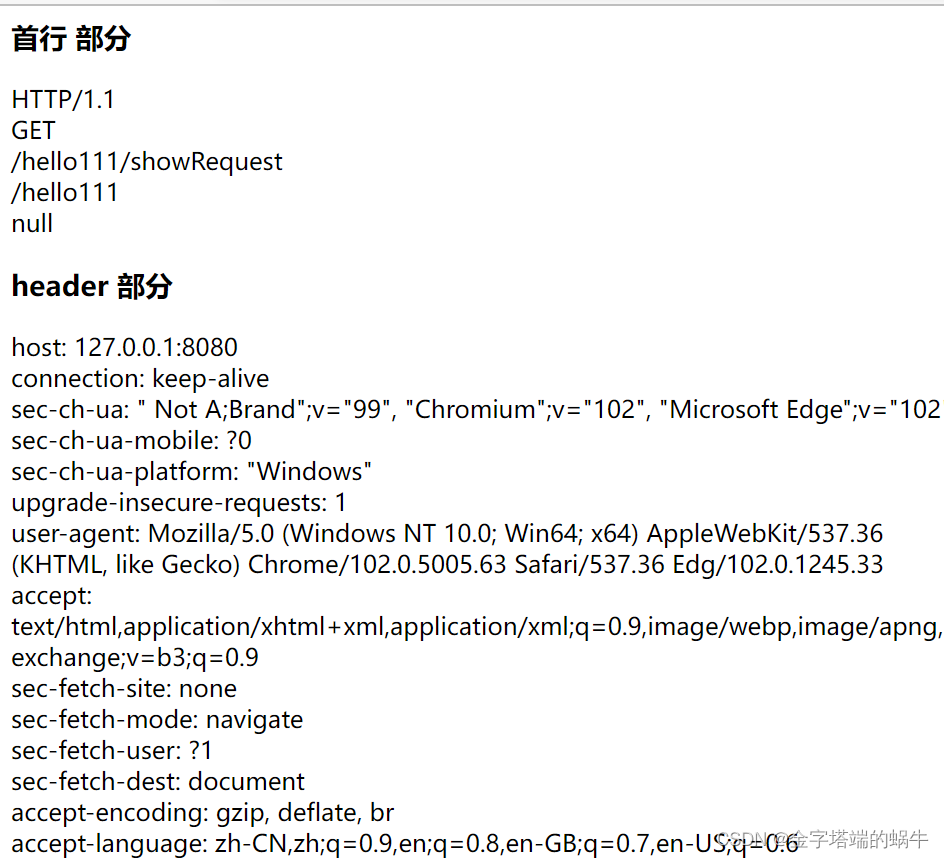
结果:
获取GET请求中的参数
import javax.servlet.ServletException;
import javax.servlet.annotation.WebServlet;
import javax.servlet.http.HttpServlet;
import javax.servlet.http.HttpServletRequest;
import javax.servlet.http.HttpServletResponse;
import java.io.IOException;

@WebServlet("/getParameter")
public class getParameterServlet extends HttpServlet {

    //预期浏览器传来一个形容这样的请求:/getParameter?userId=123&classId=456
  @Override
  protected void doGet(HttpServletRequest req, HttpServletResponse resp) throws ServletException, IOException {

      String userId=req.getParameter("userId");
      String classId=req.getParameter("classId");
      resp.getWriter().write("userId="+userId+", classId="+classId);
  }


}

获取POST请求中的参数
POST请求中的参数一般通过body传递给服务器。
POST请求body格式
(1)x-www-form-urlencoded
(2)form-data
(3)json
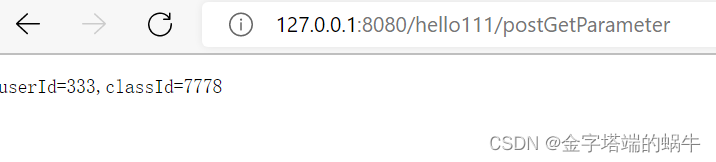
1.如果请求是x-www-form-urlencoded这种格式,服务器如何获取参数呢?
获取参数的方式和GET一样,也是getParameter
在前端通过form表单构造请求
在这里插入代码片import javax.servlet.ServletException;
import javax.servlet.annotation.WebServlet;
import javax.servlet.http.HttpServlet;
import javax.servlet.http.HttpServletRequest;
import javax.servlet.http.HttpServletResponse;
import java.io.IOException;

@WebServlet("/postGetParameter")
public class PostGetParameterServlet extends HttpServlet {

    @Override
    protected void doPost(HttpServletRequest req, HttpServletResponse resp) throws ServletException, IOException {

        //假设前端传过来的参数是userId=10&classId=20
        //服务器也是通过req.getParameter来获取到内容
        String userId=req.getParameter("userId");
        String classId=req.getParameter("classId");
        resp.getWriter().write("userId="+userId+",classId="+classId);
    }
}
<body>
    <form action="postGetParameter" method="POST">
        <input type="text" name="userId">
        <input type="text" name="classId">
        <input type="submit" value="提交">
    </form>
    <script src="https://cdn.bootcdn.net/ajax/libs/jquery/3.6.0/jquery.min.js"></script>
    <script>
        // $.ajax({

        // type:'post',
        // url:'method',
        // success:function(body){

        // console.log(body);


        // }

        // });
    </script>


</body>

2.如果请求是json的方式,该如何处理?
可以通过第三方库,直接处理json格式数据。
主要使用的库,叫做Jackson.
通过maven把Jackson这个库,下载到本地,并引入到项目中。

(一)在浏览器前端代码中,通过JS构造出body为json格式的请求
<input type="text" id="userId">
<input type="text" id="classId">
<input type="button" value="提交" id="submit">
<script src="https://cdn.bootcdn.net/ajax/libs/jquery/3.6.0/jquery.min.js"></script>
    <script>
     let userIdinput=document.querySelector("#userId");
        let classIdinput=document.querySelector("#classId");
        let button=document.querySelector("#submit");
        button.onclick=function(){

            $.ajax({

                type:'post',
                url:'postJson',
                contentType:'application/json',
                data:JSON.stringify({

                    userId:userIdinput.value,
                    classId:classIdinput.value

                }),
                success:function(body){

                    console.log(body);

                }


            });


        }
    </script>
(二)在Java后端代码中,通过Jackson进行处理。
import com.fasterxml.jackson.databind.ObjectMapper;

import javax.servlet.ServletException;
import javax.servlet.annotation.WebServlet;
import javax.servlet.http.HttpServlet;
import javax.servlet.http.HttpServletRequest;
import javax.servlet.http.HttpServletResponse;
import java.io.IOException;
class User {

    public int userId;
    public int classId;

}
@WebServlet("/postJson")
public class PostJsonServlet extends HttpServlet {

    //1.创建一个Jackson的核心对象
    private ObjectMapper objectMapper=new ObjectMapper();

    @Override
    protected void doPost(HttpServletRequest req, HttpServletResponse resp) throws ServletException, IOException {

        //2.读取body中的请求,然后使用objectMapper来解析成需要的对象
        //readValue就是把json格式的字符串,转成Java的对象
        //第一个参数,表示对哪个字符串进行转换,这个参数可以填写成一个String,也可以填写成一个InputStream对象,还可以填File
        //第二个参数,表示 要把这个json格式的字符串,转成哪个Java对象
        User user=objectMapper.readValue(req.getInputStream(),User.class);
        resp.getWriter().write("userId:"+user.userId+",classId"+user.classId);


    }
}
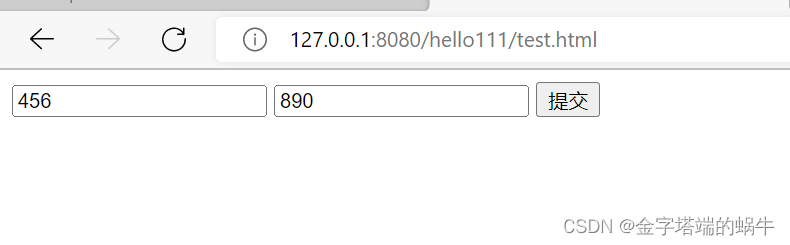
结果:
点击提交之后,可以看到,在浏览器控制台中,就打印出来了服务器的响应数据。当前使用的是ajax的方式来提交数据,这个操作默认不会产生页面跳转,就和使用form风格差别很大。

HttpServletResponse
HttpServletResponse对应到一个HTTP响应,HTTP响应里有
啥,这里就有啥。
核心方法

设置状态码
200
import javax.servlet.ServletException;
import javax.servlet.annotation.WebServlet;
import javax.servlet.http.HttpServlet;
import javax.servlet.http.HttpServletRequest;
import javax.servlet.http.HttpServletResponse;
import java.io.IOException;

@WebServlet("/status")
public class StatusServlet extends HttpServlet {

    @Override
    protected void doGet(HttpServletRequest req, HttpServletResponse resp) throws ServletException, IOException {

        resp.setStatus(200);
        resp.getWriter().write("hello");
    }
}
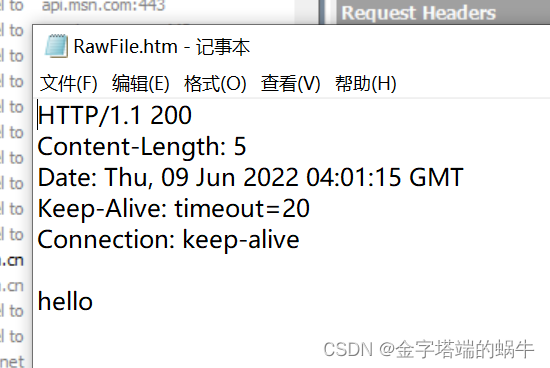
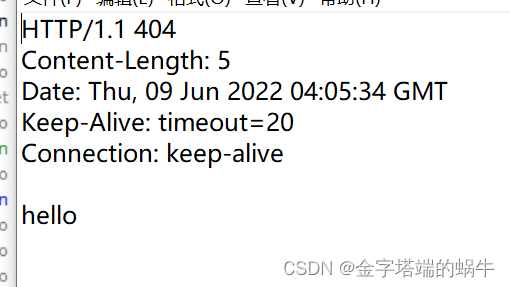
通过fiddler抓包,可以看到结果
404
@WebServlet("/status")
public class StatusServlet extends HttpServlet {

    @Override
    protected void doGet(HttpServletRequest req, HttpServletResponse resp) throws ServletException, IOException {

        resp.setStatus(404);
        resp.getWriter().write("hello");
    }
}
自动刷新
给http响应中设置一个header.Refresh
import javax.servlet.ServletException;
import javax.servlet.annotation.WebServlet;
import javax.servlet.http.HttpServlet;
import javax.servlet.http.HttpServletRequest;
import javax.servlet.http.HttpServletResponse;
import java.io.IOException;

@WebServlet("/autoRefresh")
public class AutoRefresh extends HttpServlet {

    @Override
    protected void doGet(HttpServletRequest req, HttpServletResponse resp) throws ServletException, IOException {

        resp.setHeader("Refresh","1");
        resp.getWriter().write("timeStamp:"+System.currentTimeMillis());

    }
}
重定向
import javax.servlet.ServletException;
import javax.servlet.annotation.WebServlet;
import javax.servlet.http.HttpServlet;
import javax.servlet.http.HttpServletRequest;
import javax.servlet.http.HttpServletResponse;
import java.io.IOException;

@WebServlet("/redirect")
public class RedirectServlet extends HttpServlet {

    @Override
    protected void doGet(HttpServletRequest req, HttpServletResponse resp) throws ServletException, IOException {

        //在这里返回一个302重定向响应,让浏览器自动跳转到 搜狗主页
        resp.setStatus(302);
        resp.setHeader("Location","https://www.sogou.com/");
    }
}
更简单的用法
@WebServlet("/redirect")
public class RedirectServlet extends HttpServlet {

    @Override
    protected void doGet(HttpServletRequest req, HttpServletResponse resp) throws ServletException, IOException {

        //在这里返回一个302重定向响应,让浏览器自动跳转到 搜狗主页
       resp.sendRedirect("https:www.baidu.com");
    }
}
服务器版本的表白墙
之前实现的表白墙,页面一刷新,内容就不存在了,因此可以通过服务器,来保存数据,从而做到“持久化”存储。
在实现这个程序的时候,就需要先考虑客户端和服务器该如何进行交互。
也就是要约定前后端交互接口。
对表白墙来说,主要提供两个接口。
1.告诉服务器,当前留言了一条啥样的数据
(当用户点击提交按钮的时候,就会给服务器发送一个HTTP请求,让服务器把这个消息存下来)
2.从服务器获取到,当前都有哪些留言数据。(当页面加载的时候,就需要从服务器获取到曾经存储的这些消息内容)
import com.fasterxml.jackson.databind.ObjectMapper;

import javax.servlet.ServletException;
import javax.servlet.annotation.WebServlet;
import javax.servlet.http.HttpServlet;
import javax.servlet.http.HttpServletRequest;
import javax.servlet.http.HttpServletResponse;
import java.io.IOException;
import java.util.ArrayList;
import java.util.List;

class Message {

    public String from;
    public String to;
    public String message;
}
@WebServlet("/message")
public class MessageServlet extends HttpServlet {

    private ObjectMapper objectMapper=new ObjectMapper();

    private List<Message> messages=new ArrayList<>();
    @Override
    protected void doPost(HttpServletRequest req, HttpServletResponse resp) throws ServletException, IOException {

        //处理提交消息的请求
       Message message= objectMapper.readValue(req.getInputStream(),Message.class);
      //最简单的保存方法是保存到内存中
       messages.add(message);
       //通过ContentType告知页面,返回的数据是json格式
       resp.setContentType("application/json;charset=utf8");
       resp.getWriter().write("{\"ok\":true}");
    }

    @Override
    protected void doGet(HttpServletRequest req, HttpServletResponse resp) throws ServletException, IOException {

        //获取到消息列表,只要把消息列表内容整个给返回客户端即可
        //此处需要使用objectMapper把Java对象,转成json格式字符串

        String jsonString=objectMapper.writeValueAsString(messages);
        System.out.println("jsonString: " + jsonString);
        resp.setContentType("application/json;charset=utf8");
        resp.getWriter().write(jsonString);
    }


}
<script src="https://cdn.bootcdn.net/ajax/libs/jquery/3.6.0/jquery.min.js"></script>
    <script>
    // 加入ajax的代码,此处要加入的逻辑有两个部分
    // 点击提交按钮的时候,ajax要能够构造数据发送给服务器
    // 页面加载的时候,从服务器获取消息列表,并在界面上直接显示
        function getMessages(){

            $.ajax({

                type:'get',
                url:'message',
                success:function(body){

                  //当前的body已经是一个JS对象数组了,ajax会根据响应的content type来自动进行解析
                  //如果服务器返回的content type已经是application/json了,ajax就会把body自动转成JS的对象
                  //如果客户端没有自动转,也可以通过JSON.parse()来手动转换
                    let container=document.querySelector('.container');
                    for(let message of body){

                        let div=document.createElement('div');
                        div.innerHTML=message.from+'对'+message.to+'说:'+message.message;
                        div.className='row';
                        container.appendChild(div);

                    }

                }

            });
        }
        //函数调用
        getMessages();


        //当用户点击submit,就会获取到input中的内容,从而把内容构造成一个div,插入到页面的末尾
        let submitBtn=document.querySelector('#submit');
        submitBtn.onclick=function() {

            //1.先获取到3个input中的内容
            let inputs=document.querySelectorAll('input');
            let from=inputs[0].value;
            let to=inputs[1].value;
            let msg=inputs[2].value;
            if(from=='' || to=='' || msg==''){

                //用户还没填写完事,暂时先不提交数据
                return;
            }
            //2.生成新的div,内容就是input里的内容,把这个新的div加到页面中
            let div=document.createElement('div');
            div.innerHTML=from+'对'+to+'说:'+msg;
            div.className='row';
            let container=document.querySelector('.container');
            container.appendChild(div);
            //3.清空之前输入框的内容
            for(let i=0;i<inputs.length;i++){

                inputs[i].value='';
            }
            //4. 把把当前获取到的输入框的内容,构造成一个HTTP POST请求,通过ajax发给服务器
            let body={

                from:from,
                to:to,
                message:msg
            };
            $.ajax({

                type:"post",
                url:"message",
                contentType:"application/json;charset=utf8",
                data:JSON.stringify(body),
                success:function(body){

                    alert("消息提交成功");
                },
                error:function(){

                    alert("消息提交失败");
                }
            });


        }
    </script>
刷新页面,数据确实还在,但是重新启动服务器,数据就不存在了,因此需要把数据保存在硬盘上。
使用JDBC基本流程:
- 创建数据源
- 和数据库建立连接
- 构造SQL语句
- 执行SQL语句
- 如果是查询语句,需要遍历结果集,如果是插入/ 删除 /修改,则不需要
- 关闭连接,释放资源
部分源码:
private void save(Message message){

        //把一条消息保存在数据库中
        Connection connection=null;
        PreparedStatement statement=null;
        try {

            //1.与数据库建立连接
             connection=DBUtil.getConnection();
            //2.构造SQL
            String sql="insert into message values(?,?,?)";
             statement=connection.prepareStatement(sql);
            statement.setString(1,message.from);
            statement.setString(2,message.to);
            statement.setString(3,message.message);
            //3.执行sql
            statement.executeUpdate();
            //4.释放资源

        } catch (SQLException e) {

            e.printStackTrace();
        }finally {

            DBUtil.close(connection,statement,null);
        }
    }

    private List<Message> load(){

        List<Message> messages=new ArrayList<>();
        //从数据库中获取到所有的消息
        Connection connection=null;
        PreparedStatement statement=null;
        ResultSet resultSet=null;
        try {

            connection=DBUtil.getConnection();
            String sql="select * from message";
            statement=connection.prepareStatement(sql);
            resultSet=statement.executeQuery();
            while(resultSet.next()){

                Message message=new Message();
                message.from=resultSet.getString("from");
                message.to=resultSet.getString("to");
                message.message=resultSet.getString("message");
                messages.add(message);
            }
        } catch (SQLException e) {

            e.printStackTrace();
        }finally {

            DBUtil.close(connection,statement,resultSet);
        }
        return  messages;
    }
public class DBUtil {
    private static final String URL="jdbc:mysql://127.0.0.1:3306/java?characterEncoding=utf8&useSSL=false";
    private static  final  String USERNAME="root";
    private static  final  String PASSWORD="999990";
    private volatile static DataSource dataSource = null;

    private  static DataSource getDataSource() {
        if(dataSource == null){
            synchronized (DBUtil.class){
                if(dataSource==null) {
                    dataSource = new MysqlDataSource();
                    ((MysqlDataSource)dataSource).setURL(URL);
                    ((MysqlDataSource)dataSource).setUser(USERNAME);
                    ((MysqlDataSource)dataSource).setPassword(PASSWORD);
                }
            }
        }


        return dataSource;
    }

    public static Connection getConnection() throws SQLException {
        return getDataSource().getConnection();
    }

    public static void close(Connection connection, PreparedStatement statement, ResultSet resultSet) {
        if(resultSet != null){
            try {
                resultSet.close();
            } catch (SQLException e) {
                e.printStackTrace();
            }
        }
        if(statement != null){
            try {
                statement.close();
            } catch (SQLException e) {
                e.printStackTrace();
            }
        }
        if(connection != null){
            try {
                connection.close();
            } catch (SQLException e) {
                e.printStackTrace();
            }
        }
    }
}
开发表白墙的基本步骤:
(1)约定前后端交互接口(请求是啥,响应是啥)
(2)开发服务器代码
先编写Servlet能够处理前端发来的请求
编写数据库代码,来存储/获取关键数据
(3)开发客户端代码
基于ajax能够构造请求以及解析响应
能够响应用户的操作(点击按钮之后,触发给服务器发送请求的行为)
MVC
Model(操作数据存取的逻辑)
View(给用户展示的界面)
Controller(控制器,处理请求之后的关键逻辑)

边栏推荐
- Solution to idea Chinese prism garbled code error -- console Chinese output prism garbled code
- Project training of Software College of Shandong University rendering engine system radiation pre calculation (IX)
- Thinking about the probability of drawing cards in the duel link of game king
- Acwing795 prefix sum (one dimension)
- 连续八年包装饮用水市占率第一,这个品牌DTC是如何持续增长的?
- Reprise de Google net
- Analysis of China's cargo transport volume, cargo transport turnover and port cargo in 2021 [figure]
- d的sha6转大整
- The C Programming Language(第 2 版) 笔记 / 8 UNIX 系统接口 / 8.1 文件描述符
- 5-5配置Mysql复制 基于日志点的复制
猜你喜欢

关于组件传值

The C Programming Language(第 2 版) 笔记 / 8 UNIX 系统接口 / 8.7 实例(存储分配程序)

Analysis on the development status and direction of China's cultural tourism real estate industry in 2021: the average transaction price has increased, and cultural tourism projects continue to innova

当编程纳入到高考。。。

With a lamp inserted in the nostril, the IQ has risen and become popular in Silicon Valley. 30000 yuan is enough

RTOS RT thread bare metal system and multi thread system

Scanpy (VI) analysis and visualization of spatial transcriptome data
RTOS rt-thread裸机系统与多线程系统
Step by step steps to create an ABAP program with a custom screen

acwing796 子矩阵的和
随机推荐
C packing and unpacking
[browser principle] variable promotion
Global and Chinese markets of three-phase induction motors 2022-2028: Research Report on technology, participants, trends, market size and share
acwing794 高精度除法
The small flying page is upgraded to be intelligent and the bug repair is faster
Review of the development of China's medical beauty (medical beauty) industry in 2021: the supervision is becoming stricter, the market scale is expanding steadily, and the development prospect is bro
Global and Chinese markets of automatic glue applicators 2022-2028: Research Report on technology, participants, trends, market size and share
< 山东大学软件学院项目实训 > 渲染引擎系统——点云处理(十)
Scanpy (VI) analysis and visualization of spatial transcriptome data
Analysis on the current situation of China's antiarrhythmic drug industry in 2021: domestic R & D is further [figure]
acwing 802. 区间和 (离散化)
批量--03---CmdUtil
Saga architecture pattern: implementation of cross service transactions under microservice architecture
写代码也有本手俗手之分,而我们要善于发现妙手!
Writing code can also be classified as "manual" or "vulgar", and we should be good at finding good hands!
Reprise de Google net
Global and Chinese market for commercial ceiling fans 2022-2028: Research Report on technology, participants, trends, market size and share
The C Programming Language(第 2 版) 笔记 / 7 输入与输出 / 7.8 其它函数
小飞页升级变智能修复Bug更快速了
In 2020, the demand for strain sensors in China will reach 9.006 million, and the market scale will reach 2.292 billion yuan [figure]