当前位置:网站首页>Elk - x-pack set user password
Elk - x-pack set user password
2022-06-11 11:44:00 【Rufeng】
It was recorded before How to use Nginx The agent for Kibana Add login verification function , But in fact Elastic It also provides basic access control functions .
Although the related functions are X-Pack in , But you can still use it for free .
Reference resources Official website subscriptions, You can see in the Basic License Under the Security Included in the project Role-based access control.
Enable X-Pack Security
Elasticsearch The password setting command is as follows .
$ sudo /usr/share/elasticsearch/bin/elasticsearch-setup-passwords interactive

Unexpected response code [500] from calling GET http://192.168.1.88:9200/_security/_authenticate?pretty
It doesn't look like the X-Pack security feature is enabled on this Elasticsearch node.
Please check if you have enabled X-Pack security in your elasticsearch.yml configuration file.

ERROR: X-Pack Security is disabled by configuration.
Set before , It needs to be done first enable X-Pack security.
sudo vi /etc/elasticsearch/elasticsearch.yml
xpack.security.enabled: true
xpack.security.transport.ssl.enabled: true
SSL At the same time enable, Otherwise, the report will be wrong .
[2019-10-10T15:11:09,630][ERROR][o.e.b.Bootstrap          ] [appserver01] node validation exception
[1] bootstrap checks failed
[1]: Transport SSL must be enabled if security is enabled on a [basic] license. Please set [xpack.security.transport.ssl.enabled] to [true] or disable security by setting [xpack.security.enabled] to [false]
Now you can set the password .
You can see Elasticsearch Many roles and users are preset .
$ sudo /usr/share/elasticsearch/bin/elasticsearch-setup-passwords interactive
Initiating the setup of passwords for reserved users elastic,apm_system,kibana,logstash_system,beats_system,remote_monitoring_user.
You will be prompted to enter passwords as the process progresses.
Please confirm that you would like to continue [y/N]y


Enter password for [elastic]:
Reenter password for [elastic]:
Enter password for [apm_system]:
Reenter password for [apm_system]:
Enter password for [kibana]:
Reenter password for [kibana]:
Enter password for [logstash_system]:
Reenter password for [logstash_system]:
Enter password for [beats_system]:
Reenter password for [beats_system]:
Enter password for [remote_monitoring_user]:
Reenter password for [remote_monitoring_user]:
Changed password for user [apm_system]
Changed password for user [kibana]
Changed password for user [logstash_system]
Changed password for user [beats_system]
Changed password for user [remote_monitoring_user]
Changed password for user [elastic]
restart
sudo systemctl restart elasticsearch.service
Password required to access .
$ curl localhost:9200
{"error":{"root_cause":[{"type":"security_exception","reason":"missing authentication credentials for REST request [/]","header":{"WWW-Authenticate":"Basic realm=\"security\" charset=\"UTF-8\""}}],"type":"security_exception","reason":"missing authentication credentials for REST request [/]","header":{"WWW-Authenticate":"Basic realm=\"security\" charset=\"UTF-8\""}},"status":401}(base)

$ curl localhost:9200 -uelastic:<password>
{
  "name" : "appserver01",
  "cluster_name" : "elasticsearch",
  "cluster_uuid" : "wCDlDy6UTriUSuZuDrqWrw",
  "version" : {
    "number" : "7.3.2",
    "build_flavor" : "default",
    "build_type" : "rpm",
    "build_hash" : "1c1faf1",
    "build_date" : "2019-09-06T14:40:30.409026Z",
    "build_snapshot" : false,
    "lucene_version" : "8.1.0",
    "minimum_wire_compatibility_version" : "6.8.0",
    "minimum_index_compatibility_version" : "6.0.0-beta1"
  },
  "tagline" : "You Know, for Search"
}
Update Kibana Configure
After password setup in Elasticsearch, have to update configure for Kibana, Logstash and Beats.
e.g. Kibana
sudo vi /etc/kibana/kibana.yml
# sudo vi /etc/heartbeat/heartbeat.yml
elasticsearch.username: "elastic"
elasticsearch.password: "<password>"
sudo systemctl restart kibana.service
After restart, refresh Kibana and you will be asked for username and password now.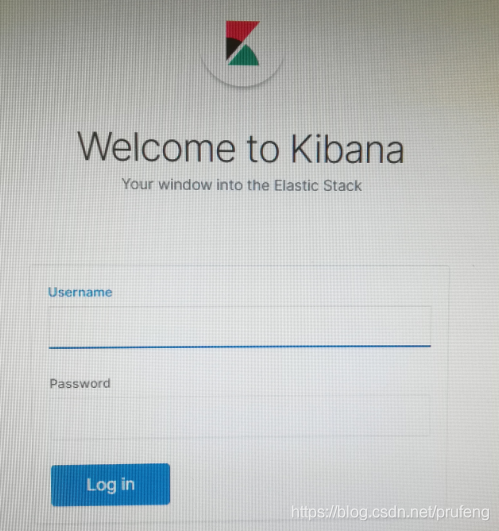
To change the password, can go to Kibana Management -> Security -> Users.

Or change data in Elasticsearch directly.
POST /_security/user/elastic/_password
{
  "password": "123456"
}
边栏推荐
- WordPress site link modification plug-in: Velvet Blues update URLs
- Processing of uci-har datasets
- Add auto thumbnail function for WordPress related log plug-ins
- [第二章 基因和染色体的关系]生物知识概括–高一生物
- JVM class loading process
- 浙大联合微软亚研院发布视频识别新方法,可对视频逐帧识别且无需,数据标记,或可用于手语翻译等
- Learning in Bi design 03
- WordPress用户名修改插件:Username Changer
- Mongodb usage
- 【C语言】anonymous/unnamed struct&&union
猜你喜欢

Uncaught TypeError: Cannot set property ‘next‘ of undefined 报错解决

National multi-year solar radiation spatial distribution data 1981-2022, temperature distribution data, evapotranspiration data, evaporation data, rainfall distribution data, sunshine data, wind speed
![[file upload vulnerability 06] server file content detection and bypass experiment + image horse production method (based on upload-labs-14 shooting range)](/img/30/79516390c2b2b50a224eaa84a0c1c9.jpg)
[file upload vulnerability 06] server file content detection and bypass experiment + image horse production method (based on upload-labs-14 shooting range)

2022 | framework for Android interview -- Analysis of the core principles of binder, handler, WMS and AMS!
JEST 单元测试说明 config.json

Adapter mode -- can you talk well?

01_ Description object_ Class diagram

設置默認收貨地址【項目 商城】

导师转我800块,让我仿真一个电路(电源设计)

Cap theory sounds very big, but it's actually very simple
随机推荐
Etcd介绍
Runtime reconfiguration of etcd
Smart sidebar plug-in: Mo widgets
ELK - Hearthbeat实现服务监控
How should ordinary people choose annuity insurance products?
NFT digital collection system platform construction
Test cos HTML cache static cache plug-in
01_ Description object_ Class diagram
中级web开发工程师,面试题+笔记+项目实战
文件excel导出
MSF CS OpenSSL traffic encryption
WordPress重新生成特色图像插件:Regenerate Thumbnails
设置默认收货地址【项目 商城】
再不刷题就晚了,最全的BAT大厂面试题整理
JS 加法乘法错误解决 number-precision
2022 | framework for Android interview -- Analysis of the core principles of binder, handler, WMS and AMS!
WordPress user name modification plug-in: username changer
Network protocol of yyds dry goods inventory: datagram socket for detailed explanation of socket protocol
AcWing 1944. Record keeping (hash, STL)
The tutor transferred me 800 yuan and asked me to simulate a circuit (power supply design)