当前位置:网站首页>Implementing MySQL master-slave replication in docker
Implementing MySQL master-slave replication in docker
2022-06-26 11:02:00 【Jaffy】
List of articles
Preface
We know , Use Docker It can be carried out conveniently MySQL Pull , start-up . Compared with the traditional installation method , stay Docker Use in MySQL It's so convenient , The content of this article is to learn how to Docker In the middle of MySQL Master-slave replication of , Because in a real production environment , At least one master and one slave mode is needed . If my friends have free time , You can still follow the steps , Give the operation a try . If you haven't tried Docker Install in MySQL My friends can quickly follow the following articles to install the previous steps .
Docker install MySQL Detailed steps of mirror image ( Suitable for beginners )
install
Mirror image
What we use here is MySQL:5.7 The mirror version of 
Preparation container
First of all, we have to think about preparing several containers . Here we are for convenience , Just one master and one follower , To be created later MySQl The name of the container is mysql_master and mysql_slave, The port is specified as 3306 and 3307, It is stipulated that the attached directories are placed in /mydata/mysql Under .
Create a new master server
docker run -d -p 3306:3306 --name mysql_master -e MYSQL_ROOT_PASSWORD=123456 -v /mydata/mysql-master/log:/var/log/mysql -v /mydata/mysql-master/data:/var/lib/mysql -v /mydata/mysql-master/conf:/etc/mysql mysql:5.7


modify my.cnf
stay /mydata/mysql-master/conf Create a new folder my.cnf file , Then paste the following content into it .
[mysqld]
##  Set up serverid, The same LAN should be unique
server_id=101
## Specify the name of the database that does not need to be synchronized
binlog-ignore-db=mysql
## Turn on binary log function
log-bin=mall-mysql-bin
## Set the memory size of binary log ( Business )
binlog_cache_size=1M
## Set the binary log format to use
binlog_format=mixed
## Binary log expiration cleanup time
expire_logs_days=7
## Skip all errors in master-slave replication or errors of the specified type , avoid slave End copy interrupt
###1062 Duplicate primary key ,1032 Main weight data is inconsistent
slave_skip_errors=1062
Restart the master server
docker restart mysql_master
Enter the main server
Enter the container
docker exec -it mysql_master /bin/bashLog in to mysql
mysql -uroot -p123456master Create a data synchronization user in the container instance
CREATE USER 'slave'@'%' IDENTIFIED BY '123456';
GRANT REPLICATION SLAVE, REPLICATION CLIENT ON *.* TO 'slave'@'%';
View the master-slave synchronization status in the master database
show master status \G;
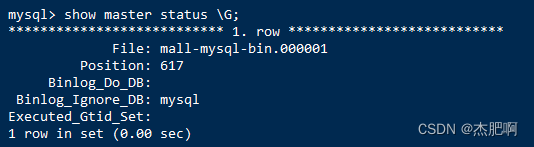
The parameters here are critical , When the database is finally configured, you need to obtain the corresponding value from here
Create a new slave server
docker run -d -p 3307:3306 --name mysql_slave -e MYSQL_ROOT_PASSWORD=123456 -v /mydata/mysql-slave/log:/var/log/mysql -v /mydata/mysql-slave/data:/var/lib/mysql -v /mydata/mysql-slave/conf:/etc/mysql mysql:5.7
modify my.cnf
[mysqld]
##  Set up serverid, The same LAN should be unique
server_id=102
## Specify the name of the database that does not need to be synchronized
binlog-ignore-db=mysql
## Turn on binary log function
log-bin=mall-mysql-slave1-bin
## Set the memory size of binary log ( Business )
binlog_cache_size=1M
## Set the binary log format to use
binlog_format=mixed
## Binary log expiration cleanup time
expire_logs_days=7
## Skip all errors in master-slave replication or errors of the specified type , avoid slave End copy interrupt
###1062 Duplicate primary key ,1032 Main weight data is inconsistent
slave_skip_errors=1062
## Configure relay logs
relay_log=mall-mysql-relay-bin
## Express slave Write the copy event to your own binary log
log_slave_updates=1
##slave Set to read only
read_only=1
Restart the slave server
docker restart mysql_slave
Enter from the server
Enter the container
docker exec -it mysql_slave /bin/bashSign in MySQL
mysql -uroot -p123456Configure the master-slave configuration in the slave database
change master to master_host='192.168.40.128', master_user='slave', master_password='123456', master_port=3306, master_log_file='mall-mysql-bin.000001', master_log_pos=617, master_connect_retry=30;master_host: The main database IP Address ;master_port: The running port of the primary database ;master_user: A user account created in the master database to synchronize data ;master_password: The user password created in the master database for synchronizing data ;master_log_file: Specify the log file to copy data from the database , By looking at the status of the master data , obtain File Parameters ;master_log_pos: Specify where to start copying data from the database , By looking at the status of the master data , obtain Position Parameters ;master_connect_retry: The connection failed and the time interval between retries , The unit is in seconds .The parameters here are defined by show master status; obtain
View the master-slave synchronization status in the slave database
show slave status \G;
Turn on master-slave synchronization
start slave;

test
use Navicat Premium The connection tool connects to the master database and the slave database respectively .

Then create a new database in the main database called mydata

At this time, it is found that the synchronization from the database is successful .

边栏推荐
- Is it safe for compass software to buy stocks for trading? How to open an account to buy shares
- Redis knowledge mind map
- Oracle11g reports an error when starting the database ora-27154: post/wait create failed
- How does unity prevent other camera positions and rotations from being controlled by steamvrplugin when using steamvrplugin
- Introduction to sysbench Basics
- MySQL 30 military regulations
- Fabric.js 上划线、中划线(删除线)、下划线
- 使用‘百家饭’自动生成API调用:JS部分进展(二)
- 滑动窗口
- CentOS安装Redis多主多从集群
猜你喜欢

That is to say, "live broadcast" is launched! One stop live broadcast service with full link upgrade
OpenCV图像处理-灰度处理

Unity使用SteamVRPlugin时如何不让其他Camera位置和旋转收到SteamVRPlugin控制

The sixth MySQL job - query data - multiple conditions

nacos2.x.x启动报错信息Error creating bean with name ‘grpcClusterServer‘;

02-Redis数据结构之链表
![[software project management] sorting out knowledge points for final review](/img/13/823faa0607b88374820be3fce82ce7.png)
[software project management] sorting out knowledge points for final review

ACK攻击是什么意思?ACK攻击怎么防御?

Flutter and native communication (Part 1)

Hazelnut cloud - SMS (tool)
随机推荐
工作汇报(3)
指南针软件买股票进行交易安全吗?怎么开户买股票
搜索引擎高级搜索方法记录
MySQL 8th job
[Beiyou orchard microprocessor design] 10 serial communication serial communication notes
That is to say, "live broadcast" is launched! One stop live broadcast service with full link upgrade
QT连接MySql数据查询失败
Character sets and comparison rules
Matrix fast power notes
Sqli-labs靶场1-5
【软件项目管理】期末复习知识点整理
[echart] i. how to learn echart and its characteristic document reading notes
Concise course of probability theory and statistics in engineering mathematics second edition review outline
Easyx-----c语言实现2048
Adaptiveavgpool2d does not support onnx export. Customize a class to replace adaptiveavgpool2d
Oracle sqlplus 查询结果显示优化
SQL Server 基础介绍整理
sliding window
laravel 安装报错 Uncaught ReflectionException: Class view does not exist
The sixth MySQL job - query data - multiple conditions