当前位置:网站首页>Embedded sig | distributed soft bus
Embedded sig | distributed soft bus
2022-07-26 22:32:00 【openEuler】
- Feature introduction -
background
openEuler Adhering to create “ Digital infrastructure operating system ” Vision , To promote and OpenHarmony Ecological cooperation and connectivity , Realize interoperability and collaboration in end-to-end fields , It is the first time to introduce distributed soft bus technology into the embedded field .
Distributed soft bus is OpenHarmony Community open source distributed device communication base , Provide unified distributed collaboration capability for interconnection between devices , Realize the senseless discovery and efficient transmission of devices .
OpenHarmony Mainly for intelligent terminals with strong interaction and other requirements 、 Internet of things terminals and industrial terminals .openEuler Mainly for high reliability 、 High performance servers 、 Edge of computing 、 Cloud and embedded devices , Both have their own emphases . Through the technology represented by distributed soft bus for ecological interoperability , With a view to achieving “1+1>2” The effect of , Support community users to develop a broader industry space .
framework
The main architecture of soft bus is as follows :
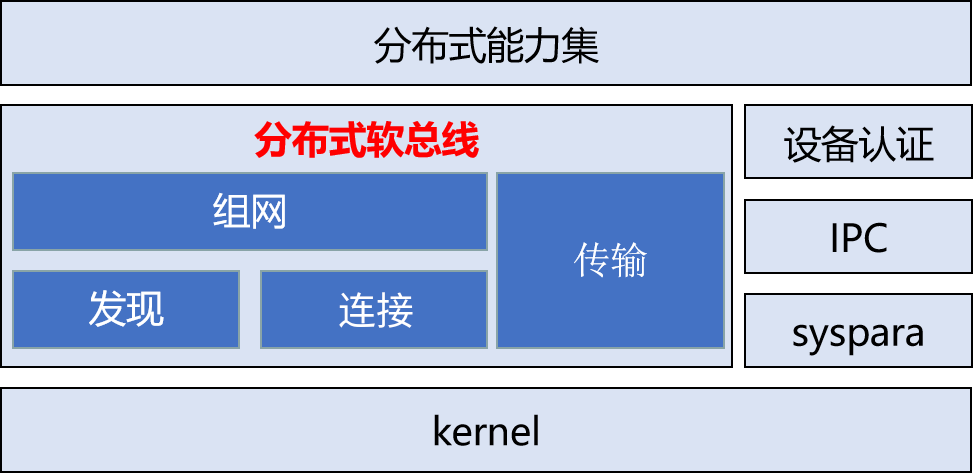
The main functions of soft bus are divided into discovery 、 networking 、 Connect and transmit four basic modules , Realization :
· Plug and play : Quickly and conveniently discover peripheral devices .
· Free circulation : Ad hoc network among equipment , Establish any business connection , Realize free communication .
· Efficient transmission : adopt WIFI、 Under Bluetooth device, hardware and software cooperate to maximize hardware transmission performance .
Soft bus southbound supports standard Ethernet communication , At the same time, the follow-up sustainable development WIFI、 Bluetooth and other communication methods . And provide a unified API Interface , Shielding the underlying communication mechanism .
Soft bus depends on device authentication 、IPC、 Logs and system parameters (SN Number ) Wait for peripheral modules , These dependent modules are replaced by template in embedded system , To realize the basic functions of soft bus . The actual peripheral module function realization , Users also need to enrich and replace according to the actual business scenarios , To expand the soft bus capability .
- Application Guide -
Deployment diagram
The soft bus supports the deployment of multiple devices in the LAN , The equipment communicates through Ethernet . Single equipment is divided into server and client, Both by IPC Modules interact .

Be careful :
At present IPC Module and SN No. and other system parameters , The embedded version provides only reference templates , Multi node and multi client Deploy . Users can do it according to the actual business scenario IPC Module and SN No. 2 system parameters, rich functions , To expand the deployment capability of soft bus .
Server startup
The main program of the server is softbus_server_main, Executing the main program can pull up the soft bus server .
For the shareholders and directors of the company to be listed 、 The qualification examination of supervisors and senior executives is the focus of the CSRC's verification . Some companies to be listed have shareholders and / Or director 、 The situation of supervisors and senior executives serving as civil servants in government organs . So , The author hereby summarizes such provisions in combination with relevant cases .
```bashopeneuler ~ # softbus_server_main >log.file &```
When the server is pulled up , Will take the initiative to pass the name ethX Network equipment coap radio broadcast , If the presence of the opposite end device is detected, the ad hoc network will be started .
client API
Header file in sdk and initrd Are stored in /usr/include/dsoftbus/ Next , among :
1. discovery\_service.h: Found module header file , Support application active detection and release API as follows :

When the server is pulled up , Will take the initiative to pass the name ethX Network equipment coap radio broadcast , If the presence of the opposite end device is detected, the ad hoc network will be started .
2. softbus\_bus\_center.h: Networking module header file , Support to obtain equipment information in the network API as follows :
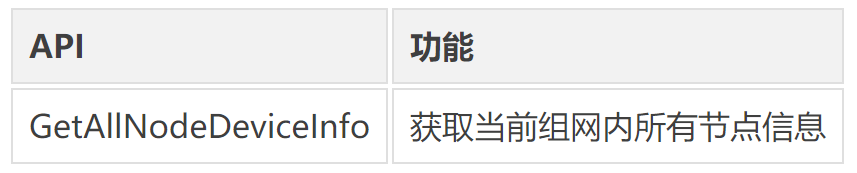
3. session.h: Connect / Transfer module header file , Support the creation of session And data transfer API as follows :

various API See the header file description for parameters .
Application example
1. Write client program
Writing client programs depends on Embedded Version released SDK, Follow these steps SDK Preparation for environmental use .
1.1 install SDK
perform SDK Self extracting installation script
```bashsh openeuler-glibc-x86_64-openeuler-image-aarch64-qemu-aarch64-toolchain-22.03.sh```
Enter the installation path of the tool chain according to the prompt , The default path is /opt/openeuler//; If we do not set up , Then install according to the default path ; You can also configure relative path or absolute path .
Examples are as follows :
```bashsh ./openeuler-glibc-x86_64-openeuler-image-armv7a-qemu-arm-toolchain-22.03.sh``openEuler embedded(openEuler Embedded Reference Distro) SDK installer version 22.03================================================================Enter target directory for SDK (default: /opt/openeuler/22.03): sdkYou are about to install the SDK to "/usr1/openeuler/sdk". Proceed [Y/n]? yExtracting SDK...............................................doneSetting it up...SDK has been successfully set up and is ready to be used.Each time you wish to use the SDK in a new shell session, you need to source the environment setup script e.g.. /usr1/openeuler/sdk/environment-setup-armv7a-openeuler-linux-gnueabi```
1.2 Set up SDK environment variable
The execution of the previous step is over, and finally it has been printed source command , Can run .
```bash. /usr1/openeuler/myfiles/sdk/environment-setup-armv7a-openeuler-linux-gnueabi```
1.3 Check whether the installation is successful
Run the following command , Check whether the installation is successful 、 Environment setting succeeded .
```basharm-openeuler-linux-gnueabi-gcc -v```
Next write the client program .
Create a main.c file , Source code is as follows :
```cint main(void){int32_t infoNum = 10;NodeBasicInfo **testInfo = malloc(sizeof(NodeBasicInfo *) * infoNum);int ret = GetAllNodeDeviceInfo("testClient", testInfo, &infoNum);if (ret != 0) {printf("Get node device info fail.\n");return 0;}printf("Get node num: %d\n", infoNum);for (int i = 0; i < infoNum; i++) {printf("\t networkId: %s, deviceName: %s, deviceTypeId: %d\n",testInfo[i]->networkId,testInfo[i]->deviceName,testInfo[i]->deviceTypeId);}for (int i = 0; i < infoNum; i++) {FreeNodeInfo(testInfo[i]);}free(testInfo);testInfo = NULL;return 0;}```
Create a `CMakeLists.txt` file , Source code is as follows :
```bashproject(dsoftbus_hello C)add_executable(dsoftbus_hello main.c)target_link_libraries(dsoftbus_hello dsoftbus_bus_center_service_sdk.z)```
Compile client
```bashmkdir buildcd buildcmake ..make```
After compilation, you will get `dsoftbus_hello`.
2. structure QEMU Networking environment
stay host Create a bridge in br0
```bashbrctl addbr br0```
start-up qemu1
```bashqemu-system-aarch64 -M virt-4.0 -m 1G -cpu cortex-a57 -nographic -kernel zImage -initrd <openeuler-image-qemu-xxx.cpio.gz> -device virtio-net-device,netdev=tap0,mac=52:54:00:12:34:56 -netdev bridge,id=tap0```
Be careful
If the following error prompt appears during the first run :
```bashfailed to parse default acl file `/usr/local/libexec/../etc/qemu/bridge.conf'qemu-system-aarch64: bridge helper failed```
You need to add “allow br0”
```bashecho "allow br0" > /usr/local/libexec/../etc/qemu/bridge.conf```
start-up qemu2
```bashqemu-system-aarch64 -M virt-4.0 -m 1G -cpu cortex-a57 -nographic -kernel zImage -initrd openeuler-image-qemu-aarch64-20220331025547.rootfs.cpio.gz -device virtio-net-device,netdev=tap1,mac=52:54:00:12:34:78 -netdev bridge,id=tap1```
Be careful
qemu1 And qemu2 Of mac The address needs to be configured with different values .
To configure IP
To configure host Bridge address of```bashifconfig br0 192.168.10.1 up```To configure qemu1 Network address of```bashifconfig eth0 192.168.10.2```To configure qemu2 Network address of```bashifconfig eth0 192.168.10.3```
Respectively in host、qemu1、qemu2 Use ping To test , Make sure qemu1 Sure ping through qemu2.
3. Start the distributed soft bus
stay qemu1 and qemu2 Start the server of the distributed soft bus```bashsoftbus_server_main >log.file &```Distribute the compiled client to qemu1 and qemu2 In the root directory of```bashscp dsoftbus_hello [email protected]192.168.10.2:/scp dsoftbus_hello [email protected]192.168.10.3:/```
Respectively in qemu1 and qemu2 Run in the root directory of `dsoftbus_hello`, You'll get the following output :
qemu1```bash[LNN]NodeStateCbCount is 10[LNN]BusCenterClientInit init OK![DISC]Init success[TRAN]init tcp direct channel success.[TRAN]init succ[COMM]softbus server register service success![COMM]softbus sdk frame init success.Get node num: 1networkId: 714373d691265f9a736442c01459ba39236642c743a71750bb63eb73cde24f5f, deviceName: UNKNOWN, deviceTypeId: 0```qemu2```bash[LNN]NodeStateCbCount is 10[LNN]BusCenterClientInit init OK![DISC]Init success[TRAN]init tcp direct channel success.[TRAN]init succ[COMM]softbus server register service success![COMM]softbus sdk frame init success.Get node num: 1networkId: eaf591f64bab3c20304ed3d3ff4fe1d878a0fd60bf8c85c96e8a8430d81e4076,deviceName: UNKNOWN, deviceTypeId: 0```
qemu1 and qemu2 The basic information of the other party's equipment found is output respectively .
Compilation guide
Compilation depends on Embedded Container image of version release , Please refer to the container construction guide for container environment preparation .
Container build guide link :
<https://docs.openeuler.org/zh/docs/22.03_LTS/docs/Embedded/ Container building instructions .html>
1. The warehouse where the script is downloaded ( For example, download to `src/yocto-meta-openeuler` Under the table of contents )
```bashgit clone https://gitee.com/openeuler/yocto-meta-openeuler.git -b openEuler-22.03-LTS -v src/yocto-meta-openeuler```
2. Execute the download script
Download the latest soft bus code :```bashsh src/yocto-meta-openeuler/scripts/download_code.sh dsoftbus```
The code is downloaded to and by default `yocto-meta-openeuler` Same level path , If you need to modify the soft bus or its dependent module code, you can find it in the corresponding path `dsoftbus/_standard` and `yocto-embedded-tools` Modify the warehouse accordingly .
3. Compiling scripts
Compile the latest soft bus code :```bashsh src/yocto-meta-openeuler/scripts/compile.sh dsoftbus```
The compilation working directory is named dsoftbus/_build, The directory name of the compiled artifacts is dsoftbus/_output, Both default to yocto-meta-openeuler At the same level path .
- Restriction constraint -
1. Only supported under LAN coap Find out .WIFI/BLE And other functions will continue to be supported in subsequent versions .
2. At present IPC、SN The dependent modules of soft bus such as No. are examples , Only dual device node deployment is supported ,client-server One to one deployment capability . Looking forward to the follow-up with community partners , These dependent modules are instantiated together according to the actual scenario .
- Pay attention to our -
Embedded Already in openEuler Community open source . A series of topics will be shared , If you are right about Embedded The construction of , Application is interested in , Welcome to watch and join .
Project address :
<https://gitee.com/openeuler/yocto-meta-openeuler>
Welcome to star、fork, Get involved in community development , Contribute more .
- Enter the communication group -
If you are interested in embedded applications , Welcome to join openEuler Embedded&Yocto SIG Technology exchange group , Discuss Embedded and Yocto And other related technologies . Please scan the QR code below to join the group chat .

Welcome to the group
This article is from WeChat official account. - openEuler(openEulercommunity).
If there is any infringement , Please contact the [email protected] Delete .
Participation of this paper “OSC Source creation plan ”, You are welcome to join us , share .
边栏推荐
- 『MongoDB』你想要的MongoDB基本操作这里都有
- [RequireComponent(typeof(....))]
- Excel-vba quick start (X. prompt box, inputable pop-up box)
- yolov1
- Introduction to MySQL database
- LeetCode 122:买卖股票的最佳时机 II
- Spend 120 billion to build a "subway" to connect 4 trillion cities. What is Guangdong thinking?
- Redis 分布式锁 + Lua原子操作
- what crlf mean
- 博客园美化技巧汇总
猜你喜欢

光源控制器拨码开关使用说明

v-model语法糖的实现

2018 arXiv preprint | MolGAN: An implicit generative model for small molecular graphs

APP信息侦察&夜神模拟器Burp抓包配置

LeetCode 122:买卖股票的最佳时机 II

模块8(消息队列存储消息数据的mysql表格)

【地平线旭日X3派试用体验】+开箱帖

A few pictures help you clarify "China's financial institution system"

【论文阅读】LOGAN:Membership Inference Attacks Against Generative Models
Instructions for use of light source controller dial switch
随机推荐
nvidia-smi报错:NVIDIA-SMI has failed because it couldn‘t communicate with the NVIDIA driver 完整记录
挖财钱堂和启牛学堂哪个更好一些?是安全的吗
想让照片中的云飘起来?视频编辑服务一键动效3步就能实现
毕业5年,从信息管理转行软件测试工程师,我的月薪终于突破了12k
Systemctl command
Want the clouds in the picture to float? Video editing services can be achieved in three steps with one click
A chip company fell in round B
09.01 深度优先搜索
国信证券手机开户收费吗?开户安全吗?
模块8(消息队列存储消息数据的mysql表格)
参数解析与跳石板
systemctl命令
Overview of banking industry
【Qt多线程之线程的等待和唤醒】
Sell 700million a year, and get ready for the IPO of Dezhou braised chicken
Open source | arex Ctrip traffic playback practice without code intrusion
yolov1
ZABBIX calls API retrieval method
JMeter -- response Chinese garbled code processing
MySQL数据库介绍