当前位置:网站首页>Excel-vba quick start (X. prompt box, inputable pop-up box)
Excel-vba quick start (X. prompt box, inputable pop-up box)
2022-07-26 22:11:00 【Three uncle notes】
List of articles
One 、 Dialog box
1.1. Pop-up dialog box
Dialog box is the most common function , Let's first look at the relatively complete dialog structure :

The figure is visible , The dialog box is generally composed of three parts ( Window title 、 Prompt content 、 Button and icon categories and default selections ),VBA In the dialog box
The same is true of grammar ,MsgBox Prompt content , Button and icon categories and buttons are selected by default , Window title
The window title and prompt content are easy to understand , The point is < Button and icon categories and buttons are selected by default > How to pass this parameter , This parameter has
Real consists of three values , In actual use, use Button categories + Icon category + The button is selected by default This format passes parameters , Common categories are listed below
Button categories
| name | value | describe |
|---|---|---|
| vbOKOnly | 0 | The dialog box displays the OK button |
| vbOKCancel | 1 | Two buttons, OK and cancel, are displayed in the dialog box |
| vbAbortRetryIgnore | 2 | The dialog box displays abort 、 retry 、 Ignore the three buttons |
| vbYesNoCancel | 3 | The dialog box shows 、 no 、 Cancel three buttons |
| vbYesNo | 4 | The dialog box displays yes and no buttons |
| vbRetryCancel | 5 | Two buttons, retry and cancel, are displayed in the dialog box |
Icon category
| name | value | describe |
|---|---|---|
| vbCritical | 16 | The danger icon is displayed in the dialog box |
| vbQuestion | 32 | The inquiry icon is displayed in the dialog box |
| vbExclamation | 48 | The warning icon is displayed in the dialog box |
| vbInformation | 64 | The information icon is displayed in the dialog box |
The button is selected by default
| name | value | describe |
|---|---|---|
| vbDefaultButton1 | 0 | The first button is selected by default in the dialog box |
| vbDefaultButton2 | 256 | The second button is selected by default in the dialog box |
| vbDefaultButton3 | 512 | The third button is selected by default in the dialog box |
| vbDefaultButton4 | 768 | The fourth button is selected by default in the dialog box |
Complete dialog parameter transfer example ,< Button and icon categories and buttons are selected by default > You can pass the name , You can also pass values
Public Sub main()
  ' Either way
  MsgBox " Prompt content ", vbYesNoCancel + vbExclamation + vbDefaultButton2, " Window title "
  MsgBox " Prompt content ", 3 + 48 + 256, " Window title "
End Sub
1.2. Get the user's selection of the dialog
When we pop up the dialog , I definitely hope to get the user's choice ,vba in , When the button in the dialog box is clicked , It will return the value of the button , We only
You need to judge this value ,vba There are relatively few buttons in the dialog box , Each button has its fixed value
| Button value name | The value of the button | describe |
|---|---|---|
| vbOk | 1 | OK button |
| vbCancel | 2 | Cancel button |
| vbAbort | 3 | Stop button |
| vbRetry | 4 | Retry button |
| vbIgnore | 5 | Ignore button |
| vbYes | 6 | It's a button |
| vbNo | 7 | No button |
Example , Using the button value name and using the button value can be judged , Be careful : When you want to get the return value of the dialog , Don't forget to give MsgBox Parameters of
List plus ()
Public Sub main()
  Dim value As Integer
  value = MsgBox(" Prompt content ", vbYesNoCancel + vbExclamation + vbDefaultButton2, " Window title ")
  ' Use the button value to judge
  If value = 6 Then
    Debug.Print " The user chose ' yes '"
  End If
  ' Use the button value name to judge
  If value = vbYes Then
    Debug.Print " The user chose ' yes '"
  End If
End Sub
Two 、 Input dialog box
This dialog box , Allows the user to enter ,vba There are two common ways to use ,InputBox Functions and Applicatoin.InputBox Method
2.1. InputBox function
InputBox Function syntax :InputBox( Prompt text of the dialog box that can be input , Window title , The default value of the input box )
The return value of the dialog box has the following situations :
- After the user enters the content, click the OK button , The return value of the dialog box is the content entered by the user
- The user did not enter the content , But when there is a default value in the input box , Click the OK button , The return value of the dialog box is the default value in the input box
- The user did not enter the content , When there is no default value in the input box , Click the OK button , The return value of the dialog box is an empty string
- When the user clicks the Cancel button , The return value of the dialog box is an empty string
Example
Public Sub main()
  Dim value
  value = InputBox(" Prompt text of the dialog box that can be input ", " Window title ", " This is the default value of the input box ")
  Debug.Print value
End Sub
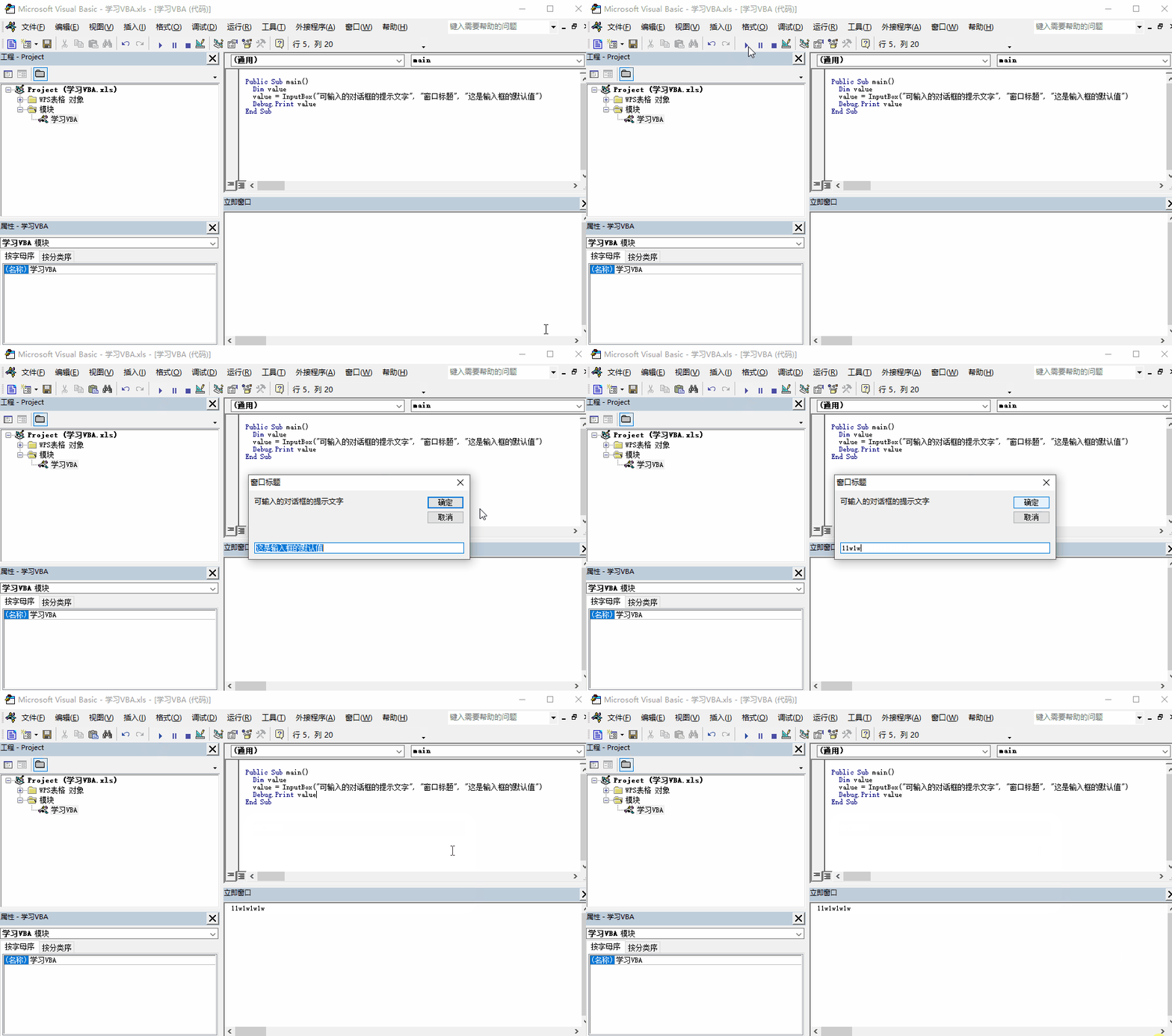
effect
2.2. Application.InputBox Method
This way is compared with the previous one , It mainly has the function of limiting the content type of the input box , Click the Cancel button in this dialog box to return False
The grammar is :Application.InputBox( The prompt text of the dialog , Window title , The input box defaults to , Input box x coordinate , Input box y coordinate , Help document , file ID, Input box content type )
There seem to be many parameters , But it's easy to understand , The prompt text of the dialog 、 Window title 、 The default value of the input box. You can see how these three parameters are described
Yes , Input box x coordinate 、 Input box y coordinate 、 Help document 、 file ID These four parameters generally do not need to be passed , So I won't introduce it here , The point is finally
One parameter ( Input box content type ), There are many types of this parameter to choose from , as follows :
| value | describe |
|---|---|
| 0 | Formula type |
| 1 | Numeric type |
| 2 | Text type 、 String type |
| 4 | Boolean type |
| 8 | Cell reference type |
| 16 | Error value type |
These types can be understood by giving it a try , Mainly record the cell reference type
Cell reference type
When selecting a cell , The dialog box returns Range object , When there are multiple cells, the dialog box returns a two-dimensional array
Example
Code :
Public Sub main()
  Dim value
  value = Application.InputBox(" The dialog box displays the contents ", " Input box title ", " The default value in the text box ", , , , , 8)
  If VBA.IsArray(value) Then
   Debug.Print " Two dimensional array :" & value(1, 1)
  Else
    Debug.Print "Range object :" & value
  End If
End Sub
effect :

边栏推荐
- Xshell7 personal free download, use
- npm, npm中文文档, npm学习使用
- imshow()函数后面如果不加waitKey()函数就不显示
- flask 源码启动阶段
- Jd.com: how does redis realize inventory deduction? How to prevent goods from being oversold?
- Go --- identifiers and keywords in go language
- Get network time by unity
- jmeter -- response中文乱码处理
- 仅需一个依赖给Swagger换上新皮肤,既简单又炫酷~
- Triangular wave spectrum of MATLAB excitation model
猜你喜欢

也谈数据治理

正规方程法(Normal Equation)原理以及与梯度下降法的区别

imshow()函数后面如果不加waitKey()函数就不显示

JS delay execution window.onload

Technology sharing | do you know the functions of the server interface automated testing and requests library?

想让照片中的云飘起来?视频编辑服务一键动效3步就能实现

Unity对资源管理器操作 打开资源管理器选择文件并筛选文件

一篇让小百彻底搞懂性能调优

小白学习MySQL - Derived Table

现货黄金操作指南与建议(上)
随机推荐
iptables防止nmap扫描以及binlog实现增量备份
Resume in 2022 is dead in the sea. Don't vote. Software testing positions are saturated
d和c的符区别
Database notes (from Lao She)
In depth interpretation of happens before principle
ansible安装及使用
Matlab draws short-term average amplitude spectrum
第15章 mysql用户管理
09 expr 命令
09 expr command
[MySql]substr用法-查询表的某个字段的具体位数的值
Finding a new direction for the development of digital retail is the key to ensure that digital retail can enter a new stage of development
Flink 在讯飞 AI 营销业务的实时数据分析实践
cmake编译obs-studio-27.2.0
The principle of normal equation method and its difference from gradient descent method
Thorough load balancing
Software Testing Technology: cross platform mobile UI automated testing (Part 2)
mysql推荐书
If you do not add waitkey() function after imshow() function, it will not be displayed
知识库工具 | 微网站、文档中心、形象展示页拖拽即可生成(附模板,直接用)