当前位置:网站首页>9.缓存优化
9.缓存优化
2022-06-30 09:35:00 【xjhqre】
缓存优化
1、环境搭建
1.1、导入maven
<dependency>
    <groupId>org.springframework.boot</groupId>
    <artifactId>spring-boot-starter-data-redis</artifactId>
</dependency>
1.2、配置redis
我的redis直接装在了windows上,所以host为本地地址。安装方法看此博客:https://www.redis.com.cn/redis-installation.html

1.3、redis配置类
在config目录下创建RedisConfig类,
这里不推荐把value也设置成StringRedisSerializer,如果设置成StringRedisSerializer,后面向redis中存入集合时会发生转换异常。
@Configuration
public class RedisConfig extends CachingConfigurerSupport {


    @Bean
    public RedisTemplate<Object, Object> redisTemplate(RedisConnectionFactory connectionFactory) {

        RedisTemplate<Object, Object> redisTemplate = new RedisTemplate<>();
        //默认的Key序列化器为:JdkSerializationRedisSerializer
        redisTemplate.setKeySerializer(new StringRedisSerializer()); // key序列化
        redisTemplate.setConnectionFactory(connectionFactory);
        return redisTemplate;
    }

}
1.4、推送
提交并推送到github,签名:redis环境配置。注意分支为 v1.0
2、缓存短信验证码
2.1、实现思路
- 在服务端UserController中注入RedisTemplate对象,用于操作Redis
- 在服务端UserController的sendMsg方法中,将随机生成的验证码缓存到Redis中,并设置有效期为5分钟
- 在服务端UserController的login方法中,从Redis中获取缓存的验证码,如果登录成功则删除Redis中的验证码
2.2、修改UserController
2.2.1、修改sendMsg方法

2.2.2、修改login方法
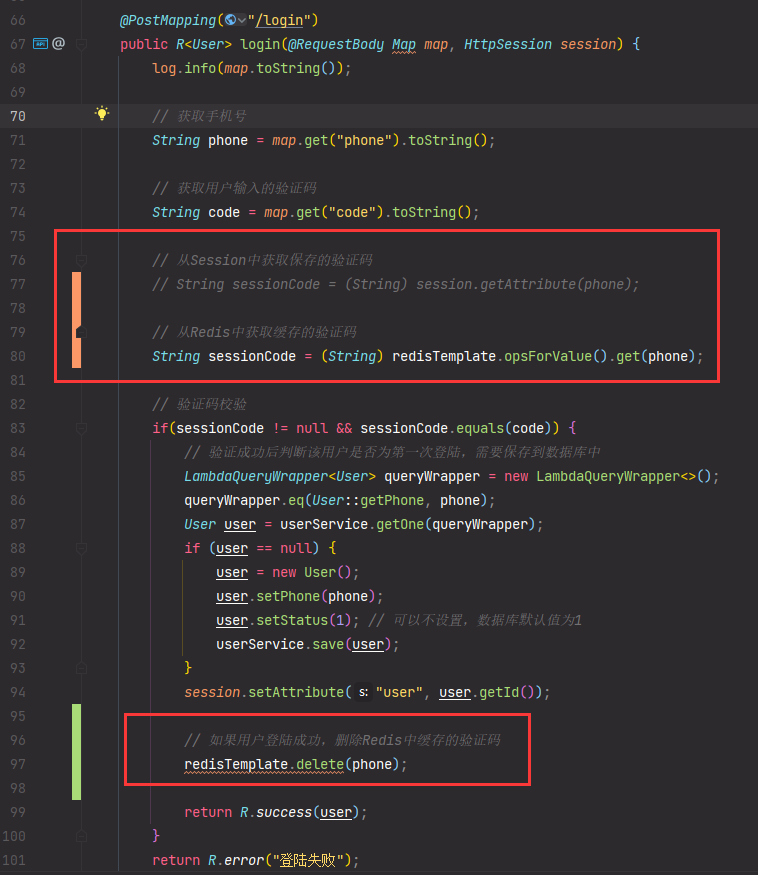
2.3、测试
安装一个redis可视化界面进行测试,我使用的是Another Redis Desktop Manager
2.4、推送代码
提交并推送代码,签名:缓存短信验证码。
3、缓存菜品
3.1、实现思路
- 改造DishController的list方法,先从Redis中获取菜品数据,如果有则直接返回,无需查询数据库;如果没有则查询数据库,并将查询到的菜品数据放入Redis。
- 改造DishController的save和update方法,加入清理缓存的逻辑
3.2、修改DishController
3.2.1、修改list方法
/** * 根据条件查询对应的菜品数据 * * @param dish * @return */
@GetMapping("/list")
public R<List<DishDto>> list(Dish dish) {

    List<DishDto> dishDtoList = null;

    String key = "dish_" + dish.getCategoryId() + "_" + dish.getStatus();

    // 先从redis获取数据
    dishDtoList = (List<DishDto>) redisTemplate.opsForValue().get(key);

    if (dishDtoList != null) {

        // 如果redis中有数据则直接返回
        return R.success(dishDtoList);
    }

    // 构造查询条件
    LambdaQueryWrapper<Dish> queryWrapper = new LambdaQueryWrapper<>();
    queryWrapper.eq(dish.getCategoryId() != null, Dish::getCategoryId, dish.getCategoryId());
    // 查询状态为1的菜品
    queryWrapper.eq(Dish::getStatus, 1);

    // 添加排序条件
    queryWrapper.orderByAsc(Dish::getSort).orderByDesc(Dish::getUpdateTime);

    List<Dish> list = dishService.list(queryWrapper);

    dishDtoList = list.stream().map(item -> {

        DishDto dishDto = new DishDto();
        // 拷贝属性
        BeanUtils.copyProperties(item, dishDto);

        // 设置DishDto分类名称属性
        Long categoryId = item.getCategoryId();
        Category category = categoryService.getById(categoryId);
        if (category != null) {

            String categoryName = category.getName();
            dishDto.setCategoryName(categoryName);
        }

        // 设置菜品口味
        Long dishId = item.getId();
        LambdaQueryWrapper<DishFlavor> dishFlavorLambdaQueryWrapper = new LambdaQueryWrapper<>();
        dishFlavorLambdaQueryWrapper.eq(DishFlavor::getDishId, dishId);
        // SQL: select * from dish_flavor where dish_id = ?
        List<DishFlavor> dishFlavorList = dishFlavorService.list(dishFlavorLambdaQueryWrapper);
        dishDto.setFlavors(dishFlavorList);

        return dishDto;
    }).collect(Collectors.toList());

    // 将数据存入redis
    redisTemplate.opsForValue().set(key, dishDtoList, 60, TimeUnit.MINUTES);

    return R.success(dishDtoList);
}
3.2.2、修改update方法
/** * 修改菜品 * @param dishDto * @return */
@PutMapping
public R<String> update(@RequestBody DishDto dishDto) {

    log.info(dishDto.toString());

    dishService.updateWithFlavor(dishDto);

    // 清理所有菜品的缓存数据
    // Set keys = redisTemplate.keys("dish_*");
    // redisTemplate.delete(keys);

    // 清理某个分类下面的菜品缓存数据
    String key = "dish_" + dishDto.getCategoryId() + "_1";
    redisTemplate.delete(key);

    return R.success("修改菜品成功");
}
3.2.3、修改save方法
/** * 新增菜品 * @param dishDto * @return */
@PostMapping
public R<String> save(@RequestBody DishDto dishDto) {

    log.info(dishDto.toString());
    dishService.saveWithFlavor(dishDto);

    // 清理所有菜品的缓存数据
    // Set keys = redisTemplate.keys("dish_*");
    // redisTemplate.delete(keys);

    // 清理某个分类下面的菜品缓存数据
    String key = "dish_" + dishDto.getCategoryId() + "_1";
    redisTemplate.delete(key);

    return R.success("新增菜品成功");
}
3.2.4、修改delete方法
/** * 逻辑删除 * @param ids * @return */
@DeleteMapping
@Transactional
public R<String> delete(Long[] ids) {

    log.info("批量删除的id:{}", Arrays.toString(ids));
    // 先逻辑删除菜品对应的口味信息
    dishFlavorService.removeByDishIds(Arrays.asList(ids));
    // 在逻辑删除菜品
    dishService.removeByIds(Arrays.asList(ids));

    // 清理所有菜品的缓存数据
    // Set keys = redisTemplate.keys("dish_*");
    // redisTemplate.delete(keys);

    // 根据dishId集合查询出categoryId集合
    List<Dish> dishes = dishService.listByIds(Arrays.asList(ids)); // 查询所有id在ids里的dish记录
    Set<Long> categoryIds = dishes.stream().map(Dish::getCategoryId).collect(Collectors.toSet());// 取出字段category_id集合,set集合防止重复

    // 清除所有id在categoryIds中的缓存
    categoryIds.forEach(item -> {

        String key = "dish_" + item + "_1";
        redisTemplate.delete(key);
    });

    return R.success("删除菜品成功");
}
3.2.5、测试缓存效果
3.2.6、推送代码
提交并推送代码,签名:缓存菜品。分支:v1.0
4、合并代码
将 v1.0 分支的代码合并到主分支上
- 切换回主分支
- 再点击 v1.0 分支的合并按钮
- 合并完后切换回 v1.0 分支继续开发
5、SpringCache缓存套餐数据
5.1、实现思路
- 导入Spring Cache和Redis相关maven坐标
- 在application.yml中配置缓存数据的过期时间
- 在启动类上加入@EnableCaching注解,开启缓存注解功能
- 在SetmealController的list方法上加入@Cacheable注解
- 在SetmealController的save和delete方法上加入CacheEvict注解
5.2、导入maven
之前已经导入了redis的相关依赖,现在只需要导入spring cache:
<dependency>
    <groupId>org.springframework.boot</groupId>
    <artifactId>spring-boot-starter-cache</artifactId>
</dependency>
5.3、开启缓存功能
在启动类上标注@EnableCaching注解
5.4、返回类型R实现序列化
public class R<T> implements Serializable
5.5、缓存套餐信息
1、修改SetmealController里的list方法
/** * 根据分类id和状态查询套餐 * @param setmeal * @return */
@GetMapping("/list")
@Cacheable(value = "setmealCache", key = "#setmeal.categoryId + '_' + #setmeal.status")
public R<List<Setmeal>> list(Setmeal setmeal) {

    LambdaQueryWrapper<Setmeal> queryWrapper = new LambdaQueryWrapper<>();
    queryWrapper.eq(setmeal.getCategoryId() != null, Setmeal::getCategoryId, setmeal.getCategoryId());
    queryWrapper.eq(setmeal.getStatus() != null, Setmeal::getStatus, setmeal.getStatus());
    queryWrapper.orderByDesc(Setmeal::getUpdateTime);

    List<Setmeal> list = setmealService.list(queryWrapper);

    return R.success(list);
}
2、给SetmealController下的delete、save、update方法都标上以下注解
@CacheEvict(value = "setmealCache", allEntries = true)
5.6、测试缓存
手机界面登陆后点击套餐查询,查看效果
5.7、推送代码&合并
提交并推送代码,签名:spring cache缓存套餐数据。分支:v1.0
合并步骤:
- 先切换到master分支
- 点击v1.0分支的合并按钮进行合并
边栏推荐
- How to build a private cloud and create a hybrid cloud ecosystem?
- 【新书推荐】Cleaning Data for Effective Data Science
- IDC released the report on China's software defined storage and hyper convergence market in the fourth quarter of 2020, and smartx hyper convergence software ranked first in the financial industry
- About the smart platform solution for business hall Terminal Desktop System
- 八大排序(二)
- prometheus 监控之 ntp_exporter
- MySQL index and data storage structure foundation
- Golang magic code
- ABAP-时间函数
- 抽象类和接口
猜你喜欢

2021-10-20

Enterprise data center "cloud" transformation solution
![[new book recommendation] cleaning data for effective data science](/img/42/1258694fc55a178a666391669a67ad.png)
[new book recommendation] cleaning data for effective data science
【新书推荐】Cleaning Data for Effective Data Science

Plan the IT technology route for the new year? Let's learn about Gartner infrastructure hype cycle

Notes on masking and padding in tensorflow keras

目标检测yolov5开源项目调试

MySQL优化

【Ubuntu-redis安装】
![[new book recommendation] DeNO web development](/img/86/27906ae378e597cf64bb2d760a9dff.png)
[new book recommendation] DeNO web development
随机推荐
JVM memory common parameter configuration set
Application exploration and practice of super convergence in the production environment of insurance industry
Distributed ID
Pass anonymous function to simplification principle
Function simplification principle: save if you can
训练一个图像分类器demo in PyTorch【学习笔记】
MySQL knowledge summary (useful for thieves)
Idea setting automatic package Guide
Abstract classes and interfaces
Electron, which can wrap web page programs into desktop applications
Why won't gold depreciate???
Properties of string
【新书推荐】Deno Web Development
Idea shortcut key settings
Dart 开发技巧
MySQL index and data storage structure foundation
Redis docker 主从模式与哨兵sentinel
Self service terminal handwritten Chinese character recognition input method library tjfink introduction
近期学习遇到的比较问题
Good partner for cloud skill improvement, senior brother cloud of Amazon officially opened today