当前位置:网站首页>Qt 5.9.8 安装教程
Qt 5.9.8 安装教程
2022-06-26 16:30:00 【无休止符】
一、Windows下安装Qt5.9.8
1 - QT5.9.8下载
- QT官网地址:https://doc.qt.io/
- 官网的下载地址太慢了,推荐几个国内可用的镜像
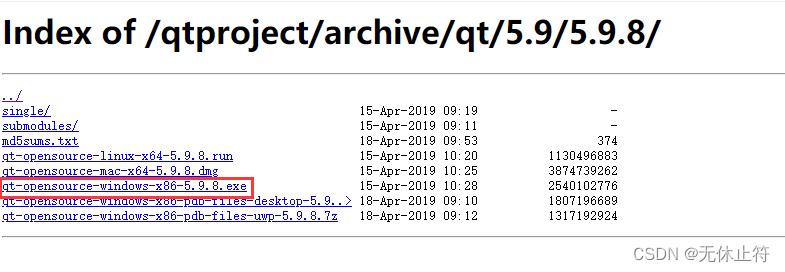
- 我们选择中国科技大学的镜像下载:http://mirrors.ustc.edu.cn/qtproject/archive/qt/5.9/5.9.8/
2 - QT5.9.8安装


- 组件选择
- MSVCxxxxxx:针对Windows平台上的MSVC编译器的QT组件,安装该组件需要计算机上已经安装对应版本的Visual Studio
- MinGW 5.3.0 32 bit:编译器模块;MinGW是Minimalist GNU for Windows的缩写;MinGW是windows平台上使用的GNU工具集导入库的集合

- tools组件选择
- Qt Creator 4.8.2 CDB Debugger support:用于和CDB调试工具对接,默认安装,一般用于VC编译的Qt程序
- MinGW 5.3.0 32-bit:开源的编译器套件


3 - QT环境变量设置
- 根据自己的编译来添加环境变量,这里我选择MSCV:路径根据自己Qt的安装路径来修改
- MinGW:
- 系统环境变量中添加名为QTPATH的变量:
D:\Qt\Qt5.9.8\5.9.8\mingw53_32 - 系统变量Path中添加编译器bin目录(uic.exe所处位置):
D:\Qt\Qt5.9.8\5.9.8\mingw53_32\bin
- 系统环境变量中添加名为QTPATH的变量:
- MSVC:
- 系统环境变量中添加名为QTPATH的变量:
D:\Qt\Qt5.9.8\5.9.8\msvc2017_64 - 系统变量Path中添加编译器bin目录(uic.exe所处位置):
D:\Qt\Qt5.9.8\5.9.8\msvc2017_64\bin
- 系统环境变量中添加名为QTPATH的变量:
- MinGW:
- cmd验证:
uic -version,显示出版本号说明设置成功
4 - Qt启动方法
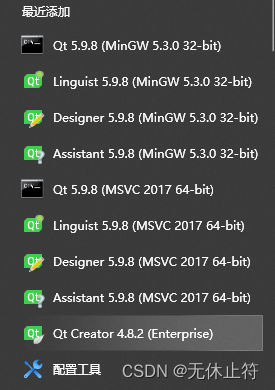
- 开始菜单:点击 -> Qt Creator 4.8.2 (Enterprise) -> 启动
- Assistant(Qt 助手):用来查看帮助文档,已被集成在 Qt Creator 中。
- Designer(Qt 设计师):图形界面可视化编辑工具,已被集成在 Qt Creator 中,在 Qt Creator 中编辑或创建界面文件时,就可以自动打开
- Linguist(Qt 语言家):多国语言翻译支持工具,可以用来编辑语言资源文件,在开发多语言界面的应用程序时会用到
- Qt 5.9.8(MinGW 5.3.0 32bit):Qt 命令行工具,用来配置 Qt 开发环境(主要是设置 PATH 变量)
- Qt Creator 4.8.2 (Enterprise):Qt 的集成开发环境,使用它来创建和管理 Qt 项目
5 - Qt的VS插件vsaddin(可选)
- 下载地址:http://mirrors.ustc.edu.cn/qtproject/archive/vsaddin/
- 版本选择:哪个版本都可以,只要能对应上自己的vs版本即可,这里我选择2.2.2版本
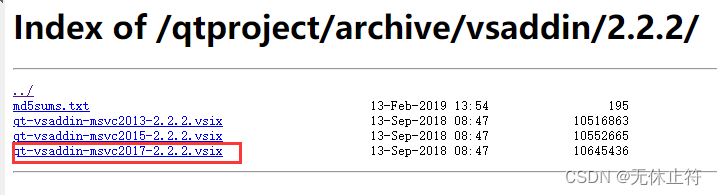
- 关闭vs2017,双击安装即可:安装完成后再次打开vs2017即可看到“Qt VS Tools”


- 配置Qt Options:Qt Vesions -> Add

边栏推荐
- The first open source MySQL HTAP database in China will be released soon, and the three highlights will be notified in advance
- Oilfield exploration problems
- JS教程之 使用 Electron.JS 构建原生桌面应用程序乒乓游戏
- I regard it as a dry product with a monthly income of more than 30000 yuan for sidelines and more than 10000 yuan for novices!
- Unlock the value of data fusion! Tencent angel powerfl won the "leading scientific and Technological Achievement Award" at the 2021 digital Expo
- 若依如何实现接口限流?
- Redis migration (recommended operation process) 1
- LeetCode Algorithm 24. 两两交换链表中的节点
- Pybullet robot simulation environment construction 5 Robot pose visualization
- 1-12vmware adds SSH function
猜你喜欢

Dialogue with the senior management of Chang'an Mazda, new products will be released in Q4, and space and intelligence will lead the Japanese system

Make up the weakness - Open Source im project openim about initialization / login / friend interface document introduction

Big talk Domain Driven Design -- presentation layer and others

首例猪心移植细节全面披露:患者体内发现人类疱疹病毒,死后心脏重量翻倍,心肌细胞纤维化丨团队最新论文...

How to implement interface current limiting?
Arduino UNO + DS1302简单获取时间并串口打印

当一个程序员一天被打扰 10 次,后果很惊人!

Angel 3.2.0 new version released! Figure the computing power is strengthened again

Learn about common functional interfaces
Scala 基礎 (二):變量和數據類型

随机推荐
神经网络“炼丹炉”内部构造长啥样?牛津大学博士小姐姐用论文解读
内存分区模型
"C language" question set of ⑩
Leetcode one week race 298, first three questions
基於Kubebuilder開發Operator(入門使用)
mha 切换(操作流程建议)
Arduino UNO + DS1302简单获取时间并串口打印
[Blue Bridge Cup training 100 questions] scratch distinguishing prime numbers and composite numbers Blue Bridge Cup scratch competition special prediction programming question intensive training simul
当一个程序员一天被打扰 10 次,后果很惊人!
Failed to upload hyperf framework using alicloud OSS
100+ data science interview questions and answers Summary - basic knowledge and data analysis
Develop operator based on kubebuilder (for getting started)
Detailed explanation of cookies and sessions
[graduation season] a word for graduates: the sky is high enough for birds to fly, and the sea is wide enough for fish to leap
SAP OData 开发教程 - 从入门到提高(包含 SEGW, RAP 和 CDP)
【时间复杂度和空间复杂度】
This year, the AI score of college entrance examination English is 134. The research of Fudan Wuda alumni is interesting
若依微服务特殊字符串被过滤的解决办法
Scala Basics (II): variables and data types
Niuke programming problem -- dynamic programming of must brush 101 (a thorough understanding of dynamic programming)