当前位置:网站首页>Vs+qt multithreading implementation -- run and movetothread
Vs+qt multithreading implementation -- run and movetothread
2022-07-03 14:49:00 【Jack1009HF】
VS+QT Multithreaded implementation ——run and moveToThread
Write in the front : I've been learning about multithreading recently , Write some learning experiences from Xiaobai's perspective . You are also welcome to make corrections and supplements .
development environment :VS2013+QT5
Implementation methods and features
- run —— Inherit QThread Of run function , By rewriting run() Method , Realize task function .
- Use run Easy to understand , Simple task flow can be encapsulated in run Inside .
- run Is the entry to the thread ,run The beginning and end of the thread means the beginning and end of the thread .
- Locking should be considered when multithreading accesses variables or handles transactions .( At present, locking is not involved , No discussion )
- Threads start() get up , Theoretically run The function will execute from beginning to end . So if run The task in is multi-step , Data feedback or ui change , Exception handling is relatively troublesome .
- QThread Only run Function is in a new thread , All the other functions are in QThread In the generated thread !!!
- moveToThread—— use moveToThread Will inherit from QObject The class of is transferred to Thread in .
- Connect with the slot through the signal , There is almost no need to consider the existence of multithreading , There is no need to consider using QMutex To synchronize .
- QT4.8 after ,QT This method is officially recommended .
Multithreading run The implementation of the
1. Code
myThread.h file
#pragma once
#include <QThread>

class myThread :public QThread
{
	Q_OBJECT
public:
	myThread();
	~myThread();
private:
	void run();
};
myThread.CPP file
#include "myThread.h"
#include <QDebug>

myThread::myThread()
{
}
myThread::~myThread()
{
}
// rewrite run function
void myThread::run()
{
	qDebug() << "currentThreadId is" << QThread::currentThreadId();
	//Todo Rewrite the function here , I used for Loop instead of . Functions can be defined according to requirements
	for (int i = 0; i < 100;i++)
	{
		;
	}
	qDebug() << "currentThreadId " << QThread::currentThreadId()<<"run to end";
}
RunDemo.h file
#pragma once
#include <QtWidgets/QMainWindow>
#include "ui_RunDemo.h"
#include "myThread.h"
#include <QtDebug>

class RunDemo : public QMainWindow
{
	Q_OBJECT
public:
	RunDemo(QWidget *parent = Q_NULLPTR);
	~RunDemo();

private slots:
	void on_btnOK_Clicked();

private:
	Ui::RunDemoClass ui;
	myThread *m_thread;
};
RunDemo.cpp file
#include "RunDemo.h"

RunDemo::RunDemo(QWidget *parent): QMainWindow(parent)
{
	ui.setupUi(this);
	// Instantiation
	m_thread = new myThread;
	// Can be in QT Designer Middle link .
	connect(ui.btnOK, SIGNAL(clicked()), this, SLOT(on_btnOK_Clicked()));
}

RunDemo::~RunDemo()
{
	if (m_thread)
	{
		delete m_thread;
		m_thread = NULL;
	}
}

void RunDemo::on_btnOK_Clicked()
{
	qDebug() << "MainThreadId is" << QThread::currentThreadId();
	m_thread->start();
	ui.lineEdit->setText("hello world");
}
2. effect
Loop operation is done in the sub thread , Did not perform any tasks .lineEdit The text is displayed as the result of the execution of the key slot function .
moveToThread Code implementation
1. Code
Woker.h file
#pragma once
#include "qobject.h"
class Woker :public QObject
{
	Q_OBJECT
public:
	Woker();
	~Woker();

public slots:
    void doWork(int i);
signals:
	void SendToMain(int i);
};
Woker.cpp file
#include "Woker.h"
#include <QDebug>
#include <QThread>

Woker::Woker()
{
}
Woker::~Woker()
{
}
// What the thread needs to do
void Woker::doWork(int i)
{
	qDebug() << "currentThreadId is" << QThread::currentThreadId();
	//Todo Here is the task function performed , Accumulation is used (+1) Instead of , You can define your own functions as needed
	i++;
	// Sending signal
	emit SendToMain(i);
	qDebug() << "currentThreadId " << QThread::currentThreadId() << "run to end";
}
moveToThreadDemo.h file
#pragma once

#include <QtWidgets/QMainWindow>
#include "ui_moveToThreadDemo.h"
#include <QThread>
#include "Woker.h"
#include <QString>
#include <QDebug>

class moveToThreadDemo : public QMainWindow
{
	Q_OBJECT

public:
	moveToThreadDemo(QWidget *parent = Q_NULLPTR);

private:
	Ui::moveToThreadDemoClass ui;

signals:
	// For the sake of understanding , The parameters passed here are int Numbers , You can customize the type according to your needs
	// The passed parameter can also be a structure 、 Class object , In the project, I passed the serial port ( The pointer )
	void SendToWoker(int i);
public slots:
    void on_btnOK_Clicked();
	void handleResult(int i);
};
moveToThreadDemo.cpp file
#include "moveToThreadDemo.h"

moveToThreadDemo::moveToThreadDemo(QWidget *parent)
	: QMainWindow(parent)
{
	ui.setupUi(this);
	// Key function connection
	connect(ui.btnOK, SIGNAL(clicked()), this, SLOT(on_btnOK_Clicked()));
	// Declare the task woker
	Woker *myWoker = new Woker;
	// Set up threads
	QThread *mythread = new QThread;

	connect(this, SIGNAL(SendToWoker(int)), myWoker, SLOT(doWork(int)));
	connect(myWoker, SIGNAL(SendToMain(int)), this, SLOT(handleResult(int)));
	connect(mythread, &QThread::finished, myWoker, &QObject::deleteLater);
	myWoker->moveToThread(mythread);
	mythread->start();

}
void moveToThreadDemo::on_btnOK_Clicked()
{
	qDebug() << "MainThreadId is" << QThread::currentThreadId();
	// The digital 1 As a signal
	emit SendToWoker(1);
}
// Processing function
void moveToThreadDemo::handleResult(int i)
{
	// receive woker Handed over i, And display
	QString qstr = QString("%1").arg(i);
	ui.lineEdit->setText(qstr);
}
2. effect
Here the number that the sub thread will receive 1 Accumulated , And send the result back to the main thread for display .
Discuss
In practice , Find out moveToThread Our method does have its unique advantages . But there is also a problem in the actual application scenario , I hope all friends can discuss together .
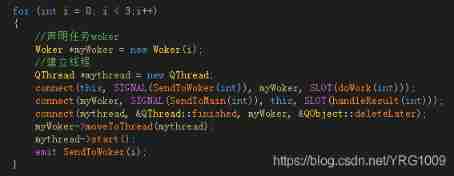
The requirement is the development of multi thread and multi serial port , Due to the variable number of serial ports , So in the thread establishment , In the process of connecting , The later signal will also trigger the slot function in the previous thread . It can be understood as when declaring , Added a for loop , The number of cycles here is the number of serial ports .
From the results of operation , It's gone 6 missions . The reason is that the first 1 individual sendToWorker The first 1 individual doWork(int) Trigger , Because it is done circularly connect, The first 2 individual sendToWorker It's going to take the second 1 And the first 2 individual doWork(int) Trigger , The first 3 individual sendToWorker It's going to take the second 1 individual 、 The first 2 And the first 3 One of the doWork(int) Trigger , This leads to a waste of system resources . The original meaning is hope i individual sendToWorker Only trigger the i individual doWork(int).
The current practice is to woker In class , to woker Private variables are added ID, The transfer parameters are also added ID, By judgment ID Whether it is consistent to decide whether to implement . however , It is not clear whether there is a better way . The solution is as follows :Woker.h file
#pragma once
#include "qobject.h"
class Woker :public QObject
{
	Q_OBJECT
public:
	Woker(int ID);
	~Woker();

private:
	int _wokerID;// Join private ID
public slots:
    void doWork(int i);
signals:
	void SendToMain(int i);
};
Woker.cpp file
#include "Woker.h"
#include <QDebug>
#include <QThread>

Woker::Woker( int ID)
{
	_wokerID = ID;
}

Woker::~Woker()
{
}

void Woker::doWork(int i)
{
    // increase ID Judge
	if (i!=_wokerID)
	{
		qDebug() << "ThreadId" << QThread::currentThreadId() << "return";
		return;
	}
	qDebug() << "currentThreadId is" << QThread::currentThreadId();
	//Todo Rewrite the function here , I used +1 Function instead of
	i++;
	// Sending signal
	emit SendToMain(i);
	qDebug() << "currentThreadId " << QThread::currentThreadId() << "run to end";
}
It can be seen from the results , Actually, I only ran 3 missions , Irrelevant trigger signals are return, So as to solve multiple triggers , Multiple execution problems . When using this method, you should also pay attention to , After the task is reset, you need disconnect. Otherwise, repeat the action , There will be multiple identical ID Of woker, I use serial port number here (COM3/COM4/COM5) As woker Of ID. The actual scenario is serial port initialization , communicate , Closing the serial port requires disconnect, Otherwise, use the serial port again , When you do the initialization , The signal of the current connection will trigger the slot function of the previous initialization connection , here ID It's the same . So when the serial port is closed , need disconnect Current connection .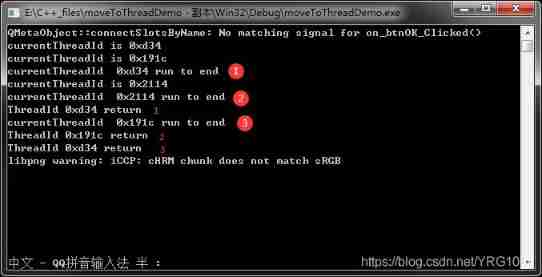
Engineering source
Reference material
边栏推荐
- [graphics] efficient target deformation animation based on OpenGL es 3.0
- Yolov5进阶之九 目标追踪实例1
- 牛客 BM83 字符串变形(大小写转换,字符串反转,字符串替换)
- tonybot 人形机器人 红外遥控玩法 0630
- Zzuli:1055 rabbit reproduction
- Creation of data table of Doris' learning notes
- Solve the problem that PR cannot be installed on win10 system. Pr2021 version -premiere Pro 2021 official Chinese version installation tutorial
- C language memory function
- [opengl] pre bake using computational shaders
- Plane vector addition
猜你喜欢

远程服务器后台挂起 nohup

复合类型(自定义类型)
![[ue4] cascading shadow CSM](/img/83/f4dfda3bd5ba0172676c450ba7693b.jpg)
[ue4] cascading shadow CSM

C language DUP function
Solve the problem that PR cannot be installed on win10 system. Pr2021 version -premiere Pro 2021 official Chinese version installation tutorial
![[ue4] material and shader permutation](/img/8f/7743ac378490fcd7b9ecc5b4c2ef2a.jpg)
[ue4] material and shader permutation

My QT learning path -- how qdatetimeedit is empty
![Luogu p5018 [noip2018 popularization group] symmetric binary tree problem solution](/img/89/da1a3a38e02671628f385de0f30369.png)
Luogu p5018 [noip2018 popularization group] symmetric binary tree problem solution
Rasterization: a practical implementation (2)

Tailing rushes to the scientific and Technological Innovation Board: it plans to raise 1.3 billion, and Xiaomi Changjiang is the shareholder
随机推荐
556. 下一个更大元素 III : 简单构造模拟题
Zzuli:1057 prime number determination
retrofit
NOI OPENJUDGE 1.6(09)
556. The next larger element III: simple construction simulation questions
分布式事务(Seata) 四大模式详解
Tailing rushes to the scientific and Technological Innovation Board: it plans to raise 1.3 billion, and Xiaomi Changjiang is the shareholder
Luogu p5536 [xr-3] core city solution
puzzle(016.3)千丝万缕
创业团队如何落地敏捷测试,提升质量效能?丨声网开发者创业讲堂 Vol.03
NFT new opportunity, multimedia NFT aggregation platform okaleido will be launched soon
Simulation of LS -al command in C language
Zzuli:1041 sum of sequence 2
牛客 BM83 字符串变形(大小写转换,字符串反转,字符串替换)
Common shortcut keys in PCB
[graphics] hair simulation in tressfx
tonybot 人形机器人 红外遥控玩法 0630
洛谷P4047 [JSOI2010]部落划分 题解
数学常数表 by q779
How can entrepreneurial teams implement agile testing to improve quality and efficiency? Voice network developer entrepreneurship lecture Vol.03