当前位置:网站首页>How to create a login page in WordPress
How to create a login page in WordPress
2022-06-29 16:03:00 【Hua Weiyun】
Landing page : Landing page is a target page with a specific target for a specific audience , Can be described as “ One page one purpose ”. The landing page must have a “ Call words ”, And keep specific goals in mind . A successful landing page has a higher conversion rate 、 Pages for more engaged and high-quality prospects .
According to your specific goals , There are two types of landing pages . They are as follows :
Generate a lead login page : The goal of this landing page is to collect potential customers for your business .
Click the login page : This landing page is in e-commerce 、 Course 、SaaS More common in companies .
The difference between landing page and home page : Landing page and home page Different . The home page usually contains all the information about your website , Including navigation bar and menu 、 Links to other pages of the site and many call to action buttons , The login page has no navigation bar and links to other pages to serve a specific purpose . The login page is the page where the user logs in after clicking on the advertisement or post , So as to generate potential customers and transform .
Use WordPress Create a landing page
In this paper , We will learn how to use Elementor Create a simple login page .Elementor Is a page builder ( Visual editor ), For developing beautiful pages and websites . It has drag and drop function , You can easily create pages .
The first 1 Step : Get your WordPress Website
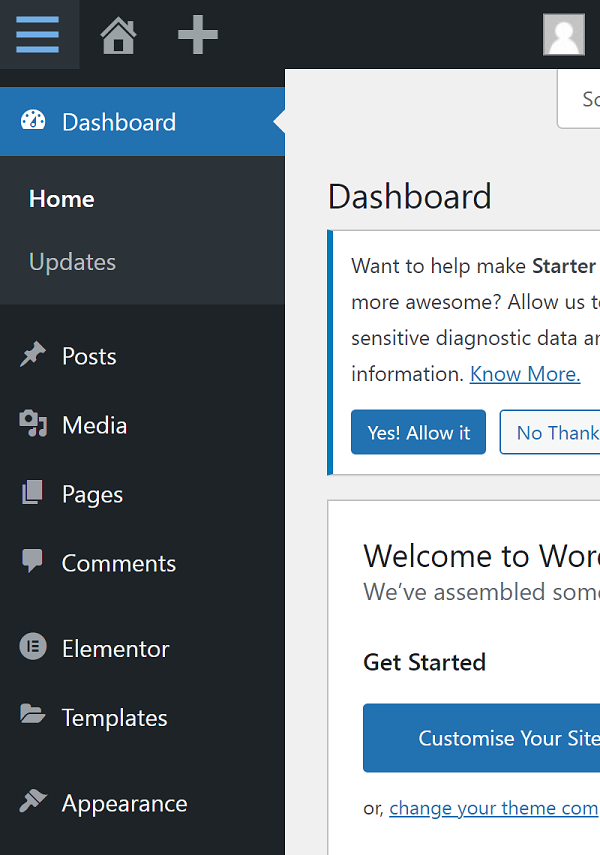
The first step is to buy your domain name and host . Install... From the control panel of the managed platform WordPress. Sign in to your WordPress account , This will open your dashboard .
The first 2 Step : Add a new plug-in
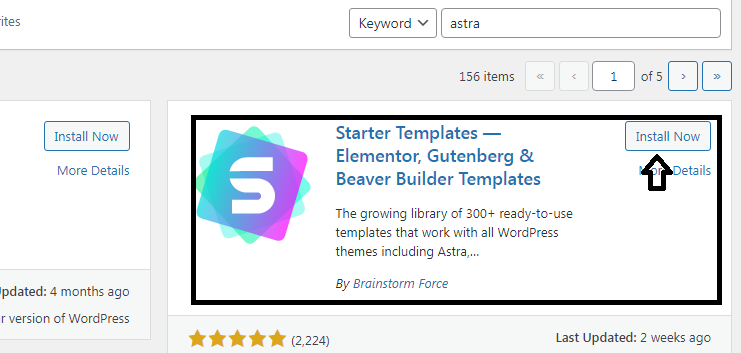
Install on your website StarterTemplates plug-in unit . This plug-in uses Elementor、Beaver Builder、Brizy and WordPress default editor Gutenberg Wait for the page builder , Many beautiful pre built website templates can be accessed as separate page templates .
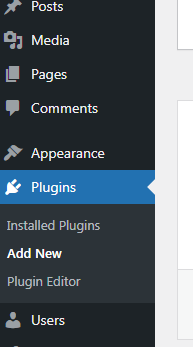
First , You need to go to Plugins And select Add New. Search plug-ins “ StarterTemplates ”. Next , You must install the plug-in . After installation , Don't forget to activate it .
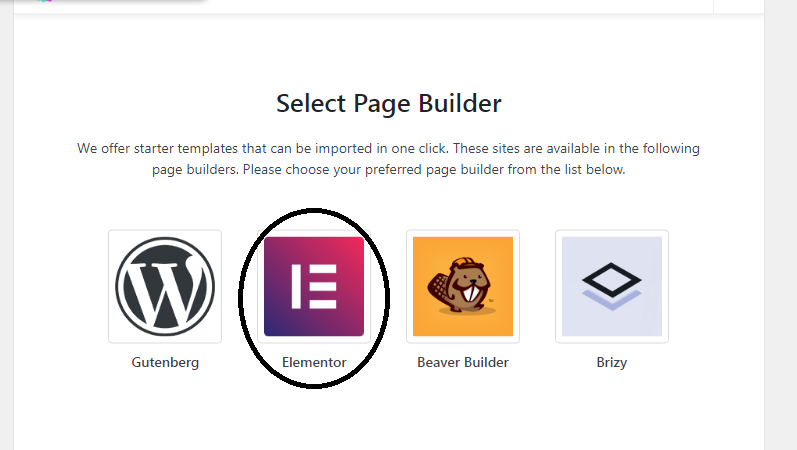
Go to the plug-in and select View Library... From the getting started template plug-in , Then select the image Elementor Such a page builder . You can also choose other page builders of your choice .
The first 3 Step : Select your target page template
On the next screen , You will be able to choose the login page theme and website theme . You can also build the login page from scratch . This plugin comes with many beautiful templates . Some of them are free to use , Some need to buy . You can choose the theme according to your needs . We chose Design & Experience The theme , As shown in the figure below :

Next , You will get two options , That is, import the complete site and import the login page template . Last , Select import login page template , As shown in the figure below , Because we're creating a single login page .
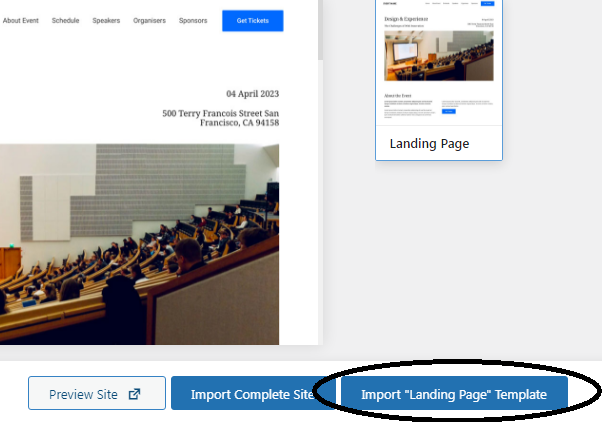
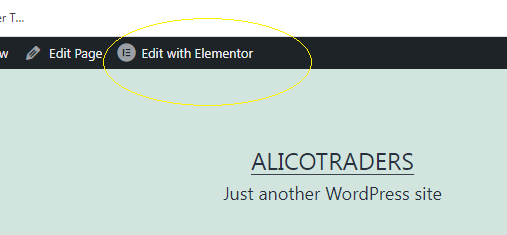
Go to the page and select the... We just loaded “ Landing page ” Templates . Open in edit mode and select “ Use Elementor edit ”.
The first 4 Step : Customize and add content
Start customizing the page according to your requirements .Elementor With drag and drop function , You can easily customize any template . When all changes have been made , single click PUBLISH Save changes . Please check the available options in detail .
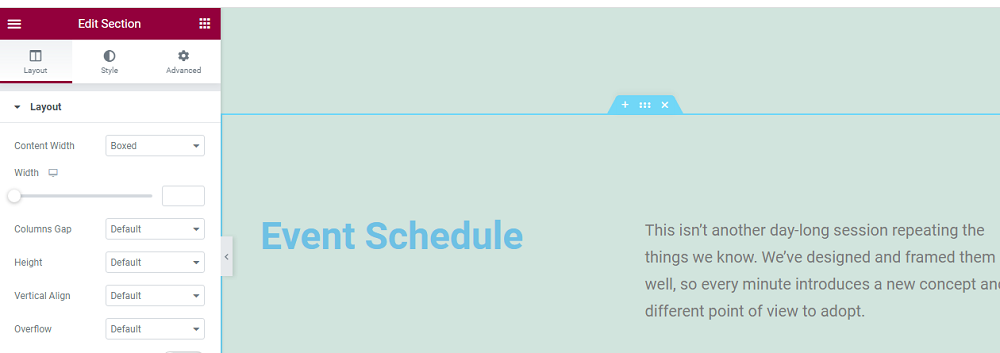
You can edit the page according to your content and add appropriate images . If you don't need it on your page , You can also delete it . You can add your own style , Such as color and font . To change the style , Click the style tab . Select the block you want to edit , You will get the following options .
边栏推荐
- C. Most Similar Words
- C語言大作業——匹配系統
- R语言DALEX包的explain函数生成指定分类预测机器学习模型解释器、predict_parts函数基于oscillations方法分析对于指定的某一条样本、每个变量对于预测结国的贡献程度
- The role of each layer in convolutional neural network
- Taro2.* 小程序配置分享微信朋友圈
- [data analysis] five common questions about learning SQL?
- el-table-column行按钮防重控制loading
- 【Try to Hack】upload-labs通关(暂时写到12关)
- 《网络是怎么样连接的》读书笔记 - WEB服务端请求和响应(五)
- Leetcode-64- minimum path sum
猜你喜欢

CVPR 2022 | 大幅减少零样本学习所需的人工标注,马普所和北邮提出富含视觉信息的类别语义嵌入

Digital tracking analysis of insurance services in the first quarter of 2022

12.udp protocol -bite

LeetCode-234-回文链表

如何使用SMS向客户传递服务信息?指南在这里!

Three development trends of enterprise application viewed from the third technological revolution

《网络是怎么样连接的》读书笔记 - WEB服务端请求和响应(五)

Cmake learning-2

2022 OpenVINO DevCon 大揭秘!英特尔携众多合作伙伴深化开发者生态建设,释放AI产业创新潜能

硬件开发笔记(八): 硬件开发基本流程,制作一个USB转RS232的模块(七):创建基础DIP元器件(晶振)封装并关联原理图元器件
随机推荐
Detailed explanation of list set
PostgreSQL source code learning (25) -- transaction log ⑥ - wait for log writing to complete
Swoole TCP distributed implementation
Kotlin annotation declaration and use
Mingdeyang xilinx-k7-325t/410t core board data manual
从第三次技术革命看企业应用三大开发趋势
Leetcode-470- implement rand10() with rand7()
商业智能BI与业务管理决策思维之三:业务质量分析
Where has lifeifei reached in his key "embodied intelligence"?
支付宝“安全锁”入选信通院“护童计划”优秀案例:超过33万用户已开通游戏保护
微信公告号 图灵机器人实现智能回复
CSDN无法复制问题
PostgreSQL source code learning (24) -- transaction log ⑤ - log writing to wal buffer
如何在网站上安装 WordPress
A. Marathon
Polarimetric SAR surface classification
Business Intelligence BI and business management decision-making thinking No. 3: business quality analysis
京东联盟API - 万能转链接口 - 京品库接口 - 接口定制
2022-06-29日报: 李飞飞划重点的「具身智能」,走到哪一步了?
C. Where‘s the Bishop?