当前位置:网站首页>Unity typewriter teaches you three ways
Unity typewriter teaches you three ways
2022-07-28 20:38:00 【_ Mr orange】
Unity Typewriter tutorial
read-ahead
Hello everyone , I'm an orange , What I bring to you today is Unity Tutorial of scene switching progress bar .
Why did you suddenly do this Unity Where's the typewriter , It's one of my teachers , Gave me a question , The main part of the topic is the effect of the typewriter , Read the online tutorial , There are different levels , So today I'm going to write an issue about the effect of this typewriter .
*,*◦*,*◦*,*◦*,-------------------- Gorgeous dividing line --------------------*◦*,*◦*,*◦*,*◦*,*◦
finished product
First, let's see what the finished product looks like 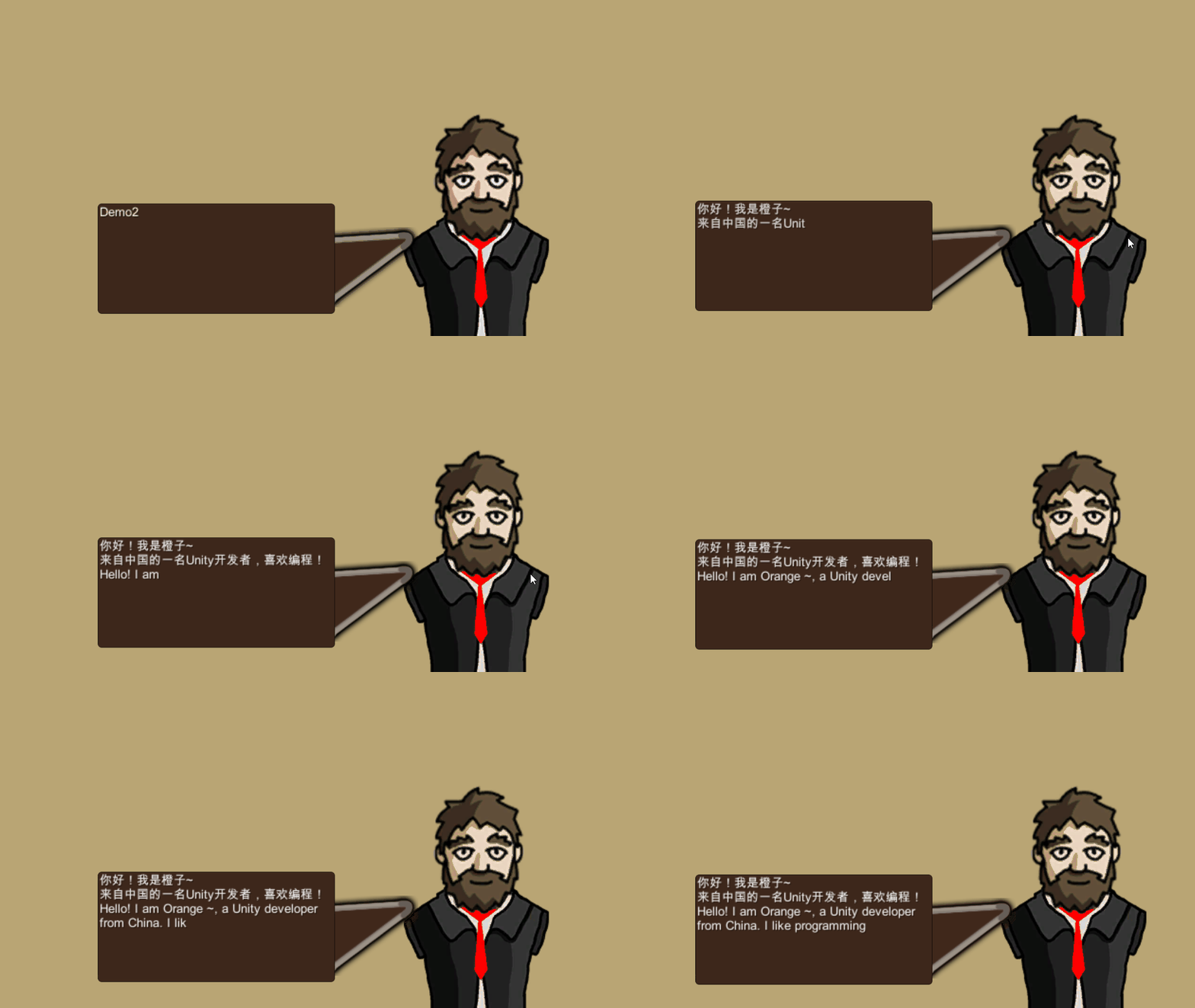
I will divide it into three cases , The depth resolution Unity How the typewriter is made ! It is better to teach people and fish than to teach people and fish .
First step establish UGUI Layout and Modify adaptation

stay Hierarchy Blank space in the panel , Right click to select Image establish .
stay Inspector Window To find the After clicking Hold down AIt key Click the button in the lower right corner 
Let the picture cover the full screen .
Then select Hierarchy Window Canvas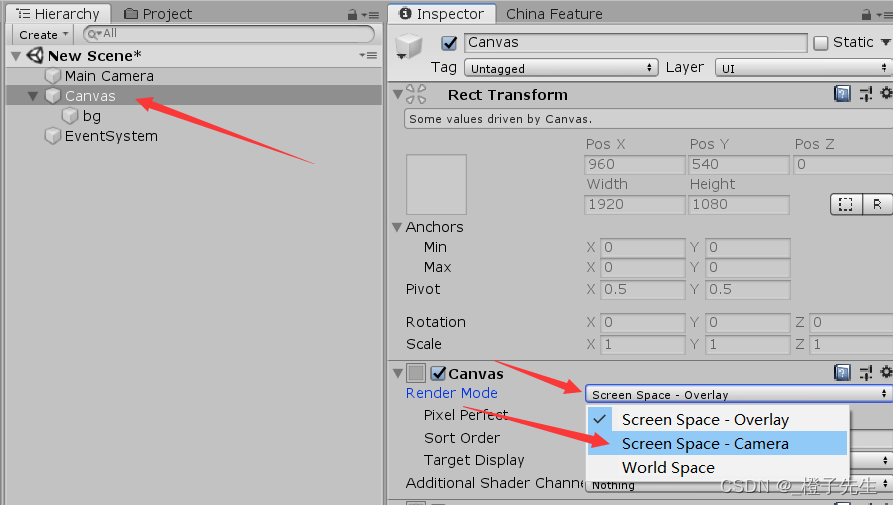
Turn rendering mode , Change it to In the middle of the Screen Space-Camera
If you don't understand why it should be changed to the middle You can see me Previous post ( Click here to jump to )
And then Drag the camera over 
Change this to Middle option And modify it Refrernce Resolution( Reference resolution )
Come here Self adaptation is done , Let's continue to design UI level

To create the Image Rename as bg, Then you can do it in his Color In the attribute Change the color of the background .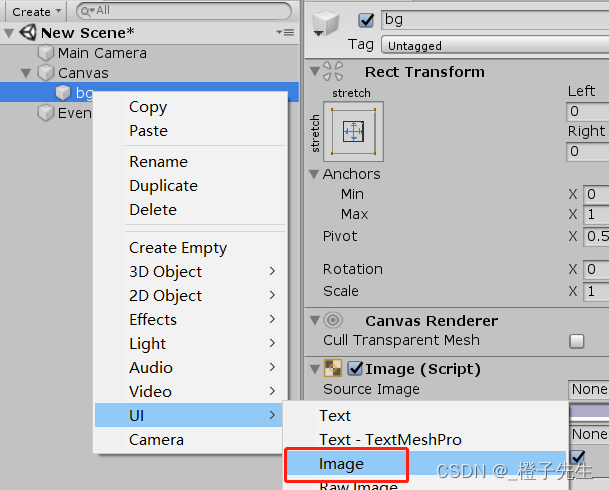
Use the method just now , stay bg Right click on UI—> Image Create two Image Here's the picture 
Then put the character material Add to Image On 
And then once you're done It feels a little small … No problem Click here to show the original size of the image 
If the feeling is still too small , Choose the first one Image stay Inspector Change his Scale
Why not choose the last Z Because it's a 2D picture Unwanted Z
I set their size to 3 It looks good
The second step Add text box
Still bg Add Image As the background of the text box And move to the right place
Add the background in the future And then build a new one from it Text Components 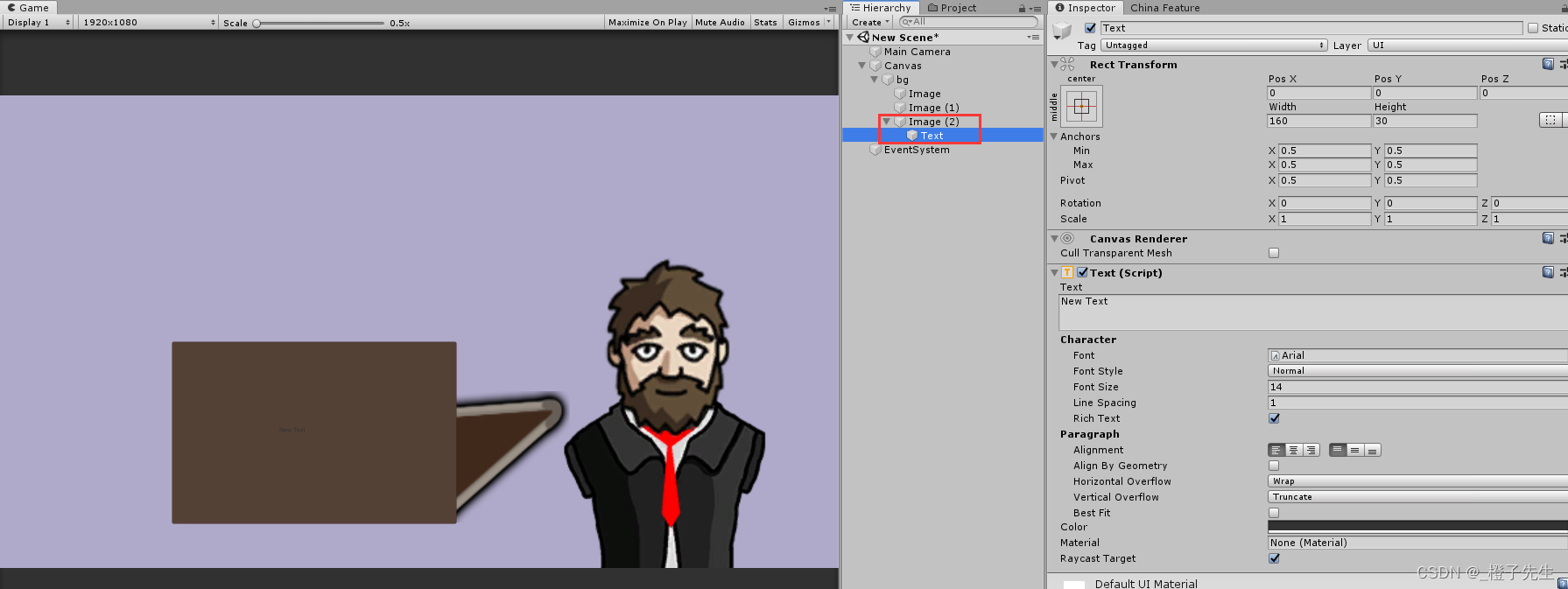
It's like this 
Come here our UGUI The level is almost designed
The third step Write code
The first kind : Conventional writing
Here's how to write it , More traditional stay FixedUpdate Execute every frame in the , There may be a little friend wondering ? Why not Update?
because Update Not every frame is fixed , If your computer has good performance , The implementation is faster , If the computer performance is poor , It will jam a little , Can't do a perfect silky catch-up , So here we use FixedUpdate Unity Whether your computer is good or bad , Are fixed for each frame .
using System.Collections;
using System.Collections.Generic;
using UnityEngine;
using UnityEngine.UI;

public class TypeWriterDemo1 : MonoBehaviour
{

    [Header(" Typing interval ")]
    public float speedTime = 0.1f;// Typing interval

    float timer;// Timer time
    Text TextCompnt;//Text Text components
    int wordNumber;// The number of words
    bool isStart;// Whether to start typing

    string wordContent;//---- Written content

    void Awake( )
    {

        TextCompnt = this.GetComponent<Text>();// Get from the current object Text Components
        isStart = true;//bool The default value of the value is false  So here we need to reset to true
        wordContent = " Hello ! I'm an orange ~\n One from China Unity developer , Like programming !\nHello! I am Orange ~, a Unity developer from China. I like programming!";
    }

    void FixedUpdate( )
    {

        StartTyping();
    }
    void StartTyping( )
    {

        if (isStart)
        {

            timer += Time.deltaTime;// Simple timer
            if (timer >= speedTime)// If the timer time > Typing interval
            {

                timer = 0;// Reset
                wordNumber++;// The number of words +1

                //Substring()  Interpretation of official documents : Retrieve substrings from this instance .  The substring starts at the specified character position and has the specified length .
                TextCompnt.text = wordContent.Substring((0), wordNumber);// The starting character position of the number of digits ( Starting from scratch )
                if (wordNumber >= wordContent.Length)// Number of figures = The length of the text
                {

                    isStart = false;// Stop typing
                }
            }
        }
    }
}
The second kind : coroutines +for loop
What about this one It is much more indirect than the previous one , And used Synergetics , The implementation method is relatively simple
using System.Collections;
using System.Collections.Generic;
using UnityEngine;
using UnityEngine.UI;

public class TypeWriterDemo2 : MonoBehaviour
{

    public float delay = 0.1f;
    string fullText = " Hello ! I'm an orange ~\n One from China Unity developer , Like programming !\nHello! I am Orange ~, a Unity developer from China. I like programming!";
    string currentText;
    void Start()
    {

        StartCoroutine(ShowText());
    }
    IEnumerator ShowText( )
    {

        for (int i = 0; i < fullText.Length; i++)// Traverse the length of the inserted string
        {

            currentText = fullText.Substring(0, i);// see demo1 Code comments for
            this.GetComponent<Text>().text = currentText;
            yield return new WaitForSeconds(delay);// Time of each delay   The smaller the numerical   The less delay
        }
    }
}
The third kind :while loop + coroutines
This pattern uses method passing , This is equivalent to encapsulating the method .
If a project uses typewriters frequently , You can set this code as a singleton , Then go straight to Run Method to transfer values .
using System.Collections;
using System.Collections.Generic;
using UnityEngine;
using UnityEngine.UI;

public class TypeWriterDemo3 : MonoBehaviour
{

    [Header(" Typing speed ")]
    public float Speed = 15;

    Text text;

    void Start( )
    {

        text = this.GetComponent<Text>();
        Run(" Hello ! I'm an orange ~\n One from China Unity developer , Like programming !\nHello! I am Orange ~, a Unity developer from China. I like programming!", text);
    }
    public void Run(string textToType, Text textLabel)
    {

        StartCoroutine(TypeText(textToType, textLabel));
    }
    IEnumerator TypeText(string textToType, Text textLabel)
    {

        float t = 0;// Time passed
        int charIndex = 0;// String index value
        while (charIndex < textToType.Length)
        {

            t += Time.deltaTime * Speed;// A simple timer is assigned to t
            charIndex = Mathf.FloorToInt(t);// hold t To int Type assigned to charIndex
            charIndex = Mathf.Clamp(charIndex, 0, textToType.Length);
            textLabel.text = textToType.Substring(0, charIndex);

            yield return null;
        }
        textLabel.text = textToType;
    }
}
Mount script
Choose one of the three that you think is the best written , Then save him , Mount to this Text On 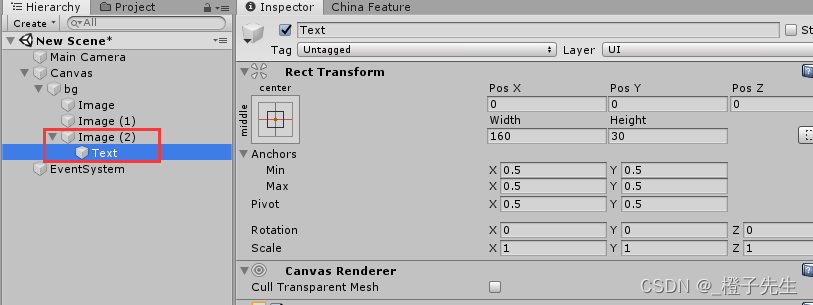
This is the time Click on the run You can achieve a perfect typewriter effect !~
summary
On the whole , It is not difficult to realize the effect of typewriter , Mainly used Substring, Interpretation of official documents : Retrieve substrings from this instance . The substring starts at the specified character position and has the specified length .
In fact, vernacular is The starting character position of the number of digits starts from zero . Then compare the length of the string .
Conclusion
Inferior to silicon step , A thousand miles .
Don't product the little stream , Beyond into the sea .
Make a little progress every day Thank you for watching .
Feel helpful to yourself , Welcome to your attention 、 Collection 、 forward ! See you next time
边栏推荐
- js飞入js特效弹窗登录框
- 上海交大牵手淘宝成立媒体计算实验室:推动视频超分等关键技术发展
- 太空射击第11课: Sound and Music
- Storage of C language data in memory (1)
- Voice controlled robot based on ROS (II): implementation of upper computer
- Raspberry Pie 3 connected to WiFi
- 动态规划:背包问题模板代码汇总
- Solve the problem that jupyter cannot import new packages
- Talking about canvas and three rendering modes in unity
- Raspberry pie CM4 -- using metartc3.0 to integrate ffmpeg to realize webrtc push-pull streaming
猜你喜欢

C language data 3 (2)

Voice controlled robot based on ROS (II): implementation of upper computer

CNN convolutional neural network structure

Linux Installation MySQL (pit filling version)

Raspberry pie CM4 -- using metartc3.0 to integrate ffmpeg to realize webrtc push-pull streaming

C语言简单实例 1

上海交大牵手淘宝成立媒体计算实验室:推动视频超分等关键技术发展

Unity gadget displays the file size of the resource directory

js飞入js特效弹窗登录框
![Teach you how to draw a map with ArcGIS [thermal map]](/img/16/993da4678667884a98e1d82db37d69.png)
Teach you how to draw a map with ArcGIS [thermal map]
随机推荐
激光slam:LeGO-LOAM---代码编译安装与gazebo测试
js网页黑白背景开关js特效
动态规划:背包问题模板代码汇总
How to make the design of governance structure more flexible when the homogenization token is combined with NFT?
产品经理访谈 | 第五代验证码的创新与背景
Mongoose condition queries part of the data of the specified attribute
同质化代币与 NFT 结合,如何使治理结构设计更灵活?
Voice controlled robot based on ROS (II): implementation of upper computer
Raspberry connects EC20 for PPP dialing
太空游戏第12课: 盾牌
DHCP.DNS.NFS
DOS common commands
C# 委托 delegate 的理解
数据挖掘(数据预处理篇)--笔记
太空射击第16课: 道具(Part 2)
3D激光SLAM:LeGO-LOAM论文解读---简介部分
Representation of base and number 2
一文让你搞懂什么是TypeScript
Windows系统下Mysql数据库定时备份
Regular symbol description