当前位置:网站首页>linux install redis using script
linux install redis using script
2022-07-29 22:15:00 【little brother】
1. If you have installed it, please uninstall it first
1. Check if redis is running
ps aux | grep redis 2. If redis is running, remove it by killing the reids processClose, you can see from the red box above that the redis process PID is 1112
# kill -9 PIDkill -9 1112After closing the process, check again, redis has stopped running
3. Enter the following command to stop the redis-server service
redis-cli shutdown4. View the redis installation directory
whereis redis
5. Delete the redis installation package
rm -rf /usr/bin/redisrm -rf /usr/local/redis 6. Check if redis is deleted

2. Install
This time I use redis script to install redis
1. First upload the redis installation package and installation script to the specified location, and give executable permission to the script file
chmod 777 -R Redis_Install.sh
2. Run the script and wait for installation
./Redis_Install.shSuccessful installation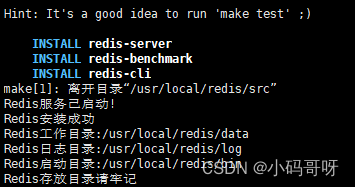
3. Error (error) NOAUTH Authentication required
When we operate on the redis client in the virtual machine, the following error (error) NOAUTH Authentication required occurs, because redis sets a password, we needUse the password to authenticate and then operate the redis client, otherwise we do not have permission to operate the redis cache database.
auth 'your password'
3. Test external connection
When trying to connect externally to the redis server just installed, we found that the connection timed out.We can end by closing the Linux firewall or specifying port 6379 for development.
3.1, close the firewall
1. Check the firewalld status. If it is in the dead status, the firewall is not enabled.If it is active, it is on.
systemctl status firewalld
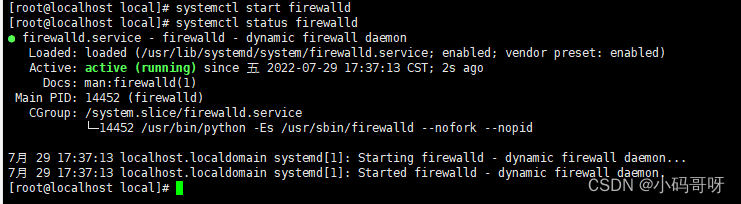 2. Turn off firewall
#Close the firewallsystemctl stop firewalld#Open firewall commandsystemctl start firewalld3.2. When the firewall is turned on, develop the specified port 6379
firewall-cmd --permanent --zone=public --add-port=6379/tcp
边栏推荐
- 【CVPR2022】A Unified Query-based Paradigm for Point Cloud Understanding
- 24小时伦敦金走势图分析
- 容器网络硬核技术内幕 (25) 知微知彰,知柔知刚 (中)
- The sword refers to Offer II 097. Number of subsequences
- 解决报错 WARNING: IPv4 forwarding is disabled. Networking will not work.
- 336. 回文对
- Panorama Tutorial丨How to shoot sunrise and sunset scenes in VR panoramic shooting?
- c#开发知识点总结
- 针对自动识别大麦网滑块验证码,提出解决方案,并进行分析、总结
- leetcode122. Best Time to Buy and Sell Stock II
猜你喜欢


随机推荐
1. Promise usage in JS, 2. The concept and usage of closures, 3. The difference between the four methods and areas of object creation, 4. How to declare a class
【ORM框架:Sequelize的查询】
VSCode 插件大全
网站ping端口的操作方法和命令介绍
The sword refers to Offer II 097. Number of subsequences
Second Best PyTorch Beginner Course; Thesis Writing Guide; Using µGo to Develop a Mini Compiler; Super Efficient Use of Transformer's Extension Library; Frontier Papers | ShowMeAI News Daily
南华早报 | 助力亚洲最具公信力报章实现AD域自动化管理
大陆泽、宁晋泊蓄滞洪区防洪工程与安全建设项目启动实施
防火墙——SNAT和DNAT策略的原理及应用、防火墙规则的备份和还原
【HDLBits 刷题】Verilog Language(4)Procedures 和 More Verilog Features 部分
UDP协议详解
SwiftUI CoreData 教程之如何加速搜索速度
容器网络硬核技术内幕 (小结-下)
24小时伦敦金走势图分析
第3章业务功能开发(线索关联市场活动,动态搜索)
PointPillars 工程复现
获取七牛云地址文件保存到本地
【点云】M3DeTR: Multi-representation, Multi-scale, Mutual-relation 3D Object Detection with Transformers
378. 有序矩阵中第 K 小的元素
PyQt5学习一(环境搭建)