当前位置:网站首页>Click to jump out and drag the pop-up window
Click to jump out and drag the pop-up window
2022-06-25 05:02:00 【Dai Sensen】
effect :
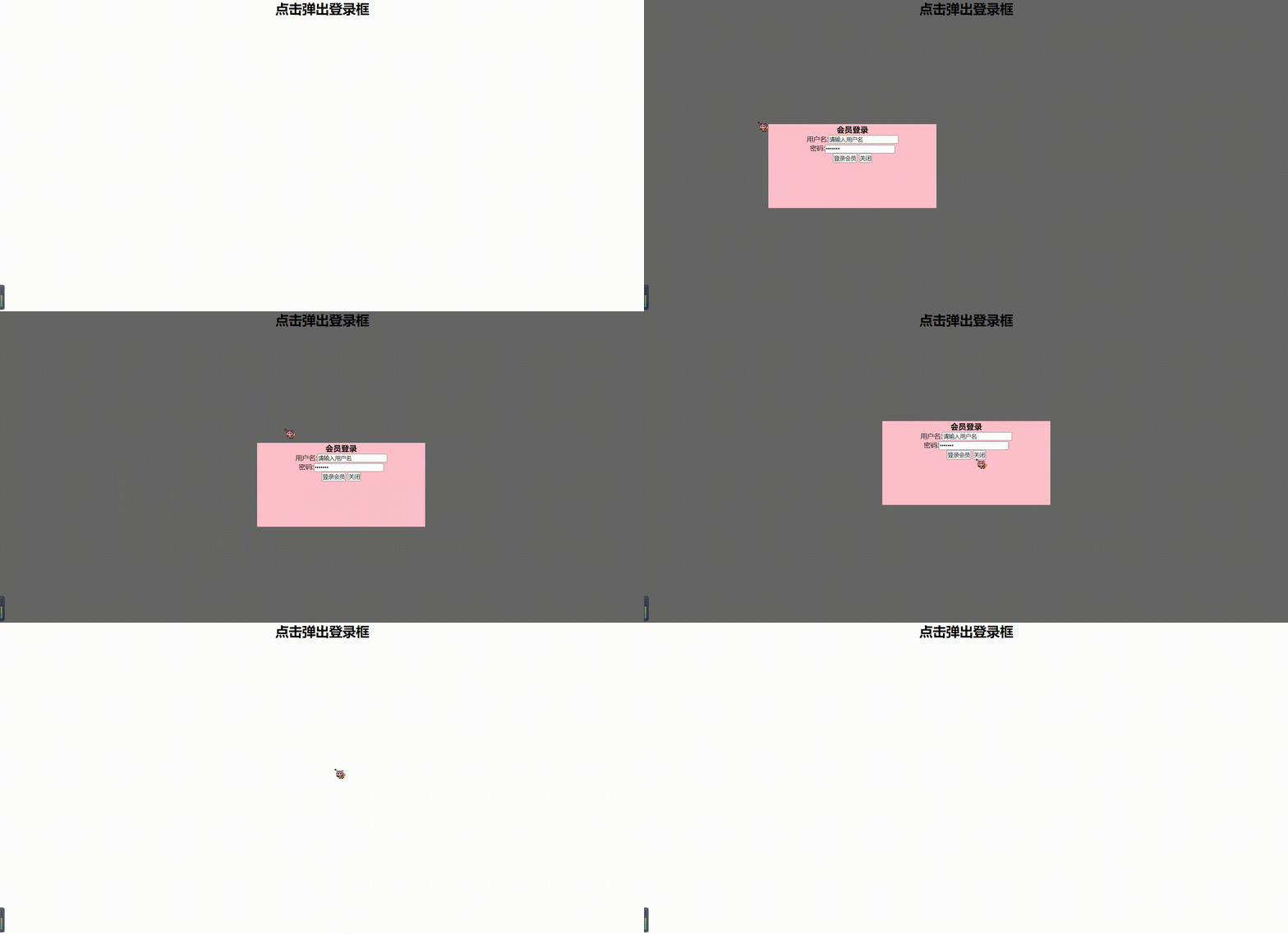
Code
  * {

            margin: 0;
            padding: 0;
        }

        .login_bg {

            display: none;
            position: absolute;
            width: 100%;
            height: 100%;
            background-color: rgba(0, 0, 0, 0.6);
            z-index: 1;
        }

        h1 {

            text-align: center;
        }

        .login_box {

            display: none;
            position: fixed;
            top: 50%;
            left: 50%;
            transform: translateX(-50%) translateY(-50%);
            text-align: center;
            width: 400px;
            height: 200px;
            background-color: pink;
            z-index: 2;
        }
 <div id='bg' class="login_bg"></div>
    <h1> Click to pop up the login box </h1>
    <div class="login_box">
        <h3> Member login </h3>
        <div>  user name :<input type="text" value=" Please enter a user name "></div>
        <div>  password :<input type="password" value=" Please enter the login password "></div>
        <button class="link"> Login member </button>
        <button class="close"> close </button>
 var login_box = document.querySelector('.login_box');
            var mask = document.querySelector('.login_bg');
            var h1 = document.querySelector('h1');
            var close = document.querySelector('.close');
            var link = document.querySelector('.link');
            var h3 = document.querySelector('h3');
            h1.addEventListener('click', function() {

                login_box.style.display = 'block';
                mask.style.display = 'block';
            });
            close.addEventListener('click', function() {

                login_box.style.display = 'none';
                mask.style.display = 'none';
            });
            //  Get the mouse coordinates in the box
            h3.addEventListener('mousedown', function(e) {

                var x = e.pageX - login_box.offsetLeft;
                var y = e.pageY - login_box.offsetTop;
                //  Coordinates from the border to the edge of the document
                document.addEventListener('mousemove', fn);

                function fn(e) {

                    login_box.style.left = e.pageX - x + 'px';
                    login_box.style.top = e.pageY - y + 'px';
                }
                //  Mouse movement event removal
                document.addEventListener('mouseup', function() {

                    document.removeEventListener('mousemove', fn);
                });
            });
边栏推荐
- How to use the Magic pig system reinstallation master
- Why is the TCP handshake just 3 times?
- Detailed summary of float
- Google Earth Engine(GEE)——全球JRC/GSW1_1/YearlyHistory数据集的批量下载(中国区域)
- Successfully solved: selenium common. exceptions. TimeoutException: Message: timeout: Timed out receiving message from
- Cannot import name 'escape' from 'jinja2' [solved successfully]
- 固态硬盘开盘数据恢复的方法
- Rce code execution & command execution (V)
- Laravel Aurora push
- February 20ctf record
猜你喜欢

Startup mode of SoC verification environment

buuctf(pwn)

ASEMI大功率场效应管和三极管的区别

What is Ethernet and how to connect the computer

Laravel's little knowledge

两小时带你进入软件测试行业风口(附全套软件测试学习路线)

Working principle of asemi three-phase rectifier bridge

ThinkPHP 5 log management

【FLink】access closed classloader classloader.check-leaked-classloader
EL & JSTL (XIII)
随机推荐
Database query optimization method
CTFHUB SSRF
成功解决:selenium.common.exceptions.TimeoutException: Message: timeout: Timed out receiving message from
【图像融合】基于matlab方向离散余弦变换和主成分分析图像融合【含Matlab源码 1907期】
Kotlin compose perfect todo project surface rendering background and shadow
Calculate student grade (virtual function and polymorphism)
Vscade setting clang format
XSS (cross site script attack) summary (II)
How do the defi protocols perform under this round of stress test?
Method of opening data recovery of solid state disk
ThinkPHP 5 log management
Customize the console plot result style
Ranorex Studio 10.1 Crack
Eyeshot Ultimate 2022 Crack By Xacker
ORA-00800: soft external error
Database low-end SQL query statement fragment
Notes on non replacement elements in the line (padding, margin, and border)
小白一键重装官网下载使用方法
Penetration test - directory traversal vulnerability
What is Ethernet and how to connect the computer