当前位置:网站首页>DOM render mount patch responsive system
DOM render mount patch responsive system
2022-07-03 08:51:00 【There is no water in the sea】
Project warehouse code :https://github.com/chenfenbgin/vue_source
One 、DOM
1、 real DOM 、 fictitious DOM
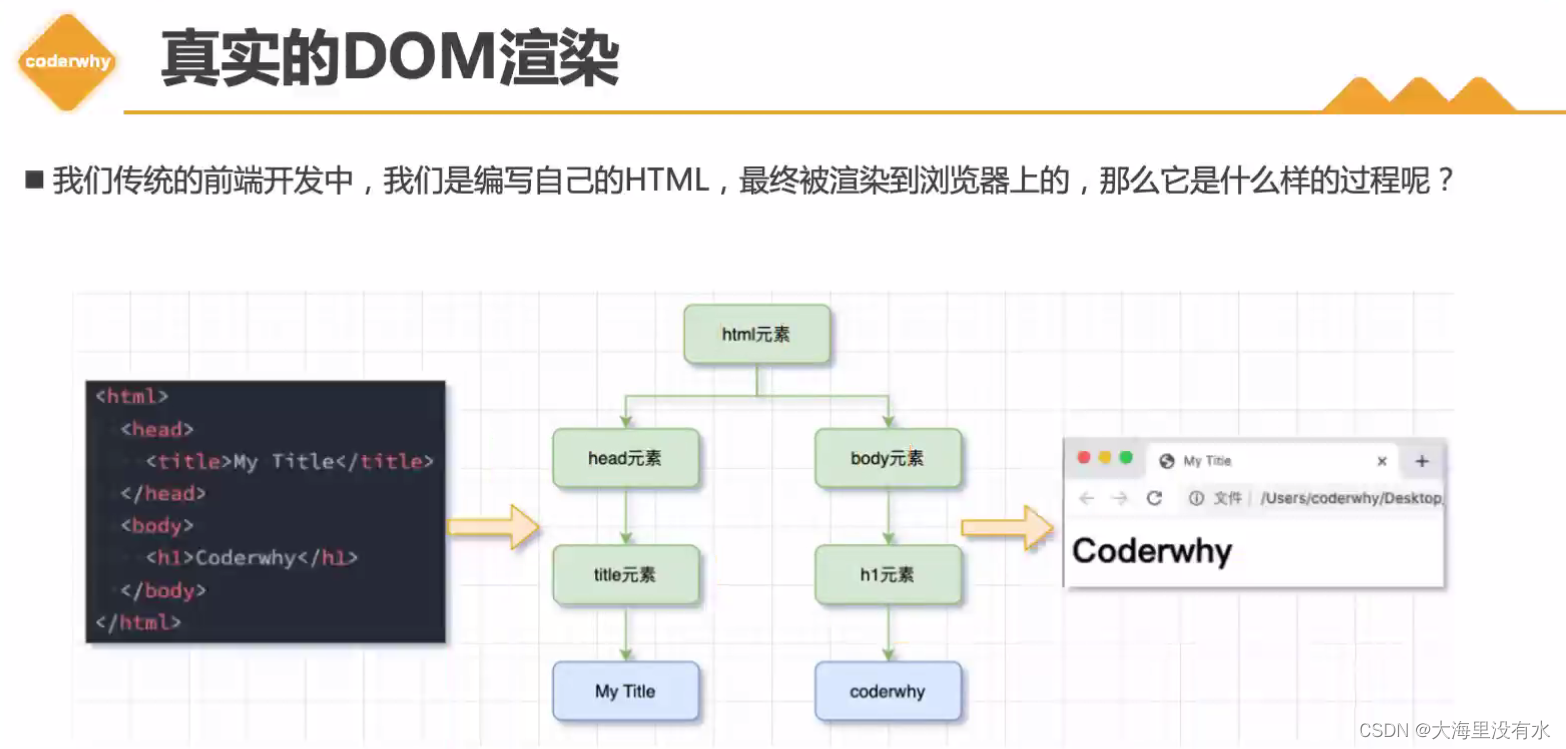
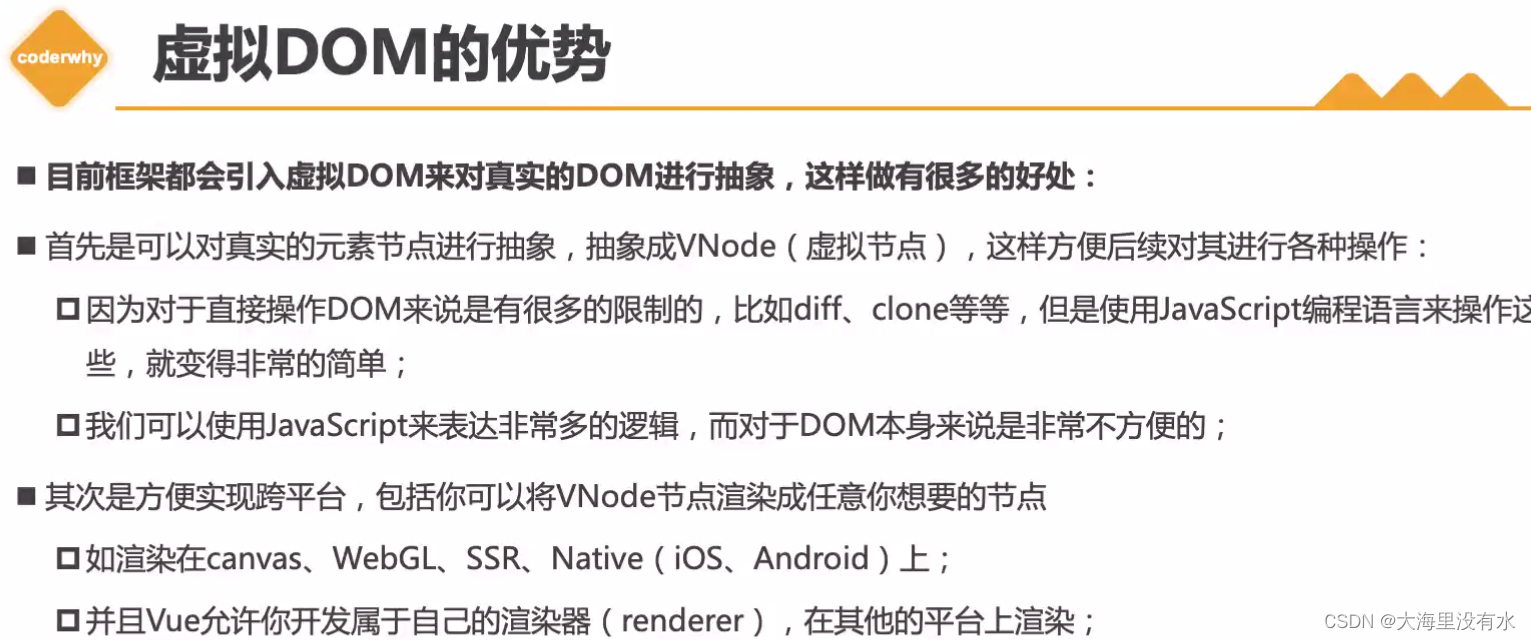
notes : Operate virtual DOM More real DOM It is more convenient ,diff The algorithm needs to compare sub elements 、 Type, etc ,clone attribute , There are many element attributes and methods . in addition , If the operation is true DOM, It will cause the backflow of the browser , Will render again . adopt vnode Nodes can be rendered into any control you want / node .
2、 fictitious DOM The rendering process
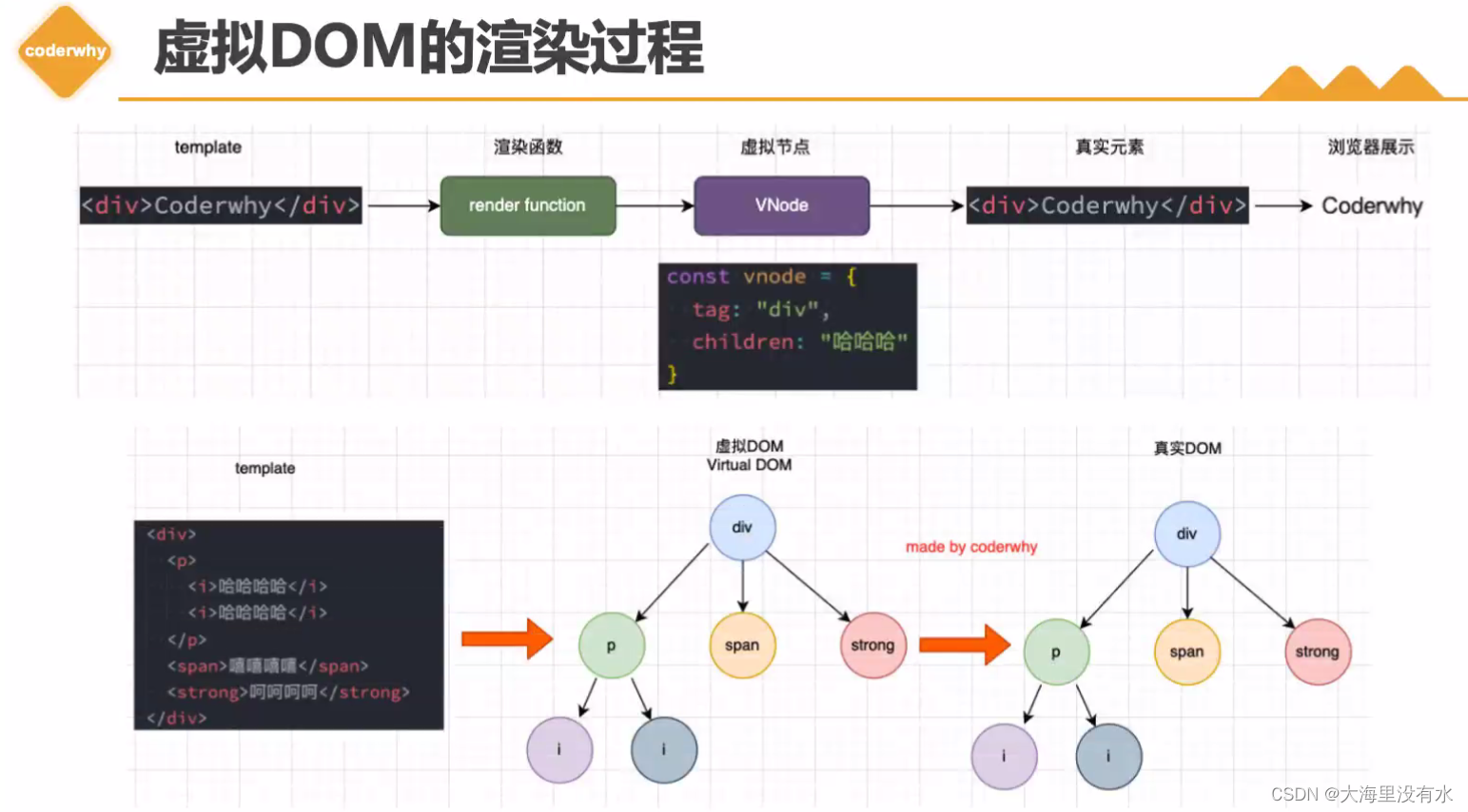
3、 Core module
notes :
1、template hand compiler The module is compiled into render function , Form a virtual node, Mount /patch operation , In the formation of real elements to the browser display .


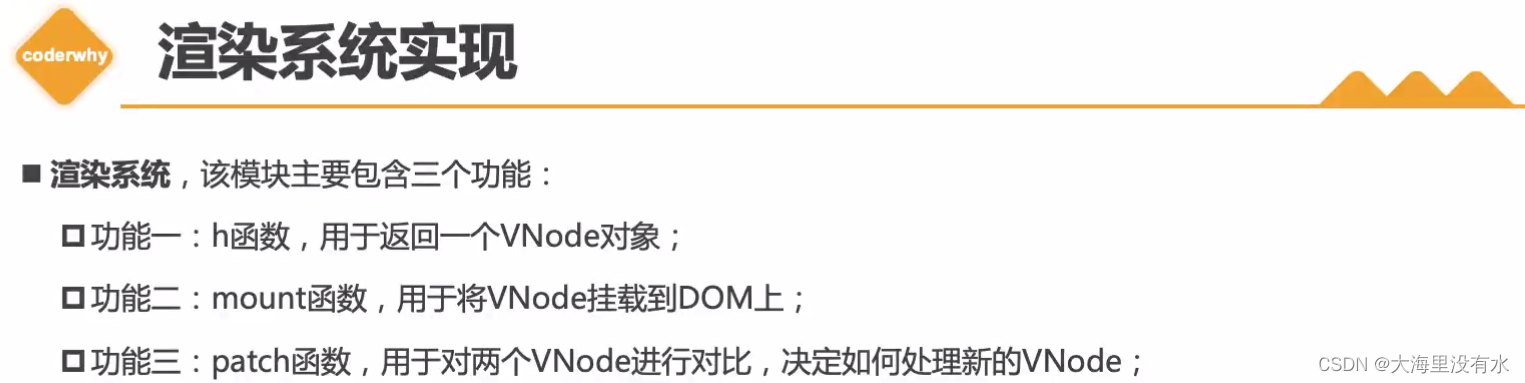
4、 Implementation of rendering system
render.js:
 notes : Implementation of rendering system
	1、h Implementation of function :  return js object , The parcel {
    tag, props, children}
	2、mount function :
		a. Create reality DOM Elements :document.createElement(vnode.tag)
		b. Handle props attribute :forEach ->  el.setAttribute(key, value)
		c. Handle children, We only deal with arrays and strings
		d. Use recursive calls directly
		e. take el Mount to container On
Step one :h Function implementation
//  Renderer implementation -----1、h Implementation of function , Customize h function
const h = (tag, props, children) => {

  //vnode It's just one.  javascript object , -> {}
  return {

    tag,
    props,
    children,
  };
};
Step two :mount Function implementation
//  Renderer implementation -----2、 establish 、 Handle 、 mount DOM Elements
// a、 Create real DOM Elements ,
// b、 Process traversal props,
// c、 Process the third parameter , What is passed in is the child node for processing
const mount = (vnode, container) => {

  //vnode -> element,  hold vnode Turn into real DOM Elements , adopt createElement That's it
  // a、 Create real elements , And in vnode Keep the real DOM:el, It will be used later
  const el = (vnode.el = document.createElement(vnode.tag));

  // b、 Handle props,  If there is... On the label class Equal attribute .
  // h("div", { class: "why" }, [
  // h("h2", null, " Current count : 100"),
  // h("button", { onclick: function () {} }, "+1"),
  // ])
  if (vnode.props) {

    for (const key in vnode.props) {

      const value = vnode.props[key];

      //  If it is an incoming function , Special treatment required ,  Judgment of event monitoring
      if (key.startsWith("on")) {

        // With on Judge at the beginning
        // onclick, Cut off on, be left over Click, Turn it into lowercase click,
        el.addEventListener(key.slice(2).toLowerCase(), value);
      } else {

        el.setAttribute(key, value);
      }
    }
  }

  // c、 Handle children, We only deal with arrays and strings
  if (vnode.children) {

    if (typeof vnode.children === "string") {

      el.textContent = vnode.children;
    } else {

      vnode.children.forEach((item) => {

        console.log("item", item);
        // d、 Use recursive calls directly
        mount(item, el);
      });
    }
  }

  // e.  take el Mount to container On
  container.appendChild(el);
};
Step three :patch Function implementation - diff Simple algorithm implementation
//  Renderer implementation ----- 3、 ... and 、patch
//  Two came in vnode
const patch = (n1, n2) => {

  //  First step : Comparison of type : When the types are different , That's what it does , Remove directly DOM
  if (n1.tag !== n2.tag) {

    // n1.el You can get the current element , Because before we put the truth DOM Save to vnode Inside the ( When creating real elements )
    //  To remove , You need to get the parent element of the current element
    const n1ElParent = n1.el.parentElement;
    n1ElParent.removeChild(n1.el);
    mount(n2, n1ElParent);
  } else {

    //  Comparison of type : When the type is the same
    // 1. Take out element object , And in n2 To save
    const el = (n2.el = n1.el);

    // 2.  Handle props,  When n1.props When it's empty , Give it a {}
    const oldProps = n1.props || {
    };
    const newProps = n2.props || {
    };

    // 2.1 Get all newProps Add to el Inside
    for (const key of newProps) {

      const oldValue = oldProps[key];
      const newValue = newProps[key];
      //  Only when id The different values inside are , Only set key/value
      if (oldValue !== newValue) {

        if (key.startsWith("on")) {

          const value = oldProps[key];
          el.addEventListener(key.slice(2).toLowerCase(), value);
        } else {

          el.setAttribute(key, newValue);
        }
      }
    }

    // 2.2  Delete the old props
    for (const key of oldProps) {

      if (!(key in newProps)) {

        if (key.startsWith("on")) {

          const value = oldProps[key];
          el.removeEventListener(key.slice(2).toLowerCase(), value);
        } else {

          el.removeAttribute(key);
        }
      }
    }

    // 3.  Handle children
    const oldChildren = n1.children || [];
    const newChildren = n2.children || [];

    //  Situation 1 : newChild Is itself a String
    if (typeof newChildren === "string") {

      // Boundary situation (edge case)
      if (typeof oldChildren === "string") {

        if (newChildren !== oldChildren) {

          el.textContent = newChildren;
        } else {

          el.innerHTML = newChildren;
        }
      }
    } else {

      //  Situation two : newChild Itself is an array
      if (typeof oldChildren === "string") {

        el.innerHTML = "";
        newChildren.forEach((item) => {

          mount(item, el);
        });
      } else {

        //  Situation three : It's all arrays
        // oldChildren: [v1, v2, v3]
        // newChildren: [v1, v2, v3, v4, v5]
        // 1. Elements with the same node in front of them patch operation
        const commonLength = Math.min(oldChildren.length, newChildren.length);
        for (let i = 0; i < commonLength; i++) {

          patch(oldChildren[i], newChildren[i]);
        }

        // 2.  Add operation : newChildren > oldChildren,
        if (newChildren.length > oldChildren.length) {

          newChildren.slice(oldChildren.length).forEach((item) => {

            mount(item, el);
          });
        }

        // 3. Remove operation : newChildren.length < oldChildren.length
        if (newChildren.length < oldChildren.length) {

          oldChildren.slice(newChildren.length).forEach((item) => {

            el.removeChild(item.el);
          });
        }
      }
    }
  }
};
index.html
<!DOCTYPE html>
<html lang="en">
  <head>
    <meta charset="UTF-8" />
    <meta http-equiv="X-UA-Compatible" content="IE=edge" />
    <meta name="viewport" content="width=device-width, initial-scale=1.0" />
    <title>Document</title>
  </head>

  <body>
    <div id="app"></div>

    <script src="./render.js"></script>
    <script> // 1. adopt h Function to create a vnode const vnode = h("div", {
       class: "why" }, [ h("h2", null, " Current count : 100"), h("button", {
       onclick: function () {
      } }, "+1"), ]); // 2.  adopt mount function ,  take vnode Mount to div in #app On  mount(vnode, document.querySelector("#app")); // 3.  Create a new vnode,  Two vnode do diff Algorithm  // const vnode1 = h('div', { class: "coderchen" }, ' Ha ha ha ha ') // patch(vnode, vnode1) setTimeout(() => {
       const vnode1 = h("h2", {
       class: "coderchen" }, " Ha ha ha ha "); patch(vnode, vnode1); }, 2000); </script>
  </body>
</html>
Two 、 Responsive system
1、 Response type dep The realization of the class
1、 For each dep Class defines a collection , The collected side effect function is not repeated (set)
2、 Go to set Add the function to be executed in the collection (add Method )
3、 notice notify() -> Traverse set aggregate -> Execute the functions inside
//  rely on
class Dep {

  constructor() {

    //  For each Dep A collection .  The elements inside don't repeat
    this.subscribers = new Set();
  }

  addEffect(effect) {

    // Add elements to a collection , No push, yes add
    this.subscribers.add(effect)
  }

  // Inform all subscribers perform
  notify() {

    this.subscribers.forEach(effect => {

      effect()
    })
  }
}


const info = {
     counter: 100 }
const dep = new Dep();

function doubleCounter() {

  console.log(info.counter * 2)
}

function powerCounter() {

  console.log(info.counter * info.counter)
}

// doubleCounter();
// powerCounter()
//  When data changes , If there is a place to rely on , Should be performed again
dep.addEffect(doubleCounter);
dep.addEffect(powerCounter);

//  Change , Call directly dep.notify
info.counter++;
dep.notify()
2、watchEffect Encapsulation
1、 encapsulation watchEffect, Pass in the function . Let the rear package depend Method , Let it add itself to set Inside .
//  rely on
class Dep {

  constructor() {

    // 1、 For each Dep A collection .  The elements inside don't repeat
    this.subscribers = new Set();
  }

  // addEffect(effect) {

  // // 2、 Add elements to a collection , No push, yes add
  // this.subscribers.add(effect)
  // }

  depend() {

    if (activeEffect) {

      this.subscribers.add(activeEffect);
    }
  }

  // 3、 Inform all subscribers perform
  notify() {

    this.subscribers.forEach((effect) => {

      effect();
    });
  }
}

let activeEffect = null;
function watchEffect(effect) {

  // dep.addEffect(effect);
  activeEffect = effect;
  dep.depend();
  effect(); // Execute it the first time
  activeEffect = null;
}

const info = {
     counter: 100, name: "chem" };
const dep = new Dep();

// watchEffect1
watchEffect(function doubleCounter() {

  console.log(info.counter * 2, info.name);
});

// watchEffect2
watchEffect(function powerCounter() {

  console.log(info.counter * info.counter);
});

// watchEffect3
watchEffect(function powerCounter() {

  console.log(info.counter + info.counter, info.name);
});

// doubleCounter();
// powerCounter()
// 4、 When data changes , If there is a place to rely on , Should be performed again ( defects 1)
// dep.addEffect(doubleCounter);
// dep.addEffect(powerCounter);

//  Change , Call directly dep.notify
info.counter++;
dep.notify(); //( defects 2: Dependence requires self adjustment notify())

info.name = "lisi";
dep.notify(); //( defects 3: Should not rely on all collected dep in )
3、vue2 Responsive implementation - The data was hijacked
//  rely on
class Dep {

  constructor() {

    // 1. For each Dep A collection .  The elements inside don't repeat
    this.subscribers = new Set();
  }

  // addEffect(effect) {

  // // 2. Add elements to a collection , No push, yes add
  // this.subscribers.add(effect)
  // }

  // 6、 encapsulation depend()
  depend() {

    if (activeEffect) {

      this.subscribers.add(activeEffect);
    }
  }

  // 3. Inform all subscribers perform
  notify() {

    this.subscribers.forEach((effect) => {

      effect();
    });
  }
}

// 5、 encapsulation watchEffect
let activeEffect = null;
function watchEffect(effect) {

  // dep.addEffect(effect);
  activeEffect = effect;
  // dep.depend();
  effect();
  activeEffect = null;
}

// 8、 return dep object
// Map({key:value}):  requirement key Is a string
// WeakMap({key( object ): value}):  requirement key It's an object , This object is a weak reference , The benefit of weak references is set to null , The garbage collection mechanism will recycle
const targetMap = new WeakMap();
function getDep(target, key) {

  // 1. according to target Object to retrieve the corresponding Map object
  let depsMap = targetMap.get(target);
  if (!depsMap) {

    depsMap = new Map();
    targetMap.set(target, depsMap);
  }

  // 2.  according to key( such as counter,name) Take out the concrete dep object
  let dep = depsMap.get(key);
  if (!dep) {

    dep = new Dep();
    depsMap.set(key, dep);
  }
  return dep;
}

// 7、 vue2  Yes  row  Hijack the incoming object
function reactive(raw) {

  // Objecet Get all the key, And then traverse it
  Object.keys(raw).forEach((key) => {

    const dep = getDep(raw, key);
    let value = raw[key];

    Object.defineProperty(raw, key, {

      //  Get data usage get, Just call watchEffect, It uses info.name, Will be here
      get() {

        dep.depend();
        return value;
      },
      //  Set data usage set
      set(newValue) {

        value = newValue;
        dep.notify();
      },
    });
  });
  return raw;
}

//  The above is the encapsulated responsive code ,  The following is the test code

const info = reactive({
     counter: 100, name: "chen" });
// info.name = "feng";

const foo = {
     height: 1.23 };

// const dep = new Dep();

// watchEffect1
watchEffect(function () {

  console.log("1:", info.counter * 2, info.name);
});

// watchEffect2
watchEffect(function () {

  console.log("2:", info.counter * info.counter);
});

// watchEffect3
watchEffect(function () {

  console.log("3:", info.counter + 10);
});

watchEffect(function () {

  console.log("4:", foo.height);
});

// doubleCounter();
// powerCounter()
// 4、 When data changes , If there is a place to rely on , Should be performed again
// dep.addEffect(doubleCounter);
// dep.addEffect(powerCounter);

//  Change , Call directly dep.notify
info.counter++;
info.name = "xiu";
// dep.notify();
4、vue3 Responsive implementation - The data was hijacked proxy

class Dep {

  constructor() {

    this.subscribers = new Set();
  }

  depend() {

    if (activeEffect) {

      this.subscribers.add(activeEffect);
    }
  }

  notify() {

    this.subscribers.forEach(effect => {

      effect();
    })
  }
}

let activeEffect = null;
function watchEffect(effect) {

  activeEffect = effect;
  effect();
  activeEffect = null;
}


// Map({key: value}): key Is a string
// WeakMap({key( object ): value}): key It's an object ,  Weak reference
const targetMap = new WeakMap();
function getDep(target, key) {

  // 1. According to object (target) Take out the corresponding Map object
  let depsMap = targetMap.get(target);
  if (!depsMap) {

    depsMap = new Map();
    targetMap.set(target, depsMap);
  }

  // 2. Take out the concrete dep object
  let dep = depsMap.get(key);
  if (!dep) {

    dep = new Dep();
    depsMap.set(key, dep);
  }
  return dep;
}


// vue3 Yes raw Data hijacking
function reactive(raw) {

  return new Proxy(raw, {

    get(target, key) {

      const dep = getDep(target, key);
      dep.depend();
      return target[key];
    },
    set(target, key, newValue) {

      const dep = getDep(target, key);
      target[key] = newValue;
      dep.notify();
    }
  })
}

// const proxy = reactive({name: "123"})
// proxy.name = "321";


// //  Test code
const info = reactive({
    counter: 100, name: "why"});
const foo = reactive({
    height: 1.88});

// watchEffect1
watchEffect(function () {

  console.log("effect1:", info.counter * 2, info.name);
})

// watchEffect2
watchEffect(function () {

  console.log("effect2:", info.counter * info.counter);
})

// watchEffect3
watchEffect(function () {

  console.log("effect3:", info.counter + 10, info.name);
})

watchEffect(function () {

  console.log("effect4:", foo.height);
})

// info.counter++;
// info.name = "why";

// foo.height = 2;
边栏推荐
- 【Rust笔记】02-所有权
- 22-06-27 Xian redis (01) commands for installing five common data types: redis and redis
- Binary tree sorting (C language, char type)
- [concurrent programming] concurrent tool class of thread
- Monotonic stack -84 The largest rectangle in the histogram
- 单调栈-84. 柱状图中最大的矩形
- 【Rust 笔记】07-结构体
- UE4 source code reading_ Bone model and animation system_ Animation node
- Deep parsing (picture and text) JVM garbage collector (II)
- 22-06-28 西安 redis(02) 持久化机制、入门使用、事务控制、主从复制机制
猜你喜欢
DOM 渲染系统(render mount patch)响应式系统
Mortgage Calculator

Visual Studio (VS) shortcut keys
Dom4j遍历和更新XML
![[concurrent programming] consistency hash](/img/5e/3d0a52caa8ca489a6e6267274bbb39.jpg)
[concurrent programming] consistency hash
OpenGL learning notes

Divide candy (circular queue)
Gradle's method of dynamically modifying APK package name

22-06-28 Xi'an redis (02) persistence mechanism, entry, transaction control, master-slave replication mechanism

First Servlet
随机推荐
Thymeleaf 404 reports an error: there was unexpected error (type=not found, status=404)
Dom4j traverses and updates XML
Deeply understand the underlying data structure of MySQL index
[rust notes] 11 practical features
First Servlet
Apache startup failed phpstudy Apache startup failed
[concurrent programming] explicit lock and AQS
Convert video to GIF
Find the intersection of line segments
Baidu editor ueeditor changes style
Unity Editor Extension - Outline
ES6 promise learning notes
Concurrent programming (III) detailed explanation of synchronized keyword
Unity notes 1
Constraintlayout's constraintset dynamically modifies constraints
How to delete CSDN after sending a wrong blog? How to operate quickly
[concurrent programming] working mechanism and type of thread pool
Binary tree traversal (first order traversal. Output results according to first order, middle order, and last order)
【Rust 笔记】11-实用特型
单调栈-503. 下一个更大元素 II