当前位置:网站首页>UE4 source code reading_ Bone model and animation system_ Animation process
UE4 source code reading_ Bone model and animation system_ Animation process
2022-07-03 08:25:00 【_ lazycat】
0. Write it at the front
This article is a collection of personal learning notes , If there is a mistake , I hope you can point out .
This rough description UE4 The main process of each frame animation calculation in , Relevant codes involved in this process , Because of the diversity of animation settings , There is also quite a lot of branch code .
This article only describes the most basic animation of the character , from SkeletalMeshComp The process of calculating the pose of the animation playback node in the animation blueprint .
1. SkeletalMeshComp technological process
【AnimInstance】
Animation examples , This class is the core of controlling animation logic , You can think of it as one AnimInstance The object corresponds to an animation blueprint .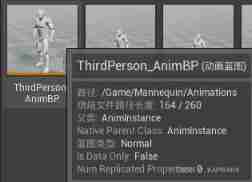
SkeletalMeshComp Three kinds of AnimInstance object :
- AnimScriptInstance: The currently active animation blueprint object
- PostProcessAnimInstance
- LinkedInstances
【 entrance 】
1)SkinnedMeshComp->TickComponent
SkinnedMeshComp Medium TickComponent Is the interface that will be called every frame , This interface is also the entrance of animation update
Two important functions :
- TickPose: Deal with non parallel parts of animation computation
- RefreshBoneTransforms: Deal with the multi-threaded parallel part of animation Computing , And by AnimInstanceProxy Handle
notes :UE4 The animation blueprint is set to multi-threaded update by default , Most of the data calculation in animation calculation is done by AnimInstanceProxy Be responsible for parallel processing in multithreading .
2)SkeletalMeshComp->TickPose:
- Calculation tick Time interval of DeltaTimeForTick
- call TickAnimation(DeltaTimeForTick, bNeedsValidRootMotion) Update three animation instances
- call AnimInstance Of UpdateAnimation, Here we deal with animation in the part of game thread calculation
- The update order is : To update LinkedInstances, Update again AnimScriptInstance, The last update PostProcessAnimInstance
3)SkeletalMeshComp->RefreshBoneTransforms Interface :
- DispatchParallelEvaluationTasks, Responsible for initiating multi-threaded computing :
- SwapEvaluationContextBuffers:
Exchange context data in buffer before calculation , hold SkeletalMeshComp Some animation data cached in is exchanged to AnimEvaluationContext.
AnimEvaluationContext(FAnimationEvaluationContext): The variable is in SkeletalMeshComp Is responsible for caching all data when calculating the current animation pose of the character . - Launch two Task:
- FParallelAnimationEvaluationTask: The Task call ParallelAnimationEvaluation
- PerformAnimationProcessing: This function is mainly responsible for adjusting the Update and Evaluate Interface , These two interfaces will update the animation data node by node , Then update the animation pose . Finally, apply animation pose data .
- ParallelDuplicateAndInterpolate:
- FParallelAnimationCompletionTask: The Task call CompleteParallelAnimationEvaluation
- SwapEvaluationContextBuffers: take AnimEvaluationContext Data exchange back SkeletalMeshComp Medium cache , Wait for the rendering thread to call
- PostAnimEvaluation(AnimEvaluationContext):
- FParallelAnimationEvaluationTask: The Task call ParallelAnimationEvaluation
- SwapEvaluationContextBuffers:
2. AnimInstance&&Proxy technological process
【 Game threads 】
It was said that SkeletalMeshComp Can tune AnimInstance Of UpdateAnimation Interface handles the logic of the animation blueprint in the game thread calculation .
- UpdateAnimation
- Update before the animation node logic updates Montage
UpdateMontage(DeltaSeconds)
UpdateMontageSyncGroup
UpdateMontageEvaluationData - BlueprintUpdateAnimation, Update the entry of various animation logic in the blueprint , The specific implementation is the animation tree of the blueprint
- Determine whether the animation needs to be updated immediately , If you don't need to update the animation immediately , Will be called by multiple threads Proxy Parallel computation
const bool bWantsImmediateUpdate = bNeedsValidRootMotion || NeedsImmediateUpdate(DeltaSeconds);
If you need to update immediately , Such as RootMotion Can't compute in parallel , Then call the update interface under this function
ParallelUpdateAnimation();
PostUpdateAnimation();
- Update before the animation node logic updates Montage
【 Multithreading 】
SkeletalMeshComp Of PerformAnimationProcessing Is responsible for calling AnimInstance Of Update and Evaluate, Update blueprint data , And pose data update .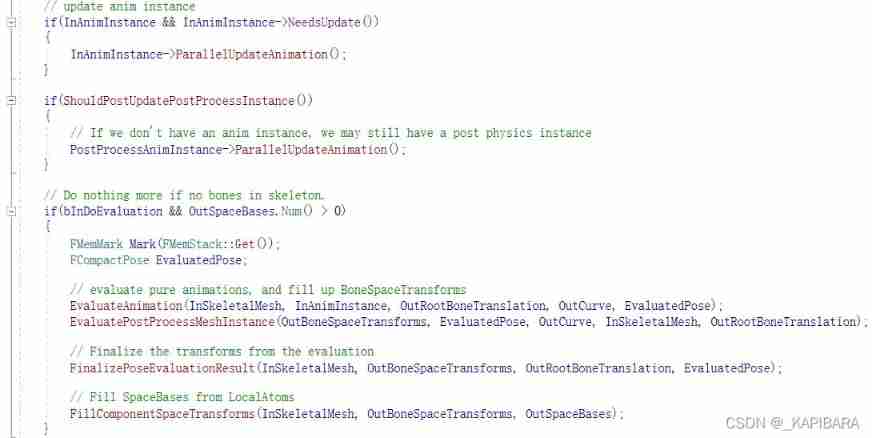
Several key functions :
- About Update:
AnimInstance->ParallelUpdateAnimation - About Evaluate:
EvaluateAnimation
EvaluatePostProcessMeshInstance
FinalizePoseEvaluationResult
FillComponentSpaceTransforms
1)ParallelUpdateAnimation
call Stack , Called by other threads

This function calls Proxy Of UpdateAnimation Interface , Look directly at Proxy:
	FAnimationUpdateSharedContext SharedContext;
	FAnimationUpdateContext Context(this, CurrentDeltaSeconds, &SharedContext);
	UpdateAnimation_WithRoot(Context, RootNode, NAME_AnimGraph);
Context: Create a context object
UpdateAnimation_WithRoot: From the root node of the animation blueprint ( The last node , That is, animation output pose node ) Go back , Traverse all the animation nodes, and make Update.
2)Proxy->UpdateAnimation_WithRoot
Mainly do a few things :
CacheBones
Proxy->UpdateAnimationNode(InContext)
- By calling the... Of the root node Update_AnyThread Interface , Start at the root node , And keep going back , Update blueprint data
- FAnimNode_Root->Update_AnyThread(Context)
Find your previous node through the connection line N, Then call N Node Update_AnyThread
Keep going back and forth , Until you reach the end node , There is no longer a connecting line .
FPoseLink: Connect line objects .
FPoseLink->LinkedNode: The node pointed by the connecting line
The root node :
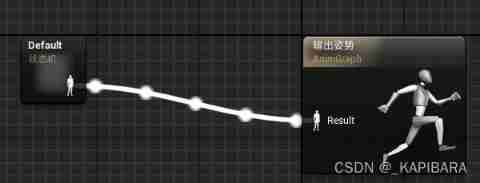
The specific update logic needs to go deep into each different animation blueprint node logic , Tentatively .
3)SkeletalMeshComp->EvaluateAnimation
- AnimInstance->ParallelEvaluateAnimation
call Stack :
Create a temporary EvaluationContext Context object
After the calculation , take Curve and Pose Assign the result to Comp Of AnimEvaluationContextFPoseContext EvaluationContext(&Proxy); EvaluationContext.ResetToRefPose(); Proxy.EvaluateAnimation(EvaluationContext); OutCurve.CopyFrom(EvaluationContext.Curve); OutPose.CopyBonesFrom(EvaluationContext.Pose); - Proxy.EvaluateAnimation(EvaluationContext)
- Proxy.EvaluateAnimation_WithRoot(Output, RootNode)
- CacheBones
- EvaluateAnimationNode_WithRoot(Output, InRootNode)
- and Update Similar process , It starts from the root node , Trace back through the connecting line , Until the end of the node .
- But inside the specific node Evaluate Logic should determine and Update The number of nodes called is different
4)SkeletalMeshComp->EvaluatePostProcessMeshInstance
EvaluatePostProcessMeshInstance Also called EvaluateAnimation, The same update process , Just different objects :PostProcessAnimInstance
5)SkeletalMeshComp->FinalizePoseEvaluationResult
- Calculation TArray& OutBoneSpaceTransforms
The bone index will be compressed (CompactBoneIndex) Turn to mesh bone index (MeshBoneIndex)
notes : Three bone indexes :CompactBoneIndex、MeshBoneIndex、SkeletalBoneIndex - Output FVector& OutRootBoneTranslation:RootBone Relative displacement
6)SkeletalMeshComp->FillComponentSpaceTransforms
Get translation 、 rotate 、 Scaling vector , To update the pose matrix of each bone
Each bone matrix applies the local matrix of the parent bone one by one starting from the root bone , That is, the output of this function is a global pose
- OutComponentSpaceTransforms :AnimEvaluationContext.CachedComponentSpaceTransforms, The final output global pose matrix
InBoneSpaceTransforms: from Evaluate Calculate the input joint pose matrix - Calculate the global pose
FTransform::Multiply(SpaceBase, LocalTransformsData + BoneIndex, ParentSpaceBase);
among SpaceBase yes OutTrans,LocalTransformData+BoneIndex It's based on index Indexed InTrans
Multiply(FTransform* OutTransform, const FTransform* A, const FTransform* B);
3. AnimNode technological process
Animation playback node :FAnimNode_SequencePlayer
The specific logic of animation playback is UAnimSequence object
1)UAnimSequence->GetBonePose (FCompactPose& OutPose, FBlendedCurve& OutCurve, const FAnimExtractContext& ExtractionContext, bool bForceUseRawData=false) const;
- initialization OutPose
According to the settings , Use Retargeting Source Of T-Pose, Or its own T-Pose data , Initialize first OutPose - EvaluateCurveData: Extract curve data
- DecompressPose: Decompress the compressed animation data , complete OutPose The calculation of
4. Reference material
https://docs.unrealengine.com/4.27/zh-CN/AnimatingObjects/SkeletalMeshAnimation/Optimization
边栏推荐
- Golang's range
- Swagger document configuration
- Wpf: solve the problem that materialdesign:dialoghost cannot be closed
- Ilruntime learning - start from scratch
- 【音视频】ijkplayer错误码
- unity2019_ Input management
- Ue5 opencv plug-in use
- Golang url的编码和解码
- [updating] wechat applet learning notes_ three
- Mysql容器化(1)Docker安装MySQL
猜你喜欢




随机推荐
Golang time format sorting
简易入手《SOM神经网络》的本质与原理
C#课程设计之员工信息管理系统
【音视频】ijkplayer错误码
数据库应用技术课程设计之商城管理系统
Thymeleaf 404 reports an error: there was unexpected error (type=not found, status=404)
Luaframwrok handles resource updates
Dotween plug-in
matlab神經網絡所有傳遞函數(激活函數)公式詳解
KunlunBase MeetUP 等您来!
Pit & ADB wireless debugging of vivo real machine debugging
Basic operation and process control 2
[global product discovery 2] the first pure cloud augmented reality (AR) platform - Israel
Base64和Base64URL
MySQL containerization (1) docker installation MySQL
One dimensional array two dimensional array (sort Max insert sort)
C language - Introduction - essence Edition - take you into programming (I)
animation
使用base64编码传图片
Ue5 opencv plug-in use