当前位置:网站首页>Ue5 opencv plug-in use
Ue5 opencv plug-in use
2022-07-03 08:15:00 【The east wind blows the Willows】
This plug-in is free ,UE5EA Personal test is valid , Thank you, senior friends , I won't thank you one by one here .
The plug-in for :OpenCVforUE5 plug-in unit - Internet document resources -CSDN download
1. The source code for
2. Project configuration
After decompressing Binaries、Plugins、ThirdParty The folder is directly copied to the root directory of the project
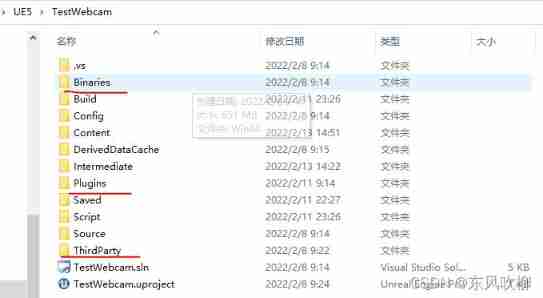
3. modify ProjectName.Build.cs
// Copyright Epic Games, Inc. All Rights Reserved.

using UnrealBuildTool;
using System.IO;

public class TestWebcam : ModuleRules
{
	private string ThirdPartyPath
	{
		get{return Path.GetFullPath(Path.Combine(ModuleDirectory,"../../ThirdParty"));}
	}
	public TestWebcam(ReadOnlyTargetRules Target) : base(Target)
	{
		PCHUsage = PCHUsageMode.UseExplicitOrSharedPCHs;

		PublicDependencyModuleNames.AddRange(new string[] { "Core", "CoreUObject", "Engine", "InputCore","OpenCV"});

		PrivateDependencyModuleNames.AddRange(new string[] {  });

		// Uncomment if you are using Slate UI
		// PrivateDependencyModuleNames.AddRange(new string[] { "Slate", "SlateCore" });

		// Uncomment if you are using online features
		// PrivateDependencyModuleNames.Add("OnlineSubsystem");

		// To include OnlineSubsystemSteam, add it to the plugins section in your uproject file with the Enabled attribute set to true
		string OpenCVPath = Path.Combine(ThirdPartyPath, "OpenCV/");
		PublicIncludePaths.AddRange(new string[] { Path.Combine(OpenCVPath, "Includes") });
		PublicLibraryPaths.Add(Path.Combine(OpenCVPath, "Libraries/Win64"));
	}
}
4. modify OpenCV.Build.cs
// Some copyright should be here...

using UnrealBuildTool;
using System.IO;

public class OpenCV : ModuleRules
{
    private string ThirdPartyPath
    {
        get { return Path.GetFullPath(Path.Combine(ModuleDirectory, "../../../../ThirdParty/")); }
    }

	//public OpenCV(TargetInfo Target)
	public OpenCV(ReadOnlyTargetRules Target) : base(Target)
	{
        // Startard Module Dependencies
		PublicDependencyModuleNames.AddRange(new string[] { "Core", "RHI", "RenderCore" });
		PrivateDependencyModuleNames.AddRange(new string[] { "CoreUObject", "Engine", "Slate", "SlateCore" });

        // Start OpenCV linking here!
        bool isLibrarySupported = false;

        // Create OpenCV Path
        string OpenCVPath = Path.Combine(ThirdPartyPath, "OpenCV");

        // Get Library Path
        string LibPath = "";
        bool isdebug = Target.Configuration == UnrealTargetConfiguration.Debug && BuildConfiguration.bDebugBuildsActuallyUseDebugCRT;
        if (Target.Platform == UnrealTargetPlatform.Win64)
        {
            LibPath = Path.Combine(OpenCVPath, "Libraries", "Win64");
            isLibrarySupported = true;
        }
        else if (Target.Platform == UnrealTargetPlatform.Win32)
        {
            // TODO: add OpenCV binaries for Win32
        }
        else if (Target.Platform == UnrealTargetPlatform.Mac)
        {
            // TODO: add OpenCV binaries for Mac
        }
        else if (Target.Platform == UnrealTargetPlatform.Linux)
        {
            // TODO: add OpenCV binaries for Linux
        }
        else
        {
            string Err = string.Format("{0} dedicated server is made to depend on {1}. We want to avoid this, please correct module dependencies.", Target.Platform.ToString(), this.ToString()); System.Console.WriteLine(Err);
        }

        if (isLibrarySupported)
        {
            //Add Include path
            PublicIncludePaths.AddRange(new string[] { Path.Combine(OpenCVPath, "Includes") });

            // Add Library Path
            PublicLibraryPaths.Add(LibPath);

            //Add Static Libraries
            PublicAdditionalLibraries.Add("opencv_world320.lib");

            //Add Dynamic Libraries
            PublicDelayLoadDLLs.Add("opencv_world320.dll");
            PublicDelayLoadDLLs.Add("opencv_ffmpeg320_64.dll");

        }

        Definitions.Add(string.Format("WITH_OPENCV_BINDING={0}", isLibrarySupported ? 1 : 0));
	}
}
5. modify OpenCV.cpp and OpenCV.h
//.cpp
//#include "OpenCVPrivatePCH.h"
#include "../Public/OpenCV.h"


//.h
//#include "ModuleManager.h"
#include "Modules/ModuleManager.h"
6. stay VS Project settings
Right click on the item -> attribute ->VC++ Catalog , stay Include Add a path to the directory :../../ThirdParty/OpenCV/Includes
7.UE5 Examples of use
stay UE5 Open plug-in in

establish webcam reader Blueprint class and material 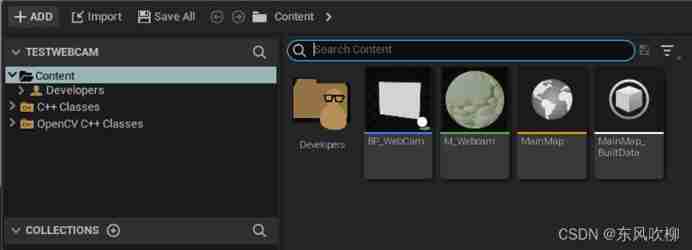


take BP_WebCam Put it in level in , The operation effect is as follows :
 Enjoy yourself , If there is a problem , Please reply in the comments section .
边栏推荐
- Transplantation of freetype Library
- 一条通往服务器所有端口的隧道
- go 解析身份证
- C#课程设计之员工信息管理系统
- Basic operation and process control 2
- [set theory] order relation (the relation between elements of partial order set | comparable | strictly less than | covering | Haas diagram)
- Encoding and decoding of golang URL
- What is BFC?
- Free use until 2015 -- viz artist multi touch plug-in package
- My touch screen production "brief history" 1
猜你喜欢

IP production stream is so close to me
animation

JS common basic case sorting (continuous update)

Abstract classes and interfaces

Free use until 2015 -- viz artist multi touch plug-in package
![[end of 2021] National Meteorological Short Video (Kwai, Tiktok) influence list in December](/img/51/81ceaf8746ec7455ea8abf9f038e81.jpg)
[end of 2021] National Meteorological Short Video (Kwai, Tiktok) influence list in December

Scite change background color

Pulitzer Prize in the field of information graphics - malofiej Award

PostGIS space function

Mall management system of database application technology course design
随机推荐
L'installateur a été installé avec une erreur inattendue
MAE
Shader foundation 01
P2704 [NOI2001] 炮兵阵地(状压dp)
Base64和Base64URL
Idea unreference Display Effect
P2704 [noi2001] artillery position (shape pressure DP)
Golang 字符串分割,替换和截取
Docker installs MySQL and successfully uses Navicat connection
Basic operation and process control
[end of 2021] National Meteorological Short Video (Kwai, Tiktok) influence list in December
C#课程设计之员工信息管理系统
Student educational administration management system of C # curriculum design
璞华PLM为全场景产品生命周期管理赋能,助力产品主线的企业数字化转型
Map的实现类的顺序性
Golang's range
STM32F103 SPI (pit Diary)
Classes and objects
Viz artist advanced script video tutorial -- stringmap use and vertex operation
使用 FileChannel 进行文件的复制拷贝