当前位置:网站首页>Unity shader learning (VI) achieving radar scanning effect
Unity shader learning (VI) achieving radar scanning effect
2022-07-29 08:11:00 【ToDoNothing】
This period mainly passed shader Achieve radar scanning effect , As shown below 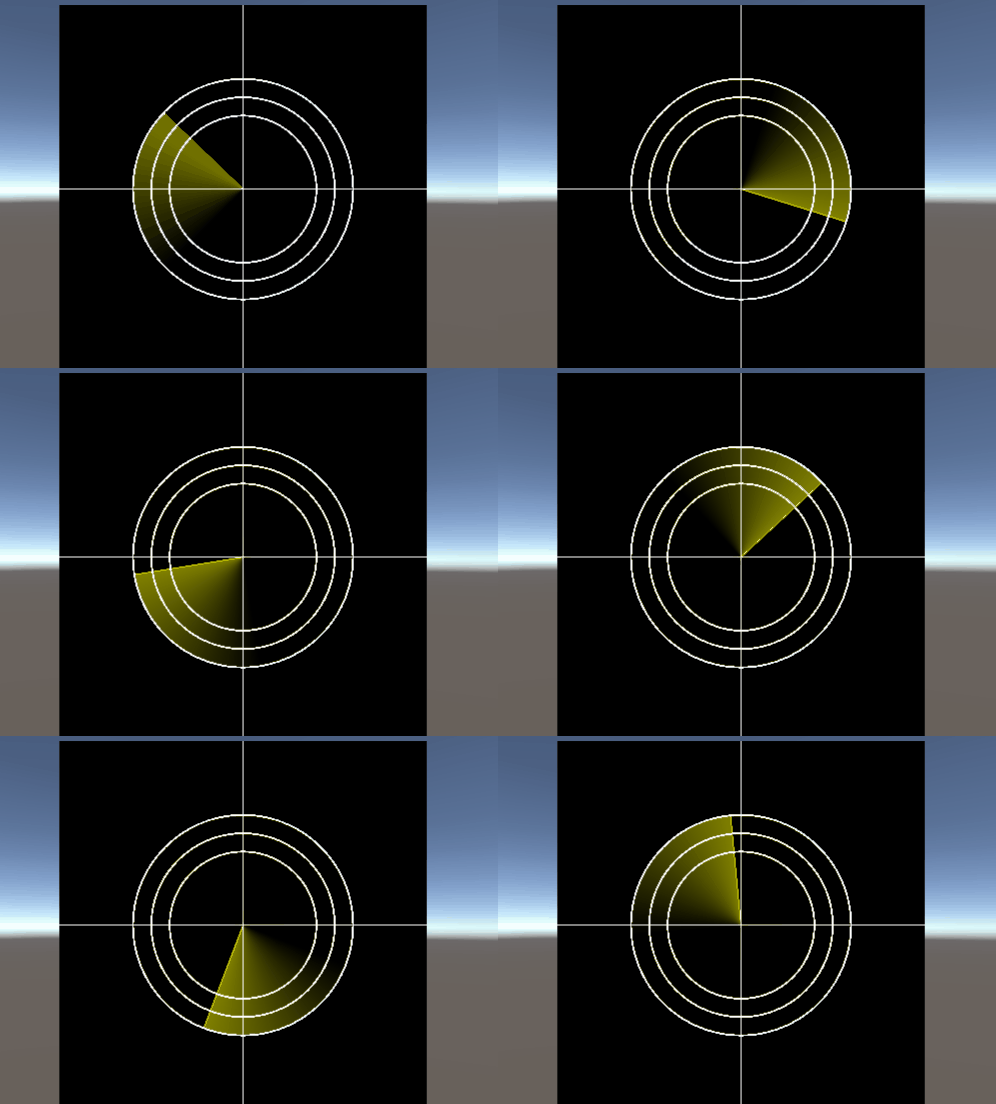
According to the effect , We need to draw a contour circle first , The code is as follows
Shader "Unlit/shader7"
{

    /// Mouse move square
    Properties
    {

    _Center("Center",Vector)=(0,0,0,0)
    _Raduis("Radius",float)=0.1
    }
    SubShader
    {

        Tags {
     "RenderType"="Opaque" }
        LOD 100

        Pass
        {

            CGPROGRAM
            #pragma vertex vert
            #pragma fragment frag


            #include "UnityCG.cginc"
        struct v2f{

            float4 vertex:SV_POSITION;
            float4 position:TEXCOORD1;
            float2 uv:TEXCOORD;
        };
        v2f vert(appdata_base v){

            v2f o;
            o.vertex=UnityObjectToClipPos(v.vertex);
            o.position=v.vertex;
            o.uv=v.texcoord;
            return o;
        }
        // Center point
        float4 _Center;
        // radius
        float _Raduis;
        // Draw a square
        float rect(float2 pt,float2 size,float2 center){

            float2 p=pt-center;
            float2 halfsize=size*0.5;
            float hotz=step(-halfsize.x,p.x)-step(halfsize.x,p.x);
            float vert=step(-halfsize.y,p.y)-step(halfsize.y,p.y);
            return hotz*vert;
        }
        // Ordinary solid circle
        float circle(float2 pt,float2 center,float radius){

            float2 p=pt-center;
            return 1.0-step(radius,length(p));
        }
        // Edge softening circle
          float circle(float2 pt,float2 center,float radius,bool soften){

            float2 p=pt-center;
            float edge=(soften)?radius*0.05:0.0;
            return 1.0-smoothstep(radius-edge,radius+edge,length(p));
        }
         // Contour circle
        float circle(float2 pt,float2 center,float radius,float line_width){

            float2 p=pt-center;
            float len=length(p);
            float half_line_width=line_width/2.0;

            return step(radius-half_line_width,len)-step(radius+half_line_width,len);
        }

            fixed4 frag (v2f i) : SV_Target
            {

                float2 pos=i.position*2;
                float2 size=0.2;
                float outlineCircle=circle(pos,_Center,_Raduis,0.01f);
                fixed3 col=fixed3(1,1,0)*outlineCircle;
                return fixed4(col,1.0);
            }
            ENDCG
        }
    }
}
Outline circle in code , It is drawn on the basis of solid circles , The solid circle needs to draw the color information of all points within the radius , And the outline is round , Just draw the outline , So just take the radius radius+half_line_width and radius-half_line_width Points within the range , As shown in the figure below
, As long as it is judged that the output is within the range of this point .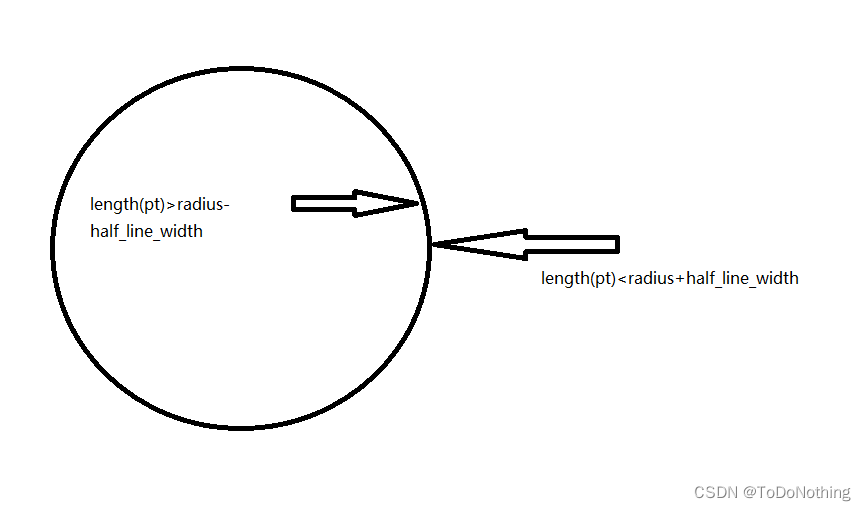
Two are used in the code step function , The result can be controlled within this range , As shown in the figure below , As long as it is within this range , It outputs 1, Not in this range , All output 0.
Based on the above code , We also need to draw lines , The code of the line is as follows
 // Draw line
        float onLine(float a,float b,float line_width,float edge_thickness){

            float half_line_width=line_width*0.5;
            return smoothstep(a-half_line_width-edge_thickness,a-half_line_width,b)-smoothstep(a+half_line_width,a+half_line_width+edge_thickness,b);
        }
In this function , Used smoothstep function , The meaning of this function is as follows
float smoothstep(float a, float b, float x)
{

  x = clamp((x - a) / (b- a), 0.0, 1.0);
  return x * x * (3 - 2 * x);
}
When a<b,x<a when return 0 x>b when , return 1 Otherwise, in the a and b Smooth transition between
When a>b,x>a when , return 0, When x<b yes , return 1. For details, please refer to understand shader function
Go back to the function of drawing lines ,a and b They are respectively linear x,y Point location ,line_width Is the width of the line ,edge_thickness Is the thickness of the line , adopt smoothstep Judge whether the point is within this range , This is based on x and y To determine the coordinates of , It's a little hard to understand , The best thing is to draw your own pictures and input parameters to prove .
After completing the functions of circle and line , Deal with it in the slice shader
            fixed4 frag (v2f i) : SV_Target
            {

                float2 pos=i.position*2;
                float2 size=0.2;
                float ouline1=onLine(i.uv.y,0.5,0.002,0.001)*_AxisColor;
                float ouline2=onLine(i.uv.x,0.5,0.002,0.001)*_AxisColor;

                float outlineCircle=circle(pos,_Center,_Raduis,0.01f);
                fixed3 col=ouline1+ouline2+outlineCircle;
                col+=circle(pos,_Center,_Raduis-0.1,0.01f);
                col+=circle(pos,_Center,_Raduis-0.2,0.01f);
                return fixed4(col,1.0);
            }
You can get the following graphics :
Next , Draw scanning lines , You need to use a very critical built-in function _Time, This function can achieve an effect of cyclic output value
t Is the time since the scene started loading ,4 The two components are (t/20, t, t2, t3)
_Time float4 time (t/20, t, t2, t3)
   // Scan line
        float sweep(float2 pt,float2 center,float radius,float line_width,float edge_thickness){

            float2 d=pt-center;
            float theta=_Time.z;
            float2 p=float2(cos(theta),-sin(theta))*radius;
            float h=clamp(dot(d,p)/dot(p,p),0.0,1.0);
            float l=length(d-p*h);
            return 1.0-smoothstep(line_width,line_width+edge_thickness,l);
        }
Scan lines are mainly based on vectors d The location of , Calculate to the loop p Distance of points , Then judge whether the distance is within the range , Point multiplication is used in this process dot Function calculation point d Projection to p The length of , The length h Used clamp Function to limit , Limited to 0-1 Inside . obtain h after , Calculate the point to p Distance of , First use d-p*h Obtain the vector of the projection point , Reuse length function . The results are as follows :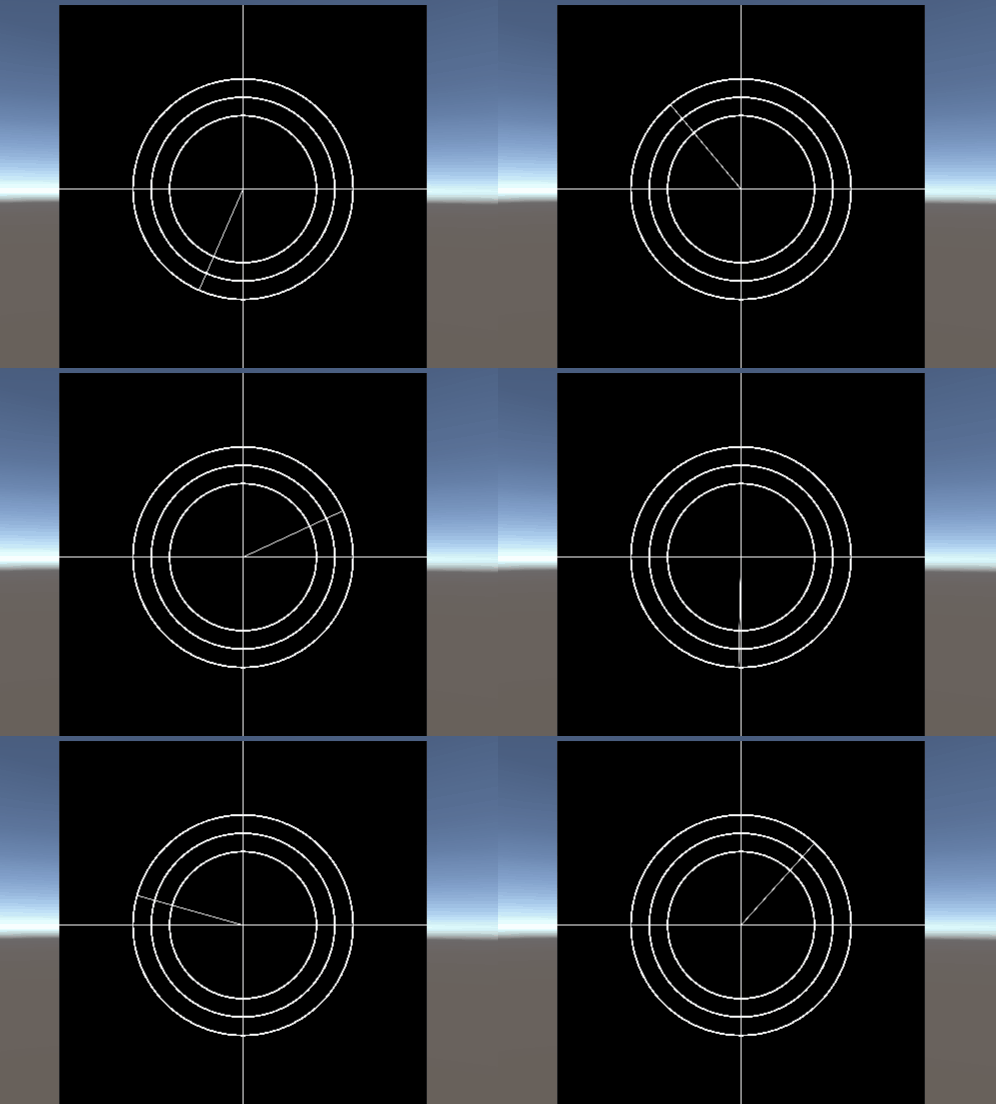
Last , Plus the delayed shadow of scanning , The overall code is as follows :
    // Scan line
        float sweep(float2 pt,float2 center,float radius,float line_width,float edge_thickness){

            float2 d=pt-center;
            float theta=_Time.z;
            float2 p=float2(cos(theta),-sin(theta))*radius;
            float h=clamp(dot(d,p)/dot(p,p),0.0,1.0);
            float l=length(d-p*h);
            float gradient=0.0;
            const float gradient_angle=UNITY_PI*0.5;
            if(length(d)<radius){

                float angle=fmod(theta+atan2(d.y,d.x),UNITY_TWO_PI);
                gradient=clamp(gradient_angle-angle,0,gradient_angle)/gradient_angle*0.5;


            return gradient+1.0-smoothstep(line_width,line_width+edge_thickness,l);
        }
Delay shadow is mainly for points d And p The angle between , The principle is also to judge and calculate the angle , It involves many mathematical problems , I'll talk more about it later , Here we only talk about the functions used
fmod: return a / b Floating point remainder of
atan2: Returns the arctangent value
Complete code :
Shader "Unlit/shader7"
{

    /// Mouse move square
    Properties
    {

    _Center("Center",Vector)=(0,0,0,0)
    _Raduis("Radius",float)=0.1
    _AxisColor("AxisColor",Color)=(1,1,0,1)
    }
    SubShader
    {

        Tags {
     "RenderType"="Opaque" }
        LOD 100

        Pass
        {

            CGPROGRAM
            #pragma vertex vert
            #pragma fragment frag


            #include "UnityCG.cginc"
        struct v2f{

            float4 vertex:SV_POSITION;
            float4 position:TEXCOORD1;
            float2 uv:TEXCOORD;
            float4 screenPos:TEXCOORD2;
        };
        v2f vert(appdata_base v){

            v2f o;
            o.vertex=UnityObjectToClipPos(v.vertex);
            o.position=v.vertex;
            o.uv=v.texcoord;
            o.screenPos=ComputeScreenPos(o.vertex);
            return o;
        }
        // Center point
        float4 _Center;
        // radius
        float _Raduis;

        fixed4 _AxisColor;
        // Draw a square
        float rect(float2 pt,float2 size,float2 center){

            float2 p=pt-center;
            float2 halfsize=size*0.5;
            float hotz=step(-halfsize.x,p.x)-step(halfsize.x,p.x);
            float vert=step(-halfsize.y,p.y)-step(halfsize.y,p.y);
            return hotz*vert;
        }
        // Ordinary solid circle
        float circle(float2 pt,float2 center,float radius){

            float2 p=pt-center;
            return 1.0-step(radius,length(p));
        }
        // Edge softening circle
          float circle(float2 pt,float2 center,float radius,bool soften){

            float2 p=pt-center;
            float edge=(soften)?radius*0.05:0.0;
            return 1.0-smoothstep(radius-edge,radius+edge,length(p));
        }
         // Contour circle
        float circle(float2 pt,float2 center,float radius,float line_width){

            float2 p=pt-center;
            float len=length(p);
            float half_line_width=line_width/2.0;

            return step(radius-half_line_width,len)-step(radius+half_line_width,len);
        }
        // Draw line
        float onLine(float a,float b,float line_width,float edge_thickness){

            float half_line_width=line_width*0.5;
            return smoothstep(a-half_line_width-edge_thickness,a-half_line_width,b)-smoothstep(a+half_line_width,a+half_line_width+edge_thickness,b);
        }
        // Scan line
        float sweep(float2 pt,float2 center,float radius,float line_width,float edge_thickness){

            float2 d=pt-center;
            float theta=_Time.z;
            float2 p=float2(cos(theta),-sin(theta))*radius;
            float h=clamp(dot(d,p)/dot(p,p),0.0,1.0);
            float l=length(d-p*h);
            float gradient=0.0;
            const float gradient_angle=UNITY_PI*0.5;
            if(length(d)<radius){

                float angle=fmod(theta+atan2(d.y,d.x),UNITY_TWO_PI);
                gradient=clamp(gradient_angle-angle,0,gradient_angle)/gradient_angle*0.5;
            }
            return gradient+1.0-smoothstep(line_width,line_width+edge_thickness,l);
        }


            fixed4 frag (v2f i) : SV_Target
            {

                float2 pos=i.position*2;
                float2 size=0.2;
                float ouline1=onLine(i.uv.y,0.5,0.002,0.001)*_AxisColor;
                float ouline2=onLine(i.uv.x,0.5,0.002,0.001)*_AxisColor;

                float outlineCircle=circle(pos,_Center,_Raduis,0.01f);
                fixed3 col=ouline1+ouline2+outlineCircle;
                col+=circle(pos,_Center,_Raduis-0.1,0.01f);
                col+=circle(pos,_Center,_Raduis-0.2,0.01f);
                col+=sweep(pos,_Center,_Raduis,0.002,0.001)*_AxisColor;
                return fixed4(col,1.0);
            }
            ENDCG
        }
    }
}
边栏推荐
- Matrix decomposition and gradient descent
- Preparation of SQL judgment statement
- Simplefoc parameter adjustment 2- speed and position control
- Unity beginner 4 - frame animation and protagonist attack (2D)
- Simplefoc parameter adjustment 3-pid parameter setting strategy
- Network Security Learning chapter
- The difference between torch.tensor and torch.tensor
- Low cost 2.4GHz wireless transceiver chip -- ci24r1
- Cs5340 domestic alternative dp5340 multi bit audio a/d converter
- [note] the art of research - (tell a good story and argument)
猜你喜欢

Convert source package to RPM package

Day 014 2D array exercise

Stm8s003 domestic substitute for dp32g003 32-bit microcontroller chip
![[beauty of software engineering - column notes] 27 | what is the core competitiveness of software engineers? (top)](/img/23/288f6c946a44e36ab58eb0555f3650.png)
[beauty of software engineering - column notes] 27 | what is the core competitiveness of software engineers? (top)

Redshift 2.6.41 for maya2018 watermark removal

Unicode私人使用区域(Private Use Areas)

Autojs微信研究:微信自动发送信息机器人最终成品(有效果演示)
![[beauty of software engineering - column notes] 24 | technical debt: continue to make do with it, or overthrow it and start over?](/img/09/296185ae299bec898b8bbe9cfc993f.png)
[beauty of software engineering - column notes] 24 | technical debt: continue to make do with it, or overthrow it and start over?
![[cryoelectron microscope] relation4.0 - subtomogram tutorial](/img/5b/5364fbe68c495b67d9db5ed9bec2ac.png)
[cryoelectron microscope] relation4.0 - subtomogram tutorial
![[密码学实验] 0x00 安装NTL库](/img/2a/03d95082a2a63238b475b3f7f3e13d.png)
[密码学实验] 0x00 安装NTL库
随机推荐
Effective learning of medical image segmentation annotation based on noise pseudo tags and adversarial learning
Research on autojs wechat: the final product of wechat automatic information sending robot (effective demonstration)
Unicode私人使用区域(Private Use Areas)
BiSeNet v2
[academic related] why can't many domestic scholars' AI papers be reproduced?
Some tools, plug-ins and software links are shared with you~
[beauty of software engineering - column notes] 24 | technical debt: continue to make do with it, or overthrow it and start over?
Dynamic Thresholds Buffer Management in a Shared Buffer Packet Switch论文总结
What is Amazon self support number and what should sellers do?
产品推广的渠道和策略,化妆品品牌推广方法及步骤
Some simple uses of crawler requests Library
Very practical shell and shellcheck
[skill accumulation] presentation practical skill accumulation, common sentence patterns
[paper reading] tomoalign: a novel approach to correcting sample motion and 3D CTF in cryoet
阿里巴巴政委体系-第一章、政委建在连队上
[lecture notes] how to do in-depth learning in poor data?
[note] the art of research (understand the importance of the problem)
[cryoelectron microscope] relion4.0 pipeline command summary (self use)
[cryptography experiment] 0x00 install NTL Library
[skill accumulation] common expressions when writing emails