当前位置:网站首页>Smart Trash Can (8) - Infrared Tube Sensor (Raspberry Pi pico)
Smart Trash Can (8) - Infrared Tube Sensor (Raspberry Pi pico)
2022-07-31 16:26:00 【light chases rain】
文章目录
一、模块展示
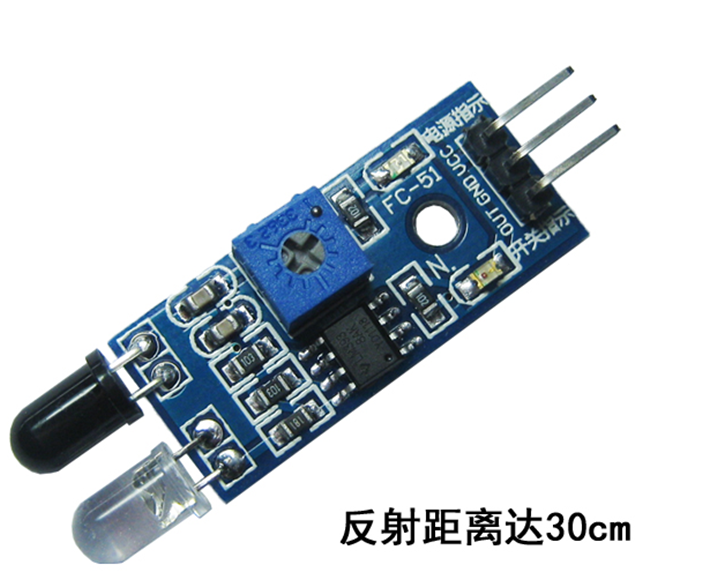
二、模块说明
该传感器模块对环境光线适应能力强,其具有一对红外线发射与接收管,发射管发射出一定频率的红外线,当检测方向遇到障碍物(反射面)时,红外线反射回来被接 收管接收,经过比较器电路处理之后,绿色指示灯会亮起,同时信号输出接口输出数字信号(一个低电平信号),可通过电位器旋钮调节检测距离,有效距离范围 2~30cm,工作电压为3.3V-5V.该传感器的探测距离可以通过电位器调节.
三、模块参数说明
- 当模块检测到前方障碍物信号时,电路板上绿色指示灯点亮电平,同时OUT端口持续输出低电平信号,该模块检测距离2~30cm,检测角度35°,检测距离可以通过电位器进行调节,顺时针调电位器,检测距离增加;逆时针调电位器,检测距离减少.
- 传感器主动红外线反射探测,因此目标的反射率和形状是探测距离的关键.其中黑色探测距离最小,白色最大;小面积物体距离小,大面积距离大.
- 传感器模块输出端口OUT可直接与单片机IO口连接即可,也可以直接驱动一个5V继电器;连接方式:VCC-VCC;GND-GND;OUT-IO.
- 可采用3-5V直流电源对模块进行供电.当电源接通时,红色电源指示灯点亮.
四、模块接口说明
1 VCC 外接3.3V-5V电压(可以直接与5v单片机和3.3v单片机相连)
2 GND 外接GND
3 OUT 小板数字量输出接口(0和1)
五、Interfacing with the pins of the Raspberry Pi
5.1 参照图
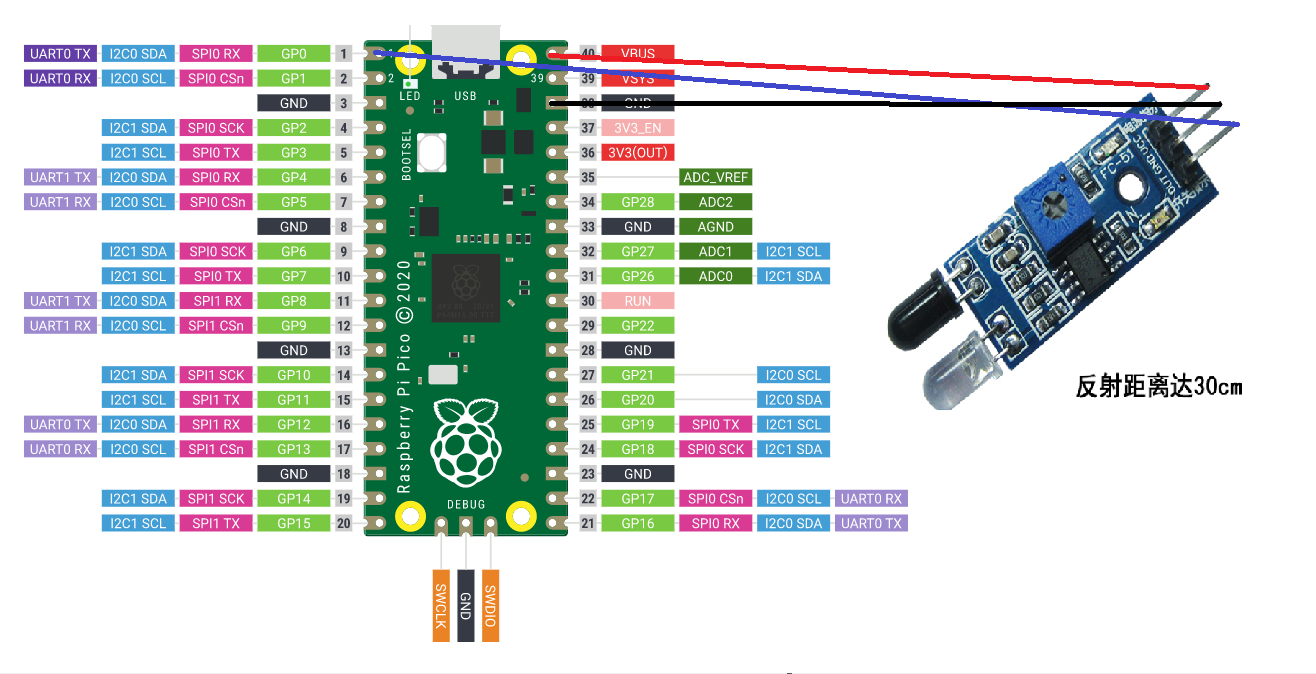
5.2 实物图

六、代码展示
from machine import Pin
import utime

key = Pin(0, Pin.IN)

# 配置按键
# key = machine.Pin(id, mode, pull)
# id:树莓派Pico引脚编号
# mode:输入输出方式,有Pin.IN(输入)和Pin.OUT(输出)两种
# pull:上下拉电阻配置,有None(无上下拉电阻)、Pin.PULL_UP(上拉电阻)和Pin.PULL_DOWN(下拉电阻)三种

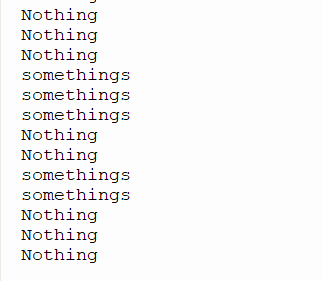
while True:
    while key.value() == 0:
        print("somethings")
        utime.sleep(1)
    while key.value() == 1:
        print("Nothing")
        utime.sleep(1)
七、效果展示
7.1 实物展示

7.2 代码效果展示
边栏推荐
- How to switch remote server in gerrit
- 二分查找的细节坑
- Tencent Cloud Deployment----DevOps
- Small program: Matlab solves differential equations "recommended collection"
- 使用 Postman 工具高效管理和测试 SAP ABAP OData 服务的试读版
- 字符指针赋值[通俗易懂]
- LevelSequence源码分析
- update data table update
- What is the difference between BI software in the domestic market?
- 2.索引及调优篇【mysql高级】
猜你喜欢

随机推荐
Premiere Pro 2022 for (pr 2022)v22.5.0
Dialogue with Zhuang Biaowei: The first lesson of open source
Applicable Scenarios of Multi-Master Replication (1) - Multi-IDC
【7.29】Code Source - 【Arrangement】【Stone Game II】【Cow and Snacks】【Minimum Number of Spawns】【Sequence】
form 表单提交后,使页面不跳转[通俗易懂]
WPF project - basic usage of controls entry, you must know XAML
【7.29】代码源 - 【排列】【石子游戏 II】【Cow and Snacks】【最小生成数】【数列】
Delete table data or clear table
Anaconda如何顺利安装CV2
使用 Postman 工具高效管理和测试 SAP ABAP OData 服务的试读版
动态规划(一)
The 2nd China PWA Developer Day
Summary of the implementation method of string inversion "recommended collection"
Implementing DDD based on ABP
Three aspects of Ali: How to solve the problem of MQ message loss, duplication and backlog?
tooltips使用教程(鼠标悬停时显示提示)
多主复制的适用场景(1)-多IDC
多主复制的适用场景(2)-需离线操作的客户端和协作编辑
牛客 HJ19 简单错误记录
Implementing click on the 3D model in RenderTexture in Unity