当前位置:网站首页>GUI application: socket network chat room
GUI application: socket network chat room
2022-07-04 04:36:00 【Python concentration camp】
Just written this weekend python Desktop application -- Internet chat room , Mainly through pyqt5 As a desktop application framework ,socket As the framework of network programming , So as to realize the network chat room including client and server GUI application , Hope we can learn together 、 Progress together !
Applications include servers server_ui.py、 client client_ui.py Two python Module implementation , And in pyqt5 In the process of using QThread Multithreaded applications and basic UI The page layout . Before you start, take a look through a dynamic graph socket Server side 、socket The effect of client communication .
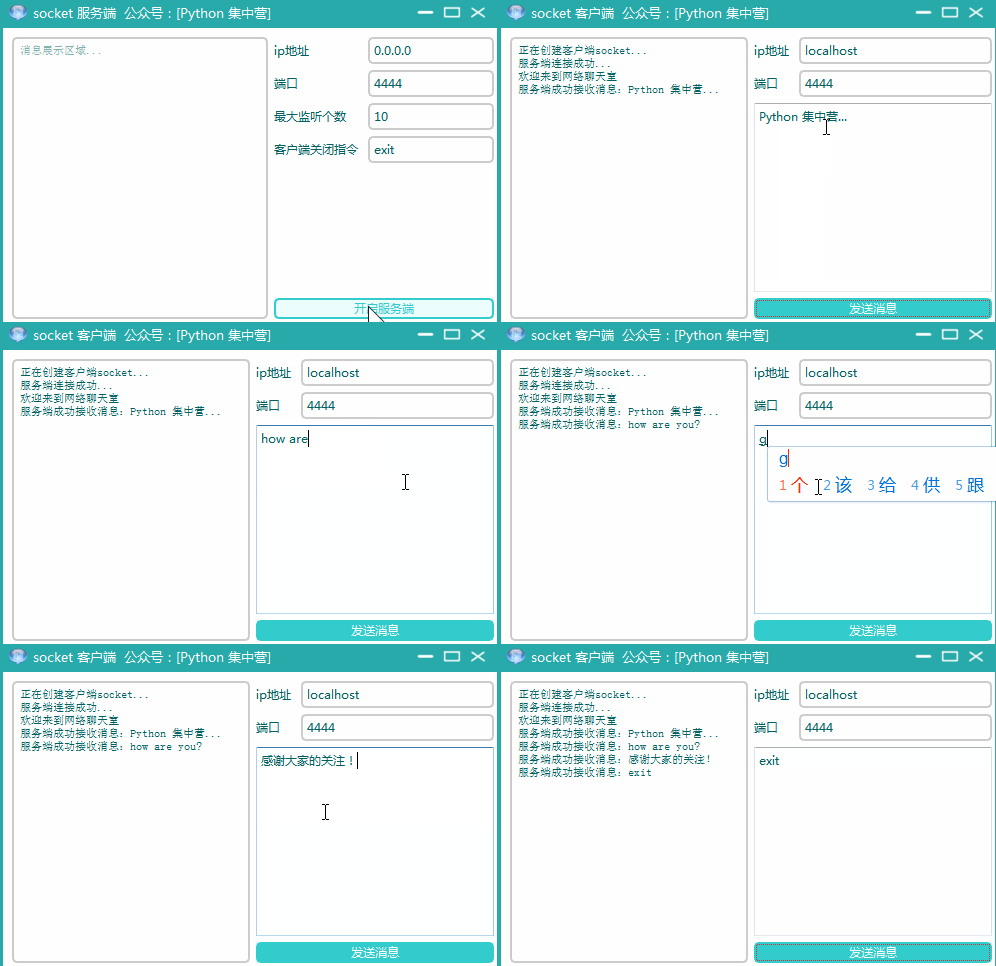
- socket_ui.py Server side
1-1. Rely on quotes
stay socket During the implementation of the server , except pyqt5 dependent UI Outside the reference of the interface , It also includes time、threading、sys、socket Wait for auxiliary modules to realize socket Server side desktop application .
from PyQt5.QtWidgets import *
from PyQt5.QtCore import *
from PyQt5.QtGui import *
import sys

from QCandyUi import CandyWindow

#  Import  socket  Communication module
import socket
#  Import the time management module
import time
#  Import multithreaded module
import threading
1-2. Implementation process
In the business implementation of the server , We still follow the previous GUI Realization way , The main thread is used to realize the page layout , Sub thread QThread To implement business logic ,socket The communication business of the server is in the sub thread ServerThread Writing in the . Here is socket All code blocks implemented by the server desktop application ,copy To your own ide You can directly start using .
class ServerUI(QWidget):
    def __init__(self):
        super(ServerUI, self).__init__()
        self.init_ui()

    def init_ui(self):
        self.setWindowTitle('socket  Server side    official account :[Python  concentration camp ]')
        self.setWindowIcon(QIcon('hi.ico'))
        self.setFixedSize(500, 300)

        hbox = QHBoxLayout()

        hbox_v1 = QVBoxLayout()
        self.brower = QTextBrowser()
        self.brower.setFont(QFont(' Song style ', 8))
        self.brower.setReadOnly(True)
        self.brower.setPlaceholderText(' Message display area ...')
        self.brower.ensureCursorVisible()
        hbox_v1.addWidget(self.brower)

        hbox_v2 = QVBoxLayout()

        hbox_v2_f1 = QFormLayout()
        self.ip_label = QLabel()
        self.ip_label.setText('ip Address  ')
        self.ip_txt = QLineEdit()
        self.ip_txt.setPlaceholderText('0.0.0.0')

        self.port_label = QLabel()
        self.port_label.setText(' port  ')
        self.port_txt = QLineEdit()
        self.port_txt.setPlaceholderText('4444')

        self.lis_num_label = QLabel()
        self.lis_num_label.setText(' Maximum number of listeners  ')
        self.lis_num_txt = QLineEdit()
        self.lis_num_txt.setPlaceholderText('10')

        self.close_cli_label = QLabel()
        self.close_cli_label.setText(' Client shutdown instruction  ')
        self.close_cli_txt = QLineEdit()
        self.close_cli_txt.setPlaceholderText('exit, When the client sends the corresponding instruction, it closes ')

        hbox_v2_f1.addRow(self.ip_label, self.ip_txt)
        hbox_v2_f1.addRow(self.port_label, self.port_txt)
        hbox_v2_f1.addRow(self.lis_num_label, self.lis_num_txt)
        hbox_v2_f1.addRow(self.close_cli_label, self.close_cli_txt)

        self.start_btn = QPushButton()
        self.start_btn.setText(' Open server ')
        self.start_btn.clicked.connect(self.start_btn_clk)

        hbox_v2.addLayout(hbox_v2_f1)
        hbox_v2.addWidget(self.start_btn)

        hbox.addLayout(hbox_v1)
        hbox.addLayout(hbox_v2)

        self.thread_ = ServerThread(self)
        self.thread_.message.connect(self.show_message)

        self.setLayout(hbox)

    def show_message(self, text):
        '''
         Slot function : Writing to a text browser
        :param text:
        :return:
        '''
        cursor = self.brower.textCursor()
        cursor.movePosition(QTextCursor.End)
        self.brower.append(text)
        self.brower.setTextCursor(cursor)
        self.brower.ensureCursorVisible()

    def start_btn_clk(self):
        self.thread_.start()
        self.start_btn.setEnabled(False)


class ServerThread(QThread):
    message = pyqtSignal(str)

    def __init__(self, parent=None):
        super(ServerThread, self).__init__(parent)
        self.parent = parent
        self.working = True

    def __del__(self):
        self.working = False
        self.wait()

    def run(self):
        self.message.emit(' Ready to start socket Server side ...')
        #  Create server  socket
        socket_server = socket.socket(socket.AF_INET, socket.SOCK_STREAM)
        #  Binding service address 、 port
        address = (self.parent.ip_txt.text().strip(), int(self.parent.port_txt.text().strip()))
        socket_server.bind(address)
        #  Set the maximum waiting number for listening
        socket_server.listen(int(self.parent.lis_num_txt.text().strip()))
        self.message.emit(" Service started , Waiting for client connection ...")
        while True:
            #  Set sleep time
            time.sleep(0.1)
            #  Allow clients to connect
            client, info = socket_server.accept()
            self.client, self.info = client, info
            #  Enable new threads to invoke message processing
            thread = threading.Thread(target=self.catch_message)
            #  Set to daemons
            thread.setDaemon(True)
            #  Start thread execution
            thread.start()

    def catch_message(self):
        self.client.send(" Welcome to the online chat room ".encode('utf-8'))
        self.message.emit(" Client information :" + str(self.info))
        close_cli = self.parent.close_cli_txt.text().strip()
        while True:
            try:
                #   Receive client messages 、 The maximum receiving length is  1024, And carry on  utf-8  decode
                message = self.client.recv(1024).decode('utf-8')
                #  Verify whether the client is closed
                if not message and close_cli == message:
                    self.client.close()
                    self.message.emit(" The current client is closed !")
                    break
                self.message.emit(" Message received :" + message)
                #  Change the message  utf-8  Send it to the client after encoding
                rcv = " The server successfully received the message :" + message
                self.client.send(rcv.encode('utf-8'))
            except Exception as e:
                self.client.send(" The server handles the message abnormally !".encode('utf-8'))
                break


if __name__ == '__main__':
    app = QApplication(sys.argv)
    w = CandyWindow.createWindow(ServerUI(), theme='blueGreen', title='socket  Server side    official account :[Python  concentration camp ]',
                                 ico_path='hi.ico')
    w.show()
    sys.exit(app.exec_())
1-3. Realization effect

- client_ui.py client
2-1. Rely on quotes
stay socket During the implementation of the client , except pyqt5 dependent UI Outside the reference of the interface , It also includes sys、socket Wait for auxiliary modules to realize socket Server side desktop application , Compared with the server , The client does not use multithreading threading modular .
from PyQt5.QtWidgets import *
from PyQt5.QtCore import *
from PyQt5.QtGui import *
import sys

from QCandyUi import CandyWindow

#  Import socket  Communication module
import socket
2-2. Implementation process
The implementation process of the client and the server server_ui.py The implementation is basically similar , Also used pyqt5 Of QThread Child thread application , The only difference is socket The communication mode of the client is not the same as that of the server , Similarly, the following code block copy To your own ide It can be used directly .
class ClientUI(QWidget):
    def __init__(self):
        super(ClientUI, self).__init__()
        self.init_ui()

    def init_ui(self):
        self.setWindowTitle('socket  client    official account :[Python  concentration camp ]')
        self.setWindowIcon(QIcon('hi.ico'))
        self.setFixedSize(500, 300)

        hbox = QHBoxLayout()

        hbox_v1 = QVBoxLayout()
        self.brower = QTextBrowser()
        self.brower.setFont(QFont(' Song style ', 8))
        self.brower.setReadOnly(True)
        self.brower.setPlaceholderText(' Message display area ...')
        self.brower.ensureCursorVisible()
        hbox_v1.addWidget(self.brower)

        hbox_v2 = QVBoxLayout()

        hbox_v2_g1 = QGridLayout()
        self.ip_label = QLabel()
        self.ip_label.setText('ip Address  ')
        self.ip_txt = QLineEdit()
        self.ip_txt.setPlaceholderText('0.0.0.0')

        self.port_label = QLabel()
        self.port_label.setText(' port  ')
        self.port_txt = QLineEdit()
        self.port_txt.setPlaceholderText('4444')

        self.message = QTextEdit()
        self.message.setPlaceholderText(' Send message content ...')

        hbox_v2_g1.addWidget(self.ip_label, 0, 0, 1, 1)
        hbox_v2_g1.addWidget(self.ip_txt, 0, 1, 1, 1)

        hbox_v2_g1.addWidget(self.port_label, 1, 0, 1, 1)
        hbox_v2_g1.addWidget(self.port_txt, 1, 1, 1, 1)

        hbox_v2_g1.addWidget(self.message, 2, 0, 1, 2)

        self.start_btn = QPushButton()
        self.start_btn.setText(' Send a message ')
        self.start_btn.clicked.connect(self.start_btn_clk)

        hbox_v2.addLayout(hbox_v2_g1)
        hbox_v2.addWidget(self.start_btn)

        hbox.addLayout(hbox_v1)
        hbox.addLayout(hbox_v2)

        self.thread_ = ClientThread(self)
        self.thread_.message.connect(self.show_message)

        self.setLayout(hbox)

    def show_message(self, text):
        '''
         Slot function : Writing to a text browser
        :param text:
        :return:
        '''
        cursor = self.brower.textCursor()
        cursor.movePosition(QTextCursor.End)
        self.brower.append(text)
        self.brower.setTextCursor(cursor)
        self.brower.ensureCursorVisible()

    def start_btn_clk(self):
        self.thread_.start()


class ClientThread(QThread):
    message = pyqtSignal(str)

    def __init__(self, parent=None):
        super(ClientThread, self).__init__(parent)
        self.parent = parent
        self.working = True
        self.is_connect = False

    def __del__(self):
        self.working = False
        self.wait()

    def run(self):
        try:
            if self.is_connect is False:
                self.connect_serv()
            #  Input the console with a message  utf-8  Send after encoding
            self.socket_client.send(self.parent.message.toPlainText().strip().encode('utf-8'))
            self.message.emit(self.socket_client.recv(1024).decode('utf-8'))
        except Exception as e:
            self.message.emit(" Sending message exception :" + str(e))

    def connect_serv(self):
        try:
            self.message.emit(" Creating client socket...")
            #  Create client  socket
            self.socket_client = socket.socket()
            #  Connect server
            address = (self.parent.ip_txt.text().strip(), int(self.parent.port_txt.text().strip()))
            self.socket_client.connect(address)
            self.message.emit(" Server connected successfully ...")
            #  Receive the server message and  utf-8  decode
            self.message.emit(self.socket_client.recv(1024).decode())
            self.is_connect = True
        except:
            self.is_connect = False


if __name__ == '__main__':
    app = QApplication(sys.argv)
    w = CandyWindow.createWindow(ClientUI(), theme='blueGreen', title='socket  client    official account :[Python  concentration camp ]',
                                 ico_path='hi.ico')
    w.show()
    sys.exit(app.exec_())
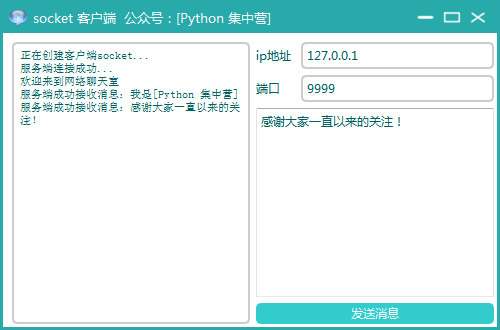
2-3. Realization effect
【 Past highlights 】
Zero configuration python journal , Install and use !
Can you do it if you don't learn English well coder, Stop worrying about it and learn it first ...
Data cleaning tools flashtext, The efficiency has been directly increased by dozens of times !
One help Function solves python View all document information for ...
python Custom exception /raise Keyword throws an exception
边栏推荐
- Distributed cap theory
- Wobo Union ended its strategic evaluation and decided to retain Bozi's business with excellent performance
- "Don't care too much about salary when looking for a job", this is the biggest lie I've ever heard
- Pytest basic self-study series (I)
- 什么是上下文?
- R语言中如何查看已安装的R包
- Longest increasing subsequence problem (do you really know it)
- (pointer) write a function to compare the size of strings by yourself, which is similar to StrCmp.
- dried food! Generation of rare samples based on GaN
- Select function variable column name in dplyr of R language
猜你喜欢
Leetcode skimming: binary tree 04 (sequence traversal of binary tree)

Apple CMS imitation watermelon video atmospheric response video template source code

戳气球和布尔运算问题(巨难)

R语言dplyr中的Select函数变量列名

Distributed cap theory

深入解析结构化异常处理(SEH) - by Matt Pietrek

Graduation project

Redis: order collection Zset type data operation command

什么是上下文?

Leetcode skimming: binary tree 07 (maximum depth of binary tree)
随机推荐
Instructions for LPC interrupt binding under ft2000+
Detailed explanation of event cycle
Asynchronous development process - touch your hand and lead you to realize a promise
MIN_RTO 对话
Imitation of "game bird" source code, mobile game issue evaluation, open service, open test collection, game download website template
I.MX6U-ALPHA开发板(模仿STM32驱动开发实验)
更优雅地远程操作服务器:Paramiko库的实践
Balloon punching and Boolean operation problems (extremely difficult)
Kivy教程之 格式化文本 (教程含源码)
NFT新的契机,多媒体NFT聚合平台OKALEIDO即将上线
leetcode:1314. Matrix area and [2D prefix and template]
“找工作不要太在意工资”,这是我听过最大的谎言
UnicodeDecodeError: ‘gbk‘ codec can‘t decode byte 0x98 in position 1093: illegal multibyte sequence
leetcode:1314. 矩阵区域和【二维前缀和模板】
新手找陪驾要注意什么
Graduation project
Unity资源路径
Redis: operation command for collecting set type data
RPC Technology
Use NRM and NVM to manage your NPM source and node versions