当前位置:网站首页>How to make a simple Snake game with pyGame
How to make a simple Snake game with pyGame
2022-06-10 16:51:00 【InfoQ】
1. preface
2. Installation and import
import pygame,sys,random
from pygame.locals import *
3. Define the subsequent required parameters
# initialization pygame library
pygame.init()
# Initialize a game interface
DISPLAY=pygame.display.set_mode((800,800))
# Set game window title
pygame.display.set_caption(' snake ')
# Define a variable to control the game speed
FPSCLOCK=pygame.time.Clock()

# Define color
BLACK=pygame.Color(0,0,0)
WHITE=pygame.Color(255,255,255)
RED=pygame.Color(255,0,0)

#  Define the initial position of the snake head
snake_Head=[100,100]
#  Define the initial length of a snake , Because the interfaces are 20*20 So the length is minus 20
snake_Body=[[80,100], [60,100]]
# #  The initial direction of the snake
direction="right"
#  Define variables that change direction , Key
changeDirection = direction
# Define the initial food location
food_Postion = [300,300]
#  Define food status ,0 Means to be eaten ,1 It means not being eaten
food_Total = 1
4. Draw snakes and food
# Draw greedy snake
def drawSnake(snake_Body):
 for i in snake_Body:
 pygame.draw.rect(DISPLAY,WHITE,Rect(i[0],i[1],20,20))

# Draw food location
def drawFood(food_Postion):
 pygame.draw.rect(DISPLAY,RED,Rect(food_Postion[0],food_Postion[1],20,20))
5. Game rules and operation
def gameover():
 # sign out pygame
 pygame.quit()
 # Exit procedure
 sys.exit()
game_flag=True
while game_flag:
 # Render the background color
 DISPLAY.fill(BLACK)
 # Draw a greedy snake
 drawSnake(snake_Body)
 # Draw the food position
 drawFood(food_Postion)
 # Increase game speed
 game_speed=1+len(snake_Body)//3
 # Refresh the display layer , Greedy snakes and food move every time , Will refresh the display layer
 pygame.display.flip()
 FPSCLOCK.tick(game_speed)
 for event in pygame.event.get():
 if event.type==QUIT:
 pygame.quit()
 sys.exit()
 elif event.type == KEYDOWN:
 #  If it's a right arrow or d, The snake moves to the right
 if event.key == K_RIGHT or event.key == K_d:
 changeDirection = 'right'
 #  If it's an arrow or a, The snake moves to the left
 if event.key == K_LEFT or event.key == K_a:
 changeDirection = 'left'
 if event.key == K_UP or event.key == K_w:
 changeDirection = 'up'
 if event.key == K_DOWN or event.key == K_s:
 changeDirection = 'down'
 #  Click on esc, sign out
 if event.key == KSCAN_ESCAPE:
 pygame.event.post(pygame.event.Event(QUIT))

 #  Confirm the direction , Determine if the reverse direction is entered
 if changeDirection == 'right' and not direction == 'left':
 direction = changeDirection
 if changeDirection == 'left' and not direction == 'right':
 direction = changeDirection
 if changeDirection == 'up' and not direction == 'down':
 direction = changeDirection
 if changeDirection == 'down' and not direction == 'up':
 direction = changeDirection

 # Move the snake's head according to the direction
 if direction=='right':
 snake_Head[0]+=20
 if direction=='left':
 snake_Head[0]-=20
 if direction=='up':
 snake_Head[1]-=20
 if direction=='down':
 snake_Head[1]+=20
 # Increase the length of the snake
 snake_Body.insert(0,list(snake_Head))
 # Judge whether you have food
 if snake_Head[0] == food_Postion[0] and snake_Head[1] == food_Postion[1]:
 food_Total = 0
 else:
 snake_Body.pop()
 if food_Total == 0:
 x = random.randrange(1, 32)
 y = random.randrange(1, 24)
 food_Postion = [int(x * 20), int(y * 20)]
 food_Total = 1
 if snake_Head[0] > 800 or snake_Head[0] < 0:
 gameover()
 elif snake_Head[0] > 800 or snake_Head[0] < 0:
 gameover()
 #  If you meet yourself
 for body in snake_Body[1:]:
 if snake_Head[0] == body[0] and snake_Head[1] == body[1]:
 gameover()
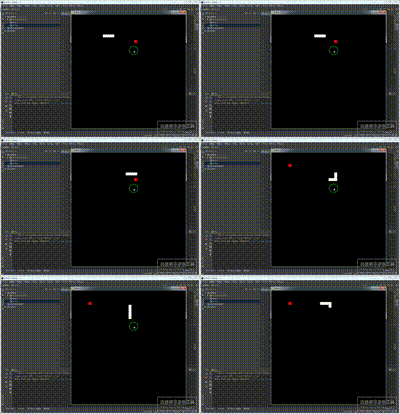
6. Finished product display
7. Complete code
import pygame,sys,random
from pygame.locals import *

# initialization pygame library
pygame.init()
# Initialize a game interface
DISPLAY=pygame.display.set_mode((800,800))
# Set game window title
pygame.display.set_caption(' snake ')

# Define a variable to control the game speed
FPSCLOCK=pygame.time.Clock()

# Define color
BLACK=pygame.Color(0,0,0)
WHITE=pygame.Color(255,255,255)
RED=pygame.Color(255,0,0)

#  Define the initial position of the snake head
snake_Head=[100,100]
#  Define the initial length of a snake , Because the interfaces are 20*20 So the length is minus 20
snake_Body=[[80,100], [60,100],[40,100]]
# #  The initial direction of the snake
direction="right"
#  Define variables that change direction , Key
changeDirection = direction
# Define the initial food location
food_Postion = [300,300]
#  Define food status ,0 Means to be eaten ,1 It means not being eaten
food_Total = 1

# Draw greedy snake
def drawSnake(snake_Body):
 for i in snake_Body:
 pygame.draw.rect(DISPLAY,WHITE,Rect(i[0],i[1],20,20))

# Draw food location
def drawFood(food_Postion):
 pygame.draw.rect(DISPLAY,RED,Rect(food_Postion[0],food_Postion[1],20,20))

def gameover():
 # sign out pygame
 pygame.quit()
 # Exit procedure
 sys.exit()


game_flag=True
while game_flag:
 # Render the background color
 DISPLAY.fill(BLACK)
 # Draw a greedy snake
 drawSnake(snake_Body)
 # Draw the food position
 drawFood(food_Postion)
 # Increase game speed
 game_speed=1+len(snake_Body)//3
 # Refresh the display layer , Greedy snakes and food move every time , Will refresh the display layer
 pygame.display.flip()
 FPSCLOCK.tick(game_speed)
 for event in pygame.event.get():
 if event.type==QUIT:
 pygame.quit()
 sys.exit()

 elif event.type == KEYDOWN:
 #  If it's a right arrow or d, The snake moves to the right
 if event.key == K_RIGHT or event.key == K_d:
 changeDirection = 'right'
 #  If it's an arrow or a, The snake moves to the left
 if event.key == K_LEFT or event.key == K_a:
 changeDirection = 'left'
 if event.key == K_UP or event.key == K_w:
 changeDirection = 'up'
 if event.key == K_DOWN or event.key == K_s:
 changeDirection = 'down'
 #  Click on esc, sign out
 if event.key == KSCAN_ESCAPE:
 pygame.event.post(pygame.event.Event(QUIT))

 #  Confirm the direction , Determine if the reverse direction is entered
 if changeDirection == 'right' and not direction == 'left':
 direction = changeDirection
 if changeDirection == 'left' and not direction == 'right':
 direction = changeDirection
 if changeDirection == 'up' and not direction == 'down':
 direction = changeDirection
 if changeDirection == 'down' and not direction == 'up':
 direction = changeDirection

 # Move the snake's head according to the direction
 if direction=='right':
 snake_Head[0]+=20
 if direction=='left':
 snake_Head[0]-=20
 if direction=='up':
 snake_Head[1]-=20
 if direction=='down':
 snake_Head[1]+=20
 # Increase the length of the snake
 snake_Body.insert(0,list(snake_Head))
 # Judge whether you have food
 if snake_Head[0] == food_Postion[0] and snake_Head[1] == food_Postion[1]:
 food_Total = 0
 else:
 snake_Body.pop()

 if food_Total == 0:
 x = random.randrange(1, 32)
 y = random.randrange(1, 24)
 food_Postion = [int(x * 20), int(y * 20)]
 food_Total = 1

 if snake_Head[0] > 800 or snake_Head[0] < 0:
 gameover()
 elif snake_Head[0] > 800 or snake_Head[0] < 0:
 gameover()
 #  If you meet yourself
 for body in snake_Body[1:]:
 if snake_Head[0] == body[0] and snake_Head[1] == body[1]:
 gameover()
边栏推荐
- Software College of Shandong University Project Training - Innovation Training - network security range experimental platform (XVII)
- Two methods of modifying PIP download source
- 靠,嘉立创打板又降价
- You have a ml.net quick reference manual to check!
- Carry forward the past and forge ahead into the future, multiple residuals | densenet (I)
- 接口测试学习笔记
- STOP在屏幕程序的应用_SAP刘梦_
- Meetup review how Devops & mlops solve the machine learning dilemma in enterprises?
- Rethinking atlas revolution for semantic image segmentation (deeplobv3) personal summary
- postman参数化
猜你喜欢

Why do I need a thread pool? What is pooling technology?

Actual combat of software testing e-commerce project (actual combat video station B has been released)

Fosun Group hekaiduo: grow together with Alibaba cloud and help business innovation
L1-069 tire pressure monitoring (15 points)
技术分享| 快对讲,全球对讲
postman常用断言

Carry forward the past and forge ahead into the future, multiple residuals | densenet (II)

Research Report on the development scale of Chinese sanatorium industry and the 14th five year plan (2022-2028)

How does Dao achieve decentralized governance?

Bluetooth - Bluetooth SIG
随机推荐
Jerry's long press reset and high level reset [chapter]
PV operation daily question - orange apple question (advanced version variant)
Learn actionchains through jianshu.com and Chapter 3 of selenium webdriver
Why do I need a thread pool? What is pooling technology?
Fiddler过滤会话
[quick code] define the new speed of intelligent transportation with low code
Research Report on the development scale of Chinese sanatorium industry and the 14th five year plan (2022-2028)
Chinese translation of Rilke's autumn with heartless sword
数字图像处理:灰度化
The command set has reached strategic cooperation with Yingmin technology, and the domestic original Internet of things operating system has helped to make power detection "intelligent"
Devops-1- introduction
Build a leading privacy computing scheme impulse online data interconnection platform and obtain Kunpeng validated certification
Jerry's ble dynamic power regulation [chapter]
Why__ Inline usually needs static
Jerry's ble timer clock source cannot choose OSC crystal oscillator [chapter]
PHP实现多张图片上传功能的示例代码
【BSP视频教程】BSP视频教程第17期:单片机bootloader专题,启动,跳转配置和调试下载的各种用法(2022-06-10)
mysql数据库实现设置字段长度
sql注入报错之注入原理实例解析
You have a ml.net quick reference manual to check!