当前位置:网站首页>【小程序项目开发-- 京东商城】uni-app之自定义搜索组件(下) -- 搜索历史
【小程序项目开发-- 京东商城】uni-app之自定义搜索组件(下) -- 搜索历史
2022-07-31 07:42:00 【m0_67393413】

???欢迎来到???
??魔术之家!!??该文章收录专栏
?-- 2022微信小程序京东商城实战 --?专栏内容
?-- 京东商城uni-app项目搭建 --?
?-- 京东商城uni-app 配置tabBar & 窗口样式 --?
?-- 京东商城uni-app开发之分包配置 --?
?-- 京东商城uni-app开发之轮播图 --?
?-- 京东商城uni-app之分类导航区域 --?
?-- 京东商城uni-app 首页楼层商品 --?
?-- 京东商城uni-app 商品分类页面(上) --?
?-- 京东商城uni-app 商品分类页面(下) --?
?-- 京东商城uni-app之自定义搜索组件(上) --?
?-- 京东商城uni-app之自定义搜索组件(中) --?
文章目录
一、搜索历史的基本结构
在
data定义数据 存贮搜索历史data() {
return {
// 输入数据
inputString: ‘’,
// 延时器
timer: null,
// 搜索建议
searchSuggest: ‘’,
// 搜索历史
histortSearch: [‘a’,‘apple’,‘money’]
};
},渲染UI结构
<view class="history-list-container">
  <!-- 标题区域 -->
  <view class="history-head-box">
    <text>搜索历史</text>
    <uni-icons type="trash" size="17"></uni-icons>
  </view>
  <!-- 列表区域 -->
  <view class="history-item-container">
    <view class="history-item" v-for="(item,i) in histortSearch" :key="i">
      <uni-tag :text="item" custom-style="background-color:#f9f9f9; color: black;" inverted="true"></uni-tag>
    </view>
  </view>
</view>
美化样式
.history-list-container {
.history-head-box {
display: flex;
justify-content: space-between;
padding: 18rpx;
border-bottom: 3rpx solid #ebebeb;
font-size: 28rpx;
align-items: center;
}.history-item-container { display: flex; .history-item { margin: 10rpx; } }}
效果
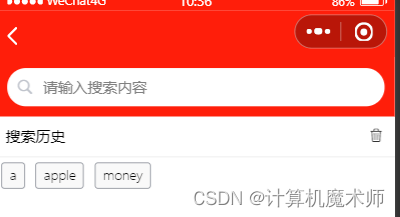
1.1 按需显示
- (搜索时只显示建议,不显示历史)
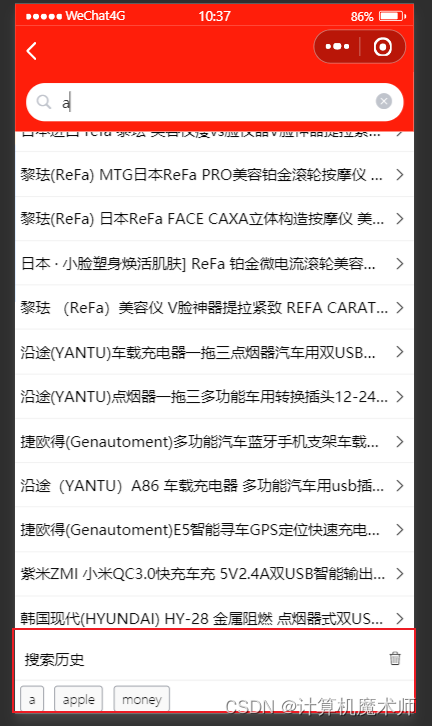
解决(添加block 判断条件)
<!-- 搜索建议列表容器 -->
<block v-if="inputString.length != 0">
  <view class="sgg-list-container">
    <navigator class="sgg-item" v-for="(product,i) in searchSuggest" v-bind:key="i"
      :url="'/subpackages/goods_detail/goods_detail?cat_id=' + product.goods_id">
      <view class="sgg-name">{
     {product.goods_name}}</view>
      <uni-icons type="right"></uni-icons>
    </navigator>
  </view>
</block>
<!-- 搜索历史容器 -->
<block v-if="inputString.length === 0">
  <view class="history-list-container">
    <!-- 标题区域 -->
    <view class="history-head-box">
      <text>搜索历史</text>
      <uni-icons type="trash" size="17"></uni-icons>
    </view>
    <!-- 列表区域 -->
    <view class="history-item-container">
      <view class="history-item" v-for="(item,i) in histortSearch" :key="i">
        <uni-tag :text="item" custom-style="background-color:#f9f9f9; color: black;" inverted="true"></uni-tag>
      </view>
    </view>
  </view>
</block>

二、处理历史搜索关键词
需要做到:
- 添加关键词 (push)
- 最近时间查询的放在数组第一位(reverse,unshfit)
注意:因为列表是可变的,如果直接对列表使用
reverser(),第二两翻转时第二个就变成倒数第二个了,原因在于你翻转之后push元素,应该在列表不变情况push,解决办法有两种,
第一种:翻转显示后,在进行push之前按,再reverse翻转回去在push
第二种:...展开列表reverse(此时不改变原列表),此时可以在computed(计算属性,类似数据监听器和过滤器,有缓存机制)中返回reverse的值
- 建议 使用
unshift直接添加第一项
- 去重(使用集合性质Set)
代码实现(在调取数据成功时调用一下函数)
// 添加到历史
      addhistory(){
        this.histortSearch.unshift(this.inputString)
        // this.histortSearch.reverse()
        const res = new Set(this.histortSearch) //创建set对象 需要用new
        this.histortSearch = Array.from(res)
      }
- 效果:
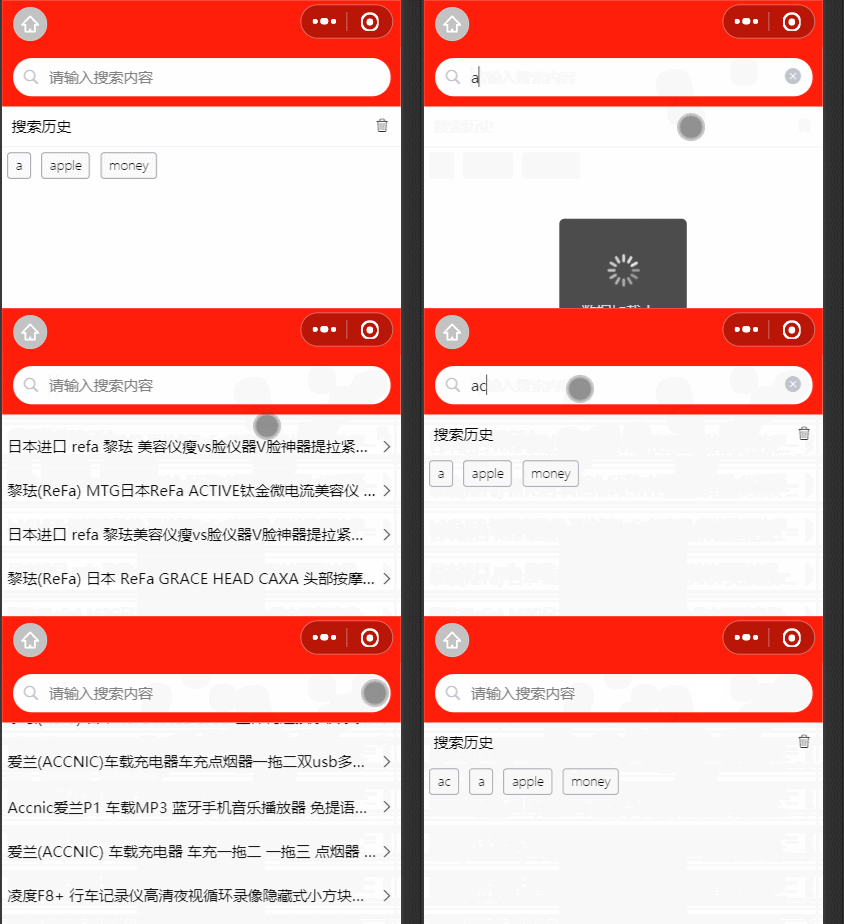
三、保存历史记录到本地
由于每次编译都会被清空,所以我们需要保存记录到本地缓存
使用
uni.setStorageSync(键,值)将数据存贮在本地// 添加到历史
addhistory() {
this.histortSearch.unshift(this.inputString)
// this.histortSearch.reverse()
const res = new Set(this.histortSearch) //创建set对象 需要用new
this.histortSearch = Array.from(res)
// 将存贮数据存贮在本地
uni.setStorageSync(‘history’, JSON.stringify(this.histortSearch))
}
},在
onLoad初始化 导入本地数据onLoad() {
this.histortSearch = JSON.parse(uni.getStorageSync (‘history’) || ‘[]’) // 通过键得到值,JSON解析字符串为数组对象 不存在对象则为空数组
},
- 效果
四、按下trash键清空历史
绑定事件处理函数
clearhistory<uni-icons type=“trash” size=“17” @click=“clearHistory”>
clearhistory函数定义// 清空历史
clearHistory() {
this.histortSearch = []
uni.setStorageSync(‘history’,[‘’]) //必须重新赋值为空数组,只能为数组数据类型
},效果

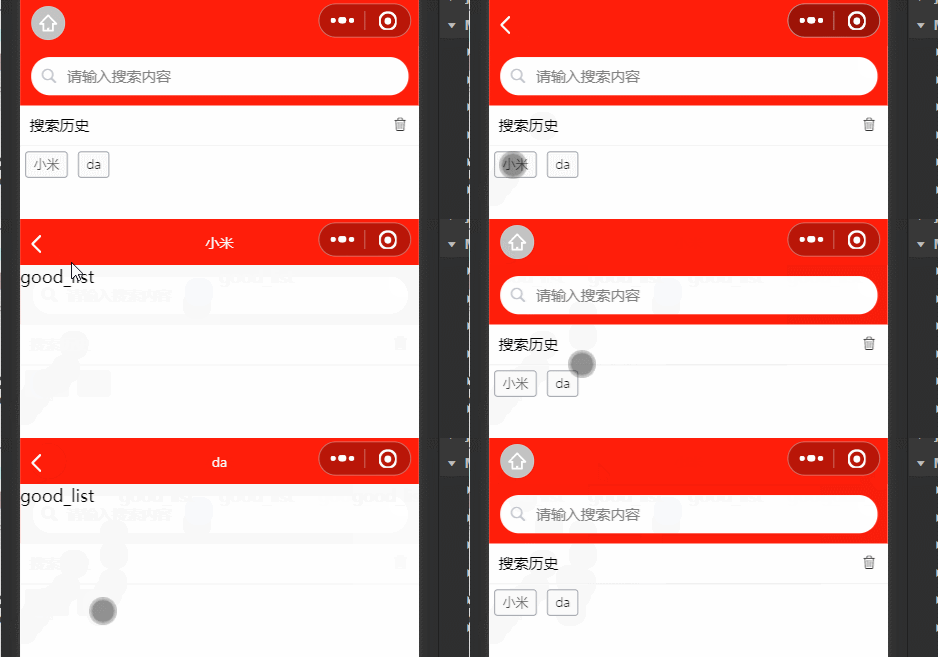
五、点击搜索历史跳转到商品详情页
每个标签绑定
click事件<uni-tag :text=“item” custom-style=“background-color:#f9f9f9; color: black;” inverted=“true” @click=“gotogoodslist(item)”>
定义事件函数
// 点击tag事件
gotogoodslist(item){
uni.navigateTo({
url:‘/subpackages/goods_list/goods_list?query=’ + item效果
六、search分支的提交
git branch查看分支git add .提交到暂存区git commit -m "完成了search的开发"提交到本地仓库git push origin -u search提交到远程仓库的search分支git checkout master切换到主分支git merge search合并search分支git push提交到远程仓库主分支git branch -d search删除search分支

?谢谢你的阅读,您的点赞和收藏就是我创造的最大动力!?
先自我介绍一下,小编13年上师交大毕业,曾经在小公司待过,去过华为OPPO等大厂,18年进入阿里,直到现在。深知大多数初中级java工程师,想要升技能,往往是需要自己摸索成长或是报班学习,但对于培训机构动则近万元的学费,着实压力不小。自己不成体系的自学效率很低又漫长,而且容易碰到天花板技术停止不前。因此我收集了一份《java开发全套学习资料》送给大家,初衷也很简单,就是希望帮助到想自学又不知道该从何学起的朋友,同时减轻大家的负担。添加下方名片,即可获取全套学习资料哦
边栏推荐
- 2022.07.22 _ a day
- 2022.07.24_Daily Question
- 'vite' is not an internal or external command, nor is it a runnable program or batch file.
- Super detailed mysql database installation guide
- 《C语言小游戏》扫雷
- 控制文本保留几行,末尾省略
- [Interview: Concurrency 37: Multithreading: Thread Pool] Custom Thread Pool
- Regarding "computing power", this article is worth reading
- Collation and sharing of related classic papers and datasets in the field of deep learning communication
- Ceph单节点部署
猜你喜欢
"C language game" entry-level chess game (robot enhanced version)
MySQL安装到最后一步 write configuration file 失败 怎么办?及后安装步骤
Shell编程之条件语句

The Perfect Guide|How to use ODBC for Agentless Oracle Database Monitoring?

Locust 1.0版本引入的变化

力扣 593. 有效的正方形
Vulkan与OpenGL对比——Vulkan的全新渲染架构
Visual Studio新功能出炉:低优先级构建
初识NK-RTU980开发板

分布式缓存系统必须要解决的四大问题
随机推荐
模块化规范
使用PageHelper实现分页查询(详细)
2022.07.24_Daily Question
"C language" frog jumping steps recursion problem
Matlab学习第一天(持续更新中)
波士顿房价数据集 Boston house prices dataset
进程调度的基本过程
Open Source | Commodity Recognition Recommender System
[PSQL] Complex query
Read Elephant Swap in one article, why does it bring such a high premium to ePLATO?
【插值与拟合】
linux redis6.2.6配置文件
Spark 在 Yarn 上运行 Spark 应用程序
The first part of the R language
XSS详解
SQLAlchemy使用教程
最大似然估计和最小二乘法 含代码
MySQL installation to the last step in the write the configuration file failed?And after the installation steps
ros little turtle drawing
Shellshock