当前位置:网站首页>使用域名转发mqtt协议,避坑指南
使用域名转发mqtt协议,避坑指南
2022-06-27 05:08:00 【猿小飞】
1.需求
我们需要通过域名的方式进行mqtt的链接。这样的好处就是当我们后台ip改变的时候,前端的设备能不受影响。
2.使用nginx进行转发
注意问题:配置反向代理TCP的方式,需要使用nginx的stream服务节点。该节点是和http结点是并列的。
使用的nginx的版本:1.23.0

版本的问题,是因为有些老版本还需要手动安装支持stream。所以如果我们使用了高版本,默认都是支持这些的。
2.1.nginx里的配置文件
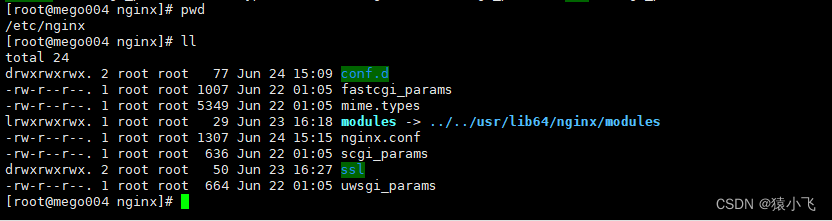
我们直接在nginx.conf里配置,因为需要和http同节点。
 完整的配置文件也贴一下:
stream {
    log_format proxy '$remote_addr [$time_local] '
                 '$protocol $status $bytes_sent $bytes_received '
                 '$session_time "$upstream_addr" '
                 '"$upstream_bytes_sent" "$upstream_bytes_received" "$upstream_connect_time"';

    access_log /var/log/nginx/mqtt_access.log proxy;
    open_log_file_cache off;

    upstream mqtt_tcp_server {
        server xxx.xxx.xxx.xxx:1883;  #这里要改自己的ip地址
    }

    server {
        listen       1883;  #监听端口 也可以使用1883
        proxy_connect_timeout 150s;
        proxy_timeout 150s;
        proxy_pass mqtt_tcp_server;  #反向代理地址
        proxy_buffer_size 3M;
        tcp_nodelay on;
    }
}
3.配置完之后,重启nginx不生效
netstat -tunpl
使用该命令,可以查看到我们监听1883端口是否已经起来。刚开始异常的时候,因为使用nginx -t,发现语法没有问题,在使用nginx -s reload命令启动的时候。也没有异常,但最终发现1883端口还是没有起来。我们去查看nginx的error日志,最后发现了一个错误。
2022/06/24 14:48:40 [emerg] 11768#11768: bind() to 0.0.0.0:1883 failed (13: Permission denied)3.1.这个问题,实际上是SELinux 开放和关闭端口问题;
查看所有开放端口:
semanage port -l查看某个端口:
查看1883端口是否已经开启来:
semanage port -l | grep 1883
已经启动后的结果。
查看selinux针对http的策略开放的端口:
semanage port -l | grep http_port_t 添加端口:
重点来了,如果上面的结果是没有开放出来,则需要我们手动添加端口进去:
semanage port -a -t http_port_t -p tcp 1883http策略添加开放1883端口。
关闭http策略的某个端口:
最后,如果在一些时候,我们不需要开启这个端口的时候,则可以关闭该端口:
semanage port -d -t http_port_t -p tcp 1883边栏推荐
- How pychart installs packages
- 微服务系统设计——消息缓存服务设计
- [BJDCTF2020]The mystery of ip
- Remapping (STM32)
- 微服务系统设计——服务熔断和降级设计
- 高等数学(第七版)同济大学 习题1-10 个人解答
- Microservice system design -- API gateway service design
- 差点因为 JSON.stringify 丢了奖金...
- 论文解读(LG2AR)《Learning Graph Augmentations to Learn Graph Representations》
- 【FPGA】基于bt1120时序设计实现棋盘格横纵向灰阶图数据输出
猜你喜欢

neo4j图数据库基本概念
![[BJDCTF2020]The mystery of ip](/img/f8/c3a7334252724635d42c8db3d1bbb0.png)
[BJDCTF2020]The mystery of ip
MySql最详细的下载教程
![[station B up dr_can learning notes] Kalman filter 3](/img/40/d3ec97be2f29b76a6c049c26ff4998.gif)
[station B up dr_can learning notes] Kalman filter 3

【FPGA】 基于FPGA分频,倍频设计实现

Terminal in pychar cannot enter the venv environment

Ad22 Gerber files Click to open the Gerber step interface. Official solutions to problems

Microservice system design -- unified authentication service design

Quick sort (non recursive) and merge sort

Zener diode zener diode sod123 package positive and negative distinction
随机推荐
Microservice system design -- distributed cache service design
015 basics of C language: C structure and common body
关于元器件封装的一些文章和一下我的体会
Machunmei, the first edition of principles and applications of database... Compiled final review notes
014 C language foundation: C string
RTP sending PS stream tool (open source)
010 C语言基础:C函数
微服务系统设计——消息缓存服务设计
微服务系统设计——微服务调用设计
Chapter 2 Introduction to key technologies
牛客练习赛101-C 推理小丑---位运算+思维
How pychart installs packages
[unity] button of UI interactive component & summary of optional base classes
Edge在IE模式下加载网页 - Edge设置IE兼容性
【NIPS 2017】PointNet++:度量空间中点集的深层次特征学习
Interview: what are the positioning methods in selenium? Which one do you use most?
Microservice system design -- service registration, discovery and configuration design
微服务系统设计——服务注册与发现和配置设计
Golang Hello installation environment exception [resolved]
【Unity】UI交互组件之按钮Button&可选基类总结