当前位置:网站首页>JDBC连接数据库
JDBC连接数据库
2022-07-27 14:54:00 【zhangzhang_one】
JDBC
JDBC指的是Java数据库连接,是一种标准Java应用编程接口,每个数据库厂商需要实现这套接口,我们只需要调用就可以用Java实现连接数据库。
下载驱动包
下载地址为:https://downloads.mysql.com/archives/c-j/
下载后,将其解压。
驱动分为两类:旧版本:mysql-connector-java-5.1.46-bin.jar;
新版本:mysql-connector-java-8.0.11.jar。
不同版本的驱动在连接数据库时有所不同。旧版本的驱动名称为:com.mysql.jdbc.Driver;新版本的驱动名称为com.mysql.cj.jdbc.Driver。
驱动配置
(1)在当前项目下新建一个lib文件夹,将驱动jar包放在该目录下
(2)右击驱动jar包,将其加入到路径当中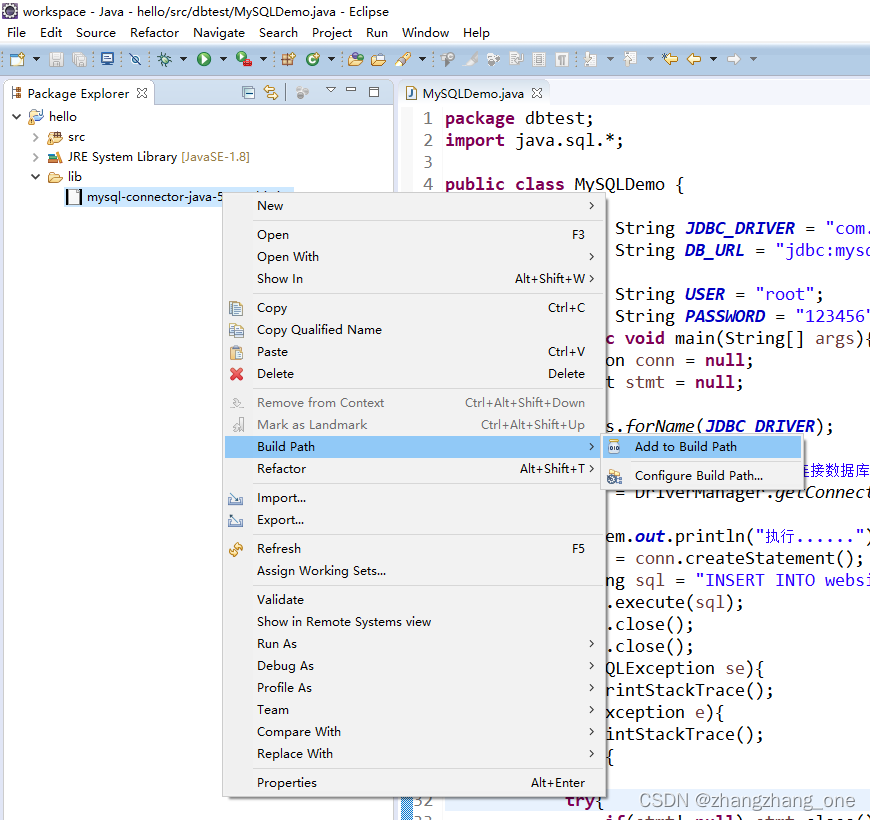
配置成功后显示: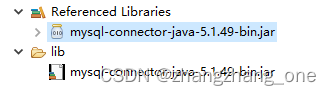
连接数据库测试
在MySQL数据库中创建一个数据库,并创建一个表用于测试。
代码如下:
package dbtest;
import java.sql.*;

public class MySQLDemo {

	//声明JDBC驱动名及数据库URL
	static final String JDBC_DRIVER = "com.mysql.jdbc.Driver"; //根据不同版本号设置
	static final String DB_URL = "jdbc:mysql://localhost:3306/runoob?useSSL=false&allowPublicKeyRetrieval=true&serverTimezone=UTC&characterEncoding=UTF-8";
	//声明数据库的用户和密码
	static final String USER = "root";
	static final String PASSWORD = "123456";
	public static void main(String[] args){

		Connection conn = null;
		Statement stmt = null;
		try{

			//注册JDBC驱动
			Class.forName(JDBC_DRIVER);
			//连接数据库
			System.out.println("正在连接数据库.....");
			conn = DriverManager.getConnection(DB_URL,USER,PASSWORD);
			//执行插入
			System.out.println("执行插入......");
			stmt = conn.createStatement();
			//SQL插入语句
			String sql = "INSERT INTO websites VALUES ('2', '淘宝', 'https://www.taobao.com/', '13', 'CN')";
			stmt.execute(sql); //执行
			//执行完后关闭
			stmt.close();
			conn.close();
		}catch(SQLException se){

			//处理SQL异常
			se.printStackTrace();
		}catch(Exception e){

			e.printStackTrace();
		}finally{


			try{

				if(stmt!=null) stmt.close();
				if(conn!=null) conn.close();
			}catch(SQLException se2){

				se2.printStackTrace();
			}
		}
		System.out.println("插入一条数据!");
	}
}
遇到的错误:
由于数据库的编码编码不一致,所以当插入中文到数据库时出现了乱码。
可以通过命令 show variables like ‘character%’;查看数据库的编码。
可以通过set character_set_xxxx=utf8命令来修改,但是这种修改在mysql重启之后就不起作用了。
所以修改字符编码推荐取修改mysql的配置文件,windows下是my.ini文件,linux下是my.conf文件,然后重启mysql服务器生效。
边栏推荐
- Start from scratch blazor server (1) -- project construction
- 2021-06-02
- 【论文阅读】A CNN-Transformer Hybrid Approach for CropClassification Using MultitemporalMultisensor Images
- Gurobi——GRBLinExpr
- OpenCV(二)——图像基本处理
- 知网、万方数据库免费下载论文------比连接学校内网速度快数倍不止(有的学校万方数据库不支持下载)
- Two methods of generating excel table with PHP
- 雪花ID(Go 实现)
- t5 学习
- D3.js create a cool arc
猜你喜欢

Kubesphere multi node installation error

D3.js create a cool arc

Insert pictures in word to maintain high DPI method
As changes the background theme and background picture

201403-1

Clear understanding of torchvision (mind map)
MPC_ ORCA

CODIS cluster deployment

Opencv (IV) -- image features and target detection

Product axure9 English version, using repeater repeater to realize drop-down multi selection box
随机推荐
The 31st --- the 52nd
HowNet and Wanfang database download papers for free ----- several times faster than connecting to the school intranet (some schools Wanfang database does not support downloading)
[cqoi2012] local minima & Mike and foam
t5 学习
AS更换背景主题以及背景图片
Opencv (II) -- basic image processing
Opencv (V) -- moving target recognition
Filament Creator材质编辑工具的实现
The bill module of freeswitch
Get the array list of the previous n days and the previous and subsequent days of the current time, and cycle through each day
Bean: Model: Entity的区别
Script file ‘D:\programs\anaconda3\Scripts\pip-script. py‘ is not present.
Kmeans implementation
Cvxpy - latest issue
Gurobi——GRBModel
Gpt-2 text generation
Three level cache of pictures in Android
Handling of multiple parts with duplicate names and missing parts when importing SOLIDWORK assemblies into Adams
pdf 提取文字
从零开始Blazor Server(1)--项目搭建