当前位置:网站首页>Audio basics and PCM to WAV
Audio basics and PCM to WAV
2022-06-25 23:39:00 【android_ cai_ niao】
Audio Basics
What is the sound ?
I remember when we studied physics in junior high school, we learned sound , Sound is produced by vibration , Sound vibrates in the air to form vibration waves that reach our ears , Our eardrums are receiving vibrations , So you can feel the sound . We can't see the vibration wave of sound in the air , It can be compared to the waves in the water , Water waves can be seen , as follows :
We can think about the appearance of water waves , Then imagine the water wave as an invisible sound vibration wave .
Vibration amplitude and frequency
Sound consists of vibration amplitude and vibration frequency , Amplitude is the amplitude of up and down vibration , Of course, we can't see this , Generally, we will use the up and down vibration of a ruler as an analogy , Here's the picture :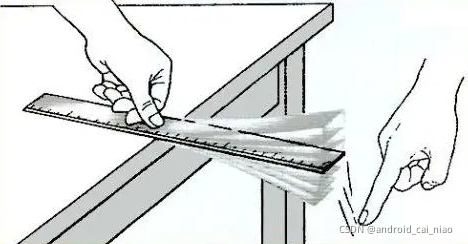
Press and hold one end of the ruler on the table , The ruler is a straight line , Then we move the other side , The ruler will vibrate up and down , The height above and below is the amplitude , Over time , The vibration amplitude will be smaller and smaller , Finally, calm was restored .
Vibration frequency , That is, the speed of up and down vibration , For example, rulers made of different materials , In a minute , It may vibrate up and down 100 Time , It may also vibrate 200 Time , This 100 Time 、200 The second is the frequency of its vibration .
In the computer , The bit depth is used to record the vibration amplitude , The sampling frequency is used to record the vibration frequency .
Professional term : Bit depth English is :Bit Depth, Sampling frequency in English is :Simple Rate
A deep
such as , We draw a vertical line , Divide it into 10 paragraph , Used to indicate vibration amplitude , Then it can only mean 10 A place , Examples are as follows :

Let's assume that at some point , The vibration amplitude of the sound is 8.6 The location of , But because we only divided 10 A place , There is no way to record 8.6 This position , So you can only round , Take it as a position 9 To deal with it , This is not very accurate , Just lost some precision , There is a deviation from the original position . therefore , The more up and down positions there are , The closer the position of the amplitude that can be described , Why can we only say that it is close , Because we studied in junior high school , A straight line is made up of innumerable points , So the position of the amplitude can be at any point , And there are countless points , So we can only say that it is close to . How many positions should we divide into ? The common method used in computers is 8 position 、16 position 、24 position , This doesn't mean sharing 8 A place 、16 A place 、24 A place , It's about how many bits represent the number of positions . For example, we only use 1 Bits to indicate , Can represent 0 and 1, Only two positions can be represented , If you use two bits , It can mean 00、01、10、11 this 4 A combination of , That is to say 4 A place , If it's for use 8 A bit , Then there are 256 A combination of , Can express 256 A place , If you use 16 A bit , It can mean 65536 A place , Compared with 8 A bit , The range that can be expressed will be larger 256 times , That is to say, the bit depth is 16 The sampling precision of bits will be 8 Bit 256 times . Um. ? What is the relationship between bit depth and sampling accuracy ? Different descriptions of the same thing , Bit depth mainly refers to how many bits it uses to describe the amplitude , This is more or less called sampling accuracy , Low sampling accuracy , This means that fewer bits are used , High sampling accuracy means that more bits are used . So when we hear others say bit depth or sampling accuracy in terms of Audio theme , We need to know that he is talking about amplitude .
sampling frequency
The understanding of audio sampling frequency and video sampling frequency is the same . For example, we set the video capture frame rate of the mobile camera to 25 frame / second , This means that in 1 In seconds , The camera will shoot 25 A picture , That is, every 40 Take a picture in milliseconds , pat 25 Zhang need 1000 millisecond , Just one second , Play back all the pictures you have taken , This is the moving video .
The sound is the same , As time goes by , The vibration amplitude is also changing constantly , For example 1 In milliseconds , The amplitude is 5 The location of ,2 In milliseconds , The amplitude is 10 The location of ,3 The amplitude is 15 The location of ... Then we 1 How many times should I take the position of the amplitude in seconds ? The sampling rate of sound is much higher than that of video , video 1 Second take 25 You can get a relatively smooth video by using the camera picture , If the sound 1 Only take... In seconds 25 Secondary amplitude , I don't know how bad the sound effect is , Because the vibration frequency of sound is relatively large , For example, a sound vibrates in one second 8000 Time , And you just took one of them 25 Vibration value of times , It can be seen how serious the precision loss is . The sampling frequency of audio is commonly used 8000 Time 、32000 Time 、44100 Time , Specialty means 8kHz、32kHz、44.1kHz.
About Hz Baidu Encyclopedia of the unit :
Hertz is the unit of frequency in the international system of units , It is a measure of the number of periodic variations per second .
Hertz is abbreviated as Hertz . Vibrate every second ( Or oscillate 、 wave ) One time for 1 Hertz , Or it can be written as times / second , Zhou / second . Named after the German scientist hertz .
therefore Hz It can be understood as Chinese “ Time ”,8000Hz or 8kHz That is to say 1 Seconds to collect 8000 Time , No matter what the sound is 1 Is there any number of vibrations in seconds 8000 Time , Anyway, the collection is in 1 Seconds to collect 8000 Time . So the sampling rate is not directly equal to the vibration frequency , But the higher the sampling rate, the more accurate the vibration frequency can be restored .
8kHz Write small and medium k Refers to 1000,8k Namely 8000, The common lower case unit base is 1000, The base of capital units is 1024, such as 1k = 1000,1K = 1024. For example, a person's salary is 15000, It can be said that his salary is 15k, Only lowercase k, Do not use capital letters K.
The knowledge points with unknown sources are as follows :
The frequency of sound emitted by human vocal organs is about 80-3400Hz, But the signal frequency of human speech is usually 300-3000Hz
So when doing audio and video development , The audio acquisition during voice calls generally uses 8kHz As the sampling rate , The advantage of this is : The acquisition accuracy of human voice is enough , Two is 8kHz The amount of audio data collected is relatively small , Convenient network transmission . General music mp3 This is what you need to use 44.1kHz.
Finally, a picture showing the bit depth and sampling frequency is pasted , In the axis , The vertical scale indicates the amplitude , The scale in the horizontal direction indicates the number of samples .
Pictured above , Connect the amplitudes collected at the specified sampling frequency to form a curve .
Calculation PCM Audio file size
With the previous knowledge , We can easily calculate PCM The size of the audio file ,pcm Format audio is the original audio data without any compression .
record 1 Seconds of audio , Save as pcm How much storage space does the format need ? It can be calculated by formula , Suppose the sampling parameters used are as follows :
- A deep :16 position
- Sampling rate :8000
- Track number :1
The space required for acquiring amplitude data once is :16 / 8 * 1 = 2 byte, because 8 Position as 1 Bytes , So divide by 8 Get in bytes , Because only 1 A voice , So multiply by 1, If it's two channels, multiply by 2.
Here the sampling rate is 8000, explain 1 Collect in seconds 8000 Secondary amplitude data , therefore 1 Second pcm file size = 2byte * 8000 = 16000byte = 15.625kb
If it is recording 1 minute , be 16000byte * 60 = 960000 byte = 937.5kb, Probably 1M
summary pcm The size calculation formula is : A deep / 8 x The channel number x Sampling rate x Time ( Company : second ), Get a total size in bytes .
Source code interpretation
BytesPerSample( Sample size )
stay AndioFormat Class has the following methods :
public static int getBytesPerSample(int audioFormat) {

    switch (audioFormat) {

    case ENCODING_PCM_8BIT:
        return 1;
    case ENCODING_PCM_16BIT:
    case ENCODING_IEC61937:
    case ENCODING_DEFAULT:
        return 2;
    case ENCODING_PCM_FLOAT:
        return 4;
    case ENCODING_INVALID:
    default:
        throw new IllegalArgumentException("Bad audio format " + audioFormat);
    }
}
Function name :bytes per sample, The translation is the size of each sample , I call it... For short Sample size , For example, the bit depth is 16, Then a sample needs 16 Bits to store , That's what we need 2 Bytes to store , Then the size of each sample is 2 byte . therefore BytesPerSample and A deep It describes the same thing , It's just a description in bytes , One is described in bits .
What is a sample ? And the vibration amplitude of the sound , We collect the data of vibration amplitude of sound once , Keep it , If the bit depth is 16, Is the use 16 position (2 byte ) To save the vibration amplitude data , The saved data is the sample , To save the data of a vibration amplitude is to save an audio sample , The sound vibration amplitude data is saved twice , Two audio samples are saved .
Size per frame
We're creating AudioRecord When the object , You need to pass in a constructor called bufferSizeInBytes Parameters of , The official document explains that the function of this parameter is : Used to specify the total size of the buffer used to write audio data during recording , How to understand this sentence ? This means that when collecting audio data , Where does the collected audio data exist ? Save to buffer first , And how big the buffer should be set , Just from bufferSizeInBytes Parameter to specify , The system saves the collected audio data in the buffer , Then we read the audio data in the buffer , So we get the audio data . The buffer size can not be arbitrarily set , Certain conditions must be met , stay AudioRecord The following methods are used to detect bufferSizeInBytes( Buffer size ) Is it legal :
private void audioBuffSizeCheck(int audioBufferSize) throws IllegalArgumentException {

    int frameSizeInBytes = mChannelCount * (AudioFormat.getBytesPerSample(mAudioFormat));
    if ((audioBufferSize % frameSizeInBytes != 0) || (audioBufferSize < 1)) {

        throw new IllegalArgumentException("Invalid audio buffer size " + audioBufferSize + " (frame size " + frameSizeInBytes + ")");
    }
    mNativeBufferSizeInBytes = audioBufferSize;
}
The first line of the function is to calculate frameSizeInBytes, The translation is the frame size , That is, the size of a frame of audio , It uses the number of channels x Sample size ,BytesPerSample You mean for The size of each sample ( abbreviation Sample size ), If it's mono , Then one sample is collected for each frame , If it's a two channel , Then two samples are collected per frame . According to the above function code , We are setting the buffer size for storing collected audio data (bufferSizeInBytes or audioBufferSize) when , This size value must be a multiple of the audio frame size .
thus , We learned that Audio frame What do you mean , Audio frame size = The channel number * Sample size .
Combine it with the vibration amplitude of the sound you have understood before , One frame of audio , That is, the vibration amplitude of a sound , The size of a frame of audio , That is, the storage size required to collect the vibration amplitude of a sound , If it's mono , The required size is A deep /2, except 2 Is to replace bits with bytes , If it's a two channel , You need to multiply by 2, Because this is equivalent to opening two acquisition channels at the same time .
To collect the vibration amplitude of a sound is to collect a frame of audio data , If the sampling rate is :8000Hz( or 8kHz), said 1 Seconds to collect 8000 The vibration amplitude of the infrasound , In other words 1 Seconds to collect 8000 Frame audio data . If the sampling rate is 44100Hz( or 44.1kHz), be 1 Second acquisition 44100 Frame audio data .
Minimum buffer
We said earlier , When recording , The system will save the collected audio data to the buffer first , The size of the buffer is determined by bufferSizeInBytes Parameter to specify , This parameter must be a multiple of the audio frame size , For example, the following situations :
Suppose the bit depth used is 16 position , be :
- Mono , The size of one frame of audio data is :16 / 8 * 1 = 2 byte
- Two channel , The size of one frame of audio data is :16 / 8 * 2 = 4 byte
The bit depth used for general recording is 16 position , If mono recording is used , Then the set buffer size must be 2 Multiple , If you use two channel recording , The set buffer size must be 4 Multiple .
stay Android In development , The buffer size must be a multiple of the audio frame size , Also meet the minimum buffer size requirements of the system . such as , We put bufferSizeInBytes Set to 2 or 4 It's not allowed , Because the buffer is too small
PCM turn WAV
PCM Is an uncompressed audio file format ,PCM All data is original audio data , If you use a player to play it , It can't be played , Because the player doesn't know this PCM What is the bit depth of the file , What is the sampling rate , What is the number of channels , So I don't know how to play . And some professional audio editing tools can open and play , Because it's opening pcm When you file , You need to manually select the bit depth 、 Sample rate these parameters , So that the editing tool knows how to handle this pcm file .
WAV Format is also an uncompressed audio file format , comparison PCM, It just has one more file header , The bit depth of the audio is recorded in the file header 、 Sampling rate 、 Audio parameters such as channel number , So general audio players can play directly wav Audio files in format .
wav The contents and functions of the file header are described below :
| data type | Occupancy space | Functional specifications |
|---|---|---|
| character | 4 | Resource exchange file flag (RIFF) |
| Long integers | 4 | The total number of bytes from the next address to the end of the file ( The former 8 Bytes don't count ) |
| character | 4 | WAV Document mark (WAVE) |
| character | 4 | Waveform format flag (fmt ), The last space . |
| Long integers | 4 | Filter bytes ( It's usually 16) |
| Integer numbers | 2 | Format type ( The value is 1 when , Indicates that the data is linear PCM code ) |
| Integer numbers | 2 | Number of channels , Mono is 1, Dual channel is 2 |
| Long integers | 4 | sampling frequency |
| Long integers | 4 | The size of audio per second |
| Integer numbers | 2 | The size of each frame of audio |
| Integer numbers | 2 | A deep |
| character | 4 | Data identifier (data) |
| Long integers | 4 | data Total data length |
The file header occupies a total of 44byte. The data types here all use C In words ,C The long shaping of is equivalent to Java Plastic surgery ,C The shaping of is equivalent to Java Short shaping of . Baidu PCM turn WAV All of my articles are written in C Written language , in my opinion , Just add a file header , Be me Android There is no need to use C Realized , Otherwise, we have to do JNI And Java Call to call to , trouble . In the file header data above , A deep 、 Sampling rate 、 The number of channels can be determined when the recording is turned on , What is uncertain is pcm Length of data , In the file header above , Only two are about data length , It's an unknown number , So you can use random access streams , The length of the data is known at the end of the file , At this point, skip to the beginning of the file and add... To the file header of the data length .
According to the communication with the great God of our company , It is said that even if the length is 0, As long as other file header parameters are normal, they can also be played normally , So you can set the length to 0, Wait until the document is finished , The length is determined , You can write the file header again , Here is to write all the file headers again , To simplify the code , Although it's a waste to write it completely again , But the waste of that performance is minimal , because 44 A file header of bytes can be written in an instant , Very fast .
If it's directly put pcm File transfer wav, It can be determined at the beginning pcm The length of the data , But if it's a recording , When recording, you should directly save it as wav, At this point, the length of the data cannot be determined , Because you don't know when the user pressed to stop recording , So for the sake of generality , We wait until the stream is closed at the end of writing to the file to determine the length of the data , Then write the file header again .
Okay , The principle is clear , Then there's the code , With kotlin Language , Can't kotlin The language can also be used by the code itself java Knock once ,Kotlin and Java It's the same .
import java.io.*

fun main() {

    val start = System.currentTimeMillis()
    val pcmFile = File("C:\\Users\\Even\\Music\\pcm.pcm")
    val wavFile = File("C:\\Users\\Even\\Music\\result_01.wav")
    val sampleRate = 8000
    val bitDepth = 16
    val channelCount = 1
    val wavWriter = WavWriter(wavFile, sampleRate, bitDepth, channelCount)
    BufferedInputStream(FileInputStream(pcmFile)).use {
     bis ->
        val buf = ByteArray(8192)
        var length: Int
        while (bis.read(buf, 0, 8192).also {
     length = it } != -1) {

            wavWriter.writeData(buf, length)
        }
    }
    wavWriter.close()
    println("wav File written successfully , Use your time :${
      System.currentTimeMillis() - start}")
}
import java.io.*

class WavWriter(
    wavFile: File,
    /**  Sampling rate  */
    private val sampleRate: Int,
    /**  A deep  */
    private val bitDepth: Int,
    /**  Number of channels  */
    private val channelCount: Int,
    ) {


    private val raf = RandomAccessFile(wavFile, "rws")
    private var dataTotalLength = 0

    init {

        writeHeader(0)
    }

    private fun writeHeader(dataLength: Int) {

        // pcm  file size :1358680
        val bytesPerFrame = bitDepth / 8 * channelCount
        val bytesPerSec = bytesPerFrame * sampleRate
        writeString("RIFF")         //  Resource exchange file flag (RIFF)
        writeInt(36 + dataLength) 	//  The total number of bytes from the next address to the end of the file ( The former 8 Bytes don't count )
        writeString("WAVE")     	// WAV Document mark (WAVE)
        writeString("fmt ")     	//  Waveform format flag (fmt ), The last space .
        writeInt(16)          		//  Filter bytes ( It's usually 16)
        writeShort(1)         		//  Format type ( The value is 1 when , Indicates that the data is linear PCM code )
        writeShort(channelCount)    //  Number of channels , Mono is 1, Dual channel is 2
        writeInt(sampleRate)        //  sampling frequency
        writeInt(bytesPerSec)       //  The size of audio per second
        writeShort(bytesPerFrame)   //  The size of each frame of audio
        writeShort(bitDepth)        //  A deep
        writeString("data")     	//  Data identifier (data)
        writeInt(dataLength)        // data Total data length
    }

    fun writeData(data: ByteArray, dataLength: Int) {

        raf.write(data, 0, dataLength)
        dataTotalLength += dataLength
    }

    fun close() {

        //  The data is finished , The length is also known , Rewrite the file header according to the length .
        //  Logically, you only need to rewrite the data about the length , But because the file header is very small , Write quickly , Just rewrite it all !
        raf.seek(0)
        writeHeader(dataTotalLength)
    }

    /**  preservation 4 Characters  */
    private fun writeString(str: String) {

        raf.write(str.toByteArray(), 0, 4)
    }

    /**  Write a Int( Write in small end mode ) */
    private fun writeInt(value: Int) {

        // raf.writeInt(value)  This is written in big end mode
        raf.writeByte(value ushr 0 and 0xFF)
        raf.writeByte(value ushr 8 and 0xFF)
        raf.writeByte(value ushr 16 and 0xFF)
        raf.writeByte(value ushr 24 and 0xFF)
    }

    /**  Write a Short( Write in small end mode ) */
    private fun writeShort(value: Int) {

        // raf.writeShort(value)  This is written in big end mode
        raf.write(value ushr 0 and 0xFF)
        raf.write(value ushr 8 and 0xFF)
    }

}
notes : Here is a big end 、 Small end knowledge points , You can refer to my document :https://blog.csdn.net/android_cai_niao/article/details/121421706
边栏推荐
- C2. k-LCM (hard version)-Codeforces Round #708 (Div. 2)
- User interaction scanner usage Advanced Edition example
- [untitled] open an item connection. If it cannot be displayed normally, Ping the IP address
- RepOptimizer: 其实是RepVGG2
- Qt自定义实现的日历控件
- Analysis and comprehensive summary of full type equivalent judgment in go
- 第五章 习题(124、678、15、19、22)【微机原理】【习题】
- Solving typeerror: Unicode objects must be encoded before hashing
- Konva series tutorial 2: drawing graphics
- Informatics Orsay all in one 1353: expression bracket matching | Luogu p1739 expression bracket matching
猜你喜欢

第六章 习题(678)【微机原理】【习题】

史上最简单的录屏转gif小工具LICEcap,要求不高可以试试

CAD中图纸比较功能怎么用
excel如何实现中文单词自动翻译成英文?这个公式教你了

第五章 习题(124、678、15、19、22)【微机原理】【习题】
hiberate核心API/配置文件/一级缓存详解

录屏转gif的好用小工具ScreenToGif,免费又好用!

转载: QTableWidget详解(样式、右键菜单、表头塌陷、多选等)

(serial port Lora module) centrida rf-al42uh private protocol test at instruction test communication process

QComboBox下拉菜单中有分隔符Separator时的样式设置
随机推荐
konva系列教程2:绘制图形
Screen recording to GIF is an easy-to-use gadget, screentogif, which is free and easy to use!
Tree class query component
Uniapp - call payment function: Alipay
社招两年半10个公司28轮面试面经(含字节、拼多多、美团、滴滴......)
The first public available pytorch version alphafold2 is reproduced, and Columbia University is open source openfold, with more than 1000 stars
Summary of common JDBC exceptions and error solutions
C. Fibonacci Words-April Fools Day Contest 2021
Record the ideas and precautions for QT to output a small number of pictures to mp4
UE4 learning record 2 adding skeleton, skin and motion animation to characters
B. Box Fitting-CodeCraft-21 and Codeforces Round #711 (Div. 2)
Graduation trip | recommended 5-day trip to London
【2023校招刷题】番外篇1:度量科技FPGA岗(大致解析版)
When are the three tools used for interface testing?
CSDN add on page Jump and off page specified paragraph jump
对卡巴斯基发现的一个将shellcode写入evenlog的植入物的复现
Pycharm student's qualification expires, prompting no suitable licenses associated with account solution
(serial port Lora module) centrida rf-al42uh private protocol test at instruction test communication process
自定义QComboBox下拉框,右对齐显示,下拉列表滑动操作
18亿像素火星全景超高清NASA放出,非常震撼